Lost My programs icons

madzombie

New member
Local time
9:34 AM
Messages
2
hi,
i lost my programs icon. outlook, messenger, word, itunes.....
how can i return the icons...
i attachment the problem of screen.
 

Attachments

  • iconproblem.png
    iconproblem.png
    11.5 KB · Views: 69

My Computer

Computer Manufacturer/Model Number
Acer Notebook
OS
Windows 7 / Server 2008 / RHEL 5
CPU
Amd Turion 64 x2
Memory
4 GB DDR2
Graphics Card(s)
GeForce 8400m G
Hard Drives
1 TB
hi,
i lost my programs icon. outlook, messenger, word, itunes.....
how can i return the icons...
i attachment the problem of screen.

if by lost you mean the generic icons on the toolbar its simple delete theose and create new ones.
 

My Computer

Computer Manufacturer/Model Number
HP Pavillion dv-7 1005 Tx
OS
Win 8 Release candidate 8400
CPU
[email protected]
Memory
4 gigs
Graphics Card(s)
Nvidia 9600M
Sound Card
HD built-in
Monitor(s) Displays
17" Wxga
Screen Resolution
1440x900
Cooling
none
Internet Speed
45Mb down 5Mb up
hi,
i lost my programs icon. outlook, messenger, word, itunes.....
how can i return the icons...
i attachment the problem of screen.

Hi madzombie (I dont like the name ... why a man will be a zombie ? though he might be mad ;)), if you want to repair it , follow the steps.
1. Click on start menu.
2. click on all programs.
3. Go to microsoft office > microsoft office word.
4. Right click on microsoft office word link and click on properties.
5. In the properties box. click on change icon
It may take you to microsoft office icons field, or imageres.dll. after clicking on change icon, if the ms word icon is visible, select it , then apply and ok. But if it opens up imageres.dll, click on browse tab.
6. Browse to c:\program files\microsoft office\office 12 , and scroll upto the bottom of the window.
6. locate "winword" there , select it.
7. Now apply and ok.
8. Do the same process for outlook
9. To see the change in taskbar, Remove the taskbar icon, and reopen the program.

 

My Computer

Computer type
PC/Desktop
Computer Manufacturer/Model Number
Self Assembled
OS
Microsoft Windows 10 Pro Insider Preview 64-bit
CPU
Intel(R) Core(TM) i3-4130 CPU @ 3.40GHz
Motherboard
Gigabyte Technology Co., Ltd. B85M-D3H
Memory
Corsair Vengence 4GB x2 (8.00GB Dual-Channel DDR3 @ 798MHz)
Graphics Card(s)
2047MB GeForce GTS 450 (ZOTAC International)
Sound Card
Onboard (Realtek High Definition Audio)
Monitor(s) Displays
LG Flatron E2040T
Screen Resolution
1600x900
Hard Drives
Western Digital 1 TB
Seagate 500 GB
PSU
Corsair VS550
Case
Cooler Master K380
Cooling
Cooler Master Seidon 120V Plus
Keyboard
Logitech MK260r
Mouse
Logitech MK260r
Internet Speed
PMPL Broadband
Antivirus
Windows Defender + MBAM
Browser
Firefox
Other Info
Dell Studio 15" Laptop
In the properties box. click on change icon

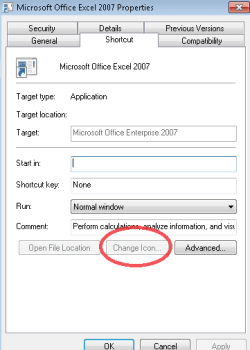
That button does not work in this issue.

click on browse tab.
6. Browse to c:\program files\microsoft office\office 12 , and scroll upto the bottom of the window

yes, i know but, 150 computer that has this problem....
I can not do for them.
 

Attachments

  • icon2.png
    icon2.png
    6 KB · Views: 5

My Computer

Computer Manufacturer/Model Number
Acer Notebook
OS
Windows 7 / Server 2008 / RHEL 5
CPU
Amd Turion 64 x2
Memory
4 GB DDR2
Graphics Card(s)
GeForce 8400m G
Hard Drives
1 TB
Sorry madzombie pal, I tried to understand the situation, but the target box , open file location box all are disabled .... it may be a virus (little chance) or system corruption(fare chance)

First check for system corruption commanding sfc /scannow in a elevated command prompt. If after that everything is not ok, have a system restore using a restore point prior to the first occurrence of this situation.

If still it does not work, it is better to reinstall the program, coz the extent of corruption might increase .

Edit : Scannow will not fix it x
 

My Computer

Computer type
PC/Desktop
Computer Manufacturer/Model Number
Self Assembled
OS
Microsoft Windows 10 Pro Insider Preview 64-bit
CPU
Intel(R) Core(TM) i3-4130 CPU @ 3.40GHz
Motherboard
Gigabyte Technology Co., Ltd. B85M-D3H
Memory
Corsair Vengence 4GB x2 (8.00GB Dual-Channel DDR3 @ 798MHz)
Graphics Card(s)
2047MB GeForce GTS 450 (ZOTAC International)
Sound Card
Onboard (Realtek High Definition Audio)
Monitor(s) Displays
LG Flatron E2040T
Screen Resolution
1600x900
Hard Drives
Western Digital 1 TB
Seagate 500 GB
PSU
Corsair VS550
Case
Cooler Master K380
Cooling
Cooler Master Seidon 120V Plus
Keyboard
Logitech MK260r
Mouse
Logitech MK260r
Internet Speed
PMPL Broadband
Antivirus
Windows Defender + MBAM
Browser
Firefox
Other Info
Dell Studio 15" Laptop
Back
Top