
Lost network connectivity

sjboyer

New member
Local time
12:27 PM
Messages
6
Location
Berwyn, Illinois
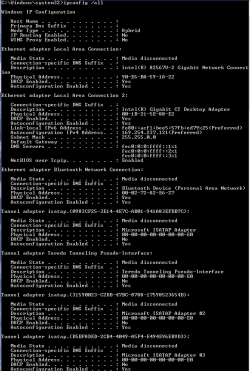
Had browser up and working then started a MS update session with 4 updates. The updates all failed and my browser lost all network connectivity.

Windows 7 Home Premium running on an HP e9280t desktop, i7 920 processors, 8 GB memory.

Went through HP support with out any joy. Reset router and modem. Used MS tool to verify router is fully compatible with Win7. Cannot ping the router, nor execute an ipconfig /reset. Tried new network card - same thing.
 

Attachments
  • IPCONFIG.PNG
    IPCONFIG.PNG
    66.6 KB · Views: 34

My Computer

Computer Manufacturer/Model Number
HP/e9280t
OS
Windows 7 Home Premium 64-bit, Build 7600, DirectX 11
CPU
i7 920
Motherboard
Truckee, chipset - Southbridge Intel ICH10R
Memory
8 GB, 2 GBx4 DDR3
Graphics Card(s)
NVIDIA GeForce GT 220, Driver 8.17.11.9745
Sound Card
Realtek High Definition Audio, Driver 6.0.1.5910
Monitor(s) Displays
HP w2338h Digital
Hard Drives
Seagate ST37505528AS 698.6 GB, SATA RAID controller, 7200 RPM, firmware HP34
PSU
HP
Case
Tower
Had browser up and working then started a MS update session with 4 updates. The updates all failed and my browser lost all network connectivity.

Windows 7 Home Premium running on an HP e9280t desktop, i7 920 processors, 8 GB memory.

Went through HP support with out any joy. Reset router and modem. Used MS tool to verify router is fully compatible with Win7. Cannot ping the router, nor execute an ipconfig /reset. Tried new network card - same thing.


The only active connection is ethernet and it isnt configured correctly. Heve you checked device manager to make sure the driver is installed and working correctly? (type device manager in search>go to network connections. Yours should be listed and not have a yellow triangle on it.

Ken
 

My Computer

Computer Manufacturer/Model Number
HP Pavillion dv-7 1005 Tx
OS
Win 8 Release candidate 8400
CPU
[email protected]
Memory
4 gigs
Graphics Card(s)
Nvidia 9600M
Sound Card
HD built-in
Monitor(s) Displays
17" Wxga
Screen Resolution
1440x900
Cooling
none
Internet Speed
45Mb down 5Mb up
I have uninstalled the driver and re-installed with the original HP supplied driver.
 

My Computer

Computer Manufacturer/Model Number
HP/e9280t
OS
Windows 7 Home Premium 64-bit, Build 7600, DirectX 11
CPU
i7 920
Motherboard
Truckee, chipset - Southbridge Intel ICH10R
Memory
8 GB, 2 GBx4 DDR3
Graphics Card(s)
NVIDIA GeForce GT 220, Driver 8.17.11.9745
Sound Card
Realtek High Definition Audio, Driver 6.0.1.5910
Monitor(s) Displays
HP w2338h Digital
Hard Drives
Seagate ST37505528AS 698.6 GB, SATA RAID controller, 7200 RPM, firmware HP34
PSU
HP
Case
Tower
Had browser up and working then started a MS update session with 4 updates. The updates all failed and my browser lost all network connectivity.

Windows 7 Home Premium running on an HP e9280t desktop, i7 920 processors, 8 GB memory.

Went through HP support with out any joy. Reset router and modem. Used MS tool to verify router is fully compatible with Win7. Cannot ping the router, nor execute an ipconfig /reset. Tried new network card - same thing.

There is no default gateway showing up which is a problem. It may help if you enter your default gateway and IP manually by going into your ipv4 connection properties and manually entering the default gateway and IP address.

Default gateway is usually 192.168.x.x, X depends on what router you are using usually 0.1 or 1.1.

This is supposed to occur automatically if you are using DHCP in your router and Windows 7 settings. I'm not sure how Windows updates could have caused this problem but it's been happening a lot lately.

I helped fix this same problem just the other day, thread in the link below.
http://www.sevenforums.com/network-sharing/86127-doesnt-have-valid-ip-configuration.html
 

Attachments

  • ipv4 IP address change.PNG
    ipv4 IP address change.PNG
    131.7 KB · Views: 30

My Computer

Computer type
PC/Desktop
Computer Manufacturer/Model Number
Home built
OS
Windows 7 Ult, Windows 8.1 Pro,
CPU
Q9650-4.275GHz, E8600 4.5GHz, E6750-3.8GHz
Motherboard
Evga 780i FTW
Memory
G.Skill PC2 9600 1200Mhz 5 5 5 15 2T
Graphics Card(s)
GTX480
Sound Card
Asus Xonar D2
Monitor(s) Displays
HannsG
Screen Resolution
1680X1050
Hard Drives
GSkill Phoenix Pro 120GB SSD
PSU
ThermalTake Toughpower 1000Watt modular
Case
ThermalTake XaserV
Cooling
Xigmatek S1283
Keyboard
Logitech G15
Mouse
Logitech G9
Internet Speed
T1
Thanks chev65 but I have tried that and reseting the linksys router.
 

My Computer

Computer Manufacturer/Model Number
HP/e9280t
OS
Windows 7 Home Premium 64-bit, Build 7600, DirectX 11
CPU
i7 920
Motherboard
Truckee, chipset - Southbridge Intel ICH10R
Memory
8 GB, 2 GBx4 DDR3
Graphics Card(s)
NVIDIA GeForce GT 220, Driver 8.17.11.9745
Sound Card
Realtek High Definition Audio, Driver 6.0.1.5910
Monitor(s) Displays
HP w2338h Digital
Hard Drives
Seagate ST37505528AS 698.6 GB, SATA RAID controller, 7200 RPM, firmware HP34
PSU
HP
Case
Tower
Thanks chev65 but I have tried that and reseting the linksys router.

Have you tried to reset winsock yet?
Have you tried using system restore?
It may also help to rollback or reinstall the network driver.
Running the sfc /scannow command may help fix any files that were written over or corrupted.
 

My Computer

Computer type
PC/Desktop
Computer Manufacturer/Model Number
Home built
OS
Windows 7 Ult, Windows 8.1 Pro,
CPU
Q9650-4.275GHz, E8600 4.5GHz, E6750-3.8GHz
Motherboard
Evga 780i FTW
Memory
G.Skill PC2 9600 1200Mhz 5 5 5 15 2T
Graphics Card(s)
GTX480
Sound Card
Asus Xonar D2
Monitor(s) Displays
HannsG
Screen Resolution
1680X1050
Hard Drives
GSkill Phoenix Pro 120GB SSD
PSU
ThermalTake Toughpower 1000Watt modular
Case
ThermalTake XaserV
Cooling
Xigmatek S1283
Keyboard
Logitech G15
Mouse
Logitech G9
Internet Speed
T1
I have reset winsock, did a system restore before the problem started and removed and reinstalled the network driver. sfc doesn't seem to do anything.

I have entered the ip, dns' and gateway addresses in place of dhcp. That allows me to ping the router but still no internet or other network connectivity.
 

My Computer

Computer Manufacturer/Model Number
HP/e9280t
OS
Windows 7 Home Premium 64-bit, Build 7600, DirectX 11
CPU
i7 920
Motherboard
Truckee, chipset - Southbridge Intel ICH10R
Memory
8 GB, 2 GBx4 DDR3
Graphics Card(s)
NVIDIA GeForce GT 220, Driver 8.17.11.9745
Sound Card
Realtek High Definition Audio, Driver 6.0.1.5910
Monitor(s) Displays
HP w2338h Digital
Hard Drives
Seagate ST37505528AS 698.6 GB, SATA RAID controller, 7200 RPM, firmware HP34
PSU
HP
Case
Tower
Those updates messed up something I'd say but hard to say what. Msoft does support problems caused by their updates so they may have a better idea of what is going on.
 

My Computer

Computer type
PC/Desktop
Computer Manufacturer/Model Number
Home built
OS
Windows 7 Ult, Windows 8.1 Pro,
CPU
Q9650-4.275GHz, E8600 4.5GHz, E6750-3.8GHz
Motherboard
Evga 780i FTW
Memory
G.Skill PC2 9600 1200Mhz 5 5 5 15 2T
Graphics Card(s)
GTX480
Sound Card
Asus Xonar D2
Monitor(s) Displays
HannsG
Screen Resolution
1680X1050
Hard Drives
GSkill Phoenix Pro 120GB SSD
PSU
ThermalTake Toughpower 1000Watt modular
Case
ThermalTake XaserV
Cooling
Xigmatek S1283
Keyboard
Logitech G15
Mouse
Logitech G9
Internet Speed
T1
check ur mac address if u find its value is 000000000000 change it to another one .
u can check mac addressee through local area connection > properties > configure>advanced tap > network addressee
 

My Computer

OS
windows 7
Motherboard
gigabyte g 31
Memory
kingston 1 gb
Graphics Card(s)
intel chipest
Sound Card
intel
Thanks but it has an address.
 

My Computer

Computer Manufacturer/Model Number
HP/e9280t
OS
Windows 7 Home Premium 64-bit, Build 7600, DirectX 11
CPU
i7 920
Motherboard
Truckee, chipset - Southbridge Intel ICH10R
Memory
8 GB, 2 GBx4 DDR3
Graphics Card(s)
NVIDIA GeForce GT 220, Driver 8.17.11.9745
Sound Card
Realtek High Definition Audio, Driver 6.0.1.5910
Monitor(s) Displays
HP w2338h Digital
Hard Drives
Seagate ST37505528AS 698.6 GB, SATA RAID controller, 7200 RPM, firmware HP34
PSU
HP
Case
Tower
I checked the DHCP service and found it was not running. Get a 'not authorized' message when I try to start it but it does list as started for a moment but when I check it again it not running. msconfig shows it as 'Automatic'.
 

My Computer

Computer Manufacturer/Model Number
HP/e9280t
OS
Windows 7 Home Premium 64-bit, Build 7600, DirectX 11
CPU
i7 920
Motherboard
Truckee, chipset - Southbridge Intel ICH10R
Memory
8 GB, 2 GBx4 DDR3
Graphics Card(s)
NVIDIA GeForce GT 220, Driver 8.17.11.9745
Sound Card
Realtek High Definition Audio, Driver 6.0.1.5910
Monitor(s) Displays
HP w2338h Digital
Hard Drives
Seagate ST37505528AS 698.6 GB, SATA RAID controller, 7200 RPM, firmware HP34
PSU
HP
Case
Tower
Back
Top