Lost ownership of Folders and files after removing XP and installing 7

Abhijeet sharma

New member
Local time
3:55 PM
Messages
8
Hello everyone,
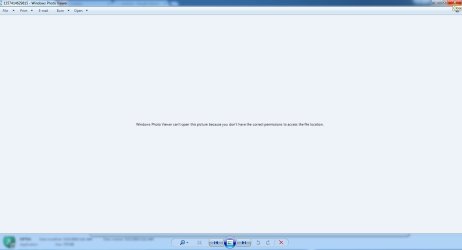
So I have been using win XP for many years, 2 years back I installed win 7. Everything was fine but today when I was trying to access 4-5 year old photos the Photo Viewer is giving the error "Windows Photo Viewer can't open this picture because you don't have the correct permissions to access the file location". And some of them I can't even copy to different location.

I have tried Takeown.exe, Icacls.exe and manually changing the permissions for single photos just to verify. NOTHING WORKED. Please help me how to resolve it.

Thanks in advance :cry:
 

My Computer My Computer

At a glance

Windows 7 Ultimate x64Phenom II x6 1055t8gb
Computer type
PC/Desktop
Computer Manufacturer/Model Number
Other
OS
Windows 7 Ultimate x64
CPU
Phenom II x6 1055t
Motherboard
Asus M5A88 M Evoa
Memory
8gb
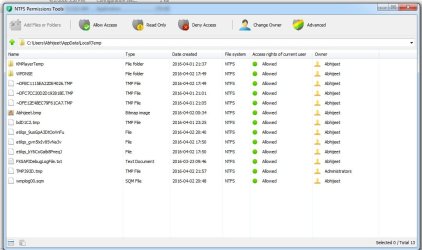
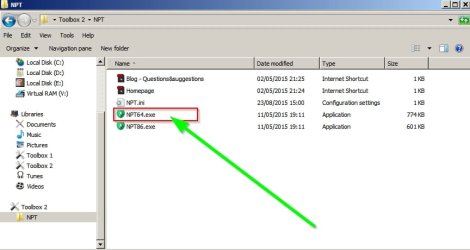
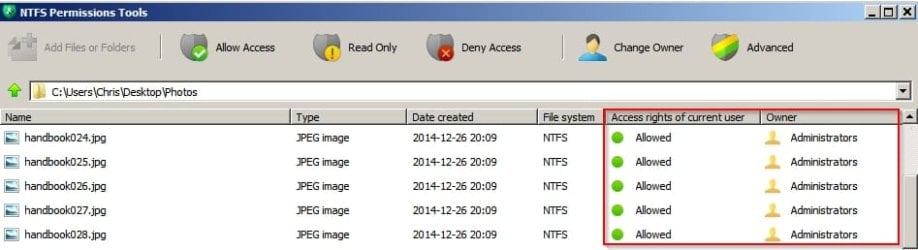
Try downloading this portable program:

DBC studio

Extract the files and run the executable.

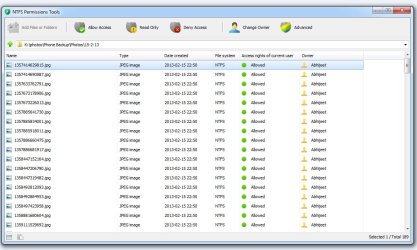
Navigate to a photo. What does it show?

NPT.jpg

NPT2.jpg
 

My Computer My Computer

At a glance

Microsoft Windows 7 Home Premium 64-bit 7601 ...AMD C-60 APU with Radeon(tm) HD Graphics4.00 GBAMD Radeon HD 6290 Graphics
Computer type
Laptop
Computer Manufacturer/Model Number
ASUS
OS
Microsoft Windows 7 Home Premium 64-bit 7601 Multiprocessor Free Service Pack 1
CPU
AMD C-60 APU with Radeon(tm) HD Graphics
Motherboard
ASUSTeK COMPUTER INC. X501U
Memory
4.00 GB
Graphics Card(s)
AMD Radeon HD 6290 Graphics
Sound Card
(1) AMD High Definition Audio Device (2) Realtek High Defi

Screen Resolution
1366 x 768 x 32 bits (4294967296 colors) @ 60 Hz
Hard Drives
Hitachi HTS545050A7E380 SATA Disk Device
Antivirus
Comodo CIS & FW, SecureAplus App Whitelisting, Threatfire
Browser
Cyberfox 64bit, Opera 64bit, Airfox
Other Info
Spy-The-Spy, HitmanPro.Alert, Norton Connect Safe, MJRegWatcher, BitDefender TrafficLight, Voodoo Shield, Zemana AntiMalware
look for a free app called take ownership and download it.
It is a .reg file.
Right click and merge to registry
reboot
For any file or folder, you can now take ownership by right clicking the file and choosing takeownership
 

My Computer My Computer

At a glance

window 7 32 bit
Computer type
PC/Desktop
Computer Manufacturer/Model Number
Intel
OS
window 7 32 bit

My Computer My Computer

At a glance

Microsoft Windows 7 Home Premium 64-bit 7601 ...AMD C-60 APU with Radeon(tm) HD Graphics4.00 GBAMD Radeon HD 6290 Graphics
Computer type
Laptop
Computer Manufacturer/Model Number
ASUS
OS
Microsoft Windows 7 Home Premium 64-bit 7601 Multiprocessor Free Service Pack 1
CPU
AMD C-60 APU with Radeon(tm) HD Graphics
Motherboard
ASUSTeK COMPUTER INC. X501U
Memory
4.00 GB
Graphics Card(s)
AMD Radeon HD 6290 Graphics
Sound Card
(1) AMD High Definition Audio Device (2) Realtek High Defi
Screen Resolution
1366 x 768 x 32 bits (4294967296 colors) @ 60 Hz
Hard Drives
Hitachi HTS545050A7E380 SATA Disk Device
Antivirus
Comodo CIS & FW, SecureAplus App Whitelisting, Threatfire
Browser
Cyberfox 64bit, Opera 64bit, Airfox
Other Info
Spy-The-Spy, HitmanPro.Alert, Norton Connect Safe, MJRegWatcher, BitDefender TrafficLight, Voodoo Shield, Zemana AntiMalware

Attachments

  • Permissions.jpg
    Permissions.jpg
    89.6 KB · Views: 0
  • Error.jpg
    Error.jpg
    24.6 KB · Views: 0

My Computer My Computer

At a glance

Windows 7 Ultimate x64Phenom II x6 1055t8gb
Computer type
PC/Desktop
Computer Manufacturer/Model Number
Other
OS
Windows 7 Ultimate x64
CPU
Phenom II x6 1055t
Motherboard
Asus M5A88 M Evoa
Memory
8gb
look for a free app called take ownership and download it.
It is a .reg file.
Right click and merge to registry
reboot
For any file or folder, you can now take ownership by right clicking the file and choosing takeownership

I already have the ownership, or atleast that's what it's showing. :/
 

My Computer My Computer

At a glance

Windows 7 Ultimate x64Phenom II x6 1055t8gb
Computer type
PC/Desktop
Computer Manufacturer/Model Number
Other
OS
Windows 7 Ultimate x64
CPU
Phenom II x6 1055t
Motherboard
Asus M5A88 M Evoa
Memory
8gb
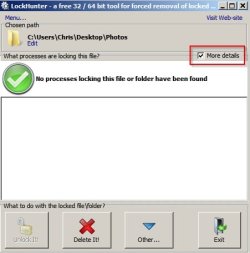
Thanks for the screenshot. File permissions appear to be okay. Would you find out if some process is locking the folder containing the images?

You can use LockHunter to do that. Right click the folder and select the "What is locking this folder?" option.

LockHunter.jpg
 
Last edited:

My Computer My Computer

At a glance

Microsoft Windows 7 Home Premium 64-bit 7601 ...AMD C-60 APU with Radeon(tm) HD Graphics4.00 GBAMD Radeon HD 6290 Graphics
Computer type
Laptop
Computer Manufacturer/Model Number
ASUS
OS
Microsoft Windows 7 Home Premium 64-bit 7601 Multiprocessor Free Service Pack 1
CPU
AMD C-60 APU with Radeon(tm) HD Graphics
Motherboard
ASUSTeK COMPUTER INC. X501U
Memory
4.00 GB
Graphics Card(s)
AMD Radeon HD 6290 Graphics
Sound Card
(1) AMD High Definition Audio Device (2) Realtek High Defi
Screen Resolution
1366 x 768 x 32 bits (4294967296 colors) @ 60 Hz
Hard Drives
Hitachi HTS545050A7E380 SATA Disk Device
Antivirus
Comodo CIS & FW, SecureAplus App Whitelisting, Threatfire
Browser
Cyberfox 64bit, Opera 64bit, Airfox
Other Info
Spy-The-Spy, HitmanPro.Alert, Norton Connect Safe, MJRegWatcher, BitDefender TrafficLight, Voodoo Shield, Zemana AntiMalware
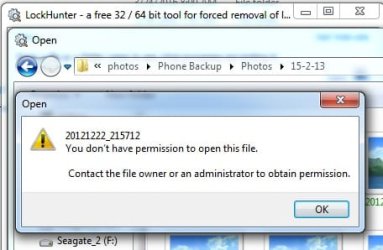
It says no process is locking the folder. But when I select a file it says permission issues.
 

Attachments

  • error2.jpg
    error2.jpg
    24.1 KB · Views: 15
Last edited:

My Computer My Computer

At a glance

Windows 7 Ultimate x64Phenom II x6 1055t8gb
Computer type
PC/Desktop
Computer Manufacturer/Model Number
Other
OS
Windows 7 Ultimate x64
CPU
Phenom II x6 1055t
Motherboard
Asus M5A88 M Evoa
Memory
8gb
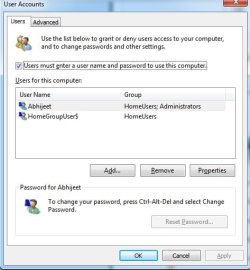
It seems to be an admin account problem. I'm not sure that I can help with that. What do you see if you go to:

Start> Run

then type:

netplwiz

Press Enter.

Post a screenshot of users tab please.

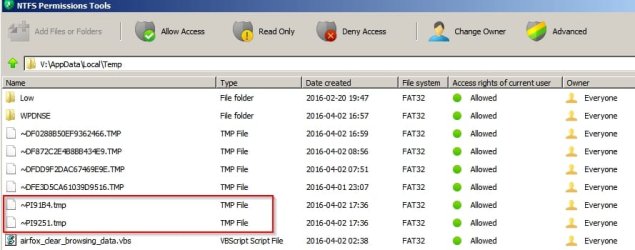
Additionally when you open an image using Windows Photo Viewer a Temp file is created in your AppData folder.

NPT Temp 2.jpg

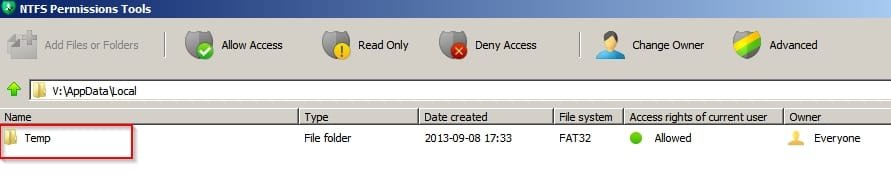
Maybe there's an issue with permissions for that folder especially if you took ownership of it.

NPT Temp folder.jpg

On my machine that folder has been moved to a non-standard location.

You should look here:

C:\Users\Username\AppData\Local\Temp
 

My Computer My Computer

At a glance

Microsoft Windows 7 Home Premium 64-bit 7601 ...AMD C-60 APU with Radeon(tm) HD Graphics4.00 GBAMD Radeon HD 6290 Graphics
Computer type
Laptop
Computer Manufacturer/Model Number
ASUS
OS
Microsoft Windows 7 Home Premium 64-bit 7601 Multiprocessor Free Service Pack 1
CPU
AMD C-60 APU with Radeon(tm) HD Graphics
Motherboard
ASUSTeK COMPUTER INC. X501U
Memory
4.00 GB
Graphics Card(s)
AMD Radeon HD 6290 Graphics
Sound Card
(1) AMD High Definition Audio Device (2) Realtek High Defi
Screen Resolution
1366 x 768 x 32 bits (4294967296 colors) @ 60 Hz
Hard Drives
Hitachi HTS545050A7E380 SATA Disk Device
Antivirus
Comodo CIS & FW, SecureAplus App Whitelisting, Threatfire
Browser
Cyberfox 64bit, Opera 64bit, Airfox
Other Info
Spy-The-Spy, HitmanPro.Alert, Norton Connect Safe, MJRegWatcher, BitDefender TrafficLight, Voodoo Shield, Zemana AntiMalware
Here are the screenshots that you asked for. I don't understand whats the issue :/
 

Attachments

  • temp.jpg
    temp.jpg
    69.2 KB · Views: 0
  • users.jpg
    users.jpg
    33.1 KB · Views: 18

My Computer My Computer

At a glance

Windows 7 Ultimate x64Phenom II x6 1055t8gb
Computer type
PC/Desktop
Computer Manufacturer/Model Number
Other
OS
Windows 7 Ultimate x64
CPU
Phenom II x6 1055t
Motherboard
Asus M5A88 M Evoa
Memory
8gb
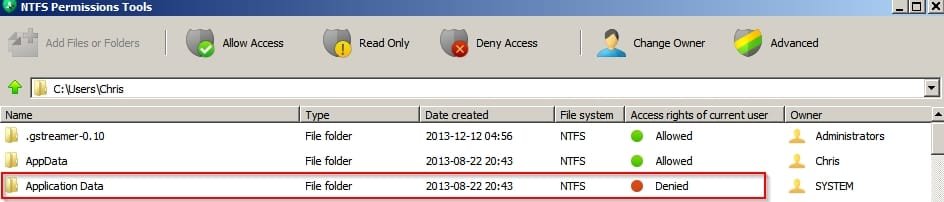
I'm not sure what the issue is! I was wondering if you had mistakenly taken ownership of your Application Data folder but asked you to look in the wrong place.

If you set folder options to show protected operating system files

Uncheck:

Folder Options.jpg

You should get access denied if you navigate to Application Data which is the way it should be. Is your Application Data folder showing the same?

Application Data.jpg

Also what is the drive where the photos are stored? Is it a flash drive or something else?
 

My Computer My Computer

At a glance

Microsoft Windows 7 Home Premium 64-bit 7601 ...AMD C-60 APU with Radeon(tm) HD Graphics4.00 GBAMD Radeon HD 6290 Graphics
Computer type
Laptop
Computer Manufacturer/Model Number
ASUS
OS
Microsoft Windows 7 Home Premium 64-bit 7601 Multiprocessor Free Service Pack 1
CPU
AMD C-60 APU with Radeon(tm) HD Graphics
Motherboard
ASUSTeK COMPUTER INC. X501U
Memory
4.00 GB
Graphics Card(s)
AMD Radeon HD 6290 Graphics
Sound Card
(1) AMD High Definition Audio Device (2) Realtek High Defi
Screen Resolution
1366 x 768 x 32 bits (4294967296 colors) @ 60 Hz
Hard Drives
Hitachi HTS545050A7E380 SATA Disk Device
Antivirus
Comodo CIS & FW, SecureAplus App Whitelisting, Threatfire
Browser
Cyberfox 64bit, Opera 64bit, Airfox
Other Info
Spy-The-Spy, HitmanPro.Alert, Norton Connect Safe, MJRegWatcher, BitDefender TrafficLight, Voodoo Shield, Zemana AntiMalware
Just checked, as you said the access to the application data folder is showing 'Denied".
Also, the photos are in my internal HDD drive.
 

My Computer My Computer

At a glance

Windows 7 Ultimate x64Phenom II x6 1055t8gb
Computer type
PC/Desktop
Computer Manufacturer/Model Number
Other
OS
Windows 7 Ultimate x64
CPU
Phenom II x6 1055t
Motherboard
Asus M5A88 M Evoa
Memory
8gb
Okay I don't know if this will work but you can try it:

Do you have another folder on the same drive that contains images that you can open? If so navigate to that folder using NTFS Permissions tool and right click then choose "Copy Security Settings"

NPT Copy Permissions.jpg

Then navigate to the problem folder - right click and choose "Paste Security Settings"

If that doesn't work then I don't know what the problem is. Maybe other members will have ideas.
 

My Computer My Computer

At a glance

Microsoft Windows 7 Home Premium 64-bit 7601 ...AMD C-60 APU with Radeon(tm) HD Graphics4.00 GBAMD Radeon HD 6290 Graphics
Computer type
Laptop
Computer Manufacturer/Model Number
ASUS
OS
Microsoft Windows 7 Home Premium 64-bit 7601 Multiprocessor Free Service Pack 1
CPU
AMD C-60 APU with Radeon(tm) HD Graphics
Motherboard
ASUSTeK COMPUTER INC. X501U
Memory
4.00 GB
Graphics Card(s)
AMD Radeon HD 6290 Graphics
Sound Card
(1) AMD High Definition Audio Device (2) Realtek High Defi
Screen Resolution
1366 x 768 x 32 bits (4294967296 colors) @ 60 Hz
Hard Drives
Hitachi HTS545050A7E380 SATA Disk Device
Antivirus
Comodo CIS & FW, SecureAplus App Whitelisting, Threatfire
Browser
Cyberfox 64bit, Opera 64bit, Airfox
Other Info
Spy-The-Spy, HitmanPro.Alert, Norton Connect Safe, MJRegWatcher, BitDefender TrafficLight, Voodoo Shield, Zemana AntiMalware
Tried and it didn't work.
I forgot to mention one thing, don't know if it's relevant or not. The names of the files all appear green even if I uncheck the encrypt option from advanced tab access is denied for that action.
 

My Computer My Computer

At a glance

Windows 7 Ultimate x64Phenom II x6 1055t8gb
Computer type
PC/Desktop
Computer Manufacturer/Model Number
Other
OS
Windows 7 Ultimate x64
CPU
Phenom II x6 1055t
Motherboard
Asus M5A88 M Evoa
Memory
8gb
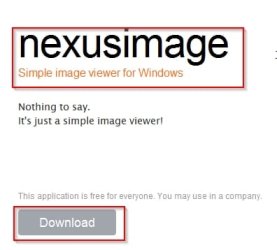
It might be interesting to see if you can open images using a different photo viewer. Here's a portable one you can test if you don't have anything else installed. It will run without installation.

Simple, easy and well designed applications by xiles

Scroll down the page to:

Nexus.jpg

If you extract the files and run the program can it open the problem images?
 

My Computer My Computer

At a glance

Microsoft Windows 7 Home Premium 64-bit 7601 ...AMD C-60 APU with Radeon(tm) HD Graphics4.00 GBAMD Radeon HD 6290 Graphics
Computer type
Laptop
Computer Manufacturer/Model Number
ASUS
OS
Microsoft Windows 7 Home Premium 64-bit 7601 Multiprocessor Free Service Pack 1
CPU
AMD C-60 APU with Radeon(tm) HD Graphics
Motherboard
ASUSTeK COMPUTER INC. X501U
Memory
4.00 GB
Graphics Card(s)
AMD Radeon HD 6290 Graphics
Sound Card
(1) AMD High Definition Audio Device (2) Realtek High Defi
Screen Resolution
1366 x 768 x 32 bits (4294967296 colors) @ 60 Hz
Hard Drives
Hitachi HTS545050A7E380 SATA Disk Device
Antivirus
Comodo CIS & FW, SecureAplus App Whitelisting, Threatfire
Browser
Cyberfox 64bit, Opera 64bit, Airfox
Other Info
Spy-The-Spy, HitmanPro.Alert, Norton Connect Safe, MJRegWatcher, BitDefender TrafficLight, Voodoo Shield, Zemana AntiMalware
Tried and it didn't work.
I forgot to mention one thing, don't know if it's relevant or not. The names of the files all appear green even if I uncheck the encrypt option from advanced tab access is denied for that action.

Well if those files are encrypted that is very likely to be the problem. I don't use any sort of Windows file encryption as I prefer to use third party tools for encryption.

Anyone else want to help out?
 

My Computer My Computer

At a glance

Microsoft Windows 7 Home Premium 64-bit 7601 ...AMD C-60 APU with Radeon(tm) HD Graphics4.00 GBAMD Radeon HD 6290 Graphics
Computer type
Laptop
Computer Manufacturer/Model Number
ASUS
OS
Microsoft Windows 7 Home Premium 64-bit 7601 Multiprocessor Free Service Pack 1
CPU
AMD C-60 APU with Radeon(tm) HD Graphics
Motherboard
ASUSTeK COMPUTER INC. X501U
Memory
4.00 GB
Graphics Card(s)
AMD Radeon HD 6290 Graphics
Sound Card
(1) AMD High Definition Audio Device (2) Realtek High Defi
Screen Resolution
1366 x 768 x 32 bits (4294967296 colors) @ 60 Hz
Hard Drives
Hitachi HTS545050A7E380 SATA Disk Device
Antivirus
Comodo CIS & FW, SecureAplus App Whitelisting, Threatfire
Browser
Cyberfox 64bit, Opera 64bit, Airfox
Other Info
Spy-The-Spy, HitmanPro.Alert, Norton Connect Safe, MJRegWatcher, BitDefender TrafficLight, Voodoo Shield, Zemana AntiMalware
Even Nexus didn't work, again access denied message.
I don't really remember intentionally encrypting though. :/
 

My Computer My Computer

At a glance

Windows 7 Ultimate x64Phenom II x6 1055t8gb
Computer type
PC/Desktop
Computer Manufacturer/Model Number
Other
OS
Windows 7 Ultimate x64
CPU
Phenom II x6 1055t
Motherboard
Asus M5A88 M Evoa
Memory
8gb
I know nothing about the encryption problem but here's what I found:

You need to use the same user account that encrypted the files to decrypt and access them.

If they came from another computer you need to get the encryption key from that machine. You will also need to know the password that was used to encrypt the files.
 

My Computer My Computer

At a glance

Microsoft Windows 7 Home Premium 64-bit 7601 ...AMD C-60 APU with Radeon(tm) HD Graphics4.00 GBAMD Radeon HD 6290 Graphics
Computer type
Laptop
Computer Manufacturer/Model Number
ASUS
OS
Microsoft Windows 7 Home Premium 64-bit 7601 Multiprocessor Free Service Pack 1
CPU
AMD C-60 APU with Radeon(tm) HD Graphics
Motherboard
ASUSTeK COMPUTER INC. X501U
Memory
4.00 GB
Graphics Card(s)
AMD Radeon HD 6290 Graphics
Sound Card
(1) AMD High Definition Audio Device (2) Realtek High Defi
Screen Resolution
1366 x 768 x 32 bits (4294967296 colors) @ 60 Hz
Hard Drives
Hitachi HTS545050A7E380 SATA Disk Device
Antivirus
Comodo CIS & FW, SecureAplus App Whitelisting, Threatfire
Browser
Cyberfox 64bit, Opera 64bit, Airfox
Other Info
Spy-The-Spy, HitmanPro.Alert, Norton Connect Safe, MJRegWatcher, BitDefender TrafficLight, Voodoo Shield, Zemana AntiMalware
Back
Top