Solved Lost partition letter and can't add it

noexit

New member
Local time
2:45 AM
Messages
6
When instaled Partition magic 8 on windows 7 when i started it program something Fixed

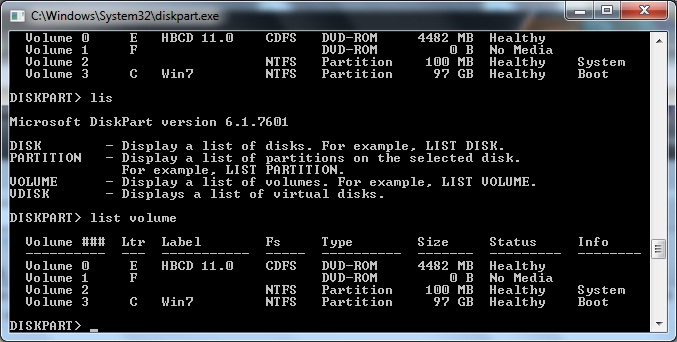
And later disperd my data partition like showed in picture above.

Can someone help me? maybe can some one give me link that program will fix this?

f39bf1a0cff09a9e3270ce98baffc707.jpg
 

My Computer My Computer

At a glance

windows 7 prof 32b
OS
windows 7 prof 32b
You could try using DiskPart.

Click Start and type in "diskpart" if you have Windows Search enabled.

Right click the program and select Run as Administrator.

After this has loaded type in "listvolume" and hit Enter.

When you see the Partition you want to format, look at the number it has assigned for that partition.

Type "select volume 5", replace "5" with whatever number it gave you.

Finally, type select "assign letter J", replacing J with whatever letter you chose.

http://answers.microsoft.com/en-us/...-to-date/42b1ebc3-edaf-4c3f-93cd-beda4bab2671
 

My Computer My Computer

At a glance

Windows 7 Ultimate x64Intel Core i5 2500K Processor2x4GB DDR3 1333Mhz MemoryNovatech Radeon 6770 1GB Graphics Card
Computer Manufacturer/Model Number
iRush Pro
OS
Windows 7 Ultimate x64
CPU
Intel Core i5 2500K Processor
Motherboard
Intel H67 Chipset Motherboard (Micro ATX)
Memory
2x4GB DDR3 1333Mhz Memory
Graphics Card(s)
Novatech Radeon 6770 1GB Graphics Card
Hard Drives
1TB
PSU
Novatech 500W
Case
Novatech ATX Gaming Case
Cooling
-
Keyboard
Novatech Wired Keyboard
Mouse
Novatech Wired Mouse
Internet Speed
VirginMedia 10MB/s
When instaled Partition magic 8 on windows 7 when i started it program something Fixed
I didn't think that the old program named "Partition Magic" was actually usable on Win7, but maybe the problem is strictly that it's out-of-date and unsupported by Symantec any longer. I certainly had trouble trying to use it with Win x64 two years ago and just looked for an alternative.

The equivalent program you really SHOULD be using instead is named "Partition Wizard". You'll find it very very very very similar looking to "Partition Magic". Curious, to say the least.

Anyway it's free, modern, has been spiffed up over the past few years, supports modern large hard drives, and absolutely runs under Win7 both x86 and x64. It's very widely used and very highly regarded. Download and install it, and run it, and see what it makes of that unallocated/raw space on your drive.

Also you should download/burn the ISO image for Partition Wizard standalone boot CD. This is a "safe" version to use, through which you can do everything you can when using the installed version under Win7 itself. But it also can do special things (e.g. to your C-partition) that cannot be performed while Windows is up and running, hence the standalone boot CD usage.

 

My Computer My Computer

At a glance

Windows 7 Pro x64 (1), Win7 Pro X64 (2)i5-3350p 3.1Ghz/6MB-cache (1); E8400 3.0Ghz/6...8GB PC3-12800 DDR3 (1); 4GB PC3-10600 DDR3 (2)ATI HD7750 (1), (see TV cards); ATI R7 250 (2)
Computer type
PC/Desktop
Computer Manufacturer/Model Number
Home-built, two systems (1) and (2)
OS
Windows 7 Pro x64 (1), Win7 Pro X64 (2)
CPU
i5-3350p 3.1Ghz/6MB-cache (1); E8400 3.0Ghz/6MB-cache (2)
Motherboard
ASUS P8Z77-V Pro (1); ASUS P5Q3 (2)
Memory
8GB PC3-12800 DDR3 (1); 4GB PC3-10600 DDR3 (2)
Graphics Card(s)
ATI HD7750 (1), (see TV cards); ATI R7 250 (2)
Sound Card
Realtek ALC892 HD Audio (1); Realtek ALC1200 HD Audio (2)
Monitor(s) Displays
Eizo HD2441W LCD, Eizo S2433W (1); Eizo 24" S2433W (2)
Screen Resolution
1920x1200, 1920x1200 (1); 1920x1200 (2)
Hard Drives
(1) 1TB SATA-II (7200RPM), 2x2TB SATA-III (7200RPM), 250GB SATA-III (10000RPM) for OS; 2x2TB external USB 3.0

(2) 320GB SATA-II (7200RPM), 750GB SATA-II (7200RPM), 150GB SATA-II (10000RPM) for OS; 2TB external USB 3.0
PSU
Nesteq ECS-6001 600W (1); Nesteq ECS-5001 500W (2)
Case
Acousti-Case 360 (1) and (2)
Cooling
Noctua NH-U12P SE2 for CPU, 2x120mm case fans (1) and (2)
Keyboard
IBM PS/2 (1) and (2)
Mouse
Logitech MX Revolution wireless (1); Microsoft wired (2)
Internet Speed
100mbps down / 10mbps up
Antivirus
Microsoft Security Essentials; Malwarebyte Anti-Malware Pro
Browser
Firefox
Other Info
Ceton InfiniTV 4-tuner cablecard-enabled TV card as well as Hauppauge HVR-2250 OTA/ATSC 2-tuner TV card in (1), running under Win7 WMC
thanks it helped
 

My Computer My Computer

At a glance

windows 7 prof 32b
OS
windows 7 prof 32b
When instaled Partition magic 8 on windows 7 when i started it program something Fixed
I didn't think that the old program named "Partition Magic" was actually usable on Win7, but maybe the problem is strictly that it's out-of-date and unsupported by Symantec any longer. I certainly had trouble trying to use it with Win x64 two years ago and just looked for an alternative.

The equivalent program you really SHOULD be using instead is named "Partition Wizard". You'll find it very very very very similar looking to "Partition Magic". Curious, to say the least.

Anyway it's free, modern, has been spiffed up over the past few years, supports modern large hard drives, and absolutely runs under Win7 both x86 and x64. It's very widely used and very highly regarded. Download and install it, and run it, and see what it makes of that unallocated/raw space on your drive.

Also you should download/burn the ISO image for Partition Wizard standalone boot CD. This is a "safe" version to use, through which you can do everything you can when using the installed version under Win7 itself. But it also can do special things (e.g. to your C-partition) that cannot be performed while Windows is up and running, hence the standalone boot CD usage.

Now i know can't use it

Yes i used partition wizard it helped , i runit from windows
 

My Computer My Computer

At a glance

windows 7 prof 32b
OS
windows 7 prof 32b
thanks it helped
Please tell us more...

What happened? What action did you do with Partition Wizard?

Did it get your drive letter back?

Can you please post another screenshot from DISKMGMT.MSC to show the "after" results. Please make it full-screen, and spread the columns so that all the text in each cell is visible. Thanks.


But obviously if you're back in business then terrific!
 

My Computer My Computer

At a glance

Windows 7 Pro x64 (1), Win7 Pro X64 (2)i5-3350p 3.1Ghz/6MB-cache (1); E8400 3.0Ghz/6...8GB PC3-12800 DDR3 (1); 4GB PC3-10600 DDR3 (2)ATI HD7750 (1), (see TV cards); ATI R7 250 (2)
Computer type
PC/Desktop
Computer Manufacturer/Model Number
Home-built, two systems (1) and (2)
OS
Windows 7 Pro x64 (1), Win7 Pro X64 (2)
CPU
i5-3350p 3.1Ghz/6MB-cache (1); E8400 3.0Ghz/6MB-cache (2)
Motherboard
ASUS P8Z77-V Pro (1); ASUS P5Q3 (2)
Memory
8GB PC3-12800 DDR3 (1); 4GB PC3-10600 DDR3 (2)
Graphics Card(s)
ATI HD7750 (1), (see TV cards); ATI R7 250 (2)
Sound Card
Realtek ALC892 HD Audio (1); Realtek ALC1200 HD Audio (2)
Monitor(s) Displays
Eizo HD2441W LCD, Eizo S2433W (1); Eizo 24" S2433W (2)
Screen Resolution
1920x1200, 1920x1200 (1); 1920x1200 (2)
Hard Drives
(1) 1TB SATA-II (7200RPM), 2x2TB SATA-III (7200RPM), 250GB SATA-III (10000RPM) for OS; 2x2TB external USB 3.0

(2) 320GB SATA-II (7200RPM), 750GB SATA-II (7200RPM), 150GB SATA-II (10000RPM) for OS; 2TB external USB 3.0
PSU
Nesteq ECS-6001 600W (1); Nesteq ECS-5001 500W (2)
Case
Acousti-Case 360 (1) and (2)
Cooling
Noctua NH-U12P SE2 for CPU, 2x120mm case fans (1) and (2)
Keyboard
IBM PS/2 (1) and (2)
Mouse
Logitech MX Revolution wireless (1); Microsoft wired (2)
Internet Speed
100mbps down / 10mbps up
Antivirus
Microsoft Security Essentials; Malwarebyte Anti-Malware Pro
Browser
Firefox
Other Info
Ceton InfiniTV 4-tuner cablecard-enabled TV card as well as Hauppauge HVR-2250 OTA/ATSC 2-tuner TV card in (1), running under Win7 WMC
thanks it helped
Please tell us more...

What happened? What action did you do with Partition Wizard?

Did it get your drive letter back?

Can you please post another screenshot from DISKMGMT.MSC to show the "after" results. Please make it full-screen, and spread the columns so that all the text in each cell is visible. Thanks.


But obviously if you're back in business then terrific!

1) When i used Diskpart list volume was like that. No D: Data disk in it (volume 3)

382bda97745b49b70331a6e7e811b589.jpg


2) When i used Partition home Edition from Hirens boot cd. And hided partition, then resized, and labeled
c5af1e01c1311adc7e76e2d2ea99d728.jpg


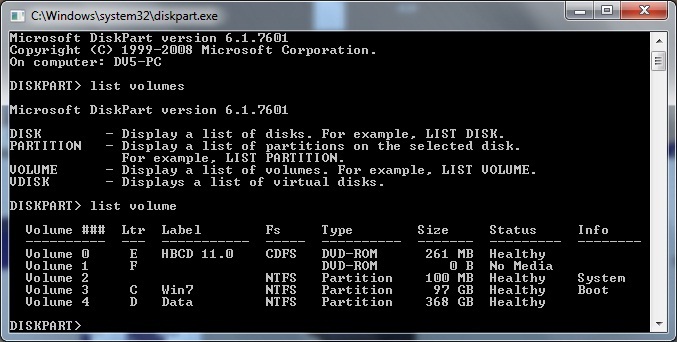
3) After restart computer , when i used diskpart i see
f1d16ed79140a22f0cf835284910b88d.jpg


And i have my disk partition back Volume 4

Thanks every one who helped to me
 

My Computer My Computer

At a glance

windows 7 prof 32b
OS
windows 7 prof 32b
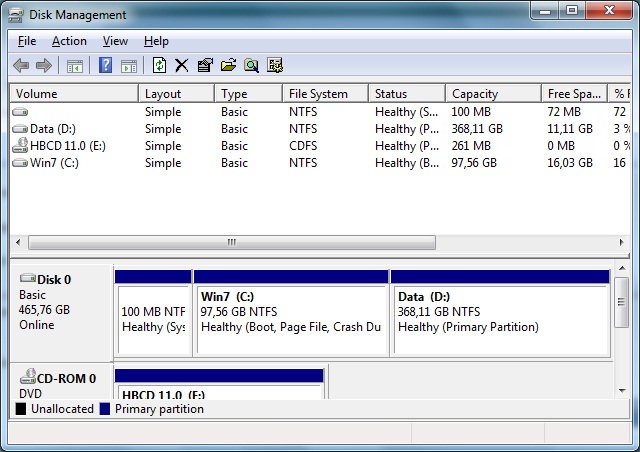
And in DISKMGMT.MSC every thin was back to normal

7b15dd8a0a063954eee51b67b20b344e.jpg
 

My Computer My Computer

At a glance

windows 7 prof 32b
OS
windows 7 prof 32b
And in DISKMGMT.MSC every thin was back to normal

7b15dd8a0a063954eee51b67b20b344e.jpg
Excellent!! Glad Partition Wizard was able to solve your problem.

There's certainly a similarity of purpose and function to DISKMGMT.MSC and Partition Wizard, and then there's also DISKPART with its own set of unique functions and capabilities. But I find myself using PW instead of DISKMGMT, just because I like its user interface... not to mention that it can do MORE than DISKMGMT can do.

Anyway, I see that your standalone Partition Wizard boot CD is from version 5 of the product. The current release is version 7. Still free, still "home edition", but version 7 and it looks better and works easier than version 5.

I recommend that you download and burn the ISO for version 7 of PW for future use.

Same goes for the installed version that runs under Win7... also free home edition at version 7.
 

My Computer My Computer

At a glance

Windows 7 Pro x64 (1), Win7 Pro X64 (2)i5-3350p 3.1Ghz/6MB-cache (1); E8400 3.0Ghz/6...8GB PC3-12800 DDR3 (1); 4GB PC3-10600 DDR3 (2)ATI HD7750 (1), (see TV cards); ATI R7 250 (2)
Computer type
PC/Desktop
Computer Manufacturer/Model Number
Home-built, two systems (1) and (2)
OS
Windows 7 Pro x64 (1), Win7 Pro X64 (2)
CPU
i5-3350p 3.1Ghz/6MB-cache (1); E8400 3.0Ghz/6MB-cache (2)
Motherboard
ASUS P8Z77-V Pro (1); ASUS P5Q3 (2)
Memory
8GB PC3-12800 DDR3 (1); 4GB PC3-10600 DDR3 (2)
Graphics Card(s)
ATI HD7750 (1), (see TV cards); ATI R7 250 (2)
Sound Card
Realtek ALC892 HD Audio (1); Realtek ALC1200 HD Audio (2)
Monitor(s) Displays
Eizo HD2441W LCD, Eizo S2433W (1); Eizo 24" S2433W (2)
Screen Resolution
1920x1200, 1920x1200 (1); 1920x1200 (2)
Hard Drives
(1) 1TB SATA-II (7200RPM), 2x2TB SATA-III (7200RPM), 250GB SATA-III (10000RPM) for OS; 2x2TB external USB 3.0

(2) 320GB SATA-II (7200RPM), 750GB SATA-II (7200RPM), 150GB SATA-II (10000RPM) for OS; 2TB external USB 3.0
PSU
Nesteq ECS-6001 600W (1); Nesteq ECS-5001 500W (2)
Case
Acousti-Case 360 (1) and (2)
Cooling
Noctua NH-U12P SE2 for CPU, 2x120mm case fans (1) and (2)
Keyboard
IBM PS/2 (1) and (2)
Mouse
Logitech MX Revolution wireless (1); Microsoft wired (2)
Internet Speed
100mbps down / 10mbps up
Antivirus
Microsoft Security Essentials; Malwarebyte Anti-Malware Pro
Browser
Firefox
Other Info
Ceton InfiniTV 4-tuner cablecard-enabled TV card as well as Hauppauge HVR-2250 OTA/ATSC 2-tuner TV card in (1), running under Win7 WMC
yes i get it now and in future us it
thanks for recomendation
and for help
 

My Computer My Computer

At a glance

windows 7 prof 32b
OS
windows 7 prof 32b
Back
Top