Solved lost partition

hiba24

Banned
Local time
5:31 PM
Messages
15
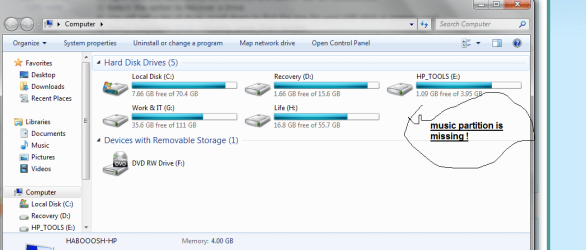
a few days ago my i restarted my laptop because of voice issues anyway when i went to my computer there was a drive missing i restarted again but it did not show up when i checked driver it was changed to
unallocated area it was full of 60 G music ! how can i get that back ?
 

My Computer

OS
windows 7 home basic
Based on my experience at doing this successfully, my suggestions are the following:
1) Download and install the trial version of RecoverMyFiles from Runtime Software in MS Windows.
2) Right-click the RecoverMyFiles shortcut and select "Run as Administrator"
3) Select the option to Recover a Drive
4) You will get a list of drive, scroll down to find the one for your USB stick or memory card
5) Select Automatic Driver recovery, press Start button
6) It will run for a while but when done, will show a directory tree in the left pane. Do NOT interrupt it.
7) When done, browse the folders in the directory tree -- and be SURE to check the filesizes of the files you want to recover. If the filesize is zero, the file is trashed and you will NOT be able to recover it.

If the files look OK, you will need to contact Runtime Software to purchase a license for the recovery. You won't have to reinstall the app; instead, they will email you an activation code which you can use to turn on the recovery feature.

According to their website, the "standard" version of the app is $70 USD. They also have a Pro version for $99 dollars, but if you go to the website below, you can compare the features and (at least for me) the extra cost wasn't worth it:
Purchase Recover My Files data recovery software

Your data ... your money ... your choice.

 

My Computer

Computer type
PC/Desktop
Computer Manufacturer/Model Number
Custom
OS
Win7 Pro 32-bit, Win8 Pro 32-bit
CPU
AMD Phenom II X6 1090T
Motherboard
Gigabyte
Memory
4GB ddr3 1300
Graphics Card(s)
AMD HD 4290 onboard
Sound Card
Builtin Realtek HD Audio
Monitor(s) Displays
Samsung 24" widescreen, LG 23" widescreen
Screen Resolution
1920x1200/1920x1080
Hard Drives
Kingston 256GB SSD
Keyboard
Logitech Illuminated Keyboard
Mouse
Logitech M705 wireless mouse
Antivirus
Norton Av 2013
Browser
IE v10
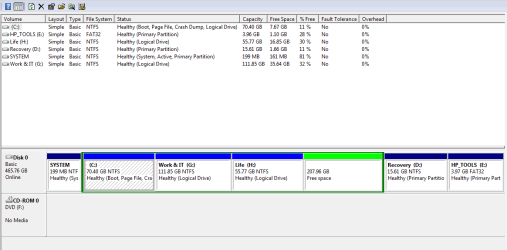
when i go to recover my file it see only the current drive , while my problem that a whole drive disappeared !! when i check drive manager i see it became unallocated how to restore that partition and data was in it !

please see attached images
 

Attachments

  • drive.png
    drive.png
    35.7 KB · Views: 0

My Computer

OS
windows 7 home basic
Hi hiba24,

Can you please post a screenshot of how the drive/partition looks in Windows Disk Management?

http://www.sevenforums.com/tutorials/274797-disk-management-post-screen-capture-image.html

In particular I would like to know:

1. Whether it is a whole drive missing as unallocated? or

2. Is it just one partition in a physical drive? and if it is

3. Is that partition which you call a drive, a partition in the system drive or a partition in a second internal drive or a partition in an external drive?
 

My Computer

OS
Windows 7 Home Premium 32 bit
Done
 

Attachments

  • Capture.PNG
    Capture.PNG
    15.6 KB · Views: 3

My Computer

OS
windows 7 home basic
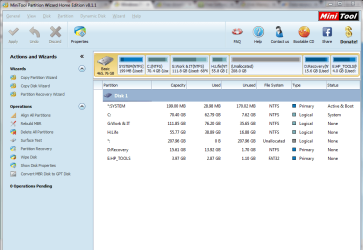
Ok, download , install and Run MiniTools Partition Wizard Home Edition 8.1.1. http://www.partitionwizard.com/download.html

Run the Partition Recovery Wizard in it.

Partition Recovery>Full Disk>Next> Quick Scan>Next

Post the screenshot of the resulting screen.
 

My Computer

OS
Windows 7 Home Premium 32 bit
I downloaded MiniTools Partition Wizard Home Edition 8.1.1. then run it choose minitool partition wizard but i cant find where is quick scan ??

1. Whether it is a whole drive missing as unallocated? or

the whole drive became unaloocated

2. Is it just one partition in a physical drive? and if it is

yes only this one

3. Is that partition which you call a drive, a partition in the system drive or a partition in a second internal drive or a partition in an external drive?

yes i call it drive ,a partition in the system drive
 

Attachments

  • Capture2222.PNG
    Capture2222.PNG
    42.7 KB · Views: 0

My Computer

OS
windows 7 home basic
Click on Partition Recovery under operations in the left panel.

Partition Recovery>Full Disk>Next> Quick Scan>Next

Post the screenshot of the resulting screen.
 

My Computer

OS
Windows 7 Home Premium 32 bit
OK, I am going to bed now.

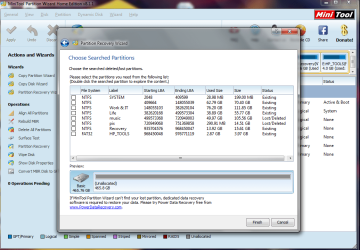
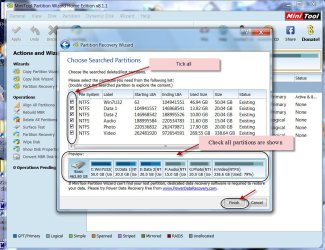
If you can see all partitions, put a tick mark against all and each partition shown. Check that the bottom disk map shows all partitions.

Click on Finish.

That should take you back to the main screen.

Does it show all partitions?

Does the lost partition now has a drive letter?

If not right click on it and assign a drive letter.

Click on Apply on the top bar for the changes to take effect.

Close Partition Wizard and reboot.

If you have any doubts, may be others can help from where I left.

If that isn't coming just close Partition Wizard without making any changes and we will see after another eight hours when I am up.
 

My Computer

OS
Windows 7 Home Premium 32 bit
OMG there is another partition also lost.

"Music and pix" are my lost partition how to get these back ?
 

Attachments

  • Capturevvvvvv.PNG
    Capturevvvvvv.PNG
    66.8 KB · Views: 0

My Computer

OS
windows 7 home basic
OK, dear friend, you are good to go.

Tick all the square boxes - Note : ALL ALL

29-04-2014 13-01-18.jpg

And do what all is said in post # 9 - yes, I had already said what all you should do before I retired yesterday. :)
 

My Computer

OS
Windows 7 Home Premium 32 bit
:D:D:D:D:D:D:D

million thanks every thing is back to normal :D
 

My Computer

OS
windows 7 home basic
Glad you followed every single instruction and got back your prized possessions.;) Have a good day.
 

My Computer

OS
Windows 7 Home Premium 32 bit
Back
Top