Solved Lost picture thumbnails?

flycaster

New member
Member
VIP
Local time
6:08 PM
Messages
472
Location
Boynton Beach, FL
Don't know how i did it (probably when I thought I was increasing the computer's efficiency), but now when i go to my picture folders, the thumbnails aren't showing...
 

My Computer My Computer

Computer Manufacturer/Model Number
Gateway DX4720-03/HP Pavilion dv6
OS
Windows 7 HP 64-bit
Memory
4GB/4GB
Antivirus
Avast Pro
Browser
Firefox, the latest

My Computer My Computer

Computer type
PC/Desktop
Computer Manufacturer/Model Number
Self Built
OS
Win 10 Pro x64
CPU
Intel I5-2500K @3.3GHz
Motherboard
Asrock P67 Extreme4
Memory
16GB G.Skill Ripjaws X (4x4GB)
Graphics Card(s)
EVGA GeForce 750 Ti SC 2GB
Sound Card
ASUS Xonar DG 5.1 Channels 24-bit 96KHz PCI Interface Sound
Monitor(s) Displays
auria eq2367
Screen Resolution
1920 x 1080
Hard Drives
250GB Samsung 850 EVO SSD
1TB WD Blue
1TB Hitachi
PSU
SeaSonic X 650W 80 Plus Gold
Case
Corsair Obsidian 750D
Cooling
Corsair H60, Three 140mm case fans
Keyboard
Logitech Wireless Keyboard K520
Mouse
Logitech Wireless Mouse M310
Internet Speed
Wave Broadband ~ 100 dn 5 up
Antivirus
Windows Defender, Malwarebytes Premium
Browser
Edge, IE11, Chrome
Other Info
Laptop specs: HP g7-1365dx /
CPU: AMD A6-3420M APU with Radeon(tm) HD Graphics /
RAM: Crucial 8Gb (2x4Gb) /
SSD: Crucial M4-CT128M4SSD2 ATA Device/ FW 000F /
GFX: AMD Radeon HD 6520G /
OS: Windows 10 Pro x64
After you follow Derek's posting to turn the Thumbnails back on.
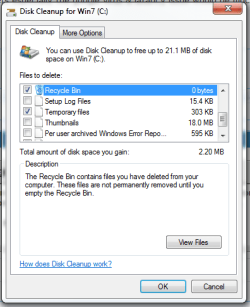
Then check to make sure when you run Disk Clean Up that you don't delete them every time you run it.

http://www.sevenforums.com/tutorials/818-disk-cleanup-open-use.html

As in my Snip below make sure the Thumbnails box is unchecked.
If checked it will delete the Thumbnails.
Then you start over to rebuild the cache which can take a few days.
I know I deleted mine by accident. :(
Mike
 

Attachments

  • Disk Clean2.PNG
    Disk Clean2.PNG
    15.3 KB · Views: 12

My Computer My Computer

Computer Manufacturer/Model Number
Hopalong/ Godzilla
OS
Windows7 Pro 64bit SP-1; Windows XP Pro 32bit
CPU
Intel Core i7-870 Lynnfield 2.93GHz LGA 1156 95W Quad-Core
Motherboard
ASUS P7P55D-E PRO
Memory
8GB@1400MHz Crucial Ballistix DDR3-1600 4x2GB
Graphics Card(s)
ASUS ENGTX460 DirectCU/2DI/1GD5 1GB 256-bit GDDR5
Sound Card
VIA Onboard
Monitor(s) Displays
Asus VS248H-P 24"; Samsung SyncMaster 941BW 19"ws
Screen Resolution
1920x1080; 1440x900
Hard Drives
Samsung 830 120GB SSD
Intel 320 120GB SSD
Western Digital Caviar Black WD7501AALS 750GB 7200 RPM SATA 3.0Gb/s
Western Digital Caviar Black WD6401AALS 640GB 7200 RPM SATA 3.0Gb/s
PSU
COOLER MASTER Silent Pro RS850-AMBAJ3-US 850W Modular
Case
COOLER MASTER HAF 932 RC-932-KKN5-GP Black
Cooling
Scythe "Mugen-2 Rev.B" (2 ScytheKaze-Jyuni PWM fans)
Keyboard
Logitech K-320
Mouse
Kensington
Antivirus
Avast Inernet Suite
Browser
IE 9 ; Chrome
Thanks for the help. Got things straightened away, but did have a bit of trouble which I;d like to pass on. In one of my picture folders (Libraries/pictures) I was able to restore the thumbnails. However, in another picture folder (My Pictures), although I had unchecked the right box in Folder options/View, I was still getting icons. This was driving me crazy until I realized that in View on the Toolbar I had Details instead of one of the icon sizes chosen...
 

My Computer My Computer

Computer Manufacturer/Model Number
Gateway DX4720-03/HP Pavilion dv6
OS
Windows 7 HP 64-bit
Memory
4GB/4GB
Antivirus
Avast Pro
Browser
Firefox, the latest
show thumbnails instead of icons

I'm sure by now you've gotten it resolved, but if you go to Start - > Right Click on Computer and click Properties. Click Advanced System Settings on the Left. On the Advanced Tab under the Performance Heading Click on Settings. Make sure show thumbnails instead of icons is selected.
 

My Computer My Computer

Computer type
PC/Desktop
Computer Manufacturer/Model Number
varies
OS
varies
CPU
varies
Motherboard
varies
Memory
varies
Graphics Card(s)
varies
Hard Drives
varies
Antivirus
varies
Browser
varies
Back
Top