Solved Lost some fonts

Nisko

New member
Member
VIP
Local time
10:10 PM
Messages
242
I've lost some fonts - witnessed by small squares where characters should be. I have a sequential backup, including the OS, that might pre-date the problem. How can I tell which fonts are missing - and how do I fix this problem?
 

My Computer

Computer Manufacturer/Model Number
HP Pavilion KQ574AV
OS
Windows 7

My Computer

Computer type
Laptop
Computer Manufacturer/Model Number
Sony Vaio VPCEB47GM Laptop
OS
Win 7 Pro 64-bit
CPU
Intel i5 2.4 Ghz
Memory
8GB DDR3
Graphics Card(s)
Intel HD 3000
Sound Card
IDT High Definition
Monitor(s) Displays
15.6 WGXA Anti-Glare LED
Screen Resolution
1280x800
Hard Drives
640Gb 7200rpm
Antivirus
MSE
Browser
Opera (primary) with IE9 backup
This Microsoft forum might help.

How to restore Windows 7 default fonts.

You could also try using a system restore point to return your machine to a date/time prior to when the fonts went missing.

Windows 7 Features: System Restore

Or you could try running system file checker.

http://www.sevenforums.com/tutorials/1538-sfc-scannow-command-system-file-checker.html

I've tried SFC - that's how I found that kalinga.ttf is missing. My Restore Points don't go back far enough. Thanks for the suggestions. BTW, how do I reply in this forum without using "Quote?"
 

My Computer

Computer Manufacturer/Model Number
HP Pavilion KQ574AV
OS
Windows 7
Hello Nisko,

You can use the Quick Reply box at the bottom of the thread to post a reply without a "Quote". :)
 

My Computer

Computer type
PC/Desktop
Computer Manufacturer/Model Number
Self built custom
OS
64-bit Windows 11 Pro for Workstations
CPU
Intel i7-8700K OC'd to 5 GHz
Motherboard
ASUS ROG Maximus XI Formula Z390
Memory
64 GB (4x16GB) G.SKILL TridentZ RGB DDR4 3600 MHz
Graphics Card(s)
ASUS ROG-STRIX-GTX1080TI-O11G-GAMING
Sound Card
Integrated
Monitor(s) Displays
2 x Samsung Odyssey G7 27"
Screen Resolution
2560x1440
Hard Drives
1TB Samsung 990 PRO M.2,
4TB Samsung 990 PRO PRO M.2,
TerraMaster F8 SSD Plus NAS
PSU
Seasonic Prime Titanium 850W
Case
Thermaltake Core P3
Cooling
Corsair Hydro H115i
Keyboard
Logitech wireless K800
Mouse
Logitech MX Master 4
Internet Speed
2 Gb/s Download and 100 Mb/s Upload
Antivirus
Malwarebyte Anti-Malware Premium
Browser
Google Chrome
Other Info
Logitech Z625 speaker system,
Logitech BRIO 4K Pro webcam,
HP Color LaserJet Pro MFP M477fdn,
APC SMART-UPS RT 1000 XL - SURT1000XLI,
Galaxy S23 Plus phone
Here is the Kalinga fonts from my system in a ZIP file below.

You would just need to download the ZIP to your desktop, extract the fonts, right click on them, and click on Install to add them back.

Hope this helps,
Shawn
 

Attachments

My Computer

Computer type
PC/Desktop
Computer Manufacturer/Model Number
Self built custom
OS
64-bit Windows 11 Pro for Workstations
CPU
Intel i7-8700K OC'd to 5 GHz
Motherboard
ASUS ROG Maximus XI Formula Z390
Memory
64 GB (4x16GB) G.SKILL TridentZ RGB DDR4 3600 MHz
Graphics Card(s)
ASUS ROG-STRIX-GTX1080TI-O11G-GAMING
Sound Card
Integrated
Monitor(s) Displays
2 x Samsung Odyssey G7 27"
Screen Resolution
2560x1440
Hard Drives
1TB Samsung 990 PRO M.2,
4TB Samsung 990 PRO PRO M.2,
TerraMaster F8 SSD Plus NAS
PSU
Seasonic Prime Titanium 850W
Case
Thermaltake Core P3
Cooling
Corsair Hydro H115i
Keyboard
Logitech wireless K800
Mouse
Logitech MX Master 4
Internet Speed
2 Gb/s Download and 100 Mb/s Upload
Antivirus
Malwarebyte Anti-Malware Premium
Browser
Google Chrome
Other Info
Logitech Z625 speaker system,
Logitech BRIO 4K Pro webcam,
HP Color LaserJet Pro MFP M477fdn,
APC SMART-UPS RT 1000 XL - SURT1000XLI,
Galaxy S23 Plus phone
Happy Holidays, Nisko!

From,
Texas

:grouphug:
 

My Computer

Computer type
Laptop
Computer Manufacturer/Model Number
Sony Vaio VPCEB47GM Laptop
OS
Win 7 Pro 64-bit
CPU
Intel i5 2.4 Ghz
Memory
8GB DDR3
Graphics Card(s)
Intel HD 3000
Sound Card
IDT High Definition
Monitor(s) Displays
15.6 WGXA Anti-Glare LED
Screen Resolution
1280x800
Hard Drives
640Gb 7200rpm
Antivirus
MSE
Browser
Opera (primary) with IE9 backup
Hello Nisko,

You can use the Quick Reply box at the bottom of the thread to post a reply without a "Quote". :)

Thanks - but I can't find where it says "Quick Reply." All I see in the bottom right corner is Quote and Multi. Perhaps you could be a little more specific? I scrolled all the way down. Another issue: If I have more than one Posting to me, how do I reply to each one individually without using Quote?
 

My Computer

Computer Manufacturer/Model Number
HP Pavilion KQ574AV
OS
Windows 7
Happy Holidays, Nisko!

From,
Texas

:grouphug:

Hello!! How do I "know" you? I live both in Rhode Island AND San Antonio where I have a house.
 

My Computer

Computer Manufacturer/Model Number
HP Pavilion KQ574AV
OS
Windows 7
I've lost some fonts - witnessed by small squares where characters should be. I have a sequential backup, including the OS, that might pre-date the problem. How can I tell which fonts are missing - and how do I fix this problem?

Don't know if this is proper ediquette - but following is extracted from the CBS.log:

POQ 81 ends.
2010-12-12 11:16:14, Info CSI 000001ae [SR] Verify complete
2010-12-12 11:16:14, Info CSI 000001af [SR] Repairing 1 components
2010-12-12 11:16:14, Info CSI 000001b0 [SR] Beginning Verify and Repair transaction
2010-12-12 11:16:14, Info CSI 000001b1 Hashes for file member \SystemRoot\WinSxS\x86_microsoft-windows-font-truetype-kalinga_31bf3856ad364e35_6.1.7600.16385_none_092fe6b3e1e343f5\kalinga.ttf do not match actual file [l:22{11}]"kalinga.ttf" :
Found: {l:32 b:QIOX8/U9WezNX0efo5xRnx/6xEJzP3BpRj/0m3Y+A/g=} Expected: {l:32 b:xuftqm+2RwZA+yzrPL5t6pHoXUUIDAIAmKsqZPHlXtA=}
2010-12-12 11:16:14, Info CSI 000001b2 [SR] Cannot repair member file [l:22{11}]"kalinga.ttf" of Microsoft-Windows-Font-TrueType-Kalinga, Version = 6.1.7600.16385, pA = PROCESSOR_ARCHITECTURE_INTEL (0), Culture neutral, VersionScope = 1 nonSxS, PublicKeyToken = {l:8 b:31bf3856ad364e35}, Type neutral, TypeName neutral, PublicKey neutral in the store, hash mismatch
2010-12-12 11:16:14, Info CSI 000001b3 Hashes for file member \SystemRoot\WinSxS\x86_microsoft-windows-font-truetype-kalinga_31bf3856ad364e35_6.1.7600.16385_none_092fe6b3e1e343f5\kalinga.ttf do not match actual file [l:22{11}]"kalinga.ttf" :
Found: {l:32 b:QIOX8/U9WezNX0efo5xRnx/6xEJzP3BpRj/0m3Y+A/g=} Expected: {l:32 b:xuftqm+2RwZA+yzrPL5t6pHoXUUIDAIAmKsqZPHlXtA=}
2010-12-12 11:16:14, Info CSI 000001b4 [SR] Cannot repair member file [l:22{11}]"kalinga.ttf" of Microsoft-Windows-Font-TrueType-Kalinga, Version = 6.1.7600.16385, pA = PROCESSOR_ARCHITECTURE_INTEL (0), Culture neutral, VersionScope = 1 nonSxS, PublicKeyToken = {l:8 b:31bf3856ad364e35}, Type neutral, TypeName neutral, PublicKey neutral in the store, hash mismatch
2010-12-12 11:16:14, Info CSI 000001b5 [SR] This component was referenced by [l:198{99}]"Microsoft-Windows-Foundation-Package~31bf3856ad364e35~x86~~6.1.7600.16385.WindowsFoundationDelivery"
2010-12-12 11:16:14, Info CSI 000001b6 Hashes for file member \??\C:\Windows\fonts\kalinga.ttf do not match actual file [l:22{11}]"kalinga.ttf" :
Found: {l:32 b:QIOX8/U9WezNX0efo5xRnx/6xEJzP3BpRj/0m3Y+A/g=} Expected: {l:32 b:xuftqm+2RwZA+yzrPL5t6pHoXUUIDAIAmKsqZPHlXtA=}
2010-12-12 11:16:14, Info CSI 000001b7 Hashes for file member \SystemRoot\WinSxS\x86_microsoft-windows-font-truetype-kalinga_31bf3856ad364e35_6.1.7600.16385_none_092fe6b3e1e343f5\kalinga.ttf do not match actual file [l:22{11}]"kalinga.ttf" :
Found: {l:32 b:QIOX8/U9WezNX0efo5xRnx/6xEJzP3BpRj/0m3Y+A/g=} Expected: {l:32 b:xuftqm+2RwZA+yzrPL5t6pHoXUUIDAIAmKsqZPHlXtA=}
2010-12-12 11:16:14, Info CSI 000001b8 [SR] Could not reproject corrupted file [ml:520{260},l:40{20}]"\??\C:\Windows\fonts"\[l:22{11}]"kalinga.ttf"; source file in store is also corrupted
2010-12-12 11:16:14, Info CSI 000001b9 Repair results created:
POQ 82 starts:

POQ 82 ends.
2010-12-12 11:16:14, Info CSI 000001ba [SR] Repair complete
2010-12-12 11:16:14, Info CSI 000001bb [SR] Committing transaction
2010-12-12 11:16:14, Info CSI 000001bc Creating NT transaction (seq 2), objectname [6]"(null)"
2010-12-12 11:16:14, Info CSI 000001bd Created NT transaction (seq 2) result 0x00000000, handle @0x6f0
2010-12-12 11:16:14, Info CSI 000001be@2010/12/12:16:16:14.526 CSI perf trace:
CSIPERF:TXCOMMIT;10
2010-12-12 11:16:14, Info CSI 000001bf [SR] Verify and Repair Transaction completed. All files and registry keys listed in this transaction have been successfully repaired

 

My Computer

Computer Manufacturer/Model Number
HP Pavilion KQ574AV
OS
Windows 7
Hello Nisko,

You can use the Quick Reply box at the bottom of the thread to post a reply without a "Quote". :)

Thanks - but I can't find where it says "Quick Reply." All I see in the bottom right corner is Quote and Multi. Perhaps you could be a little more specific? I scrolled all the way down. Another issue: If I have more than one Posting to me, how do I reply to each one individually without using Quote?


Nisko,

Did you see my post above to add them back?

http://www.sevenforums.com/general-discussion/130371-lost-some-fonts.html#post1125088


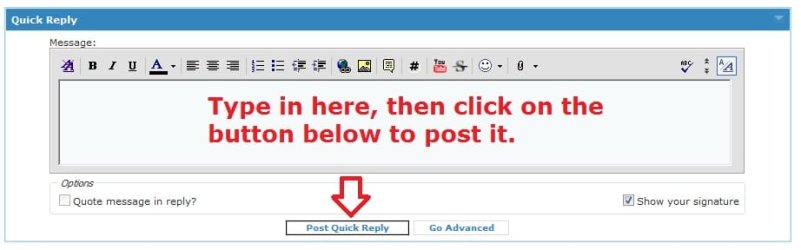
Here's what the Quick Reply box looks like towards the bottom. You may need to scroll down a bit to see it. :)

Quick_Reply.jpg
 

My Computer

Computer type
PC/Desktop
Computer Manufacturer/Model Number
Self built custom
OS
64-bit Windows 11 Pro for Workstations
CPU
Intel i7-8700K OC'd to 5 GHz
Motherboard
ASUS ROG Maximus XI Formula Z390
Memory
64 GB (4x16GB) G.SKILL TridentZ RGB DDR4 3600 MHz
Graphics Card(s)
ASUS ROG-STRIX-GTX1080TI-O11G-GAMING
Sound Card
Integrated
Monitor(s) Displays
2 x Samsung Odyssey G7 27"
Screen Resolution
2560x1440
Hard Drives
1TB Samsung 990 PRO M.2,
4TB Samsung 990 PRO PRO M.2,
TerraMaster F8 SSD Plus NAS
PSU
Seasonic Prime Titanium 850W
Case
Thermaltake Core P3
Cooling
Corsair Hydro H115i
Keyboard
Logitech wireless K800
Mouse
Logitech MX Master 4
Internet Speed
2 Gb/s Download and 100 Mb/s Upload
Antivirus
Malwarebyte Anti-Malware Premium
Browser
Google Chrome
Other Info
Logitech Z625 speaker system,
Logitech BRIO 4K Pro webcam,
HP Color LaserJet Pro MFP M477fdn,
APC SMART-UPS RT 1000 XL - SURT1000XLI,
Galaxy S23 Plus phone
Hello Nisko,

You can use the Quick Reply box at the bottom of the thread to post a reply without a "Quote". :)

Thanks - but I can't find where it says "Quick Reply." All I see in the bottom right corner is Quote and Multi. Perhaps you could be a little more specific? I scrolled all the way down. Another issue: If I have more than one Posting to me, how do I reply to each one individually without using Quote?


Nisko,

Did you see my post above to add them back?

http://www.sevenforums.com/general-discussion/130371-lost-some-fonts.html#post1125088


Here's what the Quick Reply box looks like towards the bottom. You may need to scroll down a bit to see it. :)

View attachment 122892

Here's what the bottom of my screen shows (hope you can see my attachment - I don't know how to embed a file.:
 

Attachments

  • Screen.jpeg
    Screen.jpeg
    114 KB · Views: 10

My Computer

Computer Manufacturer/Model Number
HP Pavilion KQ574AV
OS
Windows 7
Scroll down and look at the bottom without hitting the "Quote" or "Edit" buttons. ;)
 

My Computer

Computer type
PC/Desktop
Computer Manufacturer/Model Number
Self built custom
OS
64-bit Windows 11 Pro for Workstations
CPU
Intel i7-8700K OC'd to 5 GHz
Motherboard
ASUS ROG Maximus XI Formula Z390
Memory
64 GB (4x16GB) G.SKILL TridentZ RGB DDR4 3600 MHz
Graphics Card(s)
ASUS ROG-STRIX-GTX1080TI-O11G-GAMING
Sound Card
Integrated
Monitor(s) Displays
2 x Samsung Odyssey G7 27"
Screen Resolution
2560x1440
Hard Drives
1TB Samsung 990 PRO M.2,
4TB Samsung 990 PRO PRO M.2,
TerraMaster F8 SSD Plus NAS
PSU
Seasonic Prime Titanium 850W
Case
Thermaltake Core P3
Cooling
Corsair Hydro H115i
Keyboard
Logitech wireless K800
Mouse
Logitech MX Master 4
Internet Speed
2 Gb/s Download and 100 Mb/s Upload
Antivirus
Malwarebyte Anti-Malware Premium
Browser
Google Chrome
Other Info
Logitech Z625 speaker system,
Logitech BRIO 4K Pro webcam,
HP Color LaserJet Pro MFP M477fdn,
APC SMART-UPS RT 1000 XL - SURT1000XLI,
Galaxy S23 Plus phone
Scroll down and look at the bottom without hitting the "Quote" or "Edit" buttons. ;)

Must be something wrong with the way the web page is displayed on my PC with IE9. I'll try Firefox. In IE9, I can tell that something is being blocked at the bottom of the screen.
 

My Computer

Computer Manufacturer/Model Number
HP Pavilion KQ574AV
OS
Windows 7
"Post Quick Reply" is below this message - but I'm using Firefox. The problem is in using IE8 (I said IE9 in another post. That was a mistake. I'm using IE8 as my default browser. Any ideas now? Thanks........
 

My Computer

Computer Manufacturer/Model Number
HP Pavilion KQ574AV
OS
Windows 7
Nisko,

Copy and paste iexplore.exe -extoff in the Start Menu search box and press enter to run IE8 w/out add-ons to see if it you have "Quick Reply" afterwards. If you do, then it may be a bad add-on that you have installed in IE8.
 

My Computer

Computer type
PC/Desktop
Computer Manufacturer/Model Number
Self built custom
OS
64-bit Windows 11 Pro for Workstations
CPU
Intel i7-8700K OC'd to 5 GHz
Motherboard
ASUS ROG Maximus XI Formula Z390
Memory
64 GB (4x16GB) G.SKILL TridentZ RGB DDR4 3600 MHz
Graphics Card(s)
ASUS ROG-STRIX-GTX1080TI-O11G-GAMING
Sound Card
Integrated
Monitor(s) Displays
2 x Samsung Odyssey G7 27"
Screen Resolution
2560x1440
Hard Drives
1TB Samsung 990 PRO M.2,
4TB Samsung 990 PRO PRO M.2,
TerraMaster F8 SSD Plus NAS
PSU
Seasonic Prime Titanium 850W
Case
Thermaltake Core P3
Cooling
Corsair Hydro H115i
Keyboard
Logitech wireless K800
Mouse
Logitech MX Master 4
Internet Speed
2 Gb/s Download and 100 Mb/s Upload
Antivirus
Malwarebyte Anti-Malware Premium
Browser
Google Chrome
Other Info
Logitech Z625 speaker system,
Logitech BRIO 4K Pro webcam,
HP Color LaserJet Pro MFP M477fdn,
APC SMART-UPS RT 1000 XL - SURT1000XLI,
Galaxy S23 Plus phone
To: whs re: kalinga font thread

Thank you for allowing me to download the fonts. However, I still have several problems:
1. I must have kalinga and kalingab version 6.1.7600.16385
2. How can I tell what version you sent me?
3. If you didn't send me 6.1.7600.16385, how can I get it?
4. When I right click on your fonts, I don't get the option to install and I can't tell which version you sent.
5. CBS.log says the copy in the "store" is also corrupt. What is the "store" and how do I get that copy uncorrupted?
6. Sorry I couldn't respond to you in your post - I don't have privileges in that level (I guess).
 

My Computer

Computer Manufacturer/Model Number
HP Pavilion KQ574AV
OS
Windows 7
Here is the Kalinga fonts from my system in a ZIP file below.

You would just need to download the ZIP to your desktop, extract the fonts, right click on them, and click on Install to add them back.

Hope this helps,
Shawn

Thanks - but they HAVE to be version 6.1.7600.16385. I received version 5.9.

Then my CBS.log says "could not reproject corrupted file.....source file in store is also corrupted.

So, besides needing the above version, I need to be able to fix the "store" version also. Where is the "store" version?
 

My Computer

Computer Manufacturer/Model Number
HP Pavilion KQ574AV
OS
Windows 7
Nisko,

When you extract the fonts from the ZIP file I posted and try to install them, what does it say?
 

My Computer

Computer type
PC/Desktop
Computer Manufacturer/Model Number
Self built custom
OS
64-bit Windows 11 Pro for Workstations
CPU
Intel i7-8700K OC'd to 5 GHz
Motherboard
ASUS ROG Maximus XI Formula Z390
Memory
64 GB (4x16GB) G.SKILL TridentZ RGB DDR4 3600 MHz
Graphics Card(s)
ASUS ROG-STRIX-GTX1080TI-O11G-GAMING
Sound Card
Integrated
Monitor(s) Displays
2 x Samsung Odyssey G7 27"
Screen Resolution
2560x1440
Hard Drives
1TB Samsung 990 PRO M.2,
4TB Samsung 990 PRO PRO M.2,
TerraMaster F8 SSD Plus NAS
PSU
Seasonic Prime Titanium 850W
Case
Thermaltake Core P3
Cooling
Corsair Hydro H115i
Keyboard
Logitech wireless K800
Mouse
Logitech MX Master 4
Internet Speed
2 Gb/s Download and 100 Mb/s Upload
Antivirus
Malwarebyte Anti-Malware Premium
Browser
Google Chrome
Other Info
Logitech Z625 speaker system,
Logitech BRIO 4K Pro webcam,
HP Color LaserJet Pro MFP M477fdn,
APC SMART-UPS RT 1000 XL - SURT1000XLI,
Galaxy S23 Plus phone
Nisko,

When you extract the fonts from the ZIP file I posted and try to install them, what does it say?

I finally was able to install them - but they are version 5.9 and I need version 6.1.7500.etc.

Also, I had forgotten - but, I bought the laptop with Vista installed - so the hidden partition still has the Vista installation files. I later purchased Windows 7 Premium Home Edition and installed it. Now I know why sfc is telling me that the version of kalinga in "store" is corrupt also. I either need to replace that info in the hidden partition with W7 or change the Registry to point to the installation DVD (which I don't know how to do).
 

My Computer

Computer Manufacturer/Model Number
HP Pavilion KQ574AV
OS
Windows 7
That's great news Nisko.

If the fonts are working for you, then it does not matter about the version number.

I would recommend to leave the hidden partition alone if you ever wanted to reinstall Vista at some point in the future.
 

My Computer

Computer type
PC/Desktop
Computer Manufacturer/Model Number
Self built custom
OS
64-bit Windows 11 Pro for Workstations
CPU
Intel i7-8700K OC'd to 5 GHz
Motherboard
ASUS ROG Maximus XI Formula Z390
Memory
64 GB (4x16GB) G.SKILL TridentZ RGB DDR4 3600 MHz
Graphics Card(s)
ASUS ROG-STRIX-GTX1080TI-O11G-GAMING
Sound Card
Integrated
Monitor(s) Displays
2 x Samsung Odyssey G7 27"
Screen Resolution
2560x1440
Hard Drives
1TB Samsung 990 PRO M.2,
4TB Samsung 990 PRO PRO M.2,
TerraMaster F8 SSD Plus NAS
PSU
Seasonic Prime Titanium 850W
Case
Thermaltake Core P3
Cooling
Corsair Hydro H115i
Keyboard
Logitech wireless K800
Mouse
Logitech MX Master 4
Internet Speed
2 Gb/s Download and 100 Mb/s Upload
Antivirus
Malwarebyte Anti-Malware Premium
Browser
Google Chrome
Other Info
Logitech Z625 speaker system,
Logitech BRIO 4K Pro webcam,
HP Color LaserJet Pro MFP M477fdn,
APC SMART-UPS RT 1000 XL - SURT1000XLI,
Galaxy S23 Plus phone
Back
Top