Lost Thunderbird & important folders when synchronising computers!

vocalis

New member
Local time
7:14 PM
Messages
7
Hi
I bought a new Dell PC with Windows 8.1 and wanted to transfer files from my old PC (Windows 7) to it.
I used a program called Goodsync which has a function called Goodsync Connect which connects and synchronises the 2 computers.
To my horror, at the end of the synchronisation, the files from my old PC, including the very important Pictures folder and everything in Thunderbird, had disappeared from the old PC but were nowhere to be found on the new!
I tried system restore but it doesn't restore files and documents or emails.
Can you advise please?
 

My Computer

Computer type
PC/Desktop
Computer Manufacturer/Model Number
Dell
OS
Windows 7 64 bit
I tried Recuva as advised on other posts and saved the files recovered to an external hard drive.
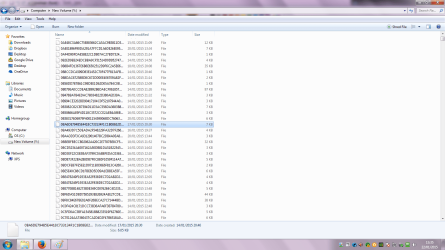
I get thousands of files like these in the screenshot
Is it what I am supposed to find?
How do I restore this to my PC hard drive?

Untitled.png
 

My Computer

Computer type
PC/Desktop
Computer Manufacturer/Model Number
Dell
OS
Windows 7 64 bit
Regarding Thunderbird, have you specifically looked at this location on the old PC:

C:\Users\your user name whatever it is\appdata\roaming\

It's a hidden folder.

Do you see a Thunderbird folder inside that roaming folder? That's your complete Thunderbird installation and can be copied elsewhere.
 

My Computer

Computer type
PC/Desktop
Computer Manufacturer/Model Number
Ignatz Special; 4 speed manual gearbox; factory air conditioning; one of one
OS
Windows 7 Home Premium SP1, 64-bit
CPU
Intel Skylake i5-6600K, not overclocked
Motherboard
AsRock Z170M Extreme 4, micro ATX
Memory
8 GB HyperX DDR4-2666 (2 x 4 GB)
Graphics Card(s)
none; graphics are integrated on CPU
Sound Card
onboard: Realtek ALC1150; external: USB Behringer UF0-202
Monitor(s) Displays
Dell S2340M 23 inch IPS
Screen Resolution
1600 x 900
Hard Drives
System: Crucial MX100 series SSD, 128 GB;
Data: Samsung Spinpoint 103SJ, 1 TB;
Backup: WD Caviar Green WD30EZRX-00D8PB0, 3 TB
PSU
Rosewill SilentNight 500 watt fanless, semi-modular
Case
Antec Solo II
Cooling
Noctua NH-U12S; Noctua F12 intake, Noctua S12A exhaust
Keyboard
Microsoft 200 6JH-00001 USB
Mouse
Dell or Microsoft optical wired; USB
Antivirus
Microsoft Security Essentials and Malwarebytes Premium
Browser
Pale Moon
Other Info
All fans PWM; speeds at idle: CPU circa 500 rpm; intake circa 600 rpm; exhaust circa 600 rpm; CPU temps 27 idle and 47 C load in a warm room (27 C/81 F) when running Intel Extreme Tuning Utility stress test.
Regarding Thunderbird, have you specifically looked at this location on the old PC:

C:\Users\your user name whatever it is\appdata\roaming\

It's a hidden folder.

Do you see a Thunderbird folder inside that roaming folder? That's your complete Thunderbird installation and can be copied elsewhere.

Thank you ignatzatsonic. I looked in that location and the Thunderbird profile folder has 2MB of content while before it was a few GB!
 

My Computer

Computer type
PC/Desktop
Computer Manufacturer/Model Number
Dell
OS
Windows 7 64 bit
I have no solution to your problem, but offer these comments:

I manually back up that Thunderbird folder within roaming periodically--maybe every month. I can thereby copy the backup back to the roaming folder in case of any corruption or weirdness.

I do not trust any program (Goodsync Connect or others) designed to move folders or files from an old PC to a new PC. I do that manually, using my own backups.

If your files are truly lost and are in fact NOT on the new PC, then Recuva may be your best option as it has a pretty good reputation--but I don't know how to use it properly.
 

My Computer

Computer type
PC/Desktop
Computer Manufacturer/Model Number
Ignatz Special; 4 speed manual gearbox; factory air conditioning; one of one
OS
Windows 7 Home Premium SP1, 64-bit
CPU
Intel Skylake i5-6600K, not overclocked
Motherboard
AsRock Z170M Extreme 4, micro ATX
Memory
8 GB HyperX DDR4-2666 (2 x 4 GB)
Graphics Card(s)
none; graphics are integrated on CPU
Sound Card
onboard: Realtek ALC1150; external: USB Behringer UF0-202
Monitor(s) Displays
Dell S2340M 23 inch IPS
Screen Resolution
1600 x 900
Hard Drives
System: Crucial MX100 series SSD, 128 GB;
Data: Samsung Spinpoint 103SJ, 1 TB;
Backup: WD Caviar Green WD30EZRX-00D8PB0, 3 TB
PSU
Rosewill SilentNight 500 watt fanless, semi-modular
Case
Antec Solo II
Cooling
Noctua NH-U12S; Noctua F12 intake, Noctua S12A exhaust
Keyboard
Microsoft 200 6JH-00001 USB
Mouse
Dell or Microsoft optical wired; USB
Antivirus
Microsoft Security Essentials and Malwarebytes Premium
Browser
Pale Moon
Other Info
All fans PWM; speeds at idle: CPU circa 500 rpm; intake circa 600 rpm; exhaust circa 600 rpm; CPU temps 27 idle and 47 C load in a warm room (27 C/81 F) when running Intel Extreme Tuning Utility stress test.
Tunderbird issues

Regarding Thunderbird, have you specifically looked at this location on the old PC:

C:\Users\your user name whatever it is\appdata\roaming\

It's a hidden folder.

Do you see a Thunderbird folder inside that roaming folder? That's your complete Thunderbird installation and can be copied elsewhere.

Thank you ignatzatsonic. I looked in that location and the Thunderbird profile folder has 2MB of content while before it was a few GB!

What email domain are you using? Is it a webmail service. Sometimes just fully removing Thunderbird then rebooting/ reinstalling will allow you to download all emails on the server if you didn't delete them. Backup your current profile first. (Copy your Thunderbird Profiles folder and profiles.ini file to a folder created on your desktop)

Also check for old copies of that profile folder that you found using either:

ShadowExplorer.com - Downloads

or http://nicbedford.co.uk/files/InstallSystemRestoreExplorer.msi - direct download link. Clicking will initiate a download so don't click the link if you don't want the download.

Other than that - if you have a system image backup - mount it and copy your Thunderbird profile from there.
 

My Computer

Computer type
Laptop
Computer Manufacturer/Model Number
ASUS
OS
Microsoft Windows 7 Home Premium 64-bit 7601 Multiprocessor Free Service Pack 1
CPU
AMD C-60 APU with Radeon(tm) HD Graphics
Motherboard
ASUSTeK COMPUTER INC. X501U
Memory
4.00 GB
Graphics Card(s)
AMD Radeon HD 6290 Graphics
Sound Card
(1) AMD High Definition Audio Device (2) Realtek High Defi
Screen Resolution
1366 x 768 x 32 bits (4294967296 colors) @ 60 Hz
Hard Drives
Hitachi HTS545050A7E380 SATA Disk Device
Antivirus
Comodo CIS & FW, SecureAplus App Whitelisting, Threatfire
Browser
Cyberfox 64bit, Opera 64bit, Airfox
Other Info
Spy-The-Spy, HitmanPro.Alert, Norton Connect Safe, MJRegWatcher, BitDefender TrafficLight, Voodoo Shield, Zemana AntiMalware
Recuva - Thunderbird

Some more info:

Your recovered files look as if they're beyond recovery. There should be file names - not a jumble of letters.

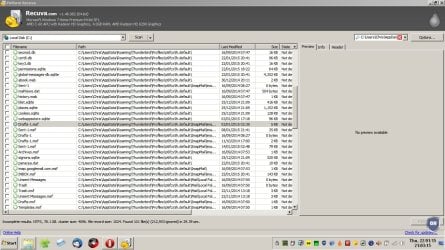
See this screenshot:

Recovered Thunderbird Profile files:

Recuva.jpg

So you enter the file path to your profile in the filter box then recover the files that you need to another drive then copy them back into your existing profile. The problem is that Recuva doesn't restore folder structure - only files. You need to know the file names that were in your original profile.

I'd try the earlier suggestions first and if they don't work I know of some free recovery software that works at folder level.
 

My Computer

Computer type
Laptop
Computer Manufacturer/Model Number
ASUS
OS
Microsoft Windows 7 Home Premium 64-bit 7601 Multiprocessor Free Service Pack 1
CPU
AMD C-60 APU with Radeon(tm) HD Graphics
Motherboard
ASUSTeK COMPUTER INC. X501U
Memory
4.00 GB
Graphics Card(s)
AMD Radeon HD 6290 Graphics
Sound Card
(1) AMD High Definition Audio Device (2) Realtek High Defi
Screen Resolution
1366 x 768 x 32 bits (4294967296 colors) @ 60 Hz
Hard Drives
Hitachi HTS545050A7E380 SATA Disk Device
Antivirus
Comodo CIS & FW, SecureAplus App Whitelisting, Threatfire
Browser
Cyberfox 64bit, Opera 64bit, Airfox
Other Info
Spy-The-Spy, HitmanPro.Alert, Norton Connect Safe, MJRegWatcher, BitDefender TrafficLight, Voodoo Shield, Zemana AntiMalware
I have no solution to your problem, but offer these comments:

I manually back up that Thunderbird folder within roaming periodically--maybe every month. I can thereby copy the backup back to the roaming folder in case of any corruption or weirdness.

I do not trust any program (Goodsync Connect or others) designed to move folders or files from an old PC to a new PC. I do that manually, using my own backups.

If your files are truly lost and are in fact NOT on the new PC, then Recuva may be your best option as it has a pretty good reputation--but I don't know how to use it properly.

Thank you for the advice ignatzatsonic
I learned my lesson for the future!
I had become a bit slack with backups!
 

My Computer

Computer type
PC/Desktop
Computer Manufacturer/Model Number
Dell
OS
Windows 7 64 bit
Regarding Thunderbird, have you specifically looked at this location on the old PC:

C:\Users\your user name whatever it is\appdata\roaming\

It's a hidden folder.

Do you see a Thunderbird folder inside that roaming folder? That's your complete Thunderbird installation and can be copied elsewhere.

Thank you ignatzatsonic. I looked in that location and the Thunderbird profile folder has 2MB of content while before it was a few GB!

What email domain are you using? Is it a webmail service. Sometimes just fully removing Thunderbird then rebooting/ reinstalling will allow you to download all emails on the server if you didn't delete them. Backup your current profile first. (Copy your Thunderbird Profiles folder and profiles.ini file to a folder created on your desktop)

Also check for old copies of that profile folder that you found using either:

ShadowExplorer.com - Downloads

or http://nicbedford.co.uk/files/InstallSystemRestoreExplorer.msi - direct download link. Clicking will initiate a download so don't click the link if you don't want the download.

Other than that - if you have a system image backup - mount it and copy your Thunderbird profile from there.

Thank you Callender, worthwhile trying everything you suggested.
I will post un update on how I get on.
 

My Computer

Computer type
PC/Desktop
Computer Manufacturer/Model Number
Dell
OS
Windows 7 64 bit
Solved!
Luckily Goodsync saves automatically all the data to a folder called _gsdata_ which I couldn't find but have now found!
Thank you to all for the helpful advice!
 

My Computer

Computer type
PC/Desktop
Computer Manufacturer/Model Number
Dell
OS
Windows 7 64 bit
I have used Free File Sync and/or manual-copy on both Firefox and Thunderbird successfully. It's best to not be doing other Explorer-related things while syncing and/or copying FF & Tbird info from X to Y.
 

My Computer

Computer type
PC/Desktop
Computer Manufacturer/Model Number
Antec desktop; Acer Aspire laptops
OS
Windows 7 Professional 64-bit
CPU
Desktop i5; Acers i5 & i7
Memory
desktop 16GB; 1 Acer 8GB & 1 Acer 16GB
Hard Drives
1TB split into 2 equal partitions [OS and data] usable by RJS
Internet Speed
AT&T DSL
Browser
FF, GChrome, msIE
Other Info
Windows 7 Firewall, Emsisoft AM/AV, MSE [scan-only], SpywareBlaster, Ruiware/BillP combine
About Thunderbird (+ Firefox), check out this one > MozBackup | SourceForge.net

Backup\move\restore content\settings\accounts etc to\from anything\anywhere. It's been great here :O)
 

My Computer

Computer type
Laptop
Computer Manufacturer/Model Number
Dell \ Lenovo\ HP \ Toshiba
OS
W7, W8.1
Antivirus
MSE, Malwarebytes
Browser
FF
Back
Top