
Hi,
Most recently, the custom icons I made for my USB HDs & Flash Ds have disappeared even though I reloaded the original Icons & [autoruns] on the drives several times.
I have viewed a solution on the W7 forum at Drive Icon Change. However it seemed to apply only to icons originally included with W7 installation.
Happy NY
klx
Most recently, the custom icons I made for my USB HDs & Flash Ds have disappeared even though I reloaded the original Icons & [autoruns] on the drives several times.
I have viewed a solution on the W7 forum at Drive Icon Change. However it seemed to apply only to icons originally included with W7 installation.
Q: is there a different [simpler] way to do it or do I have to go into the registry which I'm reluctant to do. If so please advise.
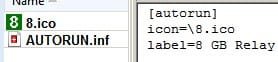
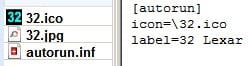
Below are pix of how I've been doing it for years.
Happy NY
klx
Attachments
My Computer
- Computer type
- PC/Desktop
- Computer Manufacturer/Model Number
- locally made
- OS
- w7 pro 32 bit w/XP virt enabled.
- CPU
- AMD A6-3650
- Motherboard
- ASUS F1A55-M CSM
- Memory
- 4 GB DDR3 RAM
- Graphics Card(s)
- NVIDIA GeForce 210
- Sound Card
- NVIDIA High Definition Audio
- Monitor(s) Displays
- 28" HD monitor
- Screen Resolution
- 1680 x 1050 x 32 bits (4294967296 colors) @ 59 Hz
- Hard Drives
- 2 x 500 GB Western Digital Blue Hard Drive
- PSU
- ?
- Case
- ?
- Cooling
- 3-4 fans
- Keyboard
- big yellow keys
- Mouse
- logitec
- Internet Speed
- 60 mb
- Antivirus
- panda
- Browser
- ff
- Other Info
- scanner, webcam, bw printer, fax modem, cd/dvd burner, PC usb ports: 2 usb3, 6 usb2 plus 7 port usb hub, 2 tb usb3, 1 Tb usb3, 500Mb usb2, 120Mb USB2 portable drives, asst of flash drives 250 Mb to 32 Gb. backup PC, office

