
GiCOMMANDO
New member
- Local time
- 3:37 AM
- Messages
- 13
Hello, i have a Windows 7 64bit OS and i am running a Laptop.
Ever since i had this virus (Win32 malware gen) which kept coming up with a notifications of the virus on avast every 2-5 minutes my computer was running slow and when i deleted the virus, by dragging it in to the recycle bin and erasing it, my computer was still running slow?
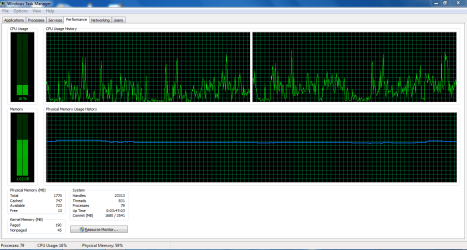
(MY COMPUTER ALWAYS HAS UNDER 100MB FREE MEMORY WHEN I RUN 1 GAME OR APPLICATION)
MY LAPTOP SPECS;
System manufacturer- EMachines
System Model- eME443
RAM- 2 GB DDR3 memory
Processor- AMD Dual-Core Processor E-350
Graphics card- AMD Radeon HD 6310
I've tried so many things to fix this problem, I have tried;
-Deleting the cache of all my browsers
-Cleaning and defragging my registry with "Clean My PC- Registry Cleaner"
-Deleting the 'appdata' cache
-Installing new drivers
-Searching for viruses with avast
-Doing a Memory/RAM test with "MemTest"
(By the way I currently haven't been getting virus notifications, so i don't think the problem is a virus)
(one time i got a BSOD, which on the top of the BSOD it said something about 'PAGEING ERROR)
I attached Images of;
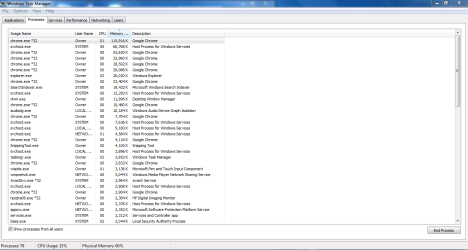
-My Task Managers 'Processes' tab
-My Task Managers 'Processes- All users' tab
-My Task Managers 'performance' tab
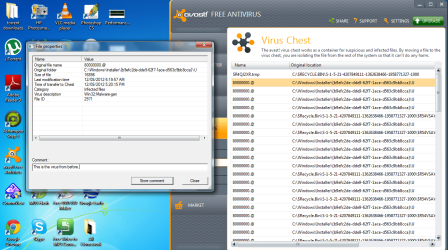
-My Avast virus report of the virus I had before
 SO COULD ANY ONE HELP PLEASE WITH THIS LAG PROBLEM
Ever since i had this virus (Win32 malware gen) which kept coming up with a notifications of the virus on avast every 2-5 minutes my computer was running slow and when i deleted the virus, by dragging it in to the recycle bin and erasing it, my computer was still running slow?
(MY COMPUTER ALWAYS HAS UNDER 100MB FREE MEMORY WHEN I RUN 1 GAME OR APPLICATION)
MY LAPTOP SPECS;
System manufacturer- EMachines
System Model- eME443
RAM- 2 GB DDR3 memory
Processor- AMD Dual-Core Processor E-350
Graphics card- AMD Radeon HD 6310
I've tried so many things to fix this problem, I have tried;
-Deleting the cache of all my browsers
-Cleaning and defragging my registry with "Clean My PC- Registry Cleaner"
-Deleting the 'appdata' cache
-Installing new drivers
-Searching for viruses with avast
-Doing a Memory/RAM test with "MemTest"
(By the way I currently haven't been getting virus notifications, so i don't think the problem is a virus)
(one time i got a BSOD, which on the top of the BSOD it said something about 'PAGEING ERROR)
I attached Images of;
-My Task Managers 'Processes' tab
-My Task Managers 'Processes- All users' tab
-My Task Managers 'performance' tab
-My Avast virus report of the virus I had before
SO COULD ANY ONE HELP PLEASE WITH THIS LAG PROBLEM Attachments

My Computer
- Computer Manufacturer/Model Number
- Emachines
- OS
- Windows 7 Home Premium 64bit
- CPU
- AMD E-350 dual-core Processor 1.6 GHz
- Memory
- 2 GB RAM
- Graphics Card(s)
- AMD Radeon HD 6310
- Internet Speed
- 18 Kb/s

