Low disk space after reinstalling windows seven.

nw31705

New member
Local time
9:55 AM
Messages
10
While running diagnostics I recevied error code 0142. I was told by a Dell rep that I needed a new hard drive. I decided to reinstall the operating system using the disk which seem to fix the problem only now I have two windows 7 drives one on C and the other on D. The C drive is labeled recovery and is red; while the other D drive is 0S. I was excited because I now am able to have internet access, but that was short lived because I have low disk space on C and when I ran expree test again I got error code 0146. I formatted the D drive but I do not have an option in the menu to delete it in the disk manager. I have been at it all day and I am at a loss. I need to delete the duplicate of windows 7 and fix the low disk space problem.
 

My Computer My Computer

Computer Manufacturer/Model Number
Dell Inspiron 1545
OS
7/ 64 bit
Memory
4.00
Please post a picture of your Disk Management. Then we'll see what can be done.
 

My Computer My Computer

Computer Manufacturer/Model Number
HP, Dell, Gateway, Toshiba - 4 laptops and 2 desktops
OS
Vista, Windows7, Mint Mate, Zorin, Windows 8
CPU
from 1.6GHz Duo to i7
Monitor(s) Displays
2x HP w2207
Hard Drives
5x HDD, 7x SSD, 12x Externals
Keyboard
with trackball - no mices
Mouse
Trackball mice
Internet Speed
DSL 6000
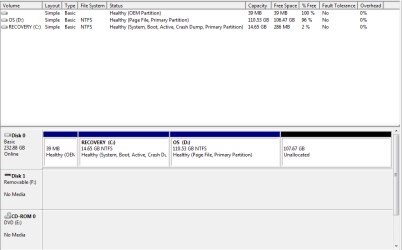
Disk Manager Pic

Here's the picture.
 

Attachments

  • Disk Manager.PNG
    Disk Manager.PNG
    11.6 KB · Views: 97

My Computer My Computer

Computer Manufacturer/Model Number
Dell Inspiron 1545
OS
7/ 64 bit
Memory
4.00
You used your Reinstallation DVD to clean reinstall onto the Recovery partition. This means it is no longer available if you want to recover your computer to factory condition, unless you made or order the Recov Disks.

However there's no reason you cannot keep the installation if you're satisfied with it. You can delete D and extend C into it's space but first you need to turn off the page file which is stuck on D keeping Disk Mgmt from allowing deletion.

Type Virtual Memory in Start Search box, click on How to Change Size Virtual Memory, follow the steps to choose No Paging File,click Set and reboot.

Now Delete D in Disk Mgmt, Extend C into its space. Turn back on System Managed Size paging file.
Partition or Volume - Delete
Partition or Volume - Extend

Here are some other steps to get a perfect reinstall of factory OEM: Reinstalling Windows 7
 
Yes I did a clean reinstall because my PC was about to completely crash. I have taken all the prgrams and everything I want to keep already owever from the old drive. I have just had a haed time deleting it. When I right click there is no delete; however it will let me extend it because I formatted it earlier.
 

My Computer My Computer

Computer Manufacturer/Model Number
Dell Inspiron 1545
OS
7/ 64 bit
Memory
4.00
It will only let you extend D into the space to it's right which is not what you want. I am assuming the Disk Mgmt screenshot above still holds true.

It will not allow you to Delete D because the Paging File is still located on it and this is viewed as a System File. Follow the steps I added in my last post to turn it off so you can delete D and then extend C into it's space. Then turn Paging File back on which will place it on C.

If this fails, open an Elevated Command Prompt, type:

Diskpart
List disk
Select disk 0 (first confirm Win7 HD is disk 0)
List partition
Sel partition 3 (first confirm by size that D is partition 3 as it should be)
Delete partition override
Exit

You can now use Disk Mgmt to Extend C into the deleted space.
 
Greg is usually right because he is the expert in these matters. But let me try my theory.

Since that is a Dell system, the recovery partition is the active partition. For some reason they seem to do that. When you reinstalled, you reinstalled into D:. It is so bloated because you have the windows.old folder in there. But it is easy to extend it.

This may be all wrong - you tell me.

PS; Greg, is this a possibility
 

My Computer My Computer

Computer Manufacturer/Model Number
HP, Dell, Gateway, Toshiba - 4 laptops and 2 desktops
OS
Vista, Windows7, Mint Mate, Zorin, Windows 8
CPU
from 1.6GHz Duo to i7
Monitor(s) Displays
2x HP w2207
Hard Drives
5x HDD, 7x SSD, 12x Externals
Keyboard
with trackball - no mices
Mouse
Trackball mice
Internet Speed
DSL 6000
Hi Wolfgang. It's only 15gb. I doubt windows.old could fit on it.

Did you boot the DVD to install Win7? Did you see that you were choosing the Recovery partition? This is why they're labeled.
 
I already search for the windows.old file and it wasn't there. I'm about to try what Greg is suggesting it sounds like he may be on to something.
 

My Computer My Computer

Computer Manufacturer/Model Number
Dell Inspiron 1545
OS
7/ 64 bit
Memory
4.00
In reply to Greg I did boot the DVD.
 

My Computer My Computer

Computer Manufacturer/Model Number
Dell Inspiron 1545
OS
7/ 64 bit
Memory
4.00
OK as long as you stick with the other suggestions to get a perfect install and setup in Reinstalling Windows 7 then you can probably save this install and learn a lot.

Toward the end running Puran Defragger in Boot Mode with full Disk Check will be extra important to check the file system after all that.
 
Ok thanks I am in the process of doing everything right now.
 

My Computer My Computer

Computer Manufacturer/Model Number
Dell Inspiron 1545
OS
7/ 64 bit
Memory
4.00
OK, I withdraw. You are in good hands.
 

My Computer My Computer

Computer Manufacturer/Model Number
HP, Dell, Gateway, Toshiba - 4 laptops and 2 desktops
OS
Vista, Windows7, Mint Mate, Zorin, Windows 8
CPU
from 1.6GHz Duo to i7
Monitor(s) Displays
2x HP w2207
Hard Drives
5x HDD, 7x SSD, 12x Externals
Keyboard
with trackball - no mices
Mouse
Trackball mice
Internet Speed
DSL 6000
Thank you Whs. Greg I ran into trouble. I tried the command prompt and it told me to type help delete volume so that's where I am now.
 

My Computer My Computer

Computer Manufacturer/Model Number
Dell Inspiron 1545
OS
7/ 64 bit
Memory
4.00
I am still unable to delete something is stopping me it keeps saying delete not allowed on the current boot, system, pagefile, hibernation or crashdump. That's it for today I'll try it again tomorrow. Thanks for your help.
 

My Computer My Computer

Computer Manufacturer/Model Number
Dell Inspiron 1545
OS
7/ 64 bit
Memory
4.00
I guess I could not give. I put the disk back in and booted with it and used the command prompt and like magic it deleted. Now all I have to do is clean up C drive and put all my programs back and I should be ok; I guess.
 

My Computer My Computer

Computer Manufacturer/Model Number
Dell Inspiron 1545
OS
7/ 64 bit
Memory
4.00
You used the Diskpart commands I gave you?

Did you try them first from Elevated Command Prompt before using the Disk Command Line?
 
I was able to figre that part out now I am trying to figure out how to get programs back. Also my web cam drive is gone but it is no longer in the start menu. My computer use to have facial recognition that's gone also.
 

My Computer My Computer

Computer Manufacturer/Model Number
Dell Inspiron 1545
OS
7/ 64 bit
Memory
4.00
You can likely find those programs on the Support Downloads webpage for your exact computer model. Let us know if you need help finding them.
 
Back
Top