
low disk space prob...

multibot

New member
Member
VIP
Local time
12:16 AM
Messages
142
Location
earth
hiii every one...
i have dis prob.... plzzz help me telling the way how to disable it....
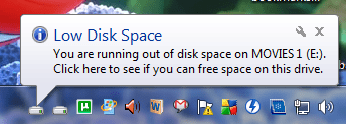
Untitled.png
 
Last edited:

My Computer

Computer Manufacturer/Model Number
self build/assembled
OS
windows 7 rtm ultimate build 7600 x86
CPU
intel pentium 4 HT 3GHz
Motherboard
intel 945 GZ Micro 775 SE
Memory
1 gb transcend 667 Mhz
Graphics Card(s)
Nvidea 8400 GS 512 MB
Sound Card
realtek inbuild
Monitor(s) Displays
23" samsung syncmaster P2370MS full HD 1080p
Screen Resolution
1920x1080
Hard Drives
hitachi 160gb sata+Samsung 500gb sata
PSU
Zebronics 450W
Case
trendsonic
Cooling
two extra fans taken from damaged PSUs
Keyboard
Microsoft
Mouse
Microsoft
Internet Speed
512Kbps

My Computer

Computer type
PC/Desktop
Computer Manufacturer/Model Number
Dell XPS 420
OS
Windows 10, Home Clean Install
CPU
Intel Core2 processsor Q8200(2.33Ghz 1333FSB) Quad Core Tech
Motherboard
Dell
Memory
6 gb
Graphics Card(s)
ATI Radeon 256MB HD3650
Sound Card
Intergrated 7.1 Channel Audio
Monitor(s) Displays
Dell SP2009W 20"
Hard Drives
640 GB Serial ATA Hard drive
Cooling
Fan
Keyboard
Dell USB Keyboard
Mouse
Dell Premium Optical USB
Internet Speed
DSL 2.85
Open the Registry Editor by clicking Start, then type regedit and hit Enter. Once it is launched simply navigate to: HKEY_CURRENT_USER\SOFTWARE\Microsoft\Windows\CurrentVersion\Policies\Explorer

Now right click the Explorer and choose New > DWORD (32bit) Value and name this as NoLowDiskSpaceChecks.

Now Double click it and set its value to 1.

Click OK and that’s it, now log off your computer and login back, you will no longer see the low disk space alerts.
 

My Computer

Computer Manufacturer/Model Number
Custom Built
OS
Windows 7 Ultimate
CPU
AMD Athlon II X2 245 2.90Ghz
Motherboard
Some Gigabyte one, dont remember model
Memory
3.00 GB
Graphics Card(s)
8800GTS 512MB
Sound Card
Sound Blaster X-Fi Titanium Fatal1ty
Monitor(s) Displays
Dual 22" widescreen
Hard Drives
250GB internal, 500GB internal
PSU
CORSAIR CMPSU-850TX 850W Power Supply
Case
Thermalkake Tsunami Dream
Cooling
Thermaltake Golden Orb II
Keyboard
Saitek Eclipse 2
Mouse
Logitech MX518

My Computer

Computer Manufacturer/Model Number
self build/assembled
OS
windows 7 rtm ultimate build 7600 x86
CPU
intel pentium 4 HT 3GHz
Motherboard
intel 945 GZ Micro 775 SE
Memory
1 gb transcend 667 Mhz
Graphics Card(s)
Nvidea 8400 GS 512 MB
Sound Card
realtek inbuild
Monitor(s) Displays
23" samsung syncmaster P2370MS full HD 1080p
Screen Resolution
1920x1080
Hard Drives
hitachi 160gb sata+Samsung 500gb sata
PSU
Zebronics 450W
Case
trendsonic
Cooling
two extra fans taken from damaged PSUs
Keyboard
Microsoft
Mouse
Microsoft
Internet Speed
512Kbps
Follow the tutorial it will work.
 

My Computer

Computer type
PC/Desktop
Computer Manufacturer/Model Number
Dell XPS 420
OS
Windows 10, Home Clean Install
CPU
Intel Core2 processsor Q8200(2.33Ghz 1333FSB) Quad Core Tech
Motherboard
Dell
Memory
6 gb
Graphics Card(s)
ATI Radeon 256MB HD3650
Sound Card
Intergrated 7.1 Channel Audio
Monitor(s) Displays
Dell SP2009W 20"
Hard Drives
640 GB Serial ATA Hard drive
Cooling
Fan
Keyboard
Dell USB Keyboard
Mouse
Dell Premium Optical USB
Internet Speed
DSL 2.85
Open the Registry Editor by clicking Start, then type regedit and hit Enter. Once it is launched simply navigate to: HKEY_CURRENT_USER\SOFTWARE\Microsoft\Windows\CurrentVersion\Policies\Explorer

Now right click the Explorer and choose New > DWORD (32bit) Value and name this as NoLowDiskSpaceChecks.

Now Double click it and set its value to 1.

Click OK and that’s it, now log off your computer and login back, you will no longer see the low disk space alerts.


but r u sure it will not remove that warning which shows that no space available....
i m talking about that warning which u get while copying any file in ur pen drive n not enough space available there to copy it completely...?????
 

My Computer

Computer Manufacturer/Model Number
self build/assembled
OS
windows 7 rtm ultimate build 7600 x86
CPU
intel pentium 4 HT 3GHz
Motherboard
intel 945 GZ Micro 775 SE
Memory
1 gb transcend 667 Mhz
Graphics Card(s)
Nvidea 8400 GS 512 MB
Sound Card
realtek inbuild
Monitor(s) Displays
23" samsung syncmaster P2370MS full HD 1080p
Screen Resolution
1920x1080
Hard Drives
hitachi 160gb sata+Samsung 500gb sata
PSU
Zebronics 450W
Case
trendsonic
Cooling
two extra fans taken from damaged PSUs
Keyboard
Microsoft
Mouse
Microsoft
Internet Speed
512Kbps
Hey Scorpion,

Turning off notifications is one thing and having enough space another. Check in windows explorer, how much space you actually have on that drive. If its teetering on the edges, try a few things.

1) I think this is just a data partition (because its labeled movies)? In that case, you can consider moving some of the stuff on it to external media like an external hdd or dvds.

2) Turn off system restore for E: drive, if this is only a data partition. System restore points take up a lot of space. Make sure you delete all the existing points.

3) Download CCleaner and run it.

4) If you use windows backup, make sure images are not set to be saved on E:.
 

My Computer

Computer Manufacturer/Model Number
Too many to describe...
OS
Windows 7 x64 pro/ Windows 7 x86 Pro/ XP SP3 x86
Hey Scorpion,

Turning off notifications is one thing and having enough space another. Check in windows explorer, how much space you actually have on that drive. If its teetering on the edges, try a few things.

1) I think this is just a data partition (because its labeled movies)? In that case, you can consider moving some of the stuff on it to external media like an external hdd or dvds.

2) Turn off system restore for E: drive, if this is only a data partition. System restore points take up a lot of space. Make sure you delete all the existing points.

3) Download CCleaner and run it.

4) If you use windows backup, make sure images are not set to be saved on E:.

i knw watever u wanna say ....
m sending u a screenshot....
Untitled.png

now the fact is i wanna keep dis drives fully loaded like dis....
but just dont want that which i posted in the thread...
now i hope u got d point...
 

My Computer

Computer Manufacturer/Model Number
self build/assembled
OS
windows 7 rtm ultimate build 7600 x86
CPU
intel pentium 4 HT 3GHz
Motherboard
intel 945 GZ Micro 775 SE
Memory
1 gb transcend 667 Mhz
Graphics Card(s)
Nvidea 8400 GS 512 MB
Sound Card
realtek inbuild
Monitor(s) Displays
23" samsung syncmaster P2370MS full HD 1080p
Screen Resolution
1920x1080
Hard Drives
hitachi 160gb sata+Samsung 500gb sata
PSU
Zebronics 450W
Case
trendsonic
Cooling
two extra fans taken from damaged PSUs
Keyboard
Microsoft
Mouse
Microsoft
Internet Speed
512Kbps
Absolutely.

Just a friendly hint, all your movie partitions are running out of space and sooner or later, you'll need to move some of that stuff off those particular partitions. Thats when the warnings will stop automatically.
 

My Computer

Computer Manufacturer/Model Number
Too many to describe...
OS
Windows 7 x64 pro/ Windows 7 x86 Pro/ XP SP3 x86
Absolutely.

Just a friendly hint, all your movie partitions are running out of space and sooner or later, you'll need to move some of that stuff off those particular partitions. Thats when the warnings will stop automatically.

i know that but i just permanently want remove this pop up warning message from the taskbar....
 

My Computer

Computer Manufacturer/Model Number
self build/assembled
OS
windows 7 rtm ultimate build 7600 x86
CPU
intel pentium 4 HT 3GHz
Motherboard
intel 945 GZ Micro 775 SE
Memory
1 gb transcend 667 Mhz
Graphics Card(s)
Nvidea 8400 GS 512 MB
Sound Card
realtek inbuild
Monitor(s) Displays
23" samsung syncmaster P2370MS full HD 1080p
Screen Resolution
1920x1080
Hard Drives
hitachi 160gb sata+Samsung 500gb sata
PSU
Zebronics 450W
Case
trendsonic
Cooling
two extra fans taken from damaged PSUs
Keyboard
Microsoft
Mouse
Microsoft
Internet Speed
512Kbps
Follow the tutorial
 

My Computer

Computer type
PC/Desktop
Computer Manufacturer/Model Number
Dell XPS 420
OS
Windows 10, Home Clean Install
CPU
Intel Core2 processsor Q8200(2.33Ghz 1333FSB) Quad Core Tech
Motherboard
Dell
Memory
6 gb
Graphics Card(s)
ATI Radeon 256MB HD3650
Sound Card
Intergrated 7.1 Channel Audio
Monitor(s) Displays
Dell SP2009W 20"
Hard Drives
640 GB Serial ATA Hard drive
Cooling
Fan
Keyboard
Dell USB Keyboard
Mouse
Dell Premium Optical USB
Internet Speed
DSL 2.85
  • Like
Reactions: whs
Follow the tutorial

But in that tutorial this is written which i afraid of.....


You will lose data, possibly everything, on the hard drive if you run out of space on it. I would recommend backing up your data and getting a bigger hard drive soon, or make more room on the drive by uninstalling stuff you do not need anymore.

This is not the same as a Low Memory error. A Low Memory error is usually due to the page file being turned off, or it's Min and Max size set to low.

as warning...
 

My Computer

Computer Manufacturer/Model Number
self build/assembled
OS
windows 7 rtm ultimate build 7600 x86
CPU
intel pentium 4 HT 3GHz
Motherboard
intel 945 GZ Micro 775 SE
Memory
1 gb transcend 667 Mhz
Graphics Card(s)
Nvidea 8400 GS 512 MB
Sound Card
realtek inbuild
Monitor(s) Displays
23" samsung syncmaster P2370MS full HD 1080p
Screen Resolution
1920x1080
Hard Drives
hitachi 160gb sata+Samsung 500gb sata
PSU
Zebronics 450W
Case
trendsonic
Cooling
two extra fans taken from damaged PSUs
Keyboard
Microsoft
Mouse
Microsoft
Internet Speed
512Kbps
i know that but i just permanently want remove this pop up warning message from the taskbar....

Open the Registry Editor by clicking Start, then type regedit and hit Enter. Once it is launched simply navigate to: HKEY_CURRENT_USER\SOFTWARE\Microsoft\Windows\CurrentVersion\Policies\Explorer

Now right click the Explorer and choose New > DWORD (32bit) Value and name this as NoLowDiskSpaceChecks.

Now Double click it and set its value to 1.

Click OK and that’s it, now log off your computer and login back, you will no longer see the low disk space alerts.

Follow these steps. It takes 2 minutes.
 

My Computer

Computer Manufacturer/Model Number
Custom Built
OS
Windows 7 Ultimate
CPU
AMD Athlon II X2 245 2.90Ghz
Motherboard
Some Gigabyte one, dont remember model
Memory
3.00 GB
Graphics Card(s)
8800GTS 512MB
Sound Card
Sound Blaster X-Fi Titanium Fatal1ty
Monitor(s) Displays
Dual 22" widescreen
Hard Drives
250GB internal, 500GB internal
PSU
CORSAIR CMPSU-850TX 850W Power Supply
Case
Thermalkake Tsunami Dream
Cooling
Thermaltake Golden Orb II
Keyboard
Saitek Eclipse 2
Mouse
Logitech MX518
  • Like
Reactions: whs
That is fine. We can only suggest.
 

My Computer

Computer type
PC/Desktop
Computer Manufacturer/Model Number
Dell XPS 420
OS
Windows 10, Home Clean Install
CPU
Intel Core2 processsor Q8200(2.33Ghz 1333FSB) Quad Core Tech
Motherboard
Dell
Memory
6 gb
Graphics Card(s)
ATI Radeon 256MB HD3650
Sound Card
Intergrated 7.1 Channel Audio
Monitor(s) Displays
Dell SP2009W 20"
Hard Drives
640 GB Serial ATA Hard drive
Cooling
Fan
Keyboard
Dell USB Keyboard
Mouse
Dell Premium Optical USB
Internet Speed
DSL 2.85
If you want to PERMANENTLY get rid of the message, my steps work.

However, you will never get a notification letting you know your hard drive is running out of space. The warning in the tutorial is just letting you know it is NOT a good idea to shut the notification off, because filling up a hard drive can cause damage to it.
 

My Computer

Computer Manufacturer/Model Number
Custom Built
OS
Windows 7 Ultimate
CPU
AMD Athlon II X2 245 2.90Ghz
Motherboard
Some Gigabyte one, dont remember model
Memory
3.00 GB
Graphics Card(s)
8800GTS 512MB
Sound Card
Sound Blaster X-Fi Titanium Fatal1ty
Monitor(s) Displays
Dual 22" widescreen
Hard Drives
250GB internal, 500GB internal
PSU
CORSAIR CMPSU-850TX 850W Power Supply
Case
Thermalkake Tsunami Dream
Cooling
Thermaltake Golden Orb II
Keyboard
Saitek Eclipse 2
Mouse
Logitech MX518
If you want to PERMANENTLY get rid of the message, my steps work.

However, you will never get a notification letting you know your hard drive is running out of space. The warning in the tutorial is just letting you know it is NOT a good idea to shut the notification off, because filling up a hard drive can cause damage to it.

You are very helpful polite and knowledgable; gave you rep.
 

My Computer

Computer type
PC/Desktop
Computer Manufacturer/Model Number
Dell XPS 420
OS
Windows 10, Home Clean Install
CPU
Intel Core2 processsor Q8200(2.33Ghz 1333FSB) Quad Core Tech
Motherboard
Dell
Memory
6 gb
Graphics Card(s)
ATI Radeon 256MB HD3650
Sound Card
Intergrated 7.1 Channel Audio
Monitor(s) Displays
Dell SP2009W 20"
Hard Drives
640 GB Serial ATA Hard drive
Cooling
Fan
Keyboard
Dell USB Keyboard
Mouse
Dell Premium Optical USB
Internet Speed
DSL 2.85
Thanks rich! There was no need to there though! Just filling him in on what was already written by someone else :)
 

My Computer

Computer Manufacturer/Model Number
Custom Built
OS
Windows 7 Ultimate
CPU
AMD Athlon II X2 245 2.90Ghz
Motherboard
Some Gigabyte one, dont remember model
Memory
3.00 GB
Graphics Card(s)
8800GTS 512MB
Sound Card
Sound Blaster X-Fi Titanium Fatal1ty
Monitor(s) Displays
Dual 22" widescreen
Hard Drives
250GB internal, 500GB internal
PSU
CORSAIR CMPSU-850TX 850W Power Supply
Case
Thermalkake Tsunami Dream
Cooling
Thermaltake Golden Orb II
Keyboard
Saitek Eclipse 2
Mouse
Logitech MX518
Can I offer another suggestion? Stop over-partitioning the bejesus out of your drives, and consolidate. You'll have more "free space" to play with. Your screenshot gave me a migraine, with two OSes and multiple small partititons. Simplify it, use one OS and virtualize the other, if you really need two, and consildate your drives.
 

My Computer

OS
Windows 7 Ultimate x64 SP1
CPU
Intel Core i7-2600
Motherboard
Gigabyte GA-P67A-UD3P-B3
Memory
12 GB Patriot Extreme DDR3-1333
Graphics Card(s)
Nvidia GTX 470
Monitor(s) Displays
Dell UltraSharp 2209WA
Hard Drives
OCZ Agility3 240 GB, WD5001AALS, WD7501AALS
PSU
OCZ ModStream 700W
Case
CoolerMaster HAF 912 Advanced
Cooling
CoolerMaster Hyper 212 Plus
Back
Top