Low Frame rates

boeingaviation

New member
Local time
9:32 AM
Messages
61
Hi folks,

Just upgraded to Win 7 Pro 64-bit.

Looks nice and everything but poor performance on my Flight Simulator 2004 game. With XP I was getting a solid 39fps with all sliders maxed out; Windows 7 I get 15-29 varying constantly, mainly hangs around the 20fps mark.

Here's my specs:
Intel Core 2 Duo E8500 3.16ghz
Kingston HyperX DDR2 800 4GB
Geforce 8800GT 512mb PCI-E
Seagate 500gb SATA2 HDD/200gb SATA 2
Asus P5KPL/1600 Mobo

Can anyone offer me any suggestions as to how I can increase my frame rates?

Many thanks,
Chris
 

My Computer

Computer type
PC/Desktop
OS
Windows 7 Pro 64-bit
CPU
Intel i7 4790K Haswell Devils Canyon
Motherboard
Asus Maximus VII Ranger ROG
Memory
Kingston Hyper X Savage Red 1600MHZ/16GB
Graphics Card(s)
EVGA GTX970 FTW ACX 2.0
Sound Card
On Board
Monitor(s) Displays
Asus 22" LCD, AOC 17" CRT
Screen Resolution
1680x1050
Hard Drives
Samsung 840EVO 250GB SSD (Windows Driver)
WD Elements 640GB External
WD Elements Portable 2TB External
WD Caviar Blue 500GB
WD Caviar Black 1TB
PSU
EVGA Supernova G2 750W Fully Modular
Case
Antect 1200 V3
Cooling
Corsair H80i Liquid Cooling
Keyboard
Genius Keyboard
Mouse
Logitech Wireless Mouse
Internet Speed
Cable
Antivirus
Nod32 Antivirus
Browser
Google Chrome
Turn off Windows Aero, it's always draining your GPU's power. There is a guide on how to do this at Disable Aero on Windows 7 or Vista - How-To Geek .

Also because you're running 64 bit your 32 bit application isn't running natively and will thus not run quite as fast as if it were on a 32 bit PC.

Also as you are new to the forum I thought I'd let you know, swearing, fighting and general rudeness are not permitted on this forum and if it carries on you will eventually get banned.

Oli
 

My Computer

Computer Manufacturer/Model Number
Apple MacBook 5,1
OS
Windows 7 Profesional x86, Mac OS X 10.6 Snow Leopard
CPU
Intel Core 2 Duo 2.4Ghz
Memory
4GB DDR3
Graphics Card(s)
Nvidia 9400m
Monitor(s) Displays
13.3" Internal + 22" DVI + 21.5" USB
Screen Resolution
1280x800 + 1920x1080 + 1920x1080
Hard Drives
Internal SATA 2.5" 500GB (395GB Mac HFS+, 105GB Windows NTFS)
2.48TB RAID consisting of 5 disks (HFS+)
Case
Aluminium Unibody
Keyboard
Apple Late 2009 Wireless Keyboard (US)
Mouse
Apple Magic Mouse
Internet Speed
6.33Mb/s up. 0.36Mb/s down.
Other Info
Harman Kardon Soundsticks II Speakers
I have disabled aero buy disabling the service and still only getting 25fps locked at 30. Is it possible that my Graphics Card is to blame?
 

My Computer

Computer type
PC/Desktop
OS
Windows 7 Pro 64-bit
CPU
Intel i7 4790K Haswell Devils Canyon
Motherboard
Asus Maximus VII Ranger ROG
Memory
Kingston Hyper X Savage Red 1600MHZ/16GB
Graphics Card(s)
EVGA GTX970 FTW ACX 2.0
Sound Card
On Board
Monitor(s) Displays
Asus 22" LCD, AOC 17" CRT
Screen Resolution
1680x1050
Hard Drives
Samsung 840EVO 250GB SSD (Windows Driver)
WD Elements 640GB External
WD Elements Portable 2TB External
WD Caviar Blue 500GB
WD Caviar Black 1TB
PSU
EVGA Supernova G2 750W Fully Modular
Case
Antect 1200 V3
Cooling
Corsair H80i Liquid Cooling
Keyboard
Genius Keyboard
Mouse
Logitech Wireless Mouse
Internet Speed
Cable
Antivirus
Nod32 Antivirus
Browser
Google Chrome
Turn off Windows Aero, it's always draining your GPU's power. There is a guide on how to do this at Disable Aero on Windows 7 or Vista - How-To Geek .

Also because you're running 64 bit your 32 bit application isn't running natively and will thus not run quite as fast as if it were on a 32 bit PC.


Oli

eh?


what drivers are you running? have you tried setting power management to prefer maximum performance in control panel make sure your cards not downclocking? Your game should and will run as well in 7 as it did in Vista
 

My Computer

Computer type
PC/Desktop
Computer Manufacturer/Model Number
Custom
OS
Win 10 Home Premium 64 Bit
CPU
I7 5930K @ 4.5
Motherboard
Asus X99 s
Memory
16GB Kingston Hyper X Fury DDR4
Graphics Card(s)
EVGA 980ti SC + ACX 2.0
Sound Card
Onboard
Monitor(s) Displays
ROG Swift PG278Q
Screen Resolution
2560x1440
Hard Drives
Kingston Hyper X 250gb SSD
Samsung 2TB mechanical
PSU
Corsair RM 850
Case
NZXT H440 Red
Cooling
Corsair H100i GTX
Keyboard
Razer Reclusa
Mouse
Logitech G5 Gamer
Internet Speed
34mb
Antivirus
Eset Smart Security
Browser
Firefox
I was running Windows XP, not Vista. I can't handle playing Flight Simulator (main game I play) at under 25fps, just too jittery.

I haven't tried setting the maximum power on my graphics card (where do I do that?).

Cheers,
Chris
 

My Computer

Computer type
PC/Desktop
OS
Windows 7 Pro 64-bit
CPU
Intel i7 4790K Haswell Devils Canyon
Motherboard
Asus Maximus VII Ranger ROG
Memory
Kingston Hyper X Savage Red 1600MHZ/16GB
Graphics Card(s)
EVGA GTX970 FTW ACX 2.0
Sound Card
On Board
Monitor(s) Displays
Asus 22" LCD, AOC 17" CRT
Screen Resolution
1680x1050
Hard Drives
Samsung 840EVO 250GB SSD (Windows Driver)
WD Elements 640GB External
WD Elements Portable 2TB External
WD Caviar Blue 500GB
WD Caviar Black 1TB
PSU
EVGA Supernova G2 750W Fully Modular
Case
Antect 1200 V3
Cooling
Corsair H80i Liquid Cooling
Keyboard
Genius Keyboard
Mouse
Logitech Wireless Mouse
Internet Speed
Cable
Antivirus
Nod32 Antivirus
Browser
Google Chrome
I was running Windows XP, not Vista. I can't handle playing Flight Simulator (main game I play) at under 25fps, just too jittery.

I haven't tried setting the maximum power on my graphics card (where do I do that?).

Cheers,
Chris

sorry i meant XP , moving from XP to win 7 with onboard graphics can cause serious gaming issues , however as you have an 8800 it should be ok , what im trying to say is its not the OS causing your problems :)

Now i assume you know what your doing but just incase are you sure you have your ingame settings exactly the same as you had in XP? and what driver version are you currently running? , could you do me a favour and if not alreay done install one of these....

32 BIT NVIDIA DRIVERS 197.13 WHQL

64 BIT NVIDIA DRIVERS 197.13 WHQL

dunno which os you have 64 or 32

there's loads of other stuff we can try , diagnstic software for checking your cor/mem speeds ingame make sure there ok but lets get the easy stuff out the way first

btw the setting i mentioned is in the NVidia conrol panel under 3d settings but leave that for now :)
 

My Computer

Computer type
PC/Desktop
Computer Manufacturer/Model Number
Custom
OS
Win 10 Home Premium 64 Bit
CPU
I7 5930K @ 4.5
Motherboard
Asus X99 s
Memory
16GB Kingston Hyper X Fury DDR4
Graphics Card(s)
EVGA 980ti SC + ACX 2.0
Sound Card
Onboard
Monitor(s) Displays
ROG Swift PG278Q
Screen Resolution
2560x1440
Hard Drives
Kingston Hyper X 250gb SSD
Samsung 2TB mechanical
PSU
Corsair RM 850
Case
NZXT H440 Red
Cooling
Corsair H100i GTX
Keyboard
Razer Reclusa
Mouse
Logitech G5 Gamer
Internet Speed
34mb
Antivirus
Eset Smart Security
Browser
Firefox
Turn off Windows Aero, it's always draining your GPU's power. There is a guide on how to do this at Disable Aero on Windows 7 or Vista - How-To Geek .

Considering Flight Sim disables the DWM, which in turn disables Aero anyway - this has zero impact on performance.

The Flight Sim series has always been heavily CPU dependent as opposed to being GPU dependent.

I'd look at trying to lighten/disable background tasks/services that are utilising CPU cycles as well as ensuring your drivers are up to date (the ones posted by Archie)
 

My Computer

Computer type
PC/Desktop
Computer Manufacturer/Model Number
Systems by SmartEyeball
OS
8 Pro x64
CPU
i7 3770K 4.6GHz
Motherboard
ASUS P8Z77 WS
Memory
16GB G.Skill Trident X 2666mhz
Graphics Card(s)
x2 EVGA 780 Ti Superclocked SLI
Sound Card
SB X-FI Surround 5.1 PRO USB / ATH-AD900 Headphones
Monitor(s) Displays
x3 Dell U2410 / 58" Samsung
Screen Resolution
5760*1200/ 1920*1200
Hard Drives
2x Intel 520 240GB (RAID 0) * 2x WD Caviar Blacks 2TB (RAID 0) * 2TB WD Caviar Black * Sony Optirac DVD
PSU
Silverstone Strider Evolution 1200W
Case
Thermaltake Level 10 GT Snow Edition
Cooling
Noctua NH-D14
Keyboard
Topre Realforce // Ducky Shine MX Black // Filco Ninja TKL
Mouse
Thermaltake Theron (Highly Recommended) + Razer Imperator
Antivirus
MSE
Browser
IE, FF, WaterFox
Other Info
GT Extreme V2 Sim Racing Cockpit + 40" LCD and K/B Mouse stand ▼
Fanatec CSR Elite Wheel + Clubsport V1 Pedals + CSR shifter/7G-H ▼Saitek X52 Pro ▼ TrackIR 5 Pro
Buttkicker v2 Seat Rumbler with Dedicated 5.1 and Sub Woofer attached to frame ▼
=
Bloody Big Grin
So I went into the Nvidia control panel, but under 3d settings I can't figure out which setting archie means by "prefer maximum performance". There is a setting which allows you to select texture filtering to be either, quality/high quality/high performance/performance.
 

My Computer

Computer type
PC/Desktop
OS
Windows 7 Pro 64-bit
CPU
Intel i7 4790K Haswell Devils Canyon
Motherboard
Asus Maximus VII Ranger ROG
Memory
Kingston Hyper X Savage Red 1600MHZ/16GB
Graphics Card(s)
EVGA GTX970 FTW ACX 2.0
Sound Card
On Board
Monitor(s) Displays
Asus 22" LCD, AOC 17" CRT
Screen Resolution
1680x1050
Hard Drives
Samsung 840EVO 250GB SSD (Windows Driver)
WD Elements 640GB External
WD Elements Portable 2TB External
WD Caviar Blue 500GB
WD Caviar Black 1TB
PSU
EVGA Supernova G2 750W Fully Modular
Case
Antect 1200 V3
Cooling
Corsair H80i Liquid Cooling
Keyboard
Genius Keyboard
Mouse
Logitech Wireless Mouse
Internet Speed
Cable
Antivirus
Nod32 Antivirus
Browser
Google Chrome
Turn down all of the graphics options in game. For most people, NVIDIA's default settings allow the game itself to control whether you're using a high resolution, and quality of textures, decals, etc.

Go into the Graphics Options of the game and turn down the resolution, texture quality, turn off anti-aliasing and turn down anything else you can think of. If that doesn't help, you may want to run a benchmark program to find out if it's related the to the game or your computer.

Futuremark - Benchmarks
 

My Computer

Computer Manufacturer/Model Number
Apple Macbook Pro (April 2009)
OS
W7 Ult. x64 | OS X
CPU
Intel Mobile Core 2 Duo 2.93Ghz [T9800 Penryn]
Motherboard
NVIDIA nForce 730i Rev. B1 [Mac-F2268EC8 (U2E1)]
Memory
4096MB Samsung DDR3 Dual Channel [PC3-8500F 1066Mhz]
Graphics Card(s)
NVIDIA GeForce 9600M GT 512MB [G96M Rev. C1]
Sound Card
SB X-Fi Surround 5.1 USB | Onboard Realtek (Disabled)
Monitor(s) Displays
Acer x223wbd 22" | Apple Anti-Glare 17" (Disabled)
Screen Resolution
{Current} 1440x900 {Acer} 1680x1050 {Apple} 1920x1200
Hard Drives
{Internal}
Seagate Momentus 320GB 2.5" 7200RPM [ST9320421AS]

{Externals}
LaCie 320GB USB 2.0 HDD [301284UR]
LaCie 750GB USB 2.0 FW400 eSATA HDD [301314U]
LaCie 1TB USB 2.0 HDD [301304UR]
PSU
Magsafe
Case
Aluminum/Unibody (MBP52)
Cooling
2 x 6000 RPM Fans
Keyboard
Logitech G-15v2 [PN 920-000379]
Mouse
Logitech G-9 [PN 910-000338]
Internet Speed
12Mbps/2.5Mbps w/ 24Mbps Speed Boost [Comcast]
Other Info
Logitech X-540 Speakers [PN 970223-0122]
Sennheiser PC-151 Headset
depending on the game, Geforce 8800GT 512mb PCI-E may be your issue.
 

My Computer

Computer Manufacturer/Model Number
Me
OS
Windows 7 Pro
CPU
Athlon II x4 620
Motherboard
Gigabyte
Memory
2gb ddr2 800mhz 6-6-6-16
Graphics Card(s)
Radeon HD 4850
Sound Card
Onboard
Monitor(s) Displays
1366 x 768
Hard Drives
WDC Black 500gb
PSU
OCZ ceritified SLI ready 500w
Case
Cool Master Mid tower
Cooling
Stock
depending on the game, Geforce 8800GT 512mb PCI-E may be your issue.

im sorry but thats not very helpfull is it? have you read his original post?

So I went into the Nvidia control panel, but under 3d settings I can't figure out which setting archie means by "prefer maximum performance". There is a setting which allows you to select texture filtering to be either, quality/high quality/high performance/performance.

Forgot that for now mate have you installed the drivers i linked you too?

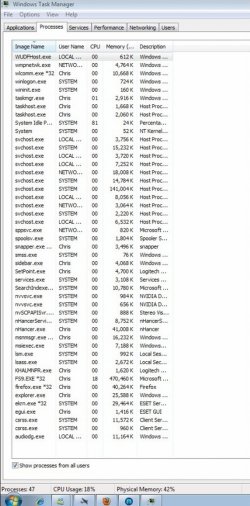
also as Smarty has said its a CPU intensive game you may have some CPU intensive tasks running all the time , resulting in low framerates ingame , could you hold down ctrl and alt the press delete once then seleck the task manager option , open the processes tab take a screen shot of it and post it up here :)
 
Last edited:

My Computer

Computer type
PC/Desktop
Computer Manufacturer/Model Number
Custom
OS
Win 10 Home Premium 64 Bit
CPU
I7 5930K @ 4.5
Motherboard
Asus X99 s
Memory
16GB Kingston Hyper X Fury DDR4
Graphics Card(s)
EVGA 980ti SC + ACX 2.0
Sound Card
Onboard
Monitor(s) Displays
ROG Swift PG278Q
Screen Resolution
2560x1440
Hard Drives
Kingston Hyper X 250gb SSD
Samsung 2TB mechanical
PSU
Corsair RM 850
Case
NZXT H440 Red
Cooling
Corsair H100i GTX
Keyboard
Razer Reclusa
Mouse
Logitech G5 Gamer
Internet Speed
34mb
Antivirus
Eset Smart Security
Browser
Firefox
Here ya go! BTW Thanks for everyone's help thus far, it's great to know there's so many people out there willing to help and let's hope we get the issue resolved so I can enjoy my game on Windows 7 :D
 

Attachments

  • windows 7 processors.jpg
    windows 7 processors.jpg
    177.4 KB · Views: 27

My Computer

Computer type
PC/Desktop
OS
Windows 7 Pro 64-bit
CPU
Intel i7 4790K Haswell Devils Canyon
Motherboard
Asus Maximus VII Ranger ROG
Memory
Kingston Hyper X Savage Red 1600MHZ/16GB
Graphics Card(s)
EVGA GTX970 FTW ACX 2.0
Sound Card
On Board
Monitor(s) Displays
Asus 22" LCD, AOC 17" CRT
Screen Resolution
1680x1050
Hard Drives
Samsung 840EVO 250GB SSD (Windows Driver)
WD Elements 640GB External
WD Elements Portable 2TB External
WD Caviar Blue 500GB
WD Caviar Black 1TB
PSU
EVGA Supernova G2 750W Fully Modular
Case
Antect 1200 V3
Cooling
Corsair H80i Liquid Cooling
Keyboard
Genius Keyboard
Mouse
Logitech Wireless Mouse
Internet Speed
Cable
Antivirus
Nod32 Antivirus
Browser
Google Chrome
That actually looks pretty normal process wise. However since the background tasks are scheduled and/or dynamic it's not always easy to catch a culprit (providing there is one)

One possibe cause may be ESET. Try turning off the resident scanner if it's enabled to see if it has an impact.

Another thing to try, would be to set the affinity of fs9.exe to utilise both cores. (right-click on the process, select only one core, ok it and then re right-click and select both cores again)

I noticed with FSX, that it would max a single core and give choppier play until I reset the affinity to 'even' out the load. It's not a 'stellar' improvement, but it did smooth play out somewhat. From memory, FS9 and FSX weren't designed to take advantage of dual/multi cores.

The other less desirable, but perhaps necessary move would be to lower a few details such as draw distance, ground texture sizes, cloud density etc (it's been a while since I had it installed, so some of those settings may have different names.)
 

My Computer

Computer type
PC/Desktop
Computer Manufacturer/Model Number
Systems by SmartEyeball
OS
8 Pro x64
CPU
i7 3770K 4.6GHz
Motherboard
ASUS P8Z77 WS
Memory
16GB G.Skill Trident X 2666mhz
Graphics Card(s)
x2 EVGA 780 Ti Superclocked SLI
Sound Card
SB X-FI Surround 5.1 PRO USB / ATH-AD900 Headphones
Monitor(s) Displays
x3 Dell U2410 / 58" Samsung
Screen Resolution
5760*1200/ 1920*1200
Hard Drives
2x Intel 520 240GB (RAID 0) * 2x WD Caviar Blacks 2TB (RAID 0) * 2TB WD Caviar Black * Sony Optirac DVD
PSU
Silverstone Strider Evolution 1200W
Case
Thermaltake Level 10 GT Snow Edition
Cooling
Noctua NH-D14
Keyboard
Topre Realforce // Ducky Shine MX Black // Filco Ninja TKL
Mouse
Thermaltake Theron (Highly Recommended) + Razer Imperator
Antivirus
MSE
Browser
IE, FF, WaterFox
Other Info
GT Extreme V2 Sim Racing Cockpit + 40" LCD and K/B Mouse stand ▼
Fanatec CSR Elite Wheel + Clubsport V1 Pedals + CSR shifter/7G-H ▼Saitek X52 Pro ▼ TrackIR 5 Pro
Buttkicker v2 Seat Rumbler with Dedicated 5.1 and Sub Woofer attached to frame ▼
=
Bloody Big Grin
depending on the game, Geforce 8800GT 512mb PCI-E may be your issue.

im sorry but thats not very helpfull is it? have you read his original post?
How isnt it? Its an old GFX card. Newer games would get low frame rates if the card isnt able to keep up.
 

My Computer

Computer Manufacturer/Model Number
Me
OS
Windows 7 Pro
CPU
Athlon II x4 620
Motherboard
Gigabyte
Memory
2gb ddr2 800mhz 6-6-6-16
Graphics Card(s)
Radeon HD 4850
Sound Card
Onboard
Monitor(s) Displays
1366 x 768
Hard Drives
WDC Black 500gb
PSU
OCZ ceritified SLI ready 500w
Case
Cool Master Mid tower
Cooling
Stock
How isnt it? Its an old GFX card. Newer games would get low frame rates if the card isnt able to keep up.

As a general rule yes, but:

The Flight Sim series has always been heavily CPU dependent as opposed to being GPU dependent.

Whilst a faster card would certainly help to a varying degree, bare in mind the OP had no real problems with framerates with that same card in XP.

However, since Seven has more general 'overhead' usage on the CPU (more background services etc), manages memory differently etcetera, upgrading to a newer card for great improvement isn't as clear cut in this case.

Simply put, the game loves high CPU clock speeds since it does the vast majority of the work.

When the FS series was developed, they 'planned ahead' for longevity and expected that CPU speeds would exponentially rise to match projected performance.

However, this did not play out exactly as planned... ;)


*************************************************************
Another thing you can try Boeing in conjunction to updating your video drivers would be to make sure you have the latest DirectX End-User Runtimes (February 2010)


Download details: DirectX Redist (February 2010)

*NB, these may have little to no impact, but will certainly not hurt to try.
 

My Computer

Computer type
PC/Desktop
Computer Manufacturer/Model Number
Systems by SmartEyeball
OS
8 Pro x64
CPU
i7 3770K 4.6GHz
Motherboard
ASUS P8Z77 WS
Memory
16GB G.Skill Trident X 2666mhz
Graphics Card(s)
x2 EVGA 780 Ti Superclocked SLI
Sound Card
SB X-FI Surround 5.1 PRO USB / ATH-AD900 Headphones
Monitor(s) Displays
x3 Dell U2410 / 58" Samsung
Screen Resolution
5760*1200/ 1920*1200
Hard Drives
2x Intel 520 240GB (RAID 0) * 2x WD Caviar Blacks 2TB (RAID 0) * 2TB WD Caviar Black * Sony Optirac DVD
PSU
Silverstone Strider Evolution 1200W
Case
Thermaltake Level 10 GT Snow Edition
Cooling
Noctua NH-D14
Keyboard
Topre Realforce // Ducky Shine MX Black // Filco Ninja TKL
Mouse
Thermaltake Theron (Highly Recommended) + Razer Imperator
Antivirus
MSE
Browser
IE, FF, WaterFox
Other Info
GT Extreme V2 Sim Racing Cockpit + 40" LCD and K/B Mouse stand ▼
Fanatec CSR Elite Wheel + Clubsport V1 Pedals + CSR shifter/7G-H ▼Saitek X52 Pro ▼ TrackIR 5 Pro
Buttkicker v2 Seat Rumbler with Dedicated 5.1 and Sub Woofer attached to frame ▼
=
Bloody Big Grin
  • Like
Reactions: JMH
depending on the game, Geforce 8800GT 512mb PCI-E may be your issue.

im sorry but thats not very helpfull is it? have you read his original post?
How isnt it? Its an old GFX card. Newer games would get low frame rates if the card isnt able to keep up.

because mate if you read the original post you'll see he was playing the game fine with the same hardware just with a differant operating system :)
 

My Computer

Computer type
PC/Desktop
Computer Manufacturer/Model Number
Custom
OS
Win 10 Home Premium 64 Bit
CPU
I7 5930K @ 4.5
Motherboard
Asus X99 s
Memory
16GB Kingston Hyper X Fury DDR4
Graphics Card(s)
EVGA 980ti SC + ACX 2.0
Sound Card
Onboard
Monitor(s) Displays
ROG Swift PG278Q
Screen Resolution
2560x1440
Hard Drives
Kingston Hyper X 250gb SSD
Samsung 2TB mechanical
PSU
Corsair RM 850
Case
NZXT H440 Red
Cooling
Corsair H100i GTX
Keyboard
Razer Reclusa
Mouse
Logitech G5 Gamer
Internet Speed
34mb
Antivirus
Eset Smart Security
Browser
Firefox
i have a queston.............what are you using NHancer for? what are doing with it? custom profile?

the two nvidia services you have running "driver helper service" you can disable them if you like also i dont notice any "stereoscopic driver" instances running , have you disabled that service? (you dont need it unles your using the 3D galsses im just asking cos if you had the latest drivers that service would be running , and you need the latest drvers ;) )
 

My Computer

Computer type
PC/Desktop
Computer Manufacturer/Model Number
Custom
OS
Win 10 Home Premium 64 Bit
CPU
I7 5930K @ 4.5
Motherboard
Asus X99 s
Memory
16GB Kingston Hyper X Fury DDR4
Graphics Card(s)
EVGA 980ti SC + ACX 2.0
Sound Card
Onboard
Monitor(s) Displays
ROG Swift PG278Q
Screen Resolution
2560x1440
Hard Drives
Kingston Hyper X 250gb SSD
Samsung 2TB mechanical
PSU
Corsair RM 850
Case
NZXT H440 Red
Cooling
Corsair H100i GTX
Keyboard
Razer Reclusa
Mouse
Logitech G5 Gamer
Internet Speed
34mb
Antivirus
Eset Smart Security
Browser
Firefox
Back
Top