
Hello Sevenforums.com,
It's my first time I'm posting here, any problem I ever find, I'll solve it by myself or by a simple search on google but not in this case, If you can't help me, then nobody can.
I have Windows 7 x64 Ultimate edition, last install was on 2012, since then no more reinstalls (and for my problem I don't want reinstall of the windows). My laptop is Acer 5740G - i5 2,20 Ghz, 4GB RAM, 1TB HDD Western Digital 5400rpm.
My old HDD was 500GB Hitachi, but I threw because it was full of bad sectors then I bought the new HDD which I have installed Windows 7 and till now.
My problem started almost 1 year ago, I noticed decreasing performance, I used to work on VirtualBox using 2 or 3 session as same time without any problem, now even a single session works low. A scan with HDTune is everything OK, scanned with Kaspersky and Bitdefender (using LiveCD) both shows that are ok without any virus. I disabled services that I don't use like "Fax;Windows Cardspace;Remote registry;Smart card;etc" and startup application that I don't need to start on boot. I did a defragmentation and a scan for errors and yet nothing. I did anything possible to solve my problem but didn't solve anything.
I noticed that pagefiles is the primary thing that causes me problem, I tried to configure it manually, using 6144MB (4GB of RAM + 50%), setting it to auto, and again no solution. I did a defragmentation with pagefile disabled then turning it again on, nothing.
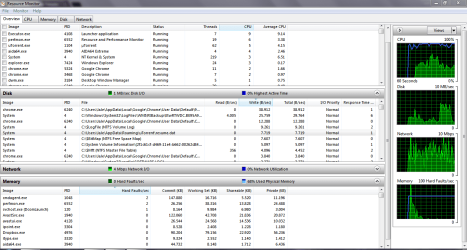
I also noticed something really weird and I couldn't find out how to fix it, to "Resource Monitor" to "Highest active time" is always to 0% I don't see any blue graph on there, normally should be. What is mean?
I think it have to be something about pagefile but I don't know what exacly....Help me please!
It's my first time I'm posting here, any problem I ever find, I'll solve it by myself or by a simple search on google but not in this case, If you can't help me, then nobody can.
I have Windows 7 x64 Ultimate edition, last install was on 2012, since then no more reinstalls (and for my problem I don't want reinstall of the windows). My laptop is Acer 5740G - i5 2,20 Ghz, 4GB RAM, 1TB HDD Western Digital 5400rpm.
My old HDD was 500GB Hitachi, but I threw because it was full of bad sectors then I bought the new HDD which I have installed Windows 7 and till now.
My problem started almost 1 year ago, I noticed decreasing performance, I used to work on VirtualBox using 2 or 3 session as same time without any problem, now even a single session works low. A scan with HDTune is everything OK, scanned with Kaspersky and Bitdefender (using LiveCD) both shows that are ok without any virus. I disabled services that I don't use like "Fax;Windows Cardspace;Remote registry;Smart card;etc" and startup application that I don't need to start on boot. I did a defragmentation and a scan for errors and yet nothing. I did anything possible to solve my problem but didn't solve anything.
I noticed that pagefiles is the primary thing that causes me problem, I tried to configure it manually, using 6144MB (4GB of RAM + 50%), setting it to auto, and again no solution. I did a defragmentation with pagefile disabled then turning it again on, nothing.
I also noticed something really weird and I couldn't find out how to fix it, to "Resource Monitor" to "Highest active time" is always to 0% I don't see any blue graph on there, normally should be. What is mean?
I think it have to be something about pagefile but I don't know what exacly....Help me please!
Attachments
My Computer
At a glance
Windows 7 Ultimate x64i5 2,2Ghz - 2,5 Ghz turbo mode4GB DDR3 1066MhzATI Radeon HD5650
- Computer type
- Laptop
- Computer Manufacturer/Model Number
- Acer
- OS
- Windows 7 Ultimate x64
- CPU
- i5 2,2Ghz - 2,5 Ghz turbo mode
- Motherboard
- N/A
- Memory
- 4GB DDR3 1066Mhz
- Graphics Card(s)
- ATI Radeon HD5650
- Hard Drives
- 1TB Western Digital 5400rpm
- Antivirus
- Kaspersky Pure 3.0 (13.0.2.558)
- Browser
- Chrome


