Low Quality User Account Picture

kobieness

New member
Local time
4:58 AM
Messages
5
Hello,

I have recently encountered a problem with my Windows 7 log-on screen. Ever since using "Tuneup Utilties" to automatically change the BACKGROUND of the log-on screen, the User Account Picture has become extremely low quality and blurry. It is not a problem with the picture resolution, even the default pictures are not blurry. I have no idea what to do. Please help.

Thank you
 

My Computer My Computer

OS
Windows 7 Home Premium 64bit
hello and welcome,
that's maybe cause by your background of the logon.
try to use the default background and see the logo picture,still got same issue or not.
 

My Computer My Computer

Computer Manufacturer/Model Number
built up
OS
windows 7
CPU
Phenom II AMD Dragon 3.5Ghz
Memory
DDR3 4GB
Graphics Card(s)
ATI Radeon 512Mb
Monitor(s) Displays
HP L1506
Screen Resolution
1152 x 864
Hard Drives
WDC 1 TB SATA-II Green Power
Keyboard
HP wireless keyboard
Mouse
HP Optic
Internet Speed
1GB
Thanks for the idea, but this did not work! I tried the default backgroud as well!
 

My Computer My Computer

OS
Windows 7 Home Premium 64bit
do you already try the other of the picture and make it log on picture.?
 

My Computer My Computer

Computer Manufacturer/Model Number
built up
OS
windows 7
CPU
Phenom II AMD Dragon 3.5Ghz
Memory
DDR3 4GB
Graphics Card(s)
ATI Radeon 512Mb
Monitor(s) Displays
HP L1506
Screen Resolution
1152 x 864
Hard Drives
WDC 1 TB SATA-II Green Power
Keyboard
HP wireless keyboard
Mouse
HP Optic
Internet Speed
1GB
do you already try the other of the picture and make it log on picture.?

Yes, as i said, I already tried many other pictures, as well as the default log-on pictures- they all appear blurry. Not sure what to do.
 

My Computer My Computer

OS
Windows 7 Home Premium 64bit
i think that's was cause by tuneup and maybe have something setting on it.
or did you have restore point?
 

My Computer My Computer

Computer Manufacturer/Model Number
built up
OS
windows 7
CPU
Phenom II AMD Dragon 3.5Ghz
Memory
DDR3 4GB
Graphics Card(s)
ATI Radeon 512Mb
Monitor(s) Displays
HP L1506
Screen Resolution
1152 x 864
Hard Drives
WDC 1 TB SATA-II Green Power
Keyboard
HP wireless keyboard
Mouse
HP Optic
Internet Speed
1GB
i think that's was cause by tuneup and maybe have something setting on it.
or did you have restore point?

Ok, so I uninstalled Tuneup Utilties, and my logon screen reverted back to normal. However, the profile picture is still low quality. This is really bugging me! please help me fix it!
 

My Computer My Computer

OS
Windows 7 Home Premium 64bit
Okay, I give up. I have tried everything for the past 5 hours. The quality is just horrible no matter what i do.

Please respond if you have a solution to this.
 

My Computer My Computer

OS
Windows 7 Home Premium 64bit
128 Pixels

I just read this article at Adding a custom picture to the list of user account pictures that tells you how to add your own icon to the list. As you can see from the source folder, all of those images are 128x128 BMP images. Even following that, they still come out blurry, so I'm pretty sure the answer here is that there's no way around this, but I was hoping there was.
 

My Computer My Computer

OS
Windows 7 Pro x64
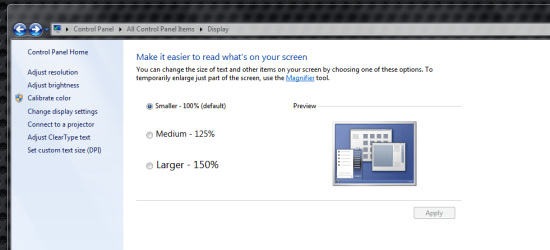
Try looking here for display properties..
Capture display.PNG

Check out all the blue adjustments on the upper left of screen.
 

My Computer My Computer

Computer Manufacturer/Model Number
HP M9077c
OS
Windows 7 Home Premium 64bit
CPU
Intel(R)Core(TM)2 quad [email protected] 2.39GHz
Motherboard
ASUSeK
Memory
6GB DDR2 6400
Graphics Card(s)
GeForce 8500/512MB
Sound Card
Realtek High Def Audio
Monitor(s) Displays
HP w2408 LCD 24" widescreen
Screen Resolution
1920x1200
Cooling
6 pack of Bud
Keyboard
MS wireless Inteli
Mouse
MS wireless Inteli
Back
Top