
techperplexed
New member
- Local time
- 1:23 AM
- Messages
- 4
I have windows 7 installed on a Samsung EVO 970 M.2 SSD. it has worked flawlessly for well over a year now. This afternoon as I was waiting for my kids to get home from school I decided to install the latest Windows updates. I believe there were only 5 of them. the cumulative security roll up, malicious software removal tool and a few others. They downloaded fine and installed and asked to restart my computer. So i did.
But when the computer restarted I was greeted with an error message that read: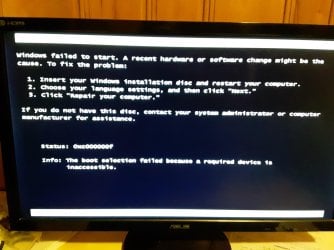
I checked the Bios and the Drive is listed there, but windows no longer recognizes it. I tried repairing the drive with the install disk but it tells me the repair program is not compatible with my version of windows. Any help is very much appreciated as I have some important documents on there. And before anyone asks, no I do not have a back up to load. I will going forward though.
But when the computer restarted I was greeted with an error message that read:
I checked the Bios and the Drive is listed there, but windows no longer recognizes it. I tried repairing the drive with the install disk but it tells me the repair program is not compatible with my version of windows. Any help is very much appreciated as I have some important documents on there. And before anyone asks, no I do not have a back up to load. I will going forward though.
My Computer
At a glance
windows 7 Professional 64 bitintel Core i5 6500 (Skylake)Corsair Vengeance DDR4 16Gb 3000 MhzPNY Geforce 1070 8Gb
- Computer type
- PC/Desktop
- Computer Manufacturer/Model Number
- Custom build
- OS
- windows 7 Professional 64 bit
- CPU
- intel Core i5 6500 (Skylake)
- Motherboard
- asus Z170-E
- Memory
- Corsair Vengeance DDR4 16Gb 3000 Mhz
- Graphics Card(s)
- PNY Geforce 1070 8Gb
- Hard Drives
- Samsung 970 EVO M.2 SSD 500Gb
Western Digital 1 TB HDD
- Browser
- Google Chrome


