m4 SSD firmware update utility 0309 error 0XC0000098

nicks1222

New member
Local time
6:00 PM
Messages
4
When I press continue so the update restarts like it suppose to when it updates then after a few seconds later my computers gets missing file /grldr.mbr error and then a status 0XC0000098 then my computer reloads and ask me if I want to run m4 ssd and from the look of it it looks like the update went though. But that leaves me with the error and missing files or maybe corrupted files?
 

My Computer My Computer

At a glance

Windows 7 Homei7-2600k8 GBGTX 570
OS
Windows 7 Home
CPU
i7-2600k
Motherboard
ASrock
Memory
8 GB
Graphics Card(s)
GTX 570
Hard Drives
SDD 120 GB
PSU
OCZ 850 Watts
Case
Cooler Master Haf X
Cooling
H60 Mod
I just read a bit about this because I bought an M4, with v0309. Latest is v000F.
Some people had problems. Google how to see what version you have from within Windows.
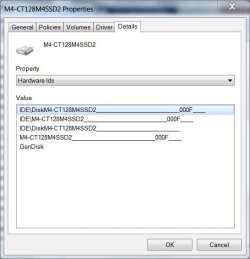
It's basically click on computer, right click the M4 drive, properties, hardware, select the M4 drive, properties, details, then select hardware id from the fropdown list. You'll see your version repeated 3 times there.
I decided not to update because I don't see benefits in the update. I'll look closer later.
People who had similar issue as you seemed to have a good update.
Look at the Crucial site for more details.
 

My Computer My Computer

At a glance

Windows 7 Ultimate x64QuadCore Intel Core i7 920, 2666 MHz (20 x 133)6134 MB (DDR3-1333 DDR3 SDRAM)(2 - SLI) NVIDIA GeForce GTS 250 (1024 MB)
Computer Manufacturer/Model Number
Home Built
OS
Windows 7 Ultimate x64
CPU
QuadCore Intel Core i7 920, 2666 MHz (20 x 133)
Motherboard
Asus P6T
Memory
6134 MB (DDR3-1333 DDR3 SDRAM)
Graphics Card(s)
(2 - SLI) NVIDIA GeForce GTS 250 (1024 MB)
Sound Card
Onboard Realtek ALC888/1200 @ Intel 82801JB IC
Monitor(s) Displays
HDMII
Screen Resolution
1280 x 800
Hard Drives
Crucial M4 (64 GB SSD)
WD Caviar Blacks
WD5001AALS-00J7B1 ATA Device (465 GB)
WD5001AALS-00L3B2 ATA Device (465 GB)
WD Elements USB External (250 GB)
PSU
Corsair 550
Case
iStarUSA S-10000BL Black
Click the start button, type device manager, click on the entry, expand disk drives, right click on the Crucial and select properties, click on the details tab, in the dropdown box click the second one down, hardware ID, the number at the end is the firmware id. You will see mine is 000F.

z.JPG
 

My Computers My Computers

  • At a glance

    Windows 11 ProRyzen 9 5900X32GB G Skill DDR4-3600EVGA RTX 3080 FTW 3 Ultra
    Computer type
    PC/Desktop
    Computer Manufacturer/Model Number
    ALWAYS UNDER CONSTRUCTION
    OS
    Windows 11 Pro
    CPU
    Ryzen 9 5900X
    Motherboard
    Asus X570 Crosshair Viii Hero
    Memory
    32GB G Skill DDR4-3600
    Graphics Card(s)
    EVGA RTX 3080 FTW 3 Ultra
    Sound Card
    On Board/Sennheiser PC37X Headset
    Monitor(s) Displays
    3 X Asus 27"
    Screen Resolution
    2560x1440
    Hard Drives
    2 X 1 TB NVME drives
    PSU
    EVGA 850
    Case
    Phanteks Eclipse P400A
    Cooling
    EVGA 280 AIO
    Keyboard
    Logitech G510s/ Logitech G13
    Mouse
    Logitech G502
    Internet Speed
    24/1
    Antivirus
    ESET/MBAM Pro/SAS Pro
    Browser
    Chrome/ Firefox/ Edge
  • At a glance

    Windows 11 ProIntel Ultra 9 288V32 GB LPDDR5X 8533
    Computer type
    Laptop
    System Manufacturer/Model Number
    Dell 16 Plus
    OS
    Windows 11 Pro
    CPU
    Intel Ultra 9 288V
    Memory
    32 GB LPDDR5X 8533
    Monitor(s) Displays
    16" Mini-LED HDR600 Touch 90 Hz
    Screen Resolution
    2560X1600
    Hard Drives
    1 TB NVME
Will I tried it again it did not update what should I do it says the samething. I got the feeling this is because the virus I had i reinstalled windows 7 to get rid of the virus I guess the files where deleted. Does anyone have a way for me to get it back= file /grldr.mbr
 

My Computer My Computer

At a glance

Windows 7 Homei7-2600k8 GBGTX 570
OS
Windows 7 Home
CPU
i7-2600k
Motherboard
ASrock
Memory
8 GB
Graphics Card(s)
GTX 570
Hard Drives
SDD 120 GB
PSU
OCZ 850 Watts
Case
Cooler Master Haf X
Cooling
H60 Mod
I'm not sure. It was so long ago, I don't remember the instructions. Download the instructions with the ISO. As I recall, your sata controller in BIOS has to be set to IDE mode, then set the boot order to your CD/DVD 1st and then your SSD 2nd., with the disk in the drive save and exit. You should boot into the CD with the ISO Burned to it. Try the update, then reboot and change the sata controller back to AHCI and set the boot order as you like it. I also recall your SSD had to be connected to port 1-3. You may also try re downloading and burning the ISO to CD again, you could have a bad download or CD burn. If reading the instructions does not work, try Crucial technical support. My directions are from memory so I suggest you read the instructiond from Crucial. Don't trust my memory.
 

My Computers My Computers

  • At a glance

    Windows 11 ProRyzen 9 5900X32GB G Skill DDR4-3600EVGA RTX 3080 FTW 3 Ultra
    Computer type
    PC/Desktop
    Computer Manufacturer/Model Number
    ALWAYS UNDER CONSTRUCTION
    OS
    Windows 11 Pro
    CPU
    Ryzen 9 5900X
    Motherboard
    Asus X570 Crosshair Viii Hero
    Memory
    32GB G Skill DDR4-3600
    Graphics Card(s)
    EVGA RTX 3080 FTW 3 Ultra
    Sound Card
    On Board/Sennheiser PC37X Headset
    Monitor(s) Displays
    3 X Asus 27"
    Screen Resolution
    2560x1440
    Hard Drives
    2 X 1 TB NVME drives
    PSU
    EVGA 850
    Case
    Phanteks Eclipse P400A
    Cooling
    EVGA 280 AIO
    Keyboard
    Logitech G510s/ Logitech G13
    Mouse
    Logitech G502
    Internet Speed
    24/1
    Antivirus
    ESET/MBAM Pro/SAS Pro
    Browser
    Chrome/ Firefox/ Edge
  • At a glance

    Windows 11 ProIntel Ultra 9 288V32 GB LPDDR5X 8533
    Computer type
    Laptop
    System Manufacturer/Model Number
    Dell 16 Plus
    OS
    Windows 11 Pro
    CPU
    Intel Ultra 9 288V
    Memory
    32 GB LPDDR5X 8533
    Monitor(s) Displays
    16" Mini-LED HDR600 Touch 90 Hz
    Screen Resolution
    2560X1600
    Hard Drives
    1 TB NVME
well just update your where right they are going to work me though it tomorrow thanks.

"This issue will require some in-depth troubleshooting. To ensure that you get the detailed assistance you need, please contact our Technical Support department at 1-800-336-8896 (U.S. and Canada only) or at 208-363-5790. Our contact hours are Monday through Friday from 7 a.m. to 6 p.m. (Mountain Time)."
 

My Computer My Computer

At a glance

Windows 7 Homei7-2600k8 GBGTX 570
OS
Windows 7 Home
CPU
i7-2600k
Motherboard
ASrock
Memory
8 GB
Graphics Card(s)
GTX 570
Hard Drives
SDD 120 GB
PSU
OCZ 850 Watts
Case
Cooler Master Haf X
Cooling
H60 Mod
Sounds like you are on the right track. If they can't help, no one can. How about an update when you are finished, I'd like to know the solution.
 

My Computers My Computers

  • At a glance

    Windows 11 ProRyzen 9 5900X32GB G Skill DDR4-3600EVGA RTX 3080 FTW 3 Ultra
    Computer type
    PC/Desktop
    Computer Manufacturer/Model Number
    ALWAYS UNDER CONSTRUCTION
    OS
    Windows 11 Pro
    CPU
    Ryzen 9 5900X
    Motherboard
    Asus X570 Crosshair Viii Hero
    Memory
    32GB G Skill DDR4-3600
    Graphics Card(s)
    EVGA RTX 3080 FTW 3 Ultra
    Sound Card
    On Board/Sennheiser PC37X Headset
    Monitor(s) Displays
    3 X Asus 27"
    Screen Resolution
    2560x1440
    Hard Drives
    2 X 1 TB NVME drives
    PSU
    EVGA 850
    Case
    Phanteks Eclipse P400A
    Cooling
    EVGA 280 AIO
    Keyboard
    Logitech G510s/ Logitech G13
    Mouse
    Logitech G502
    Internet Speed
    24/1
    Antivirus
    ESET/MBAM Pro/SAS Pro
    Browser
    Chrome/ Firefox/ Edge
  • At a glance

    Windows 11 ProIntel Ultra 9 288V32 GB LPDDR5X 8533
    Computer type
    Laptop
    System Manufacturer/Model Number
    Dell 16 Plus
    OS
    Windows 11 Pro
    CPU
    Intel Ultra 9 288V
    Memory
    32 GB LPDDR5X 8533
    Monitor(s) Displays
    16" Mini-LED HDR600 Touch 90 Hz
    Screen Resolution
    2560X1600
    Hard Drives
    1 TB NVME
install the SSD, power on and enter the BIOS.
Leave it in BIOS for around 30 minutes without using the laptop, then power off and disconnect the SSD altogether.
After 30 seconds, reconnect the SSD and repeat steps 1 and 2 again.
Power off, take out and reconnect the SSD and power back on.
 

My Computer My Computer

At a glance

Windows 7 Homei7-2600k8 GBGTX 570
OS
Windows 7 Home
CPU
i7-2600k
Motherboard
ASrock
Memory
8 GB
Graphics Card(s)
GTX 570
Hard Drives
SDD 120 GB
PSU
OCZ 850 Watts
Case
Cooler Master Haf X
Cooling
H60 Mod
Thanks for the feedback. I assume that fixed your problem and you got your firmware updated. I never heard that one. You learn something new everyday here. Thanks.
 

My Computers My Computers

  • At a glance

    Windows 11 ProRyzen 9 5900X32GB G Skill DDR4-3600EVGA RTX 3080 FTW 3 Ultra
    Computer type
    PC/Desktop
    Computer Manufacturer/Model Number
    ALWAYS UNDER CONSTRUCTION
    OS
    Windows 11 Pro
    CPU
    Ryzen 9 5900X
    Motherboard
    Asus X570 Crosshair Viii Hero
    Memory
    32GB G Skill DDR4-3600
    Graphics Card(s)
    EVGA RTX 3080 FTW 3 Ultra
    Sound Card
    On Board/Sennheiser PC37X Headset
    Monitor(s) Displays
    3 X Asus 27"
    Screen Resolution
    2560x1440
    Hard Drives
    2 X 1 TB NVME drives
    PSU
    EVGA 850
    Case
    Phanteks Eclipse P400A
    Cooling
    EVGA 280 AIO
    Keyboard
    Logitech G510s/ Logitech G13
    Mouse
    Logitech G502
    Internet Speed
    24/1
    Antivirus
    ESET/MBAM Pro/SAS Pro
    Browser
    Chrome/ Firefox/ Edge
  • At a glance

    Windows 11 ProIntel Ultra 9 288V32 GB LPDDR5X 8533
    Computer type
    Laptop
    System Manufacturer/Model Number
    Dell 16 Plus
    OS
    Windows 11 Pro
    CPU
    Intel Ultra 9 288V
    Memory
    32 GB LPDDR5X 8533
    Monitor(s) Displays
    16" Mini-LED HDR600 Touch 90 Hz
    Screen Resolution
    2560X1600
    Hard Drives
    1 TB NVME
Back
Top