MAC address spoofing

Copyright

New member
Member
VIP
Local time
7:54 PM
Messages
102
Hi, I have Windows 7 build 7022 and I cannot spoof my mac address.

I have a wireless card, and programs such as SMAC and other things just aren't working. Is this possible?
 

My Computer

Computer Manufacturer/Model Number
Dell Laptop Studio 1537
OS
Windows 7 x64 7229
CPU
Intel Core 2 Duo CPU T6400
Memory
4 GB
Graphics Card(s)
Mobile Intel 45 Chipset
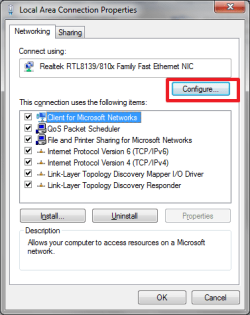
Try this
 

Attachments

  • 01.png
    01.png
    13.2 KB · Views: 1,795
  • 1.png
    1.png
    14.2 KB · Views: 2,361

My Computer

Computer Manufacturer/Model Number
ENIAC
OS
Windows 7 RC 7100 32bit/64bit
CPU
Intel Core2Duo E4500 2.20 GHz
Motherboard
ASUS P5LD2-X/1333
Memory
2x1GB Kinsgston DDR2 800MHz
Graphics Card(s)
Nvidia 8500GT
Sound Card
Onboard High Definition Audio Device
Monitor(s) Displays
Sony Bravia 42"
Case
LINKW 2222
Cooling
Standard Intel
Keyboard
Some cheap one
Mouse
Microsoft Intellimouse something
Internet Speed
24MBps ADSL
That wasn't there on my device, but I found out how to do it via the registry. Thanks for the help, though.
 

My Computer

Computer Manufacturer/Model Number
Dell Laptop Studio 1537
OS
Windows 7 x64 7229
CPU
Intel Core 2 Duo CPU T6400
Memory
4 GB
Graphics Card(s)
Mobile Intel 45 Chipset
Hi, can you provide me with a link to where to change it in the registry? TIA.
 

My Computer

OS
Windows 7 64-bit build 7000
Thanks a lot, that worked. Although the NetworkAddress key was previously changed by an application, supposed to do that, it did not appear as the changed one in the "ipconfig /all" output. Manually changing it seems to has done the trick. Thanks again.
 

My Computer

OS
Windows 7 64-bit build 7000
Hey guys,

this thread might be dead, but... if anyone picks it up and helps it would be appreciated.

I have a Realtek 8185 Extensible 802.11b/g Wireless card which I want to change the MAC address of.

I have checked the properties/configuration root, but there wasn't any Network Address. I then manually filled in the String in the registry, but to no joy.

I have also then removed the String and used SMAC (2.7) to try, but yet again to no avail. And I've also tried TMAC v5 RC3, and same result.

Everytime, I run ipconfig /all it keeps displaying my original MAC address.

Can anyone shine any light onto this please?

Thanks
 
Last edited:

My Computer

OS
Win 7 64 bit
CPU
AMD 2
Motherboard
GA-MA770-DS3
Memory
4 Gig
Graphics Card(s)
Geforce 8800 GTS
-this method doesn't appear to work on any network card under Windows 7. :p

I have tried this on 4 separate ethernet and wifi cards (Intel, nVidia and Realtek chipsets) none of which the registry entry or driver property affected.

Does anyone have a solution that works, rather than just regurgitating what works in Windows XP?
 

My Computer

OS
Win7 64-bit Professional
CPU
i5-750
Motherboard
ASUS
Memory
8Gb
Graphics Card(s)
Radeon X2
I've discovered that my connection issues happens in Windows 7, Vista and XP SP3 latest update. I've rolled back to XP x64 and just careful about what I update.

Sorry I can't offer any more insights into what I tried.
 

My Computer

OS
Win 7 64 bit
CPU
AMD 2
Motherboard
GA-MA770-DS3
Memory
4 Gig
Graphics Card(s)
Geforce 8800 GTS
install an older driver for the card and it should work in 7
 

My Computer

OS
7 Pro
MAC Address can be changed in two ways. Some LAN Adapter vendors allow to change the address from properties but others dont allow it this way. For these adapters like broadcom, you will have to change MAC address in registry. The following URL guides through both of these processes.

How to change MAC address in windows 7 | Tech Skipper
 

My Computer

OS
Win 7
MAC Address Spoofing

I've read several solutions - some work, some don't. One thing to note is that there can be different descriptor names for the MAC Address setting for different cards. The most common referenced solution I've seen in the Advanced Configuration Properties of a card is "Network Address". I have an Intel NIC and its MAC address is under the descriptor "Locally Administered Address". Since - regardless of card manufacturer - the only descriptors with the word "Address" in them seem to be exclusively related to the MAC address, just look in your card's Advanced Configuration Properties for a descriptor that includes the word "Address".

Note that syntax may require only the values - no separators such as ":" or "-".
 

My Computer

Computer Manufacturer/Model Number
HP 8730w (laptop)
OS
Dual-Boot WinXPP (x32), Win 7 Ent (x64)
CPU
Intel Core2Duo (T9400 @ 2.53GHz)
Memory
4GB
Thanks teligence, very useful solution!

Have you found any hack around microsoft's set limit on the macs. The limit is - the 2nd character of mac has to be 2 or 6 or A or E.

xy:xx:xx:xx:xx:xx

x = any character
y = 2 or 6 or A or E

Know any workaround to spoof it to any mac without limits?
 

My Computer

OS
Windows 7 Ultimate x64
FWIW: Not to revive this old thread but my thoughts on changing the MAC address on ethernet boards or wireless devices is in the vein of spoofing or attempting to bypass access restrictions and I would not help if I knew how to do it. I don't see any valid reasons for changing MAC address's.

Just my opinion.

rich
 

My Computer

Computer type
Laptop
Computer Manufacturer/Model Number
Toshiba Laptop Qosimo X870
OS
Windows 7 Pro x64 SP1
CPU
Intel Core I7
Motherboard
Toshiba Qosmio
Memory
16 Gigs
Graphics Card(s)
NVIDIA GeForce GTX 670M
Monitor(s) Displays
17.7" laptop
Screen Resolution
1600 x 900
Hard Drives
256 Gig SanDisk SSD for C
256 Gig Intel SSD for D
Internet Speed
50/25 FIOS
Antivirus
Vipre (all you can eat for 10 machines)
Browser
IE and FF
Other Info
I have dos 6.22, wfwg 3.11, win98, 2000 and xp VHD's available for testing. MS's Virtual PC works great.
Possibility to change the mac address in windows 7 or later

you can change mac address but 1st 2 digits must me 02 or 12. If your mac address starting from 02 or 12 there is possibility to change the mac address.
 

My Computer

Computer type
Laptop
Computer Manufacturer/Model Number
HP
OS
Windows 8 Enterprise x64
CPU
Intel(R) Core(TM) i3-2370M CPU @ 2.40GHz, 2400 Mhz
Motherboard
HP
Memory
2.00 GB (RAM)
Graphics Card(s)
Intel
Hard Drives
500 GB
Antivirus
Avast
Browser
Google Chrome
Back
Top