
Machine keep defrag the drive even after disable the task.

mr kp

New member
Local time
5:00 PM
Messages
12
Hi,

I have several machines that I need to disable the defragmentation. Due to the way backup software operate, defragmentation create a large snapshot and a few of them are over 150GB.
Here is what I have done so far and without luck, the drive still being defragged.

- Disable the scheduled task via the gui
- Disable the task via task scheduler
- Disable the service
- Add registry to disable boot time optimization
- Rename defrag.exe to defrag.old


Any thought and advice?
Thank you in advance.
 

My Computer My Computer

At a glance

Microsoft Windows 7 Professional x64
Computer type
PC/Desktop
OS
Microsoft Windows 7 Professional x64
Welcome to the Forum.

Have you tried the following:

Click the Start Button & in the search slot, type Computer Management & hit Enter, when it opens select Services & Applications, then click on Services, then scroll down the list until you see Disc Defragmenter, double click on that & a window will open & you will see Start Up Type with a drop down bar alongside, click on that & select Disable. Then click on Apply to set the change.

Post back if you have any problems.
 

My Computer My Computer

At a glance

Windows 7 Home Premium 64 bit sp1Intel i5 3570 3.4Ghz Ivy Bridge SKT 1155 quad...G-Skill Rip Jaws 16Gb (8x2) DDR3 -1600 PC3 12...Gigabyte NVIDIA GT610 1Gb DDR3 810/1200 PCI-E...
Computer type
PC/Desktop
Computer Manufacturer/Model Number
Self built using existing case
OS
Windows 7 Home Premium 64 bit sp1
CPU
Intel i5 3570 3.4Ghz Ivy Bridge SKT 1155 quad core
Motherboard
Gigabyte Z77-HD3 SKT 1155 2xSata 3, 4x USB 3.0
Memory
G-Skill Rip Jaws 16Gb (8x2) DDR3 -1600 PC3 12800 CL 10 red
Graphics Card(s)
Gigabyte NVIDIA GT610 1Gb DDR3 810/1200 PCI-E 2.0 Silent
Sound Card
NVIDIA High Definition & Realtech High Definition Audio
Monitor(s) Displays
2 x Philips 226V4L 16:9 aspect ratio
Screen Resolution
1920 x 1080 HD
Hard Drives
Samsung 840 Pro 256gb SSD, SATA 3.
Hitachi Touro Portable 1tb, USB 3.0 HDD used for image b/ups.
PSU
Corsair VS450
Case
Codeng
Cooling
PSU fan & CPU fan
Keyboard
Logitech
Mouse
Logitech Wireless trackball M570
Internet Speed
Wireless 3G. 3mg down & 550kb up.
Antivirus
Bitdefender Internet Security 2020
Browser
Opera (Current Version) & Firefox
Other Info
MS Office 2013 Pro. Davis weather station software. MGE Nova 600 avr UPS.
Thank you for the quick reply. Yes I have disable the service
 

My Computer My Computer

At a glance

Microsoft Windows 7 Professional x64
Computer type
PC/Desktop
OS
Microsoft Windows 7 Professional x64
defrag

Do you have any OEM or optimiser progs on your comp, it might not be just MS.

Roy
 

My Computer My Computer

At a glance

W7 home premium 32bit/W7HP 64bit/w10 tp insid...E5300 dual core3gbNvidia Geforce 7100 Nforce 630i
Computer type
PC/Desktop
Computer Manufacturer/Model Number
medionl/Aspire 6930G/acer x55a
OS
W7 home premium 32bit/W7HP 64bit/w10 tp insider ring
CPU
E5300 dual core
Motherboard
medion MS7366
Memory
3gb
Graphics Card(s)
Nvidia Geforce 7100 Nforce 630i
Monitor(s) Displays
avixc
Internet Speed
n (isp resticted to 72)
Antivirus
mse/pands
Browser
palemoon
Other Info
Belkin Fd7050 n USB using Railink RT2870 drivers, more upto date
Nothing I could think of and it happened to serveral machines on a several area/location. What really got me stuck is I even rename defrag.exe to defrag.old. It still got defragged.
 

My Computer My Computer

At a glance

Microsoft Windows 7 Professional x64
Computer type
PC/Desktop
OS
Microsoft Windows 7 Professional x64
Are you using any 3rd party Defrag tool or system optimizer program?
Are you using any IObit programs?
 

My Computer My Computer

At a glance

Windows 10 Pro. 64/ version 1709 Windows 7 Pr...Intel i7-6800K @ 4.3Corsair Platinum 16 gig @2400EVGA GTX 1070 OC
Computer type
PC/Desktop
Computer Manufacturer/Model Number
Home made Desktop
OS
Windows 10 Pro. 64/ version 1709 Windows 7 Pro/64
CPU
Intel i7-6800K @ 4.3
Motherboard
ASUS X-99 Deluxe II
Memory
Corsair Platinum 16 gig @2400
Graphics Card(s)
EVGA GTX 1070 OC
Monitor(s) Displays
Asus 27" LED LCD/VE278Q
Screen Resolution
1920-1080 or 1280-720 HDMI
Hard Drives
INTEL SSD 730-240 Gb Sata 3.0/
PSU
EVGA Platium 1200W
Case
Phanteks Luxe Tempered Glass 8 fans/ one radiator
Cooling
XSPC/ Water Cooled CPU
Keyboard
Das 4 Professional
Mouse
Logitech M705/MX Anywhere 2-S
Internet Speed
100 mbits
Antivirus
Microsoft Security Essentials/ Malwarebytes Premium 3.0/ SAS
Browser
I.E. 11 default/Firefox/ ISP Time Warner Cable/Spectrum
Other Info
LG BluRay Burner/
Sound system-KLipsch-THX/
Icy Dock ssd Hot Swap bays.
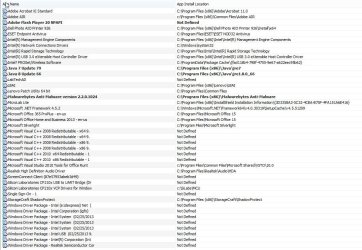
No to all questions. The machine is fairly bare bone. Only business applications. EDIT: I also attached the list of software installed on one of the machine in question
 

Attachments

  • SW.jpg
    SW.jpg
    135.5 KB · Views: 4
Last edited:

My Computer My Computer

At a glance

Microsoft Windows 7 Professional x64
Computer type
PC/Desktop
OS
Microsoft Windows 7 Professional x64
Adding to the other members that have offered suggestions, could your problem be caused by one of the programs you have installed on your computer. I notice you have some programs that many users would not be familiar with & I am certainly one of those. The programs that I am referring to are:

Screen Connect Client.
Storage Craft Shadow Protect.

I have had a look at these on the web & it seems they each have a user forum so it might be worth checking that out.
 

My Computer My Computer

At a glance

Windows 7 Home Premium 64 bit sp1Intel i5 3570 3.4Ghz Ivy Bridge SKT 1155 quad...G-Skill Rip Jaws 16Gb (8x2) DDR3 -1600 PC3 12...Gigabyte NVIDIA GT610 1Gb DDR3 810/1200 PCI-E...
Computer type
PC/Desktop
Computer Manufacturer/Model Number
Self built using existing case
OS
Windows 7 Home Premium 64 bit sp1
CPU
Intel i5 3570 3.4Ghz Ivy Bridge SKT 1155 quad core
Motherboard
Gigabyte Z77-HD3 SKT 1155 2xSata 3, 4x USB 3.0
Memory
G-Skill Rip Jaws 16Gb (8x2) DDR3 -1600 PC3 12800 CL 10 red
Graphics Card(s)
Gigabyte NVIDIA GT610 1Gb DDR3 810/1200 PCI-E 2.0 Silent
Sound Card
NVIDIA High Definition & Realtech High Definition Audio
Monitor(s) Displays
2 x Philips 226V4L 16:9 aspect ratio
Screen Resolution
1920 x 1080 HD
Hard Drives
Samsung 840 Pro 256gb SSD, SATA 3.
Hitachi Touro Portable 1tb, USB 3.0 HDD used for image b/ups.
PSU
Corsair VS450
Case
Codeng
Cooling
PSU fan & CPU fan
Keyboard
Logitech
Mouse
Logitech Wireless trackball M570
Internet Speed
Wireless 3G. 3mg down & 550kb up.
Antivirus
Bitdefender Internet Security 2020
Browser
Opera (Current Version) & Firefox
Other Info
MS Office 2013 Pro. Davis weather station software. MGE Nova 600 avr UPS.
Please dissable Lenovo LBAI, its thier Bios updater tool, and see what happens.

Roy
 

My Computer My Computer

At a glance

W7 home premium 32bit/W7HP 64bit/w10 tp insid...E5300 dual core3gbNvidia Geforce 7100 Nforce 630i
Computer type
PC/Desktop
Computer Manufacturer/Model Number
medionl/Aspire 6930G/acer x55a
OS
W7 home premium 32bit/W7HP 64bit/w10 tp insider ring
CPU
E5300 dual core
Motherboard
medion MS7366
Memory
3gb
Graphics Card(s)
Nvidia Geforce 7100 Nforce 630i
Monitor(s) Displays
avixc
Internet Speed
n (isp resticted to 72)
Antivirus
mse/pands
Browser
palemoon
Other Info
Belkin Fd7050 n USB using Railink RT2870 drivers, more upto date
Adding to the other members that have offered suggestions, could your problem be caused by one of the programs you have installed on your computer. I notice you have some programs that many users would not be familiar with & I am certainly one of those. The programs that I am referring to are:

Screen Connect Client.
Storage Craft Shadow Protect.

I have had a look at these on the web & it seems they each have a user forum so it might be worth checking that out.
Screen Connect Client is for remote control. I have check on their forum no luck.
Storagecraft Shadow Protect is a backup software. The forum suggest me to enable process monitoring event which I did. No process logged that is out of ordinary.
 

My Computer My Computer

At a glance

Microsoft Windows 7 Professional x64
Computer type
PC/Desktop
OS
Microsoft Windows 7 Professional x64
This may be a silly question, but are you sure it's defrag that's causing the large snap shot file that you mentioned in your first post.

You also mentioned that you have renamed the defrag to defrag old, so has another defrag file been set up in spite of this.
 

My Computer My Computer

At a glance

Windows 7 Home Premium 64 bit sp1Intel i5 3570 3.4Ghz Ivy Bridge SKT 1155 quad...G-Skill Rip Jaws 16Gb (8x2) DDR3 -1600 PC3 12...Gigabyte NVIDIA GT610 1Gb DDR3 810/1200 PCI-E...
Computer type
PC/Desktop
Computer Manufacturer/Model Number
Self built using existing case
OS
Windows 7 Home Premium 64 bit sp1
CPU
Intel i5 3570 3.4Ghz Ivy Bridge SKT 1155 quad core
Motherboard
Gigabyte Z77-HD3 SKT 1155 2xSata 3, 4x USB 3.0
Memory
G-Skill Rip Jaws 16Gb (8x2) DDR3 -1600 PC3 12800 CL 10 red
Graphics Card(s)
Gigabyte NVIDIA GT610 1Gb DDR3 810/1200 PCI-E 2.0 Silent
Sound Card
NVIDIA High Definition & Realtech High Definition Audio
Monitor(s) Displays
2 x Philips 226V4L 16:9 aspect ratio
Screen Resolution
1920 x 1080 HD
Hard Drives
Samsung 840 Pro 256gb SSD, SATA 3.
Hitachi Touro Portable 1tb, USB 3.0 HDD used for image b/ups.
PSU
Corsair VS450
Case
Codeng
Cooling
PSU fan & CPU fan
Keyboard
Logitech
Mouse
Logitech Wireless trackball M570
Internet Speed
Wireless 3G. 3mg down & 550kb up.
Antivirus
Bitdefender Internet Security 2020
Browser
Opera (Current Version) & Firefox
Other Info
MS Office 2013 Pro. Davis weather station software. MGE Nova 600 avr UPS.
This may be a silly question, but are you sure it's defrag that's causing the large snap shot file that you mentioned in your first post.

You also mentioned that you have renamed the defrag to defrag old, so has another defrag file been set up in spite of this.

That is a very good question and yes I am pretty sure it is the defrag. As the defragmentation value is at 0% most if not all the time. The large snapshot are huge at odd hours like 3AM or 6AM.

Second question, I did rename defrag.exe to .old and no I could not think of other defrag file. That is what got me stuck.
 

My Computer My Computer

At a glance

Microsoft Windows 7 Professional x64
Computer type
PC/Desktop
OS
Microsoft Windows 7 Professional x64
Check Disc Defragmenter & see when it was last run. Click the Start button, All Programs, Accessories, System Tools & then click on Disc Defragmenter.

When that opens it should show that it is disabled & it should show when it was last run.

I am using an SSD so I have it disabled & the last time it was run was 9 Dec 2014 at 2:30pm.
 

My Computer My Computer

At a glance

Windows 7 Home Premium 64 bit sp1Intel i5 3570 3.4Ghz Ivy Bridge SKT 1155 quad...G-Skill Rip Jaws 16Gb (8x2) DDR3 -1600 PC3 12...Gigabyte NVIDIA GT610 1Gb DDR3 810/1200 PCI-E...
Computer type
PC/Desktop
Computer Manufacturer/Model Number
Self built using existing case
OS
Windows 7 Home Premium 64 bit sp1
CPU
Intel i5 3570 3.4Ghz Ivy Bridge SKT 1155 quad core
Motherboard
Gigabyte Z77-HD3 SKT 1155 2xSata 3, 4x USB 3.0
Memory
G-Skill Rip Jaws 16Gb (8x2) DDR3 -1600 PC3 12800 CL 10 red
Graphics Card(s)
Gigabyte NVIDIA GT610 1Gb DDR3 810/1200 PCI-E 2.0 Silent
Sound Card
NVIDIA High Definition & Realtech High Definition Audio
Monitor(s) Displays
2 x Philips 226V4L 16:9 aspect ratio
Screen Resolution
1920 x 1080 HD
Hard Drives
Samsung 840 Pro 256gb SSD, SATA 3.
Hitachi Touro Portable 1tb, USB 3.0 HDD used for image b/ups.
PSU
Corsair VS450
Case
Codeng
Cooling
PSU fan & CPU fan
Keyboard
Logitech
Mouse
Logitech Wireless trackball M570
Internet Speed
Wireless 3G. 3mg down & 550kb up.
Antivirus
Bitdefender Internet Security 2020
Browser
Opera (Current Version) & Firefox
Other Info
MS Office 2013 Pro. Davis weather station software. MGE Nova 600 avr UPS.
So I might have look at this the wrong way. I enabled the process creation monitor on and during 30 minutes interval between each backup. Here is the list of process that were created during the time before the unusually large snapshot happened.

taskhost.exe

WmiPrvSE.exe

Outlook.exe

SearchProtocolHost.exe

Osppsvc.exe

SearchFilterHost.exe

Acrobat.exe

VSSVC.exe

svchost.exe

conhost.exe


I don't see anything out of ordinary that could cause bigger than usual snapshot. Any suggestion?
 

My Computer My Computer

At a glance

Microsoft Windows 7 Professional x64
Computer type
PC/Desktop
OS
Microsoft Windows 7 Professional x64
Did you check Disc Defragmenter to see when it last ran as I suggested in Post #13. If the last run was not at the time of this large snapshot then it's not the problem.

You mentioned that the snapshots occur at 3AM & 6AM. What time do the auto backups occurs.

I think the snapshots are associated with the backup program, as backups require a frozen shot to actually do the backup if the system is in use, otherwise details of the system could constantly be changing, so it needs what is called a snapshot, which is like a picture snap we photograph with a camera that actually is a frozen shot of a constantly changing scene.
 

My Computer My Computer

At a glance

Windows 7 Home Premium 64 bit sp1Intel i5 3570 3.4Ghz Ivy Bridge SKT 1155 quad...G-Skill Rip Jaws 16Gb (8x2) DDR3 -1600 PC3 12...Gigabyte NVIDIA GT610 1Gb DDR3 810/1200 PCI-E...
Computer type
PC/Desktop
Computer Manufacturer/Model Number
Self built using existing case
OS
Windows 7 Home Premium 64 bit sp1
CPU
Intel i5 3570 3.4Ghz Ivy Bridge SKT 1155 quad core
Motherboard
Gigabyte Z77-HD3 SKT 1155 2xSata 3, 4x USB 3.0
Memory
G-Skill Rip Jaws 16Gb (8x2) DDR3 -1600 PC3 12800 CL 10 red
Graphics Card(s)
Gigabyte NVIDIA GT610 1Gb DDR3 810/1200 PCI-E 2.0 Silent
Sound Card
NVIDIA High Definition & Realtech High Definition Audio
Monitor(s) Displays
2 x Philips 226V4L 16:9 aspect ratio
Screen Resolution
1920 x 1080 HD
Hard Drives
Samsung 840 Pro 256gb SSD, SATA 3.
Hitachi Touro Portable 1tb, USB 3.0 HDD used for image b/ups.
PSU
Corsair VS450
Case
Codeng
Cooling
PSU fan & CPU fan
Keyboard
Logitech
Mouse
Logitech Wireless trackball M570
Internet Speed
Wireless 3G. 3mg down & 550kb up.
Antivirus
Bitdefender Internet Security 2020
Browser
Opera (Current Version) & Firefox
Other Info
MS Office 2013 Pro. Davis weather station software. MGE Nova 600 avr UPS.
I have checked the disk defragmenter. Last run was 12/30/15 5:51AM. You might be right that it may not cause by disk defragmentation, but the fact that the disk defragmentation is always at 0% make me suspect the defragmentator. The backup software we use is indeed use a snapshot at disk level, so any change of the data block would cause larger than usual snapshot.

The event log I have been looking is between these time intervals in a day.
11:35PM - 12:05 AM, 2:58AM - 3:27AM, 6-50AM - 7:19AM, (these should be fine as during business hours) 9:43AM - 11:02AM, 1:54PM - 2:24PM, 8:12PM - 8:41PM, 11:06PM - 11:35PM.
The backup set to run all day 30 minutes interval. so the interval above are when it is unusually large.
 

My Computer My Computer

At a glance

Microsoft Windows 7 Professional x64
Computer type
PC/Desktop
OS
Microsoft Windows 7 Professional x64
Does the backup software use an incremental data backup or does it use a full system backup. An incremental backup only backs up the latest data changes to main backup.

From what you are saying it looks like it might be doing incremental backups at certain times & a full backup during the times when it is unusually large.

Just as a matter of interest how much space has been used on the OS hard drive. If the amount of space used on the hard drive is say 150gb & the snapshot is about the same size then this could be what is happening. This suggestion is just food for thought.
 

My Computer My Computer

At a glance

Windows 7 Home Premium 64 bit sp1Intel i5 3570 3.4Ghz Ivy Bridge SKT 1155 quad...G-Skill Rip Jaws 16Gb (8x2) DDR3 -1600 PC3 12...Gigabyte NVIDIA GT610 1Gb DDR3 810/1200 PCI-E...
Computer type
PC/Desktop
Computer Manufacturer/Model Number
Self built using existing case
OS
Windows 7 Home Premium 64 bit sp1
CPU
Intel i5 3570 3.4Ghz Ivy Bridge SKT 1155 quad core
Motherboard
Gigabyte Z77-HD3 SKT 1155 2xSata 3, 4x USB 3.0
Memory
G-Skill Rip Jaws 16Gb (8x2) DDR3 -1600 PC3 12800 CL 10 red
Graphics Card(s)
Gigabyte NVIDIA GT610 1Gb DDR3 810/1200 PCI-E 2.0 Silent
Sound Card
NVIDIA High Definition & Realtech High Definition Audio
Monitor(s) Displays
2 x Philips 226V4L 16:9 aspect ratio
Screen Resolution
1920 x 1080 HD
Hard Drives
Samsung 840 Pro 256gb SSD, SATA 3.
Hitachi Touro Portable 1tb, USB 3.0 HDD used for image b/ups.
PSU
Corsair VS450
Case
Codeng
Cooling
PSU fan & CPU fan
Keyboard
Logitech
Mouse
Logitech Wireless trackball M570
Internet Speed
Wireless 3G. 3mg down & 550kb up.
Antivirus
Bitdefender Internet Security 2020
Browser
Opera (Current Version) & Firefox
Other Info
MS Office 2013 Pro. Davis weather station software. MGE Nova 600 avr UPS.
It's doing incremental on all snapshot. i have a base image created year or so ago. Machine 1 used space is about 58GB. Normal incremental every 30minutes are a few megabytes and the large one are 200MB+. Machine 2 (I can't test on this one), it is using 300GB. Each snapshot it made are rougly 150GB - 200GB and normal size are usually at a few MB for hourly snapshot before this issue happened.
 

My Computer My Computer

At a glance

Microsoft Windows 7 Professional x64
Computer type
PC/Desktop
OS
Microsoft Windows 7 Professional x64
It looks like machine 1 might be operating properly as the backups are what would seem reasonable.

But on machine 2 it seems that something else is happening to cause the huge snapshot.

You could try this program to find out what is possibly causing the snapshot to be so large. This program lists what space is being used by what. I have used it & found it very helpful in trying to find where disc space has gone. While you probably don't want to know where disc space has gone it might help you see a program that might be causing the large snapshot. It's a free download.

https://www.jam-software.com/treesize_free/
 

My Computer My Computer

At a glance

Windows 7 Home Premium 64 bit sp1Intel i5 3570 3.4Ghz Ivy Bridge SKT 1155 quad...G-Skill Rip Jaws 16Gb (8x2) DDR3 -1600 PC3 12...Gigabyte NVIDIA GT610 1Gb DDR3 810/1200 PCI-E...
Computer type
PC/Desktop
Computer Manufacturer/Model Number
Self built using existing case
OS
Windows 7 Home Premium 64 bit sp1
CPU
Intel i5 3570 3.4Ghz Ivy Bridge SKT 1155 quad core
Motherboard
Gigabyte Z77-HD3 SKT 1155 2xSata 3, 4x USB 3.0
Memory
G-Skill Rip Jaws 16Gb (8x2) DDR3 -1600 PC3 12800 CL 10 red
Graphics Card(s)
Gigabyte NVIDIA GT610 1Gb DDR3 810/1200 PCI-E 2.0 Silent
Sound Card
NVIDIA High Definition & Realtech High Definition Audio
Monitor(s) Displays
2 x Philips 226V4L 16:9 aspect ratio
Screen Resolution
1920 x 1080 HD
Hard Drives
Samsung 840 Pro 256gb SSD, SATA 3.
Hitachi Touro Portable 1tb, USB 3.0 HDD used for image b/ups.
PSU
Corsair VS450
Case
Codeng
Cooling
PSU fan & CPU fan
Keyboard
Logitech
Mouse
Logitech Wireless trackball M570
Internet Speed
Wireless 3G. 3mg down & 550kb up.
Antivirus
Bitdefender Internet Security 2020
Browser
Opera (Current Version) & Firefox
Other Info
MS Office 2013 Pro. Davis weather station software. MGE Nova 600 avr UPS.
machine 1 actually is not behave normally. Normal snapshot, especially incremental every 30 minutes, should be a few MB not 200MB+ during off hours. The machine is on the domain, so all change should/would have been on the server not the local drive itself. Machine 2, drive usage itself is steady and has not grow for months now. Same reason I suspect defragmentation because drive shown 0% fragmented almost all the time.
 

My Computer My Computer

At a glance

Microsoft Windows 7 Professional x64
Computer type
PC/Desktop
OS
Microsoft Windows 7 Professional x64
Back
Top