Machine sometimes will/sometimes won't POST

DevonB

New member
Local time
3:11 PM
Messages
14
Intel i7 4790K
Asus Z97K/CSM
16 Gigs Corsair Vengeance LP
EVGA Supernova 750 G2
Onboard video only

Not sure what's going on, but for some reason this machine will POST and boot perfectly fine, other times it'll act like it's going to POST, but no video for the ASUS BIOS screen at all. The optical mouse light turns on. The USB devices I notice turn off then on. A FireWire audio interface I have hooked to this gets the signal from the FireWire PCIe card I got that it's attached ok (it'll switch from blinking to solid on the interface.) The hard drive light will blink a few times, then the machine will just sit there. I tried detaching everything from the USB ports and even the video to see if the behavior will change. It's booted a few times when I just had the 15 pin DSUB attached to the onboard video (there is no dedicated video card in this PC.) When I press power, it immediately turns off, but if it has booted, it'll shut down properly, but takes it a second to complete shut down. So overall, it acts like it's starting POST each time, but sometimes video will start, other times not. Bad PSU? I haven't torn into it yet.

D
 

My Computer My Computer

At a glance

Windows 7 Pro 64bit
Computer type
PC/Desktop
OS
Windows 7 Pro 64bit
Hello Devon mate have you tried safe mode?? if not try it see if you can get a sfc and chkdsk done.

[FONT=Arial, sans-serif]https://www.sevenforums.com/tutorials/1538-sfc-scannow-command-system-file-checker.html[/FONT]

[FONT=Arial, sans-serif]https://www.sevenforums.com/tutorials/433-disk-check.html< if necessary include the /f switch and if this does not makeany improvement then just run this switch instead /r in the commandline as per Option2 [/FONT]

[FONT=Arial, sans-serif]Runthese in safe mode and the sfc often best run for two to three runs –you can leave out the /r switch in ckdsk if you feel it not necessary[/FONT]


The other thing I/we want to know is have you ben into the BIOS lately for anything?

By the by could you also follow this please
SYSTEM SPECS


Now before we can help we do need to know what is in your machine so please do this
System Info - See Your System Specs


or either enter the specs of your system in your forum profile the specs will appear when we click on that little box bottom left of the post screen it is for me the preferable option as it is easy. As you may appreciate it is very hard when you don’t know what one is working with for example a diesel or petrol engine.

 (pretyped to save time)


If you can get a stick and put this onto it https://www.hwinfo.com/download.php then we can run this

Using HW Info

PART A:


You can test the volts on the PSU with HW Info


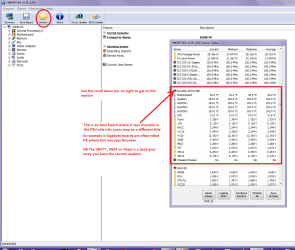
https://www.hwinfo.com/download.php < download the right bit version and close the right hand window select Sensors and scroll down to the power section where you will see what the volts are doing see my pic. In my pic the section (Nuvoton) with VBATT as a dead give away you are in the section for the rail voltages. There are other section titles and one that pops up often is ITE (sometimes the usual one for Gigabyte boards)


Now the voltage on the different rails have to be within 5% =+/- of what is required or the machine will not work properly if at all.


Limits +/- (minimum - correct - maximum)

12v1 = 11.4 - 12 - 12.6v

12v2 = 11.4 - 12- 12.6v

5v = 4.75 – 5 - 5.25v

3.3v = 3.135 – 3 – 3.465v

-12v = -10.80 - -12 - -13.20v

+5VSB = 4.75 – 5 - 5.25v

The Power good signal voltage at pin 8 on the 24 pin plug (grey cable) should be the same as the 5v rail reading/s

See this for the rail voltage info


http://www.tomshardware.com/reviews/power-supply-specifications-atx-reference,3061.html (Section 2.)


The original right hand window shows the machine running and is handy for that but for looking at the components in some detail close it and use the main left hand side panel


FOR OTHER COMPONENTS


PART B:


Open each small square with + in it on the section the components are in and then click on the individual component/s (it will highlight in blue) - in the right hand side will appear all sorts of details including brands speeds and other essential info that particular device. See pic for example.

USE PART A: for the PSU test.


Attachments

  • HW INFO DESKTOP PSU.PNG
    HW INFO DESKTOP PSU.PNG
    51.3 KB · Views: 1

My Computer My Computer

At a glance

Desk1 7 Home Prem / Desk2 10 Pro / Main lap A...Desk1 i5 3750K / Laptop i7 GTX 860M / Desk2 i...Desk1 8GB (1866) / Desk2 16GB (1333) / Laptop...Desk 1& 2NVidia GTX 650 & Laptops on board Intel
Computer type
PC/Desktop
Computer Manufacturer/Model Number
Own build (new) Desk1 / Asus ROG Win 7 / Desk2 1st build
OS
Desk1 7 Home Prem / Desk2 10 Pro / Main lap Asus ROG 10 Pro 2 laptop Toshiba 7 Pro Asus P2520 7 & 10
CPU
Desk1 i5 3750K / Laptop i7 GTX 860M / Desk2 i5 2500
Motherboard
Desk1 Asus P877-V / Desk2 Gigabyte H67 UD3H / Laptop ?
Memory
Desk1 8GB (1866) / Desk2 16GB (1333) / Laptop 8Gb DDR3
Graphics Card(s)
Desk 1& 2NVidia GTX 650 & Laptops on board Intel
Sound Card
Desk 1 & 2 -XONAR DG Realtek High Def audio Laptop
Monitor(s) Displays
Desk 1 Benq HD 2450 / Desk2 Philips 24" / Laptop 17.5"
Screen Resolution
1920x1080 D1 & D2 & Laptop 1
Hard Drives
Desk1 Samsung 120GB 830 SSD
Asus ROG 256GB 850 Pro SSD
Desk2 Samsung 840 256 SSD
Toshiba 120GB EVO
PSU
Desk 1 Corsair HX 1050/ Laptop ? / Desk 2 Corsair HX 650
Case
Desk 1 Cooler HAF XM ? Toshiba laptop / Desk2 Coolermaster
Cooling
Fans on all Desk1 -2 Desk2 - all Coolermasters 5 Laptop ?
Keyboard
Desk 1 MS Sidewinder X6 Desk 2 MS Sidewinder X 4
Mouse
Desk 1&2 - Gigabyte MS 900 gamer - laptop - Logitec wireless
Internet Speed
ADSL2+
Other Info
One other Desktop (tester) and spare Toshba laptop both with SSD's
Running Kaspersky 2016 ISS on all machines config'd identically
Logitec audio stereo systems on each machine (x3)
Canon MG5250MFC
Router/modem TP-Link running WPA2SK
Thanks for all the great ideas, but like I said, my machine doesn't even get through POST i.e. I don't even get to the BIOS screen anymore. It was on rare occasion getting through POST a few days ago, but now it won't even do that, period. Everything looks like it's starting to initialize (lights on certain devices turn off then on, HDD light blinks in a specific sequence) but I never get the BIOS splash screen on the monitor.

Devon
 

My Computer My Computer

At a glance

Windows 7 Pro 64bit
Computer type
PC/Desktop
OS
Windows 7 Pro 64bit
Yes, it can be the PS. It can also be a lot of other problems. (bad CPU, Memory, Chipset etc).
Did you overclock?
Do you have a case speaker attached to the MB? If you have, do you hear a POST beep or a more than one?
 

My Computers My Computers

  • At a glance

    Windows 7 HP 64i5 6600K - 800MHz to 4200MHz4+4G GSkill DDR4 3000IG - Intel 530
    Computer type
    PC/Desktop
    Computer Manufacturer/Model Number
    custom build
    OS
    Windows 7 HP 64
    CPU
    i5 6600K - 800MHz to 4200MHz
    Motherboard
    GA-Z170-HD3P
    Memory
    4+4G GSkill DDR4 3000
    Graphics Card(s)
    IG - Intel 530
    Monitor(s) Displays
    Samsung 226BW
    Screen Resolution
    1680x1050
    Hard Drives
    (1) -1 SM951 – 128GB M.2 AHCI PCIe SSD drive for Windows 7 and Lubuntu
    (2) -1 WD SATA 3 - 1T for Data
    (3) -1 WD SATA 3 - 1T for backup
    PSU
    Thermaltake 450W TR2 gold
    Keyboard
    Old and good Chicony mechanical keyboard
    Mouse
    Logitech mX performance - 9 buttons (had to disable some)
    Internet Speed
    500Mb/s
    Browser
    Firefox 64
    Other Info
    TinyWall firewall
  • At a glance

    Windows 7 Proi7-4500U 800MHz to 3.0GHz(4+4)G DDR3 1600IG intel 4400 + NVIDIA GeForce GT 745M
    Computer type
    Laptop
    System Manufacturer/Model Number
    Asus Q550LF
    OS
    Windows 7 Pro
    CPU
    i7-4500U 800MHz to 3.0GHz
    Motherboard
    Asus Q550LF
    Memory
    (4+4)G DDR3 1600
    Graphics Card(s)
    IG intel 4400 + NVIDIA GeForce GT 745M
    Sound Card
    Realtek
    Monitor(s) Displays
    LG Display LP156WF4-SPH1
    Screen Resolution
    1920 x 1080
    Hard Drives
    BX500 120G SSD for Windows and programs +
    1T HDD for data
    Internet Speed
    500 Mb/s
    Browser
    Firefox
    Other Info
    TinyWall firewall
Yes, it can be the PS. It can also be a lot of other problems. (bad CPU, Memory, Chipset etc).
Did you overclock?
Do you have a case speaker attached to the MB? If you have, do you hear a POST beep or a more than one?

Normally when I build a PC, I do hook up the speaker. I'd have to double check the mobo to see though. I don't hear any beeps, but I don't hear any beeps that I recall when it worked fine. So maybe it's not hooked up. With it giving all the physical signs that it's going to go to video and show the BIOS screen, but it doesn't, it could be multiple things still. Ugh, wish this one was easier.

Devon
 

My Computer My Computer

At a glance

Windows 7 Pro 64bit
Computer type
PC/Desktop
OS
Windows 7 Pro 64bit
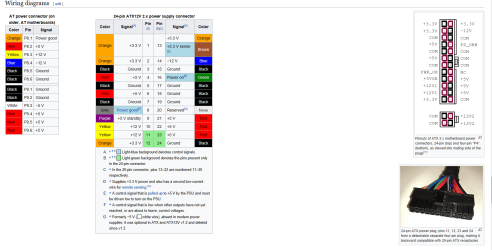
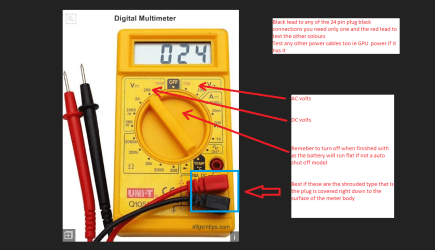
Hmm as Megahertz says mate you should be getting a single beep as the RAM is checked now as you cannot check the PSU by software I would be doing it manually with a digital multi meter see pic/s I take it you have power LEDs on the board that light up when you plug in the mains power??

Anyway the meters are very cheap these days and will give you a reading of the rail voltages these should all be within 5% + or - of the required voltage any outside of that range will cause either the macine not to boot or function at all. See this
Limits +/- (minimum - correct - maximum)
12v1 = 11.4 - 12 - 12.6v
12v2 = 11.4 - 12- 12.6v
5v = 4.75 – 5 - 5.25v
3.3v = 3.135 – 3 – 3.465v
-12v = -10.80 - -12 - -13.20v
+5VSB = 4.75 – 5 - 5.25v
The Power good signal voltage at pin 8 on the 24 pin plug (grey cable) should be the same as the 5v rail reading/s
See this as well https://en.wikipedia.org/wiki/Power_supply_unit_(computer)
 

Attachments

  • PSU PIC.PNG
    PSU PIC.PNG
    79.9 KB · Views: 1
  • DIG METER.PNG
    DIG METER.PNG
    122.6 KB · Views: 1

My Computer My Computer

At a glance

Desk1 7 Home Prem / Desk2 10 Pro / Main lap A...Desk1 i5 3750K / Laptop i7 GTX 860M / Desk2 i...Desk1 8GB (1866) / Desk2 16GB (1333) / Laptop...Desk 1& 2NVidia GTX 650 & Laptops on board Intel
Computer type
PC/Desktop
Computer Manufacturer/Model Number
Own build (new) Desk1 / Asus ROG Win 7 / Desk2 1st build
OS
Desk1 7 Home Prem / Desk2 10 Pro / Main lap Asus ROG 10 Pro 2 laptop Toshiba 7 Pro Asus P2520 7 & 10
CPU
Desk1 i5 3750K / Laptop i7 GTX 860M / Desk2 i5 2500
Motherboard
Desk1 Asus P877-V / Desk2 Gigabyte H67 UD3H / Laptop ?
Memory
Desk1 8GB (1866) / Desk2 16GB (1333) / Laptop 8Gb DDR3
Graphics Card(s)
Desk 1& 2NVidia GTX 650 & Laptops on board Intel
Sound Card
Desk 1 & 2 -XONAR DG Realtek High Def audio Laptop
Monitor(s) Displays
Desk 1 Benq HD 2450 / Desk2 Philips 24" / Laptop 17.5"
Screen Resolution
1920x1080 D1 & D2 & Laptop 1
Hard Drives
Desk1 Samsung 120GB 830 SSD
Asus ROG 256GB 850 Pro SSD
Desk2 Samsung 840 256 SSD
Toshiba 120GB EVO
PSU
Desk 1 Corsair HX 1050/ Laptop ? / Desk 2 Corsair HX 650
Case
Desk 1 Cooler HAF XM ? Toshiba laptop / Desk2 Coolermaster
Cooling
Fans on all Desk1 -2 Desk2 - all Coolermasters 5 Laptop ?
Keyboard
Desk 1 MS Sidewinder X6 Desk 2 MS Sidewinder X 4
Mouse
Desk 1&2 - Gigabyte MS 900 gamer - laptop - Logitec wireless
Internet Speed
ADSL2+
Other Info
One other Desktop (tester) and spare Toshba laptop both with SSD's
Running Kaspersky 2016 ISS on all machines config'd identically
Logitec audio stereo systems on each machine (x3)
Canon MG5250MFC
Router/modem TP-Link running WPA2SK
Update - Replaced the PSU, no dice. Put the old PSU in, it posted twice, and now won't post again. I will have a speaker with harness in the mail tomorrow to see what the beep codes are (stupid Fractal Designs R4 cases are too cheap for speaker for whatever reason!)

Does anyone have a recommendation for a PCIe/PCI (both would be nice, but rather have PCIe at minimum) motherboard diagnostics card for POST/voltage testing? I see a lot on Amazon, but no idea what to trust, and some take 3 weeks to ship from China, which I'd rather not do.

Devon
 

My Computer My Computer

At a glance

Windows 7 Pro 64bit
Computer type
PC/Desktop
OS
Windows 7 Pro 64bit
Ok, so I've done a bunch more stuff now.

Put back in old power supply (new power supply went to another machine I was planning to replace it in, and that machine works fine with the new PSU, so new PSU is good.)
Installed a speaker so I could hear the beep codes.
Getting a 1 long 3 short. According to Asus, that's video.
Install a (I believe) EVGA 210.
Now get 1 long 3 short, and one trailing short beep. Sometimes it's almost directly after the third, sometimes it delays multiple seconds, then does the single beep. That forth beep sounds slightly different than the 3 short beeps, but not at long as the long beep.
Cleared CMOS. Took longer to boot as expected, one long, three short, one short again.
Pulled video card, put it back in old system I just pulled it from. Works fine.
Boot system again, back to one long, three short.
Pulled both 8 gig sticks. One long, 2 short. Just as I expected.
Put one stick back in, 1 long, three short. (DIMM A1 slot)
Pull one stick, put in other stick in DIMM A1 slot. 1 long, 3 short.
Swap order of original sticks, 1 long, 3 short.
Put in video card into other x16 slot, just to make sure there wasn't a PCIe slot requirement. One long 3 short, 1 short like before.
Pulled video card back out again, still on 1 long, 3 short.

What I need to figure out is what the heck is the beep code when a video card is installed in the PC with 1 long, 3 short, then 1 short? Any ideas? Any other ideas? Diagnostics?

Devon
 

My Computer My Computer

At a glance

Windows 7 Pro 64bit
Computer type
PC/Desktop
OS
Windows 7 Pro 64bit

My Computers My Computers

  • At a glance

    Windows 7 HP 64i5 6600K - 800MHz to 4200MHz4+4G GSkill DDR4 3000IG - Intel 530
    Computer type
    PC/Desktop
    Computer Manufacturer/Model Number
    custom build
    OS
    Windows 7 HP 64
    CPU
    i5 6600K - 800MHz to 4200MHz
    Motherboard
    GA-Z170-HD3P
    Memory
    4+4G GSkill DDR4 3000
    Graphics Card(s)
    IG - Intel 530
    Monitor(s) Displays
    Samsung 226BW
    Screen Resolution
    1680x1050
    Hard Drives
    (1) -1 SM951 – 128GB M.2 AHCI PCIe SSD drive for Windows 7 and Lubuntu
    (2) -1 WD SATA 3 - 1T for Data
    (3) -1 WD SATA 3 - 1T for backup
    PSU
    Thermaltake 450W TR2 gold
    Keyboard
    Old and good Chicony mechanical keyboard
    Mouse
    Logitech mX performance - 9 buttons (had to disable some)
    Internet Speed
    500Mb/s
    Browser
    Firefox 64
    Other Info
    TinyWall firewall
  • At a glance

    Windows 7 Proi7-4500U 800MHz to 3.0GHz(4+4)G DDR3 1600IG intel 4400 + NVIDIA GeForce GT 745M
    Computer type
    Laptop
    System Manufacturer/Model Number
    Asus Q550LF
    OS
    Windows 7 Pro
    CPU
    i7-4500U 800MHz to 3.0GHz
    Motherboard
    Asus Q550LF
    Memory
    (4+4)G DDR3 1600
    Graphics Card(s)
    IG intel 4400 + NVIDIA GeForce GT 745M
    Sound Card
    Realtek
    Monitor(s) Displays
    LG Display LP156WF4-SPH1
    Screen Resolution
    1920 x 1080
    Hard Drives
    BX500 120G SSD for Windows and programs +
    1T HDD for data
    Internet Speed
    500 Mb/s
    Browser
    Firefox
    Other Info
    TinyWall firewall
Back
Top