Macrium Boot CD wont work.

77273GU

New member
Power User
Local time
4:25 PM
Messages
62
Hello,
I tried free Macrium the other night. Followed the tutorial by whs. Thanks whs.

I'm having a problem with the boot CD. I ran a test- Image and restore as explained in the tutorial.

Heres the problem. I select the CD as the boot device, put the boot CD in, hit enter, it loads to the 1st screen, I hit next and thats it. It just stops. Heres where it freezes.

Image1.gif

I tried it with the regular Linux boot CD and the compatibility mode CD. No Luck. Ive also tried burning to a CD-R, CD-RW and a DVD+R. Not sure what to try next.

Thanks
 

My Computer

Computer type
PC/Desktop
Computer Manufacturer/Model Number
Born on date-10-7-2011
OS
Windows 7 Home Premium 64bit
CPU
Intel Core i5-2500 K
Motherboard
Asus P8Z68-V Bios 0902
Memory
8GB J Skill- F312800CLD-8GBXM
Graphics Card(s)
Saphire 6870 & Intel HD 3000
Sound Card
Realtek HD Audio
Monitor(s) Displays
Asus VE258Q
Screen Resolution
1920 X 1080
Hard Drives
64g Crucial M4 SSD, 750g WD Caviar Black
PSU
Corsair TX 650 V2
Case
Corsair Carbide 400R
Cooling
Corsair H60
Keyboard
CM Storm Trigger Cherry Blues
Mouse
Logitech G500, G700
Hmm, I am sorry you are having this problem. This is the first time I see this particular issue. There is obviously something wrong with the CD or the optical drive. The only thing I can suggest is to burn another CD - but on a different system. Maybe your optical drive has a problem - which could be with the write, but possibly also with the read.
 

My Computer

Computer Manufacturer/Model Number
HP, Dell, Gateway, Toshiba - 4 laptops and 2 desktops
OS
Vista, Windows7, Mint Mate, Zorin, Windows 8
CPU
from 1.6GHz Duo to i7
Monitor(s) Displays
2x HP w2207
Hard Drives
5x HDD, 7x SSD, 12x Externals
Keyboard
with trackball - no mices
Mouse
Trackball mice
Internet Speed
DSL 6000
Hey whs, your video tutorial was a great help.

Ill try to burn it on another pc. The computer I'm using now is new so I haven't used the drive much. I have installed programs, played CDs, BDs and burned music without a problem.
 

My Computer

Computer type
PC/Desktop
Computer Manufacturer/Model Number
Born on date-10-7-2011
OS
Windows 7 Home Premium 64bit
CPU
Intel Core i5-2500 K
Motherboard
Asus P8Z68-V Bios 0902
Memory
8GB J Skill- F312800CLD-8GBXM
Graphics Card(s)
Saphire 6870 & Intel HD 3000
Sound Card
Realtek HD Audio
Monitor(s) Displays
Asus VE258Q
Screen Resolution
1920 X 1080
Hard Drives
64g Crucial M4 SSD, 750g WD Caviar Black
PSU
Corsair TX 650 V2
Case
Corsair Carbide 400R
Cooling
Corsair H60
Keyboard
CM Storm Trigger Cherry Blues
Mouse
Logitech G500, G700
Let us know how you make out. This is a strange problem. The recovery disk is a mini Linux with the recovery program. I cannot see what could really go wrong. And the fact that it started initially says that there does not seem to be a general device problem.
 

My Computer

Computer Manufacturer/Model Number
HP, Dell, Gateway, Toshiba - 4 laptops and 2 desktops
OS
Vista, Windows7, Mint Mate, Zorin, Windows 8
CPU
from 1.6GHz Duo to i7
Monitor(s) Displays
2x HP w2207
Hard Drives
5x HDD, 7x SSD, 12x Externals
Keyboard
with trackball - no mices
Mouse
Trackball mice
Internet Speed
DSL 6000
I downloaded Macrium on an XP computer and burned the CD. Same result.:(

I also tried a system repair disk I made and it loaded OK. I hit escape at the 1st screen because I haven't used one before and didn't want to go any further. I just wanted to see if it would load.

Maybe Ill try to run a test using the XP computer and see if the CD will work on it.
The other computer is Dell. Do you know what key to hit to get to the boot menu?
 

My Computer

Computer type
PC/Desktop
Computer Manufacturer/Model Number
Born on date-10-7-2011
OS
Windows 7 Home Premium 64bit
CPU
Intel Core i5-2500 K
Motherboard
Asus P8Z68-V Bios 0902
Memory
8GB J Skill- F312800CLD-8GBXM
Graphics Card(s)
Saphire 6870 & Intel HD 3000
Sound Card
Realtek HD Audio
Monitor(s) Displays
Asus VE258Q
Screen Resolution
1920 X 1080
Hard Drives
64g Crucial M4 SSD, 750g WD Caviar Black
PSU
Corsair TX 650 V2
Case
Corsair Carbide 400R
Cooling
Corsair H60
Keyboard
CM Storm Trigger Cherry Blues
Mouse
Logitech G500, G700
I suggest you download Hirens Boot CD ver 14.0. It has a Macrium pe capability as part of its mini XP environment. I've tested it and it works.
This is not the same as the linux boot environment you are using. The linux boot environment generally works and I use it.
 

My Computer

Computer type
PC/Desktop
Computer Manufacturer/Model Number
Own build
OS
Windows 7x64 Home Premium SP1
CPU
Intel i7 2600k
Motherboard
ASUS P8Z68 Deluxe
Memory
G.Skill Ripjaws (DDR3-1600) 2x4GB
Graphics Card(s)
Nvidia GeForce GTS 450; Intel HD Graphics 3000(GT2+)
Monitor(s) Displays
Dell Ultrasharp IPS panel U2311H, Samsung SyncMaster P2350
Screen Resolution
1920x1080
Hard Drives
Samsung 850 Pro SSD 256GB, Samsung SSD 840 120GB, Seagates 1TB Barracuda ST31000528AS x2
PSU
Seasonic M12II 520W
Case
Lian Li Lancool PC-K60
Cooling
Case: 1x120mm, 3x140mm CPU: Hyper 212+
Keyboard
Logitech MK520 (wireless)
Mouse
Logitech MK520
Internet Speed
6-7 Mbps
Antivirus
Norton Security Premium, Malwarebytes on 2 (MSE on 3rd PC)
Browser
FireFox
Other Info
Audio: Logitech Z523 2.1
I just checked out the Hirens site. Theres alot of programs in that download. How would I use it with Macrium?

I know to download it and burn it to CD. After that what program do I use to boot from or what would my next steps be?

Thanks
 

My Computer

Computer type
PC/Desktop
Computer Manufacturer/Model Number
Born on date-10-7-2011
OS
Windows 7 Home Premium 64bit
CPU
Intel Core i5-2500 K
Motherboard
Asus P8Z68-V Bios 0902
Memory
8GB J Skill- F312800CLD-8GBXM
Graphics Card(s)
Saphire 6870 & Intel HD 3000
Sound Card
Realtek HD Audio
Monitor(s) Displays
Asus VE258Q
Screen Resolution
1920 X 1080
Hard Drives
64g Crucial M4 SSD, 750g WD Caviar Black
PSU
Corsair TX 650 V2
Case
Corsair Carbide 400R
Cooling
Corsair H60
Keyboard
CM Storm Trigger Cherry Blues
Mouse
Logitech G500, G700
When you boot Hirens select the mini XP environment option. XP will load.You can select screen resolution but let's forget that for now.
You should find a list of programs to run. There should be an icon in the tool tray. Select one that looks like backup (I forget the details) for further options. One will be Macrium and select it. It then looks like the desktop Macrium environment.
As with any live boot environment partition letters change.
 

My Computer

Computer type
PC/Desktop
Computer Manufacturer/Model Number
Own build
OS
Windows 7x64 Home Premium SP1
CPU
Intel i7 2600k
Motherboard
ASUS P8Z68 Deluxe
Memory
G.Skill Ripjaws (DDR3-1600) 2x4GB
Graphics Card(s)
Nvidia GeForce GTS 450; Intel HD Graphics 3000(GT2+)
Monitor(s) Displays
Dell Ultrasharp IPS panel U2311H, Samsung SyncMaster P2350
Screen Resolution
1920x1080
Hard Drives
Samsung 850 Pro SSD 256GB, Samsung SSD 840 120GB, Seagates 1TB Barracuda ST31000528AS x2
PSU
Seasonic M12II 520W
Case
Lian Li Lancool PC-K60
Cooling
Case: 1x120mm, 3x140mm CPU: Hyper 212+
Keyboard
Logitech MK520 (wireless)
Mouse
Logitech MK520
Internet Speed
6-7 Mbps
Antivirus
Norton Security Premium, Malwarebytes on 2 (MSE on 3rd PC)
Browser
FireFox
Other Info
Audio: Logitech Z523 2.1
Tried the Hirens CD and it worked. :D I was able to restore the test image I made.

Wish I knew why the Linux CD didn't work.:confused:

Thanks for the help.
 

My Computer

Computer type
PC/Desktop
Computer Manufacturer/Model Number
Born on date-10-7-2011
OS
Windows 7 Home Premium 64bit
CPU
Intel Core i5-2500 K
Motherboard
Asus P8Z68-V Bios 0902
Memory
8GB J Skill- F312800CLD-8GBXM
Graphics Card(s)
Saphire 6870 & Intel HD 3000
Sound Card
Realtek HD Audio
Monitor(s) Displays
Asus VE258Q
Screen Resolution
1920 X 1080
Hard Drives
64g Crucial M4 SSD, 750g WD Caviar Black
PSU
Corsair TX 650 V2
Case
Corsair Carbide 400R
Cooling
Corsair H60
Keyboard
CM Storm Trigger Cherry Blues
Mouse
Logitech G500, G700
Last edited:

My Computer

Computer type
Laptop
Computer Manufacturer/Model Number
Hewlett-Packard/G62-107SA Notebook
OS
Microsoft Windows 7 Home Premium 64-bit Service Pack 1
CPU
Intel(R) Core(TM) i3 CPU M 330 @ 2.13GHz
Motherboard
Hewlett-Packard 1425
Memory
8 GB DDR3
Graphics Card(s)
Intel(R) HD Graphics
Sound Card
Realtek High Definition Audio
Monitor(s) Displays
Builtin
Screen Resolution
1366 x 768 x 32 bits (4294967296 colors) @ 60 Hz
Hard Drives
250 GB SATA Hard Disk Drive 7200 rpm
2TB Seagate GoFlex USB 2 Drive
1TB Iomega Prestige USB 2 Drive
1.5TB Iomega Prestige USB 2 Drive (Samsung)
2TB WD MyBook Live NAS.
Mouse
Logitech Anywhere MX
Internet Speed
152 Mbs download 10 Mbs upload
Antivirus
Norton 360
Browser
Chrome
Yes you can put most of your utilities on a single 4GB USB including Hirens. I find it very easy to update to to the latest version.
 

My Computer

Computer type
PC/Desktop
Computer Manufacturer/Model Number
Own build
OS
Windows 7x64 Home Premium SP1
CPU
Intel i7 2600k
Motherboard
ASUS P8Z68 Deluxe
Memory
G.Skill Ripjaws (DDR3-1600) 2x4GB
Graphics Card(s)
Nvidia GeForce GTS 450; Intel HD Graphics 3000(GT2+)
Monitor(s) Displays
Dell Ultrasharp IPS panel U2311H, Samsung SyncMaster P2350
Screen Resolution
1920x1080
Hard Drives
Samsung 850 Pro SSD 256GB, Samsung SSD 840 120GB, Seagates 1TB Barracuda ST31000528AS x2
PSU
Seasonic M12II 520W
Case
Lian Li Lancool PC-K60
Cooling
Case: 1x120mm, 3x140mm CPU: Hyper 212+
Keyboard
Logitech MK520 (wireless)
Mouse
Logitech MK520
Internet Speed
6-7 Mbps
Antivirus
Norton Security Premium, Malwarebytes on 2 (MSE on 3rd PC)
Browser
FireFox
Other Info
Audio: Logitech Z523 2.1
Yes you can put most of your utilities on a single 4GB USB including Hirens. I find it very easy to update to to the latest version.

If you are careful you can also put the Win repair disk as an ISO. It does offer to mend the mbr when you boot it but if you ignore that it works just fine.
 

My Computer

Computer type
Laptop
Computer Manufacturer/Model Number
Hewlett-Packard/G62-107SA Notebook
OS
Microsoft Windows 7 Home Premium 64-bit Service Pack 1
CPU
Intel(R) Core(TM) i3 CPU M 330 @ 2.13GHz
Motherboard
Hewlett-Packard 1425
Memory
8 GB DDR3
Graphics Card(s)
Intel(R) HD Graphics
Sound Card
Realtek High Definition Audio
Monitor(s) Displays
Builtin
Screen Resolution
1366 x 768 x 32 bits (4294967296 colors) @ 60 Hz
Hard Drives
250 GB SATA Hard Disk Drive 7200 rpm
2TB Seagate GoFlex USB 2 Drive
1TB Iomega Prestige USB 2 Drive
1.5TB Iomega Prestige USB 2 Drive (Samsung)
2TB WD MyBook Live NAS.
Mouse
Logitech Anywhere MX
Internet Speed
152 Mbs download 10 Mbs upload
Antivirus
Norton 360
Browser
Chrome
Yes you can put most of your utilities on a single 4GB USB including Hirens. I find it very easy to update to to the latest version.

If you are careful you can also put the Win repair disk as an ISO. It does offer to mend the mbr when you boot it but if you ignore that it works just fine.
Yes I always run the Repair disk ISO from the same USB but find you need to include the Boot folder.
 

My Computer

Computer type
PC/Desktop
Computer Manufacturer/Model Number
Own build
OS
Windows 7x64 Home Premium SP1
CPU
Intel i7 2600k
Motherboard
ASUS P8Z68 Deluxe
Memory
G.Skill Ripjaws (DDR3-1600) 2x4GB
Graphics Card(s)
Nvidia GeForce GTS 450; Intel HD Graphics 3000(GT2+)
Monitor(s) Displays
Dell Ultrasharp IPS panel U2311H, Samsung SyncMaster P2350
Screen Resolution
1920x1080
Hard Drives
Samsung 850 Pro SSD 256GB, Samsung SSD 840 120GB, Seagates 1TB Barracuda ST31000528AS x2
PSU
Seasonic M12II 520W
Case
Lian Li Lancool PC-K60
Cooling
Case: 1x120mm, 3x140mm CPU: Hyper 212+
Keyboard
Logitech MK520 (wireless)
Mouse
Logitech MK520
Internet Speed
6-7 Mbps
Antivirus
Norton Security Premium, Malwarebytes on 2 (MSE on 3rd PC)
Browser
FireFox
Other Info
Audio: Logitech Z523 2.1
Yes you can put most of your utilities on a single 4GB USB including Hirens. I find it very easy to update to to the latest version.

If you are careful you can also put the Win repair disk as an ISO. It does offer to mend the mbr when you boot it but if you ignore that it works just fine.
Yes I always run the Repair disk ISO from the same USB but find you need to include the Boot folder.

Include which boot folder where?
 

My Computer

Computer type
Laptop
Computer Manufacturer/Model Number
Hewlett-Packard/G62-107SA Notebook
OS
Microsoft Windows 7 Home Premium 64-bit Service Pack 1
CPU
Intel(R) Core(TM) i3 CPU M 330 @ 2.13GHz
Motherboard
Hewlett-Packard 1425
Memory
8 GB DDR3
Graphics Card(s)
Intel(R) HD Graphics
Sound Card
Realtek High Definition Audio
Monitor(s) Displays
Builtin
Screen Resolution
1366 x 768 x 32 bits (4294967296 colors) @ 60 Hz
Hard Drives
250 GB SATA Hard Disk Drive 7200 rpm
2TB Seagate GoFlex USB 2 Drive
1TB Iomega Prestige USB 2 Drive
1.5TB Iomega Prestige USB 2 Drive (Samsung)
2TB WD MyBook Live NAS.
Mouse
Logitech Anywhere MX
Internet Speed
152 Mbs download 10 Mbs upload
Antivirus
Norton 360
Browser
Chrome
The boot folder [Boot] from the system repair dvd the ISO was made from. Stored in the root of the USB.
Obviously you haven't needed to include it?
 

My Computer

Computer type
PC/Desktop
Computer Manufacturer/Model Number
Own build
OS
Windows 7x64 Home Premium SP1
CPU
Intel i7 2600k
Motherboard
ASUS P8Z68 Deluxe
Memory
G.Skill Ripjaws (DDR3-1600) 2x4GB
Graphics Card(s)
Nvidia GeForce GTS 450; Intel HD Graphics 3000(GT2+)
Monitor(s) Displays
Dell Ultrasharp IPS panel U2311H, Samsung SyncMaster P2350
Screen Resolution
1920x1080
Hard Drives
Samsung 850 Pro SSD 256GB, Samsung SSD 840 120GB, Seagates 1TB Barracuda ST31000528AS x2
PSU
Seasonic M12II 520W
Case
Lian Li Lancool PC-K60
Cooling
Case: 1x120mm, 3x140mm CPU: Hyper 212+
Keyboard
Logitech MK520 (wireless)
Mouse
Logitech MK520
Internet Speed
6-7 Mbps
Antivirus
Norton Security Premium, Malwarebytes on 2 (MSE on 3rd PC)
Browser
FireFox
Other Info
Audio: Logitech Z523 2.1
The boot folder [Boot] from the system repair dvd the ISO was made from. Stored in the root of the USB.
Obviously you haven't needed to include it?

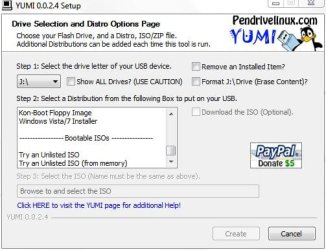
No you just use the try an unlisted iso in Yumi. It loads grub4dos to boot the iso. You need to make sure the iso name doesn't contain spaces or it doesn't boot.

Capture.JPG
 

My Computer

Computer type
Laptop
Computer Manufacturer/Model Number
Hewlett-Packard/G62-107SA Notebook
OS
Microsoft Windows 7 Home Premium 64-bit Service Pack 1
CPU
Intel(R) Core(TM) i3 CPU M 330 @ 2.13GHz
Motherboard
Hewlett-Packard 1425
Memory
8 GB DDR3
Graphics Card(s)
Intel(R) HD Graphics
Sound Card
Realtek High Definition Audio
Monitor(s) Displays
Builtin
Screen Resolution
1366 x 768 x 32 bits (4294967296 colors) @ 60 Hz
Hard Drives
250 GB SATA Hard Disk Drive 7200 rpm
2TB Seagate GoFlex USB 2 Drive
1TB Iomega Prestige USB 2 Drive
1.5TB Iomega Prestige USB 2 Drive (Samsung)
2TB WD MyBook Live NAS.
Mouse
Logitech Anywhere MX
Internet Speed
152 Mbs download 10 Mbs upload
Antivirus
Norton 360
Browser
Chrome
The boot folder [Boot] from the system repair dvd the ISO was made from. Stored in the root of the USB.
Obviously you haven't needed to include it?

No you just use the try an unlisted iso in Yumi. It loads grub4dos to boot the iso. You need to make sure the iso name doesn't contain spaces or it doesn't boot.

View attachment 164628

Ah I see how you did it. You loaded the Repair ISO as a Windows 7 Installation ISO. That works better but you have to do it before you load the Hirens otherwise YUMI complains it doesn't have enough space. You can edit the menus to give it the correct name afterwards. There is also a reported problem with any Linux distros on the same stick but I have just tried Puppy Linux and that seems to work ok.
 

My Computer

Computer type
Laptop
Computer Manufacturer/Model Number
Hewlett-Packard/G62-107SA Notebook
OS
Microsoft Windows 7 Home Premium 64-bit Service Pack 1
CPU
Intel(R) Core(TM) i3 CPU M 330 @ 2.13GHz
Motherboard
Hewlett-Packard 1425
Memory
8 GB DDR3
Graphics Card(s)
Intel(R) HD Graphics
Sound Card
Realtek High Definition Audio
Monitor(s) Displays
Builtin
Screen Resolution
1366 x 768 x 32 bits (4294967296 colors) @ 60 Hz
Hard Drives
250 GB SATA Hard Disk Drive 7200 rpm
2TB Seagate GoFlex USB 2 Drive
1TB Iomega Prestige USB 2 Drive
1.5TB Iomega Prestige USB 2 Drive (Samsung)
2TB WD MyBook Live NAS.
Mouse
Logitech Anywhere MX
Internet Speed
152 Mbs download 10 Mbs upload
Antivirus
Norton 360
Browser
Chrome
My Windows system repair is the first option in the list.
 

My Computer

Computer type
PC/Desktop
Computer Manufacturer/Model Number
Own build
OS
Windows 7x64 Home Premium SP1
CPU
Intel i7 2600k
Motherboard
ASUS P8Z68 Deluxe
Memory
G.Skill Ripjaws (DDR3-1600) 2x4GB
Graphics Card(s)
Nvidia GeForce GTS 450; Intel HD Graphics 3000(GT2+)
Monitor(s) Displays
Dell Ultrasharp IPS panel U2311H, Samsung SyncMaster P2350
Screen Resolution
1920x1080
Hard Drives
Samsung 850 Pro SSD 256GB, Samsung SSD 840 120GB, Seagates 1TB Barracuda ST31000528AS x2
PSU
Seasonic M12II 520W
Case
Lian Li Lancool PC-K60
Cooling
Case: 1x120mm, 3x140mm CPU: Hyper 212+
Keyboard
Logitech MK520 (wireless)
Mouse
Logitech MK520
Internet Speed
6-7 Mbps
Antivirus
Norton Security Premium, Malwarebytes on 2 (MSE on 3rd PC)
Browser
FireFox
Other Info
Audio: Logitech Z523 2.1
I suggest you download Hirens Boot CD ver 14.0. It has a Macrium pe capability as part of its mini XP environment. I've tested it and it works.
This is not the same as the linux boot environment you are using. The linux boot environment generally works and I use it.

Please excuse my intrusion on this thread.

Will this work to restore an image made with Macrium (free) on Windows 7? The issue I have is that the rescue CD I made from Macrium (free) does not see my WD external drive.
 

My Computer

Computer type
PC/Desktop
Computer Manufacturer/Model Number
1. HP p6733w Desktop 2. HP Envy 700-515xt Desktop
OS
1. Windows 7 Home Premium sp1 - 64bit 2. Windows 7 Pro sp1 - 64bit
CPU
1. AMD Phenom II x2 511 3.4GHz 2. Intel i7-4790 Quad 4.0GHz
Motherboard
1. N-Alvorix-RS880-uATX 2. Kaili2
Memory
1. 5 GB - DDR3 2. 8GB DDR3-1600MHz
Graphics Card(s)
Integrated 1. ATI Radeon 4200 2. Intel HD Graphics 4600
Sound Card
1. Realtek High Definition Audio 2. Realtek (Neutered Beats)
Monitor(s) Displays
1. Acer V193L 2. HP 2311 Series Wide LCD
Screen Resolution
1. 1280 x 1024 2. 1920 x 1080
Hard Drives
1. 750 GB - 7200 RPM SATA 2. 1TB 7200 RPM SATA
PSU
1. 250w 2. 300w
Cooling
Stock
Keyboard
Logitech USB keyboard
Mouse
Logitech USB optical mouse
Internet Speed
1.0 - 2.0 mbps
Antivirus
Eset Smart Security v9.0.349.0
Browser
Pale Moon
I suggest you download Hirens Boot CD ver 14.0. It has a Macrium pe capability as part of its mini XP environment. I've tested it and it works.
This is not the same as the linux boot environment you are using. The linux boot environment generally works and I use it.

Please excuse my intrusion on this thread.

Will this work to restore an image made with Macrium (free) on Windows 7? The issue I have is that the rescue CD I made from Macrium (free) does not see my WD external drive.

Yes it does. Macrium PE environments are forwards compatible. But I suggest you try it on a small test partition first. This tutorial will give you some ideas on how to do that. http://www.sevenforums.com/tutorials/73828-imaging-free-macrium.html?filter[2]=Backup%20Restore
 

My Computer

Computer type
Laptop
Computer Manufacturer/Model Number
Hewlett-Packard/G62-107SA Notebook
OS
Microsoft Windows 7 Home Premium 64-bit Service Pack 1
CPU
Intel(R) Core(TM) i3 CPU M 330 @ 2.13GHz
Motherboard
Hewlett-Packard 1425
Memory
8 GB DDR3
Graphics Card(s)
Intel(R) HD Graphics
Sound Card
Realtek High Definition Audio
Monitor(s) Displays
Builtin
Screen Resolution
1366 x 768 x 32 bits (4294967296 colors) @ 60 Hz
Hard Drives
250 GB SATA Hard Disk Drive 7200 rpm
2TB Seagate GoFlex USB 2 Drive
1TB Iomega Prestige USB 2 Drive
1.5TB Iomega Prestige USB 2 Drive (Samsung)
2TB WD MyBook Live NAS.
Mouse
Logitech Anywhere MX
Internet Speed
152 Mbs download 10 Mbs upload
Antivirus
Norton 360
Browser
Chrome
Back
Top