
Macrium, do I need Recovery disks to create OS image

bawldiggle

GrayGhost2 ret.
Pro User
VIP
Local time
7:27 PM
Messages
895
Location
Australia
I have created Recovery Disks of a new laptop ... Lenovo Win-7 x64 PRO.
- the Lenovo machine has not been used except to ...

  • register the OS with Microsft (online)
  • resized the C: partition to accomodate another partition D:
  • created the D: partition.

No other software has been installed on the laptop, just the factory installed OS.

Lenovo only allow a single shot at "getting" a copy of the recovery drive
- I have put the recovery disks (x3 ?) away for safe keeping and now I cannot find those :mad: :cry: disks.

Q1: Do I need the Recovery discs to create an image of the lenovo as it stands at the moment ?

Q2: What media is best to save images on ? What capacity media for the existing state of the Lenovo

Q3: does free Macrium verify the new image with existing state of the machine.
I plan on imaging just the existing registered OS in its smaller partition, and then (say) a weekly or Monthly image as backup.
Data is on an external HDD

I have been trawling through sevenforums.com tutes and threads for 3 days and am now drowning in information overload.
The Macrium website is very detailed and has left me floundering and confused.

I would appreciate some help, thank you :)
 

My Computer My Computer

At a glance

XP Pro (x86) | 7 HP (x86) & (x64) | 7 Pro (x64)
Computer type
PC/Desktop
Computer Manufacturer/Model Number
Toshiba, Lenovo (laptops) + 4 rigs
OS
XP Pro (x86) | 7 HP (x86) & (x64) | 7 Pro (x64)
My brain cells are wilting ... too many serves of birthday cake.
Took my own advise (my sig) and Wolfgangs tute Imaging with free Macrium is the first tute
 

My Computer My Computer

At a glance

XP Pro (x86) | 7 HP (x86) & (x64) | 7 Pro (x64)
Computer type
PC/Desktop
Computer Manufacturer/Model Number
Toshiba, Lenovo (laptops) + 4 rigs
OS
XP Pro (x86) | 7 HP (x86) & (x64) | 7 Pro (x64)
Were you able to use Macrium Reflect version 6 or anything similar to create a full image of your OS partition and a full image of your Data partition?
 

My Computer My Computer

At a glance

Windows 7 Professional 64-bitDesktop i5; Acers i5 & i7desktop 16GB; 1 Acer 8GB & 1 Acer 16GB
Computer type
PC/Desktop
Computer Manufacturer/Model Number
Antec desktop; Acer Aspire laptops
OS
Windows 7 Professional 64-bit
CPU
Desktop i5; Acers i5 & i7
Memory
desktop 16GB; 1 Acer 8GB & 1 Acer 16GB
Hard Drives
1TB split into 2 equal partitions [OS and data] usable by RJS
Internet Speed
AT&T DSL
Browser
FF, GChrome, msIE
Other Info
Windows 7 Firewall, Emsisoft AM/AV, MSE [scan-only], SpywareBlaster, Ruiware/BillP combine
I know nothing about imaging ... and have not created anything so far from my pristine Lenovo.
Before reading whs' tutorial this 2012 Toshiba crashed (overheating I think).
Ever have one of those days when everything goes wrong ?
I had to resurrect a stand-alone Win-XP rig out of mothballs, find XP SP-3 so that I could install VLC for XP (current VLC only supports XP sp3 and later) .... all to watch whs YouTube demo.

Downloaded the YT and now using the XP rig to watch the MP4 video.
... but before anything else I must clean the Toshiba before it fries.
Toshies are a nightmare to clean ... back off, keyboard out just to access the cooling system. :cry:
Lenovo is simple ... remove the back

[?] Can I create an image using portable/bootable Free Macrium ? (if it exists?
- I don't see the point in installing Macrium (Free or otherwise) just to make a very occassional image.
- and to include Macrium in the "raw" image

Data is/will be on an external HDD, and I prefer to sync files and folders to backup

[?] Do I need the Lenovo recovery media (that I created, and now cannot locate) to create an image ?

Thank you for dropping by, at least I don't feel alone.
 

My Computer My Computer

At a glance

XP Pro (x86) | 7 HP (x86) & (x64) | 7 Pro (x64)
Computer type
PC/Desktop
Computer Manufacturer/Model Number
Toshiba, Lenovo (laptops) + 4 rigs
OS
XP Pro (x86) | 7 HP (x86) & (x64) | 7 Pro (x64)
Forgive me for jumping in. It's been a few days since Roland replied and he's very knowledgeable when it comes to system images. As I understand things, the Lenovo recovery media will most likely return your computer to the exact condition it was in when you bought it. It won't have the most current operating system updates or any other files, folders, or data that you installed. It also won't have any personalizations you might have made like screen savers, sensitivity of keyboard, mouse, etc. The Lenovo recovery media disks should not be needed to create a system image.

I've found that for best results Macrium Reflect (or any of the imaging software) should be installed on your hard drive. When it comes time to make a system image, Macrium will be able to read (image) everything on the hard drive and then save it to a separate hard drive. It even images itself so if you ever have to restore that image your computer will be exactly like it was when the image was made. On my computers it takes less than 40 minutes to create a system image and about the same time to restore it. I've also found that external hard drives are relatively inexpensive these days. I use 1TB Seagates and 1TB Western Digitals. They both cost less than $50 on sale. Buy the largest capacity drive you can afford so you can store multiple images.

As far as I know system imaging software (whether Macrium, AOMEI, EaseUS Todo, Paragon, etc) asks you to create a system repair disk or a system recovery disk on a CD. This CD would be used if, for example, you couldn't start your computer the normal way. The CD is designed to let you boot up Windows - even if nothing else works - and provides you with several options for repairing your failing machine, including installing the system image you've previously made. I've also had best results by saving all system images to an external hard drive. If you save your images to the main hard drive (usually the C: drive) and if that drive fails completely and you have to replace it, you'll likely lose your images as well.

Again, my apologies for jumping in. Hopefully Roland or one of the other members will correct me if I've provided bad info.
 

My Computer My Computer

At a glance

Win 7 Pro 64-bitIntel i5 2.4 Ghz8GB DDR3Intel HD 3000
Computer type
Laptop
Computer Manufacturer/Model Number
Sony Vaio VPCEB47GM Laptop
OS
Win 7 Pro 64-bit
CPU
Intel i5 2.4 Ghz
Memory
8GB DDR3
Graphics Card(s)
Intel HD 3000
Sound Card
IDT High Definition
Monitor(s) Displays
15.6 WGXA Anti-Glare LED
Screen Resolution
1280x800
Hard Drives
640Gb 7200rpm
Antivirus
MSE
Browser
Opera (primary) with IE9 backup
"...Again, my apologies for jumping in. Hopefully Roland or one of the other members will correct me if I've provided bad info..." marsmimar -- I'm one of several who is glad you jumped in! Being at school, I cannot hang around sometimes. Your information is very thorough!
 

My Computer My Computer

At a glance

Windows 7 Professional 64-bitDesktop i5; Acers i5 & i7desktop 16GB; 1 Acer 8GB & 1 Acer 16GB
Computer type
PC/Desktop
Computer Manufacturer/Model Number
Antec desktop; Acer Aspire laptops
OS
Windows 7 Professional 64-bit
CPU
Desktop i5; Acers i5 & i7
Memory
desktop 16GB; 1 Acer 8GB & 1 Acer 16GB
Hard Drives
1TB split into 2 equal partitions [OS and data] usable by RJS
Internet Speed
AT&T DSL
Browser
FF, GChrome, msIE
Other Info
Windows 7 Firewall, Emsisoft AM/AV, MSE [scan-only], SpywareBlaster, Ruiware/BillP combine
Thank you both for your support,

I dont see the point in installing Macrium (Free version) to create an image of the C partition and include Macrium in the image file. ?
My Lenovo is unused and only has 64 bit Win7 PRO installed.

Is it possible to create an image from a portable ? or am I whistling in the wind ?

Thank you :)
 

My Computer My Computer

At a glance

XP Pro (x86) | 7 HP (x86) & (x64) | 7 Pro (x64)
Computer type
PC/Desktop
Computer Manufacturer/Model Number
Toshiba, Lenovo (laptops) + 4 rigs
OS
XP Pro (x86) | 7 HP (x86) & (x64) | 7 Pro (x64)
I don't consider myself an expert when it comes to creating system images so I went directly to the Macrium User Guide. It's in PDF format here:

http://updates.macrium.com/reflect/v6/user_guide/macrium_reflect_v6_user_guide.pdf

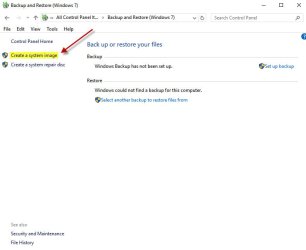
Starting on Page 37 they talk about "...how to install Macrium Reflect on an Internet connected PC using the Macrium Reflect download agent." To me (and it's very possible I'm wrong) this means Macrium is supposed to be installed on the hard drive. The only reference I saw to anything portable was the creation of rescue media on Page 7 which says, "...you can start your PC using Macrium Reflect rescue media on CD, DVD, or USB stick." Even Windows 7 own imaging tool is a part of the operating system and installed on the hard drive.

system image.jpg

Even if all you do is keep your Lenovo updated with the latest Microsoft / Windows Updates each month, a lot of folks have experienced catastrophic issues after updates are installed. Many people (myself included) have gotten into the habit of making two system images a month. One just before updates are installed and one a few days or a week after the updates and after verifying the computer is working as it should. Macrium takes up about 70MB on my hard drive so it has a very small footprint. (1000MB = 1GB.)

Again, I hope someone more knowledgeable than me pops in with additional info. My personal recommendation is to install Macrium on your Lenovo. :)
 

My Computer My Computer

At a glance

Win 7 Pro 64-bitIntel i5 2.4 Ghz8GB DDR3Intel HD 3000
Computer type
Laptop
Computer Manufacturer/Model Number
Sony Vaio VPCEB47GM Laptop
OS
Win 7 Pro 64-bit
CPU
Intel i5 2.4 Ghz
Memory
8GB DDR3
Graphics Card(s)
Intel HD 3000
Sound Card
IDT High Definition
Monitor(s) Displays
15.6 WGXA Anti-Glare LED
Screen Resolution
1280x800
Hard Drives
640Gb 7200rpm
Antivirus
MSE
Browser
Opera (primary) with IE9 backup

My Computer My Computer

At a glance

Win-7-Pro64bit 7-H-Prem-64biti7-5930K 2nd i9-9940x both water blocked VRM'...Trident-z 3200C14 2nd Trident-z 3600C16EVGA 1080ti ftw3 2nd Titan Xp both water blocked
Computer type
PC/Desktop
Computer Manufacturer/Model Number
Custom assembled by me :}
OS
Win-7-Pro64bit 7-H-Prem-64bit
CPU
i7-5930K 2nd i9-9940x both water blocked VRM's too
Motherboard
ASUS SABERTOOTH X99 2nd ASUS x299 Apex
Memory
Trident-z 3200C14 2nd Trident-z 3600C16
Graphics Card(s)
EVGA 1080ti ftw3 2nd Titan Xp both water blocked
Sound Card
Built-in Realtek
Monitor(s) Displays
1-AOC G2460PG 24"G-Sync 144Hz/ 2nd 1-ASUS VG248QE 24" 144Hz
Screen Resolution
1920 x 1080 144Hz
Hard Drives
2-Samsung M.2 Evo & Evo Plus
2-Samsung 850 EVO 500GB SSD's/ 3-2.5 W.D. Black 1tb-&3-1tb/3-3.5 WD Black 1tb hdd's
PSU
EVGA SuperNOVA 1000-P2 2nd 1200-P2
Case
2-Corsair Obsidian Series 450D Black ATX Mid Tower
Cooling
Custom water loops
Keyboard
Logitech G710+/ 2nd Logitech G910
Mouse
2-RedDragon M901 Perdition 16400 dpi Gaming mouse = wired
Internet Speed
Comcast Ping 19ms 89.31mbps download speed 6.12mbps upload
Antivirus
Malwarebytes Pro/ Superantispyware Pro
Browser
FireFox & Pale moon
Other Info
2nd ASUS X299 Apex/Intel i9-9940x with Custom water loop/7H-Prem-x64/Corsair 450D case/Ram Trident-z 3600C16 4x8gb / Samsung970Evo plus 500gb SSD/Dual ssd EZ swap evo/PSU EVGA SuperNova 1200w-P2 80+Platinum/GPU Titan Xp /8-ML-140 on push-pull on 2-280GTX rads
The Create Backup Image with Macrium Reflect by Britec - YouTube video was an excellent suggestion.
Downloaded as MP4 and watched it several times.
I now have a reasonable (not perfect) grasp of Image and clone.

My Lenovo is a new factory OEM Win-7 PRO 64bit SP1 setup.
I made a recovery disc from the hidden partition (Lenovo only allow a one-shot process) so I dont even know if the recovery disks are a success !

I am not sure whether to initially create a clone or image, as insurance if the disks are corrupted ?
I have shrunk C: partition and created an additional D: partition.
Activated Windows 7 64bit with Microsoft
... and that's it ... no system tweaks, no other installations, not even portables

Should I create a clone of the virgin setup, and then images over time as needed or just an image to start ?

Your suggestion of making an image before each Windows update is very wise :cool:
- Windows updates this late in the life of Win-7, really worries me ... considering the back log of KBs due.
- I do not want Win10.
- I have a crude list of KBs to avoid, but am feeling nervous about a hijacking by MS updating

The Create Backup Image with Macrium Reflect by Britec - YouTube recommends "verification" but does not say "how" ?

Hope I am not being a pest ... I do appreciate any help
Thank you :)
--------
I dont want to expose my Lenovo to the web before I have an additional backup.
- my Toshiba backup lappy is broken and I am relying on SWMBO's machine
;)
SWMBO = she who must be obeyed
 

My Computer My Computer

At a glance

XP Pro (x86) | 7 HP (x86) & (x64) | 7 Pro (x64)
Computer type
PC/Desktop
Computer Manufacturer/Model Number
Toshiba, Lenovo (laptops) + 4 rigs
OS
XP Pro (x86) | 7 HP (x86) & (x64) | 7 Pro (x64)
If Free Macrium is installed on C: how can Macrium create a valid clone or image if FM is installed on C: . . ?
Can I install FREE Macrium on D: partition and only backup (images or clones) ... C: partition ?
 

My Computer My Computer

At a glance

XP Pro (x86) | 7 HP (x86) & (x64) | 7 Pro (x64)
Computer type
PC/Desktop
Computer Manufacturer/Model Number
Toshiba, Lenovo (laptops) + 4 rigs
OS
XP Pro (x86) | 7 HP (x86) & (x64) | 7 Pro (x64)
What is the problem having macrium installed on C and included in the image?

That is normal.

If you really want, you can create images from the bootable media, but not sure why you would go to that trouble.

All imaging programs work along the same general priciple. Aomei , Paragon, etc.
 

My Computers My Computers

  • At a glance

    7 X64i5 84002x8gb 3200mhz
    Computer type
    PC/Desktop
    OS
    7 X64
    CPU
    i5 8400
    Motherboard
    gigabyte b365m ds3h
    Memory
    2x8gb 3200mhz
    Hard Drives
    various
    PSU
    pure power 11 400w cm
    Case
    Coolermaster
    Cooling
    cryorig m9i
  • At a glance

    7x64g54008gb ddr4 2400
    Computer type
    PC/Desktop
    OS
    7x64
    CPU
    g5400
    Motherboard
    ga b365m ds3h
    Memory
    8gb ddr4 2400
    PSU
    xfx pro 450w
Back
Top