
Macrium Reflect question

mccoady

New member
Member
VIP
Local time
12:38 AM
Messages
142
I'm using Macrium Reflect Standard Edition 5.3 and wanting to backup an image of my laptop hard drive to two different external hard drives.

Now usually when I create an image for the first time and save it to an external drive I let it create an XML Backup Definition File. Once done I then right click on it and create a desktop shortcut.

By saving the image to two different external drives I couldn't use the My Backup.xml shortcut feature correct? If I did I (and that's even if MR wouldn't even allow it) wouldn't I have two XML files and be confusing to MR? Or possibly you could use one for one external drive but not the other?

I understand you don't need to use the XML shortcut just kind of handy.
 

My Computer

Computer type
PC/Desktop
Computer Manufacturer/Model Number
Home Build
OS
Windows 7 Home Premium 64-bit; SP1
CPU
Intel Core i5 2500K
Motherboard
ASRock Z68 Extreme3 Gen3
Memory
Corsair Vengeance 16GB DDR3
Graphics Card(s)
Intel HD Graphics 3000
Sound Card
Integrated
Monitor(s) Displays
Samsung SyncMaster 943BX
Screen Resolution
1280x1024
Hard Drives
Western Digital Caviar Black WD1002FAEX 1TB 7200 RPM 64MB Cache SATA 6.0Gb/s 3.5" Internal

Western Digital Caviar Black WD7501AALS 750GB 7200 RPM 32MB Cache SATA 3.0Gb/s 3.5" Internal
PSU
SeaSonic S12ll 520W Bronze
Case
Cooler Master Haf 912 Advanced
Cooling
Cooler Master Hyper 212 EVO
Keyboard
Logitech Wireless K800
Mouse
Logitech Wireless Performance MX
Internet Speed
5.0 mb
Other Info
LG WH12LS30 Black SATA 12X Blu-ray
ASUS DRW-24B1ST/BLK/B/AS
AFT XM-5UE Card Reader
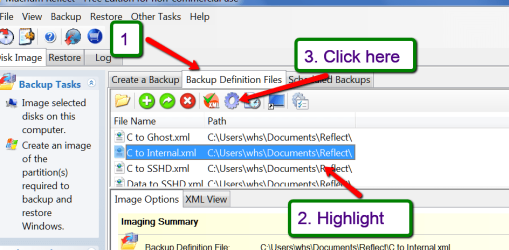
Absolutely handy. But when you clicked 'Finish' you have to give the xml a name and not leave it at 'My Backup'. Then you will see the different xmls by name when you open Macrium and click on 'Backup Definition Files'. Just highlight the one you want to repeat and click on the cog wheel.
 

Attachments

  • 2015-05-02_1834.png
    2015-05-02_1834.png
    110.8 KB · Views: 0

My Computer

Computer Manufacturer/Model Number
HP, Dell, Gateway, Toshiba - 4 laptops and 2 desktops
OS
Vista, Windows7, Mint Mate, Zorin, Windows 8
CPU
from 1.6GHz Duo to i7
Monitor(s) Displays
2x HP w2207
Hard Drives
5x HDD, 7x SSD, 12x Externals
Keyboard
with trackball - no mices
Mouse
Trackball mice
Internet Speed
DSL 6000
Dang I didn't think of that! Also if you wanted since they would be named different couldn't you still go ahead and create a desktop shortcut for each?
 

My Computer

Computer type
PC/Desktop
Computer Manufacturer/Model Number
Home Build
OS
Windows 7 Home Premium 64-bit; SP1
CPU
Intel Core i5 2500K
Motherboard
ASRock Z68 Extreme3 Gen3
Memory
Corsair Vengeance 16GB DDR3
Graphics Card(s)
Intel HD Graphics 3000
Sound Card
Integrated
Monitor(s) Displays
Samsung SyncMaster 943BX
Screen Resolution
1280x1024
Hard Drives
Western Digital Caviar Black WD1002FAEX 1TB 7200 RPM 64MB Cache SATA 6.0Gb/s 3.5" Internal

Western Digital Caviar Black WD7501AALS 750GB 7200 RPM 32MB Cache SATA 3.0Gb/s 3.5" Internal
PSU
SeaSonic S12ll 520W Bronze
Case
Cooler Master Haf 912 Advanced
Cooling
Cooler Master Hyper 212 EVO
Keyboard
Logitech Wireless K800
Mouse
Logitech Wireless Performance MX
Internet Speed
5.0 mb
Other Info
LG WH12LS30 Black SATA 12X Blu-ray
ASUS DRW-24B1ST/BLK/B/AS
AFT XM-5UE Card Reader
You can. You can even put the shortcut in the Quick Launch menu if you want.

I tried using an XML shortcut and found it was no less cumbersome to use than just using the XML file through the Macrium Reflect GUI since the shortcut doesn't open a window so you can see the progress unless you take extra steps each time to tell it to.
 

My Computer

Computer type
PC/Desktop
Computer Manufacturer/Model Number
Custom Build
OS
Win 7 Ultimate 64 bit
CPU
Intel i7-3930K
Motherboard
ASUS P9X79 WS
Memory
Kingston HyperX Genesis 32GB Kit (8x4GB Modules) 1600MHz DDR
Graphics Card(s)
MSI R7850 Twin Frozr 2GD5/OC Radeon HD 7850 2GB 256-bit GDDR
Sound Card
Asus Xonar Essence STX
Monitor(s) Displays
3x Asus VG248QE 24", Vizio 32" TV
Screen Resolution
1920 x 1080, ?
Hard Drives
Samsung 128GB 840 Pro SSD (1),
Samsung 4TB 850 EVO SSDs (4)
Samsung 4TB 850 EVO SSDs (16) external backup drives used in 2.5" hot swap bays in the computer.
PSU
Corsair HX750w
Case
Antec Two Hundred v2 (modified)
Cooling
Cooler Master GeminII S524 120mm (fan replaced with a 140mm)
Keyboard
Logitech G510s
Mouse
Logitech M525 (two in use)
Internet Speed
=< 32Mbps down, 8Mbps up
Antivirus
AVAST!, MBAM, SAS, Spybot S&D (all but MBAM free) Glary Util
Browser
IE11
Other Info
LSI 9211-8i HBA card (8 SATA III ports), 2.5" & 3.5" Hot Swap Bays, HooToo HT-CR001 PCI-E to USB 3.0 Internal Hub + 6 Slot Card Reader, and LG Model CH12LS28 BD-ROM Optical Drive. Also, ScanSnap S1500 ADF duplexing scanner, Canon 9000F flat bed scanner, Corsair SP2500 2.1 speakers, Samsung CLP 415nw laser color printer, Cyberpower PP2200SW UPS
You can create a shortcut of the xml file, but it won't do anything for you if you do it from the Reflect folder. It will just display the content of the xml file. The xml files are in your Documents folder. The folder is called Reflect.

If you make a shortcut from the Macrium page, then you can operate with it. But that is not really more practical than using Macrium.

If you ever want to delete one, do it in the Reflect folder. If you delete it in the Macrium window, it will still stay in the Reflect folder.
 

My Computer

Computer Manufacturer/Model Number
HP, Dell, Gateway, Toshiba - 4 laptops and 2 desktops
OS
Vista, Windows7, Mint Mate, Zorin, Windows 8
CPU
from 1.6GHz Duo to i7
Monitor(s) Displays
2x HP w2207
Hard Drives
5x HDD, 7x SSD, 12x Externals
Keyboard
with trackball - no mices
Mouse
Trackball mice
Internet Speed
DSL 6000
You can create a shortcut of the xml file, but it won't do anything for you. It will just display the content of the xml file. The xml files are in your Documents folder. The folder is called Reflect.

If you ever want to delete one, do it in the Reflect folder. If you delete it in the Macrium window, it will still stay in the Reflect folder.


Whs I've always been able to execute a backup via the desktop shortcut.
 

My Computer

Computer type
PC/Desktop
Computer Manufacturer/Model Number
Home Build
OS
Windows 7 Home Premium 64-bit; SP1
CPU
Intel Core i5 2500K
Motherboard
ASRock Z68 Extreme3 Gen3
Memory
Corsair Vengeance 16GB DDR3
Graphics Card(s)
Intel HD Graphics 3000
Sound Card
Integrated
Monitor(s) Displays
Samsung SyncMaster 943BX
Screen Resolution
1280x1024
Hard Drives
Western Digital Caviar Black WD1002FAEX 1TB 7200 RPM 64MB Cache SATA 6.0Gb/s 3.5" Internal

Western Digital Caviar Black WD7501AALS 750GB 7200 RPM 32MB Cache SATA 3.0Gb/s 3.5" Internal
PSU
SeaSonic S12ll 520W Bronze
Case
Cooler Master Haf 912 Advanced
Cooling
Cooler Master Hyper 212 EVO
Keyboard
Logitech Wireless K800
Mouse
Logitech Wireless Performance MX
Internet Speed
5.0 mb
Other Info
LG WH12LS30 Black SATA 12X Blu-ray
ASUS DRW-24B1ST/BLK/B/AS
AFT XM-5UE Card Reader
Yeah right. I forgot the other option. Updated it.
 

My Computer

Computer Manufacturer/Model Number
HP, Dell, Gateway, Toshiba - 4 laptops and 2 desktops
OS
Vista, Windows7, Mint Mate, Zorin, Windows 8
CPU
from 1.6GHz Duo to i7
Monitor(s) Displays
2x HP w2207
Hard Drives
5x HDD, 7x SSD, 12x Externals
Keyboard
with trackball - no mices
Mouse
Trackball mice
Internet Speed
DSL 6000
Thank you both whs & Lady Fitzgerald once explained it's like why didn't I think of that.:doh:
 

My Computer

Computer type
PC/Desktop
Computer Manufacturer/Model Number
Home Build
OS
Windows 7 Home Premium 64-bit; SP1
CPU
Intel Core i5 2500K
Motherboard
ASRock Z68 Extreme3 Gen3
Memory
Corsair Vengeance 16GB DDR3
Graphics Card(s)
Intel HD Graphics 3000
Sound Card
Integrated
Monitor(s) Displays
Samsung SyncMaster 943BX
Screen Resolution
1280x1024
Hard Drives
Western Digital Caviar Black WD1002FAEX 1TB 7200 RPM 64MB Cache SATA 6.0Gb/s 3.5" Internal

Western Digital Caviar Black WD7501AALS 750GB 7200 RPM 32MB Cache SATA 3.0Gb/s 3.5" Internal
PSU
SeaSonic S12ll 520W Bronze
Case
Cooler Master Haf 912 Advanced
Cooling
Cooler Master Hyper 212 EVO
Keyboard
Logitech Wireless K800
Mouse
Logitech Wireless Performance MX
Internet Speed
5.0 mb
Other Info
LG WH12LS30 Black SATA 12X Blu-ray
ASUS DRW-24B1ST/BLK/B/AS
AFT XM-5UE Card Reader
You are welcome.
 

My Computer

Computer Manufacturer/Model Number
HP, Dell, Gateway, Toshiba - 4 laptops and 2 desktops
OS
Vista, Windows7, Mint Mate, Zorin, Windows 8
CPU
from 1.6GHz Duo to i7
Monitor(s) Displays
2x HP w2207
Hard Drives
5x HDD, 7x SSD, 12x Externals
Keyboard
with trackball - no mices
Mouse
Trackball mice
Internet Speed
DSL 6000

My Computer

Computer type
PC/Desktop
Computer Manufacturer/Model Number
Custom Build
OS
Win 7 Ultimate 64 bit
CPU
Intel i7-3930K
Motherboard
ASUS P9X79 WS
Memory
Kingston HyperX Genesis 32GB Kit (8x4GB Modules) 1600MHz DDR
Graphics Card(s)
MSI R7850 Twin Frozr 2GD5/OC Radeon HD 7850 2GB 256-bit GDDR
Sound Card
Asus Xonar Essence STX
Monitor(s) Displays
3x Asus VG248QE 24", Vizio 32" TV
Screen Resolution
1920 x 1080, ?
Hard Drives
Samsung 128GB 840 Pro SSD (1),
Samsung 4TB 850 EVO SSDs (4)
Samsung 4TB 850 EVO SSDs (16) external backup drives used in 2.5" hot swap bays in the computer.
PSU
Corsair HX750w
Case
Antec Two Hundred v2 (modified)
Cooling
Cooler Master GeminII S524 120mm (fan replaced with a 140mm)
Keyboard
Logitech G510s
Mouse
Logitech M525 (two in use)
Internet Speed
=< 32Mbps down, 8Mbps up
Antivirus
AVAST!, MBAM, SAS, Spybot S&D (all but MBAM free) Glary Util
Browser
IE11
Other Info
LSI 9211-8i HBA card (8 SATA III ports), 2.5" & 3.5" Hot Swap Bays, HooToo HT-CR001 PCI-E to USB 3.0 Internal Hub + 6 Slot Card Reader, and LG Model CH12LS28 BD-ROM Optical Drive. Also, ScanSnap S1500 ADF duplexing scanner, Canon 9000F flat bed scanner, Corsair SP2500 2.1 speakers, Samsung CLP 415nw laser color printer, Cyberpower PP2200SW UPS
Back
Top