Solved Macrium Reflect Restore problems

OnTheRopes

New member
Member
Local time
11:10 AM
Messages
95
I am just setting up my system, a clean install of Win 7 x 64
I have installed macrium reflect free ed. and have managed to create a backup image of the C partition.
However on running restore and going through the wizard I get to the screen
'Drive C is locked The partition you are trying to overwrite is in use by windows
select one of the following
1) Close all windows and applications
2) Reboot and select reflect recovery environment
3) Reboot and start reflect recue cd

Well, reflect is the only application i have running so i dont understanfd how Im supposed to restore my C drive with windows on it?

Option 2 dont really undestand and option 3 is not an option

Any ideas? Thanks
 

My Computer

Computer type
PC/Desktop
Computer Manufacturer/Model Number
Self Build
OS
Windows Prox64
CPU
i5 760 2.8Ghz
Motherboard
Asus P7P55D-E
Memory
Corsair XTS 2x4 Gb
Graphics Card(s)
Asus GTX 460 1024Mb
Monitor(s) Displays
HP LP2475w
Hard Drives
Samsung HD103SJ Spinpoint F3 1TB
PSU
Corsair 600CX
Case
Corsair Graphite 600T
Antivirus
Kaspersky IS
Browser
Chrome
Are you keeping the image in a partition other than C, which you are trying to restore?

( I appreciate the fact that you have taken to creating and restoring backups at the initial stage itself and this "learning" will keep you in good stead later when you have to restore in emergent conditions.)
 

My Computer

Computer Manufacturer/Model Number
self-assembled
OS
Windows 7 Ultimate 32bit
CPU
AMD Phenom II X3 720 Processor
Motherboard
Gigabyte GA-MA78GM-S2H Revision 1.0
Memory
Transcend DDR2 (PC2 6400) 4 X 1GB
Graphics Card(s)
Integrated + ATI Radeon 4550
Sound Card
Integrated Realtek ALC 889A
Monitor(s) Displays
DELL 1704 FPT
Screen Resolution
1280 x 1024
Hard Drives
Western Digital Caviar SE16 250 GB x2 in RAID 0
PSU
Coolermaster 400 W
Case
Zebronics Cube
Cooling
stock
Keyboard
Microsoft - wired
Mouse
Microsoft - wired
Internet Speed
ADSL 256-512Kbps
You can't use the back up image from Windows while you are using Windows as you found.

You need to make the Macrium boot disk. This allows you to reimage without Windows running.

I''l find the tutorial or post a how to for you in a few minutes.
Mike
 

My Computer

Computer Manufacturer/Model Number
Hopalong/ Godzilla
OS
Windows7 Pro 64bit SP-1; Windows XP Pro 32bit
CPU
Intel Core i7-870 Lynnfield 2.93GHz LGA 1156 95W Quad-Core
Motherboard
ASUS P7P55D-E PRO
Memory
8GB@1400MHz Crucial Ballistix DDR3-1600 4x2GB
Graphics Card(s)
ASUS ENGTX460 DirectCU/2DI/1GD5 1GB 256-bit GDDR5
Sound Card
VIA Onboard
Monitor(s) Displays
Asus VS248H-P 24"; Samsung SyncMaster 941BW 19"ws
Screen Resolution
1920x1080; 1440x900
Hard Drives
Samsung 830 120GB SSD
Intel 320 120GB SSD
Western Digital Caviar Black WD7501AALS 750GB 7200 RPM SATA 3.0Gb/s
Western Digital Caviar Black WD6401AALS 640GB 7200 RPM SATA 3.0Gb/s
PSU
COOLER MASTER Silent Pro RS850-AMBAJ3-US 850W Modular
Case
COOLER MASTER HAF 932 RC-932-KKN5-GP Black
Cooling
Scythe "Mugen-2 Rev.B" (2 ScytheKaze-Jyuni PWM fans)
Keyboard
Logitech K-320
Mouse
Kensington
Antivirus
Avast Inernet Suite
Browser
IE 9 ; Chrome
Thanks for replying

When you say am I keeping the partition in other than c, what I am doing is the following:

1) Click on 'Craete a back up of an entire disc or selected partitions'and the wizard opens

2) Select the partition C to create a backup image for.

3) Select destination , which in my case is my removable drive and leave default Image ID etc.

The image burns and tests succesfully

So then I try to restore

1) Restore a partition button and wizard opens

2) Select the image in my removable drive which displays in top panel, in bottom panel it has Disk 1 and the name of my hard drive with - 2 C:

3) I hit next and choose a partition i want to restore where i select C: that is the only choice anyway.

4) The next sreen has a list of all partitions on the HDD so I select 1 Primary (C:)

And it is at this point I get the 'Drive C: is locked problem.

Thanks for looking at this
 

My Computer

Computer type
PC/Desktop
Computer Manufacturer/Model Number
Self Build
OS
Windows Prox64
CPU
i5 760 2.8Ghz
Motherboard
Asus P7P55D-E
Memory
Corsair XTS 2x4 Gb
Graphics Card(s)
Asus GTX 460 1024Mb
Monitor(s) Displays
HP LP2475w
Hard Drives
Samsung HD103SJ Spinpoint F3 1TB
PSU
Corsair 600CX
Case
Corsair Graphite 600T
Antivirus
Kaspersky IS
Browser
Chrome
it seems like you are trying to restore the c partition while you are actually using it.

that is why it is locked. when you are running windows, you are using the c: drive.

as hopalong instructed above, you need to make a macrium rescue cd, then boot your computer from that. then your c drive won't be in use (you'll be running from d: or whatever) and it won't be locked.

go to the 'other tasks' menu in reflect, and 'create rescue cd'. the linux option is the quicker of the two.

to boot from it, you'll need to make sure that your computer's bios is set to boot from cd/dvd.

if you need any further help, we are here. :)
 

My Computer

Computer Manufacturer/Model Number
mickey megabyte 1234
OS
ultimate 64 sp1
CPU
i5 2500K [email protected]
Motherboard
MSI P67A-GD53
Memory
8 gigs GSkill Ripjaws 1600
Graphics Card(s)
amd hd6950
Sound Card
creative x-fi gamer
Monitor(s) Displays
samsung 24"
Screen Resolution
1920x1080
Hard Drives
ocz vertex 2e 60 gig, samsung f3 1tb, buffalo 2tb ext
PSU
antec 550
Case
antec three hundred
Cooling
i'm a cooling fan
Keyboard
saitek eclipse ii
Mouse
logitech g3
Internet Speed
about 4 Mbps
Other Info
i love win7
This will help explain some of the things.
http://www.sevenforums.com/tutorials/73828-imaging-free-macrium.html

Click #1 in left picture.
Make sure Linux is selected at #2 and click next.

Right picture make sure DVD/CD burner is selected. Insert CD in burner drawer.
Click Finish.

This will burn the Recovery CD. Mark what it is and save it for when needed.
After burning I closed everything in Macrium and booted from the CD to test it.
If it boots and goes to the first screen on the Disk it is good. I just clicked Cancel but I knew CD player was reading the disk.

I also had to use it a few weeks ago to re image my XP. It works great just follow the prompts from the CD.

Hope that helps.
Mike

You cannot reimage Windows while Windows is operating or in use.
To use Recovery Disk.
You have to set the Bios boot order to CD/DVD first. Put the disk in the drawer.
Reboot and the disk will boot not Windows.
Then follow prompts on disk.
 
Last edited:

My Computer

Computer Manufacturer/Model Number
Hopalong/ Godzilla
OS
Windows7 Pro 64bit SP-1; Windows XP Pro 32bit
CPU
Intel Core i7-870 Lynnfield 2.93GHz LGA 1156 95W Quad-Core
Motherboard
ASUS P7P55D-E PRO
Memory
8GB@1400MHz Crucial Ballistix DDR3-1600 4x2GB
Graphics Card(s)
ASUS ENGTX460 DirectCU/2DI/1GD5 1GB 256-bit GDDR5
Sound Card
VIA Onboard
Monitor(s) Displays
Asus VS248H-P 24"; Samsung SyncMaster 941BW 19"ws
Screen Resolution
1920x1080; 1440x900
Hard Drives
Samsung 830 120GB SSD
Intel 320 120GB SSD
Western Digital Caviar Black WD7501AALS 750GB 7200 RPM SATA 3.0Gb/s
Western Digital Caviar Black WD6401AALS 640GB 7200 RPM SATA 3.0Gb/s
PSU
COOLER MASTER Silent Pro RS850-AMBAJ3-US 850W Modular
Case
COOLER MASTER HAF 932 RC-932-KKN5-GP Black
Cooling
Scythe "Mugen-2 Rev.B" (2 ScytheKaze-Jyuni PWM fans)
Keyboard
Logitech K-320
Mouse
Kensington
Antivirus
Avast Inernet Suite
Browser
IE 9 ; Chrome
Read both of these tutorials
#1 how to burn Recovery CD.
Macrium KB

#2 How to use Recovery CD.
Macrium KB

They have pictures of what will show on screen and are much better tutorials than I can do. You won't have any surprises.
You will have seen it all before. ;) :D

Mike
 

My Computer

Computer Manufacturer/Model Number
Hopalong/ Godzilla
OS
Windows7 Pro 64bit SP-1; Windows XP Pro 32bit
CPU
Intel Core i7-870 Lynnfield 2.93GHz LGA 1156 95W Quad-Core
Motherboard
ASUS P7P55D-E PRO
Memory
8GB@1400MHz Crucial Ballistix DDR3-1600 4x2GB
Graphics Card(s)
ASUS ENGTX460 DirectCU/2DI/1GD5 1GB 256-bit GDDR5
Sound Card
VIA Onboard
Monitor(s) Displays
Asus VS248H-P 24"; Samsung SyncMaster 941BW 19"ws
Screen Resolution
1920x1080; 1440x900
Hard Drives
Samsung 830 120GB SSD
Intel 320 120GB SSD
Western Digital Caviar Black WD7501AALS 750GB 7200 RPM SATA 3.0Gb/s
Western Digital Caviar Black WD6401AALS 640GB 7200 RPM SATA 3.0Gb/s
PSU
COOLER MASTER Silent Pro RS850-AMBAJ3-US 850W Modular
Case
COOLER MASTER HAF 932 RC-932-KKN5-GP Black
Cooling
Scythe "Mugen-2 Rev.B" (2 ScytheKaze-Jyuni PWM fans)
Keyboard
Logitech K-320
Mouse
Kensington
Antivirus
Avast Inernet Suite
Browser
IE 9 ; Chrome
Cheers, I shall go now and read those tutorials
However i have managed to burn a recovery cd but I am having a few issues, on booting it loads (says something like Linux blah blah loading) and then just hangs on a black screen. I have tried running memtest as i know this runs on my other pc but this hangs as well, so i seem to have another issue at the moment.
 

My Computer

Computer type
PC/Desktop
Computer Manufacturer/Model Number
Self Build
OS
Windows Prox64
CPU
i5 760 2.8Ghz
Motherboard
Asus P7P55D-E
Memory
Corsair XTS 2x4 Gb
Graphics Card(s)
Asus GTX 460 1024Mb
Monitor(s) Displays
HP LP2475w
Hard Drives
Samsung HD103SJ Spinpoint F3 1TB
PSU
Corsair 600CX
Case
Corsair Graphite 600T
Antivirus
Kaspersky IS
Browser
Chrome
I did read on a forum somewhere that macrium Recovery only works on 32 bit?
 

My Computer

Computer type
PC/Desktop
Computer Manufacturer/Model Number
Self Build
OS
Windows Prox64
CPU
i5 760 2.8Ghz
Motherboard
Asus P7P55D-E
Memory
Corsair XTS 2x4 Gb
Graphics Card(s)
Asus GTX 460 1024Mb
Monitor(s) Displays
HP LP2475w
Hard Drives
Samsung HD103SJ Spinpoint F3 1TB
PSU
Corsair 600CX
Case
Corsair Graphite 600T
Antivirus
Kaspersky IS
Browser
Chrome
hmm, you think you have some dodgy ram?

find and replace the dodgy stick straight away!

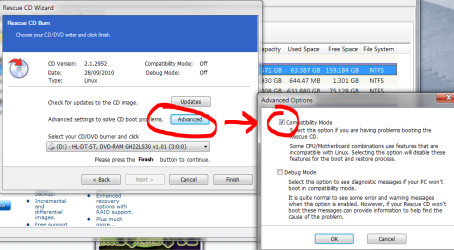
then try making a new linux recovery disc - use the advanced settings and try compatibilty mode.

refl.PNG

macrium reflect recovery works on both 32 or 64 bit machines.
 

My Computer

Computer Manufacturer/Model Number
mickey megabyte 1234
OS
ultimate 64 sp1
CPU
i5 2500K [email protected]
Motherboard
MSI P67A-GD53
Memory
8 gigs GSkill Ripjaws 1600
Graphics Card(s)
amd hd6950
Sound Card
creative x-fi gamer
Monitor(s) Displays
samsung 24"
Screen Resolution
1920x1080
Hard Drives
ocz vertex 2e 60 gig, samsung f3 1tb, buffalo 2tb ext
PSU
antec 550
Case
antec three hundred
Cooling
i'm a cooling fan
Keyboard
saitek eclipse ii
Mouse
logitech g3
Internet Speed
about 4 Mbps
Other Info
i love win7
Your CD player may be acting up or you may need to reburn it.

Make sure you select to burn it at 4x speed. Slower but much more accurate.
If you are using the Windows CD burner some people have had problems with it.

So you may need a third party burner.
I don't remember the names of the good free burning softwares at the moment.

Mike
 

My Computer

Computer Manufacturer/Model Number
Hopalong/ Godzilla
OS
Windows7 Pro 64bit SP-1; Windows XP Pro 32bit
CPU
Intel Core i7-870 Lynnfield 2.93GHz LGA 1156 95W Quad-Core
Motherboard
ASUS P7P55D-E PRO
Memory
8GB@1400MHz Crucial Ballistix DDR3-1600 4x2GB
Graphics Card(s)
ASUS ENGTX460 DirectCU/2DI/1GD5 1GB 256-bit GDDR5
Sound Card
VIA Onboard
Monitor(s) Displays
Asus VS248H-P 24"; Samsung SyncMaster 941BW 19"ws
Screen Resolution
1920x1080; 1440x900
Hard Drives
Samsung 830 120GB SSD
Intel 320 120GB SSD
Western Digital Caviar Black WD7501AALS 750GB 7200 RPM SATA 3.0Gb/s
Western Digital Caviar Black WD6401AALS 640GB 7200 RPM SATA 3.0Gb/s
PSU
COOLER MASTER Silent Pro RS850-AMBAJ3-US 850W Modular
Case
COOLER MASTER HAF 932 RC-932-KKN5-GP Black
Cooling
Scythe "Mugen-2 Rev.B" (2 ScytheKaze-Jyuni PWM fans)
Keyboard
Logitech K-320
Mouse
Kensington
Antivirus
Avast Inernet Suite
Browser
IE 9 ; Chrome
Red added by me. Macrium Reflect FREE Edition - Information and download
The fastest disk imaging software is now available as a free edition.


Absolutely free! No strings! The only free XP, Vista and Windows 7 compatible disk imaging software with BartPE and Linux based recovery options.
  • Create a disk image whilst running Windows using Microsoft Volume Shadow copy Service (VSS).
  • Image to Network, USB, FireWire drives and DVD.
  • Built in scheduler.
  • 32 bit and native 64 bit versions.
  • Industry leading compression levels and speed.
  • Linux based Rescue CD with Network access and full GUI. Only 6.5MB in size!
  • Built in CD/DVD packet writing engine. Supports packet writing to DVD DL media with Windows Vista.
  • HTML log files.
Version information
headertr.PNG
Version:
v4.2.2952
Date:
28 September 2010
File Size:
31.4MB
File Name:
reflect_setup_free_x86_x64.exe
MD5 Hash:
C3C686F88FF486BE5972D6DAE03E2AB4
Windows Versions:
XP, Vista, Windows 7. 32 and native 64 Bit.
Note: This installation file contains the 32 and 64 bit versions of Macrium Reflect. The correct version will be automatically installed.
logosmall.jpg
 

My Computer

Computer Manufacturer/Model Number
Hopalong/ Godzilla
OS
Windows7 Pro 64bit SP-1; Windows XP Pro 32bit
CPU
Intel Core i7-870 Lynnfield 2.93GHz LGA 1156 95W Quad-Core
Motherboard
ASUS P7P55D-E PRO
Memory
8GB@1400MHz Crucial Ballistix DDR3-1600 4x2GB
Graphics Card(s)
ASUS ENGTX460 DirectCU/2DI/1GD5 1GB 256-bit GDDR5
Sound Card
VIA Onboard
Monitor(s) Displays
Asus VS248H-P 24"; Samsung SyncMaster 941BW 19"ws
Screen Resolution
1920x1080; 1440x900
Hard Drives
Samsung 830 120GB SSD
Intel 320 120GB SSD
Western Digital Caviar Black WD7501AALS 750GB 7200 RPM SATA 3.0Gb/s
Western Digital Caviar Black WD6401AALS 640GB 7200 RPM SATA 3.0Gb/s
PSU
COOLER MASTER Silent Pro RS850-AMBAJ3-US 850W Modular
Case
COOLER MASTER HAF 932 RC-932-KKN5-GP Black
Cooling
Scythe "Mugen-2 Rev.B" (2 ScytheKaze-Jyuni PWM fans)
Keyboard
Logitech K-320
Mouse
Kensington
Antivirus
Avast Inernet Suite
Browser
IE 9 ; Chrome
Right, each time I tried to burn to a cd it rejected saying faulty media, if i put the same cd back in it then burned but would not boot as above. I tried this on two cd's. I have just tried again on a Packard bell CD - RW and all seems fine, maybe the Tesco cd-r's are dodgy, seems doubtful though?
 

My Computer

Computer type
PC/Desktop
Computer Manufacturer/Model Number
Self Build
OS
Windows Prox64
CPU
i5 760 2.8Ghz
Motherboard
Asus P7P55D-E
Memory
Corsair XTS 2x4 Gb
Graphics Card(s)
Asus GTX 460 1024Mb
Monitor(s) Displays
HP LP2475w
Hard Drives
Samsung HD103SJ Spinpoint F3 1TB
PSU
Corsair 600CX
Case
Corsair Graphite 600T
Antivirus
Kaspersky IS
Browser
Chrome
have you had problems with the tesco discs before? or successes?
 

My Computer

Computer Manufacturer/Model Number
mickey megabyte 1234
OS
ultimate 64 sp1
CPU
i5 2500K [email protected]
Motherboard
MSI P67A-GD53
Memory
8 gigs GSkill Ripjaws 1600
Graphics Card(s)
amd hd6950
Sound Card
creative x-fi gamer
Monitor(s) Displays
samsung 24"
Screen Resolution
1920x1080
Hard Drives
ocz vertex 2e 60 gig, samsung f3 1tb, buffalo 2tb ext
PSU
antec 550
Case
antec three hundred
Cooling
i'm a cooling fan
Keyboard
saitek eclipse ii
Mouse
logitech g3
Internet Speed
about 4 Mbps
Other Info
i love win7
If the disks work on a different computers CD drive you have a very picky CD drive on brand/type of CD it likes or the player has a problem.

Does the CD player read anything else? If not possibly a bad CD drive.
 

My Computer

Computer Manufacturer/Model Number
Hopalong/ Godzilla
OS
Windows7 Pro 64bit SP-1; Windows XP Pro 32bit
CPU
Intel Core i7-870 Lynnfield 2.93GHz LGA 1156 95W Quad-Core
Motherboard
ASUS P7P55D-E PRO
Memory
8GB@1400MHz Crucial Ballistix DDR3-1600 4x2GB
Graphics Card(s)
ASUS ENGTX460 DirectCU/2DI/1GD5 1GB 256-bit GDDR5
Sound Card
VIA Onboard
Monitor(s) Displays
Asus VS248H-P 24"; Samsung SyncMaster 941BW 19"ws
Screen Resolution
1920x1080; 1440x900
Hard Drives
Samsung 830 120GB SSD
Intel 320 120GB SSD
Western Digital Caviar Black WD7501AALS 750GB 7200 RPM SATA 3.0Gb/s
Western Digital Caviar Black WD6401AALS 640GB 7200 RPM SATA 3.0Gb/s
PSU
COOLER MASTER Silent Pro RS850-AMBAJ3-US 850W Modular
Case
COOLER MASTER HAF 932 RC-932-KKN5-GP Black
Cooling
Scythe "Mugen-2 Rev.B" (2 ScytheKaze-Jyuni PWM fans)
Keyboard
Logitech K-320
Mouse
Kensington
Antivirus
Avast Inernet Suite
Browser
IE 9 ; Chrome
With most imaging software, if Windows can boot and one wants to restore for reasons other than Windows not starting, he can initiate the restore process from within Windows. The imaging software then will enter into DOS mode and rewrite C with the image. Paragon does it. Shadowprotect does it. Does not Macrium allow this? ( I do not use Macrium)

A restore CD is required only when Windows does not boot and you want to restore C.

In the present instance, the OP is only taking the first step in creating an image from within Windows and then restoring from within Windows. So IMO asking him to create a restore CD is premature and in fact can mislead the OP into believing that a restore CD is always required for a restore. Correct me if I am wrong.

If Macrium does not allow one to perform a restore initiating it from within a running Windows, then its a different story.
 

My Computer

Computer Manufacturer/Model Number
self-assembled
OS
Windows 7 Ultimate 32bit
CPU
AMD Phenom II X3 720 Processor
Motherboard
Gigabyte GA-MA78GM-S2H Revision 1.0
Memory
Transcend DDR2 (PC2 6400) 4 X 1GB
Graphics Card(s)
Integrated + ATI Radeon 4550
Sound Card
Integrated Realtek ALC 889A
Monitor(s) Displays
DELL 1704 FPT
Screen Resolution
1280 x 1024
Hard Drives
Western Digital Caviar SE16 250 GB x2 in RAID 0
PSU
Coolermaster 400 W
Case
Zebronics Cube
Cooling
stock
Keyboard
Microsoft - wired
Mouse
Microsoft - wired
Internet Speed
ADSL 256-512Kbps
Nearly there I think, one last quetion for now ;)

I am in the restore wizard and have got to the 'Choose partition to overwrite screen.

When I backed up the image I selected the whole of C: but now C: is just the 100Mb system resreved partition and my Primary is now called D:
Is this just a temporary mane that the recovery software calls it?
 

My Computer

Computer type
PC/Desktop
Computer Manufacturer/Model Number
Self Build
OS
Windows Prox64
CPU
i5 760 2.8Ghz
Motherboard
Asus P7P55D-E
Memory
Corsair XTS 2x4 Gb
Graphics Card(s)
Asus GTX 460 1024Mb
Monitor(s) Displays
HP LP2475w
Hard Drives
Samsung HD103SJ Spinpoint F3 1TB
PSU
Corsair 600CX
Case
Corsair Graphite 600T
Antivirus
Kaspersky IS
Browser
Chrome
Ontheropes

I'm not sure. I just made the image of C. I don't know how yours will be lettered after. I'm not sure it will make a difference.???


If Macrium does not allow one to perform a restore initiating it from within a running Windows, then its a different story.
Ponmayilal
Only from CD.

Mickey Megabyte. Have any input on Ontheropes drive letters?
 

My Computer

Computer Manufacturer/Model Number
Hopalong/ Godzilla
OS
Windows7 Pro 64bit SP-1; Windows XP Pro 32bit
CPU
Intel Core i7-870 Lynnfield 2.93GHz LGA 1156 95W Quad-Core
Motherboard
ASUS P7P55D-E PRO
Memory
8GB@1400MHz Crucial Ballistix DDR3-1600 4x2GB
Graphics Card(s)
ASUS ENGTX460 DirectCU/2DI/1GD5 1GB 256-bit GDDR5
Sound Card
VIA Onboard
Monitor(s) Displays
Asus VS248H-P 24"; Samsung SyncMaster 941BW 19"ws
Screen Resolution
1920x1080; 1440x900
Hard Drives
Samsung 830 120GB SSD
Intel 320 120GB SSD
Western Digital Caviar Black WD7501AALS 750GB 7200 RPM SATA 3.0Gb/s
Western Digital Caviar Black WD6401AALS 640GB 7200 RPM SATA 3.0Gb/s
PSU
COOLER MASTER Silent Pro RS850-AMBAJ3-US 850W Modular
Case
COOLER MASTER HAF 932 RC-932-KKN5-GP Black
Cooling
Scythe "Mugen-2 Rev.B" (2 ScytheKaze-Jyuni PWM fans)
Keyboard
Logitech K-320
Mouse
Kensington
Antivirus
Avast Inernet Suite
Browser
IE 9 ; Chrome
Ponmayial
It seems as though Macrium can only restore from the CD at least in the freeware version.
I have tried the trial of Acronis and this worked perfectly though it was a free 14 day trial and is payware. I do not mind paying for good software if I need to but I have read a lot of bad reviews on Acronis. I will take a look at Paragon and Shadowprotect.

I have also had Robocopy mentioned which I believe is free with Win 7? though as yet I have not found it.
 

My Computer

Computer type
PC/Desktop
Computer Manufacturer/Model Number
Self Build
OS
Windows Prox64
CPU
i5 760 2.8Ghz
Motherboard
Asus P7P55D-E
Memory
Corsair XTS 2x4 Gb
Graphics Card(s)
Asus GTX 460 1024Mb
Monitor(s) Displays
HP LP2475w
Hard Drives
Samsung HD103SJ Spinpoint F3 1TB
PSU
Corsair 600CX
Case
Corsair Graphite 600T
Antivirus
Kaspersky IS
Browser
Chrome
Paragon and Macrium are tops on the forum. Either one.

I started with Macrium and like it but Paragon may be more to your liking. Like a lot of things some prefer one over another.
Stay away from Robo and Shadowcopy.
 

My Computer

Computer Manufacturer/Model Number
Hopalong/ Godzilla
OS
Windows7 Pro 64bit SP-1; Windows XP Pro 32bit
CPU
Intel Core i7-870 Lynnfield 2.93GHz LGA 1156 95W Quad-Core
Motherboard
ASUS P7P55D-E PRO
Memory
8GB@1400MHz Crucial Ballistix DDR3-1600 4x2GB
Graphics Card(s)
ASUS ENGTX460 DirectCU/2DI/1GD5 1GB 256-bit GDDR5
Sound Card
VIA Onboard
Monitor(s) Displays
Asus VS248H-P 24"; Samsung SyncMaster 941BW 19"ws
Screen Resolution
1920x1080; 1440x900
Hard Drives
Samsung 830 120GB SSD
Intel 320 120GB SSD
Western Digital Caviar Black WD7501AALS 750GB 7200 RPM SATA 3.0Gb/s
Western Digital Caviar Black WD6401AALS 640GB 7200 RPM SATA 3.0Gb/s
PSU
COOLER MASTER Silent Pro RS850-AMBAJ3-US 850W Modular
Case
COOLER MASTER HAF 932 RC-932-KKN5-GP Black
Cooling
Scythe "Mugen-2 Rev.B" (2 ScytheKaze-Jyuni PWM fans)
Keyboard
Logitech K-320
Mouse
Kensington
Antivirus
Avast Inernet Suite
Browser
IE 9 ; Chrome
Back
Top