Macrium Reflect

jackdash

New member
Local time
12:43 AM
Messages
168
I have made a query on this before but my memory is getting very short these days.
Its regarding the Macrium Reflect software.
I accidently deleted a section of Microsoft Office OneNote and I want to restore it from the backup file using copy paste.
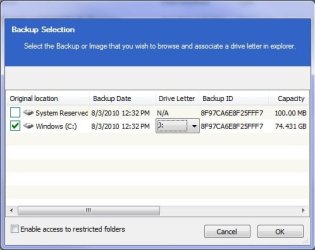
I go into the drive where my backups are stored and double click the backup file,a box comes up saying:
Select the backup or image that you wish to browse and associate a drive in explorer.
Underneath is listed the original location of the backup.
I would like to know what to do next.

Many thanks for any replies.
wallie
 

My Computer

Computer Manufacturer/Model Number
Packard Bell
OS
Windows 7 Home Premium
CPU
Intel(R) Core(TM2) Quad CPU Q8300 @ 2.50Mhz 4 Core(s)
Motherboard
Packard Bell EG43M
Memory
6.00 GB
Graphics Card(s)
Geforce GT220
Hard Drives
1.5 TB
Keyboard
Logitech Wireless
Mouse
Logitech Wireless
Select the backup or image that you wish to browse and associate a drive in explorer.

When it gets to there select the image you want to browse and it will put up a small drop box where you can choose a drive letter,

reflect.jpg

which if you do nothing will be the next available letter. Then just click OK and Reflect will start/create a virtual drive and mount the image, and you can browse/copy/etc to your heart's content.
 

My Computer

Computer type
PC/Desktop
Computer Manufacturer/Model Number
Me
OS
Win 7 Ultimate x64
CPU
FX-8350 @ 4.6 GHz so far
Motherboard
Asus M5A97 EVO
Memory
ADATA XPG V1 Series Black 8GB DDR3 1600
Graphics Card(s)
Sapphire R9 270x Dual-X
Sound Card
Xonar DGX w/ Corsair Vengence 1300
Monitor(s) Displays
Acer S232HL Abid
Screen Resolution
1920x1080
Hard Drives
120 GB OCZ Vertex 3
500 GB Seagate 7200.12
PSU
Antec Earthwatts 650W Green
Case
Antec Three Hundred
Cooling
Cooler Master 212 EVO
Keyboard
Logitech G510
Mouse
Logitech G500s
Internet Speed
35000/3000
I am trying to restore OneNote which is in Microsoft Office using copy/paste
I select the backup image and when the Backup Selection box comes up I select my C: drive and it enters F: for the drive letter then I press o/k a listing comes up.
From the listing I go into Program Files,Microsoft Office,Office12,OneNote.exe
(sorry about the coma’s instead of backslash which I cannot find on this US keyboard)
What happens now is that the current faulty version of OneNote opens up not the backup copy.
Maybe I should not be selecting Onenote.exe in the listing but I could not see any other way to display it.
I am thinking of giving up and just doing a full restore.
Thanks for your help anyway.
wallie
 

My Computer

Computer Manufacturer/Model Number
Packard Bell
OS
Windows 7 Home Premium
CPU
Intel(R) Core(TM2) Quad CPU Q8300 @ 2.50Mhz 4 Core(s)
Motherboard
Packard Bell EG43M
Memory
6.00 GB
Graphics Card(s)
Geforce GT220
Hard Drives
1.5 TB
Keyboard
Logitech Wireless
Mouse
Logitech Wireless
Back
Top