Im probably doing something wrong here as the simplest level but when I launch Macrium (Free v5) I only see the following drives which it will allow me to image:
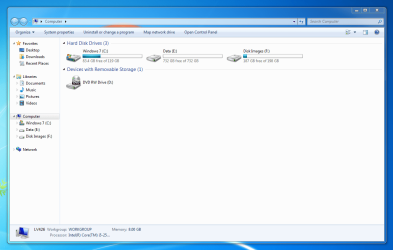
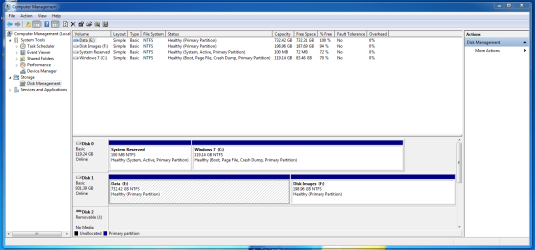
What you are seeing there is the contents of my SDD. The strange thing is that I have a HDD (spinner) which has two other drive letters. Now these are formatted using GTP rather than MBR (i wonder if this is the cause?). Below is a my computer snip:
and a disk management snip:
The worst of it is that i can happily access this HDD no problem and copy to and from it from my SSD. Additionally I have sucessfully imaged my entire SSD (both partitions) from SSD to the HDD through Macrium.
So if Macrium can write to the HDD with no problems at all, why dosnt it show up as a viable medium to copy?
Probably missing something silly here
thanks for any help
Matt
My Computer
At a glance
W7 Home Prem, Vista home PremIntel E8600 3.3GHz dual core4 GbNvidia - GForce GTX 280 - 1Gb
Computer Manufacturer/Model Number
Manufacturer: Me
OS
W7 Home Prem, Vista home Prem
CPU
Intel E8600 3.3GHz dual core
Motherboard
Asus (need to find model)
Memory
4 Gb
Graphics Card(s)
Nvidia - GForce GTX 280 - 1Gb
Sound Card
Xonar Dx 5.1
Monitor(s) Displays
Hazro flatscreen
Screen Resolution
1920 x 1200
Hard Drives
1 x Samsung Spinpoint F1 300 gb
1 x Samsung Spinpoint F1 1 Tb
1 x Samsung Spinpoint F3 1 Tb
PSU
Later
Case
Infiniti Midi tower
Cooling
later
Keyboard
Logitech G11
Mouse
Logitech G9 Laser
Internet Speed
3mb/s - awful
Other Info
I built this three years ago. It was very fast at the time. Now it's about average but still runs any game I throw at it at max detail.
1*Samsung 840 EVO 120GB SSD;
1*OCZ Vertex 2 60GB SSD;
2*Samsung F3 SpinPoint 1TB in RAID0;
1*Samsung F1 SpinPoint 1TB;
2*Western Digital 1TB External USB 3.0
1*Western Digital 500GB External USB 3.0
1*Seagate 500GB External USB 2.0
PSU
Thermaltake ToughPower QFan 750W
Case
Thermaltake Element S VK60001W2Z
Cooling
Corsair H60 Water Cooling, 2*230mm and 2*80mm case fans
you need the PRO version for GPT disks Not even the paid for Standard version works. Have a look at the comparison on the download page in my sig.
My Computer
At a glance
Microsoft Windows 7 Home Premium 64-bit Servi...Intel(R) Core(TM) i3 CPU M 330 @ 2.13GHz8 GB DDR3Intel(R) HD Graphics
Computer type
Laptop
Computer Manufacturer/Model Number
Hewlett-Packard/G62-107SA Notebook
OS
Microsoft Windows 7 Home Premium 64-bit Service Pack 1
CPU
Intel(R) Core(TM) i3 CPU M 330 @ 2.13GHz
Motherboard
Hewlett-Packard 1425
Memory
8 GB DDR3
Graphics Card(s)
Intel(R) HD Graphics
Sound Card
Realtek High Definition Audio
Monitor(s) Displays
Builtin
Screen Resolution
1366 x 768 x 32 bits (4294967296 colors) @ 60 Hz
Hard Drives
250 GB SATA Hard Disk Drive 7200 rpm
2TB Seagate GoFlex USB 2 Drive
1TB Iomega Prestige USB 2 Drive
1.5TB Iomega Prestige USB 2 Drive (Samsung)
2TB WD MyBook Live NAS.
I guess so if you want to use Macrium Free. There may be other backup software which may work with GPT disks. I might be worth having a look at Paragon and Easus ToDo. I don't know whether they support GPT but it is worth checking.
My Computer
At a glance
Microsoft Windows 7 Home Premium 64-bit Servi...Intel(R) Core(TM) i3 CPU M 330 @ 2.13GHz8 GB DDR3Intel(R) HD Graphics
Computer type
Laptop
Computer Manufacturer/Model Number
Hewlett-Packard/G62-107SA Notebook
OS
Microsoft Windows 7 Home Premium 64-bit Service Pack 1
CPU
Intel(R) Core(TM) i3 CPU M 330 @ 2.13GHz
Motherboard
Hewlett-Packard 1425
Memory
8 GB DDR3
Graphics Card(s)
Intel(R) HD Graphics
Sound Card
Realtek High Definition Audio
Monitor(s) Displays
Builtin
Screen Resolution
1366 x 768 x 32 bits (4294967296 colors) @ 60 Hz
Hard Drives
250 GB SATA Hard Disk Drive 7200 rpm
2TB Seagate GoFlex USB 2 Drive
1TB Iomega Prestige USB 2 Drive
1.5TB Iomega Prestige USB 2 Drive (Samsung)
2TB WD MyBook Live NAS.
Dear IcarusII,
Hi! Apart from the format which caused you to not view all the disk drives, there is another very important issue with the free Macrium Reflect Ver.5.
The linux based rescue disk ,which is very popular and easy to create,DOES NOT recognize RAID External/internal HDD (partitions). As a result, when you start the Rescue Wizard after popping in the Linux CD/DVD, you will get a message"the free version does not support RAID".
The solution is to create a Bart PE rescue Media,which will access all drives (where you have stored the backup images). This involves downloading WAIK( roughly 1.8 GB) from the net and burning it to DVD.
This vital point is surprisingly not mentioned in any of the Macrium support forum tutorials.
regards,
sree
My Computer
At a glance
MS Windows 7 Home Premium 64-bit SP1IntelCore [email protected]; Sandy Bridge 32nm Tech.4096Mb RAM; Single ChannelDDR3@665MHz; DRAM F...AMD Radeon HD 6630M; GPU:Whistler;BIOS Core&m...
Dear HammerHead,
The Macrium folks have customised the Bart PE to suit their needs. Once you choose the above media, the process of downloading the necessary "components" of WAIK is automatic. The manual input is to insert a DVD-R/DVD-RW and using the iMGBurn(in my case), burning the .iso to the inserted Disk. The one advantage is you need to create only once and can be used for all the backups for restore. The one niggle is it needs to load a few drivers for 1)Network, 2)Audio and 3) Ethernet.Naturally one has to choose the path of C:/Windows for the downloads.
I was used to the Linux environment rescue disks and this is a new experience to me; i mean you got to wait for the drivers to load before proceeding further. This has really stolen the beauty and simplicity of Mac-Ref Backup &Restore! IMO,version 5, though customized to the 64-bit and windows 7 OS, is a bit difficult for beginners,no doubt about it!
regards,
sree
My Computer
At a glance
MS Windows 7 Home Premium 64-bit SP1IntelCore [email protected]; Sandy Bridge 32nm Tech.4096Mb RAM; Single ChannelDDR3@665MHz; DRAM F...AMD Radeon HD 6630M; GPU:Whistler;BIOS Core&m...
Just a small point. It is no longer BartPE but the full Windows PE 3. I agree that it is vital to use that rather than the Linux disk.
My Computer
At a glance
Microsoft Windows 7 Home Premium 64-bit Servi...Intel(R) Core(TM) i3 CPU M 330 @ 2.13GHz8 GB DDR3Intel(R) HD Graphics
Computer type
Laptop
Computer Manufacturer/Model Number
Hewlett-Packard/G62-107SA Notebook
OS
Microsoft Windows 7 Home Premium 64-bit Service Pack 1
CPU
Intel(R) Core(TM) i3 CPU M 330 @ 2.13GHz
Motherboard
Hewlett-Packard 1425
Memory
8 GB DDR3
Graphics Card(s)
Intel(R) HD Graphics
Sound Card
Realtek High Definition Audio
Monitor(s) Displays
Builtin
Screen Resolution
1366 x 768 x 32 bits (4294967296 colors) @ 60 Hz
Hard Drives
250 GB SATA Hard Disk Drive 7200 rpm
2TB Seagate GoFlex USB 2 Drive
1TB Iomega Prestige USB 2 Drive
1.5TB Iomega Prestige USB 2 Drive (Samsung)
2TB WD MyBook Live NAS.
Excuse me. I looked at "Bart PE" as an entirely different app than "WIN Builder RE".
"The solution is to create a Bart PE rescue Media,which will access all drives (where you have stored the backup images). This involves downloading WAIK( roughly 1.8 GB) from the net and burning it to DVD.
This vital point is surprisingly not mentioned in any of the Macrium support forum tutorials"
BartPE was available with V4 of Macrium Free. It is not with V5. The download of the WAIK created a Windows 7 based recovery disk not a windows XP based one that is BartPE.
My Computer
At a glance
Microsoft Windows 7 Home Premium 64-bit Servi...Intel(R) Core(TM) i3 CPU M 330 @ 2.13GHz8 GB DDR3Intel(R) HD Graphics
Computer type
Laptop
Computer Manufacturer/Model Number
Hewlett-Packard/G62-107SA Notebook
OS
Microsoft Windows 7 Home Premium 64-bit Service Pack 1
CPU
Intel(R) Core(TM) i3 CPU M 330 @ 2.13GHz
Motherboard
Hewlett-Packard 1425
Memory
8 GB DDR3
Graphics Card(s)
Intel(R) HD Graphics
Sound Card
Realtek High Definition Audio
Monitor(s) Displays
Builtin
Screen Resolution
1366 x 768 x 32 bits (4294967296 colors) @ 60 Hz
Hard Drives
250 GB SATA Hard Disk Drive 7200 rpm
2TB Seagate GoFlex USB 2 Drive
1TB Iomega Prestige USB 2 Drive
1.5TB Iomega Prestige USB 2 Drive (Samsung)
2TB WD MyBook Live NAS.
Thanks for all the info. I had watched whs's tutorial on macrium free 5 before I did anything and so first thing I did was create the win pe rescue disk. Whs warned it would take 1.5 hrs but I have 40mb/s internet and a brutally fast machine so it actually only took 40 mins or so including writing the ISO.
The driver thing is annoying (i tested it). Is there a way to ensure the drivers are burned into the ISO (i really don't understand how the rescue disk actually works). Also what's the value of getting network drivers working? So I can restore an image from say a NAS drive?
Thanks
Matt
My Computer
At a glance
W7 Home Prem, Vista home PremIntel E8600 3.3GHz dual core4 GbNvidia - GForce GTX 280 - 1Gb
Computer Manufacturer/Model Number
Manufacturer: Me
OS
W7 Home Prem, Vista home Prem
CPU
Intel E8600 3.3GHz dual core
Motherboard
Asus (need to find model)
Memory
4 Gb
Graphics Card(s)
Nvidia - GForce GTX 280 - 1Gb
Sound Card
Xonar Dx 5.1
Monitor(s) Displays
Hazro flatscreen
Screen Resolution
1920 x 1200
Hard Drives
1 x Samsung Spinpoint F1 300 gb
1 x Samsung Spinpoint F1 1 Tb
1 x Samsung Spinpoint F3 1 Tb
PSU
Later
Case
Infiniti Midi tower
Cooling
later
Keyboard
Logitech G11
Mouse
Logitech G9 Laser
Internet Speed
3mb/s - awful
Other Info
I built this three years ago. It was very fast at the time. Now it's about average but still runs any game I throw at it at max detail.
I'm trying to remember. I think there is an opportunity to add extra drivers when you create the PE disk if it doesn't find the ones you need automatically.
My Computer
At a glance
Microsoft Windows 7 Home Premium 64-bit Servi...Intel(R) Core(TM) i3 CPU M 330 @ 2.13GHz8 GB DDR3Intel(R) HD Graphics
Computer type
Laptop
Computer Manufacturer/Model Number
Hewlett-Packard/G62-107SA Notebook
OS
Microsoft Windows 7 Home Premium 64-bit Service Pack 1
CPU
Intel(R) Core(TM) i3 CPU M 330 @ 2.13GHz
Motherboard
Hewlett-Packard 1425
Memory
8 GB DDR3
Graphics Card(s)
Intel(R) HD Graphics
Sound Card
Realtek High Definition Audio
Monitor(s) Displays
Builtin
Screen Resolution
1366 x 768 x 32 bits (4294967296 colors) @ 60 Hz
Hard Drives
250 GB SATA Hard Disk Drive 7200 rpm
2TB Seagate GoFlex USB 2 Drive
1TB Iomega Prestige USB 2 Drive
1.5TB Iomega Prestige USB 2 Drive (Samsung)
2TB WD MyBook Live NAS.