
Howdy Folks:
I need a little assistance in solving an annoyance relative to the thread title.
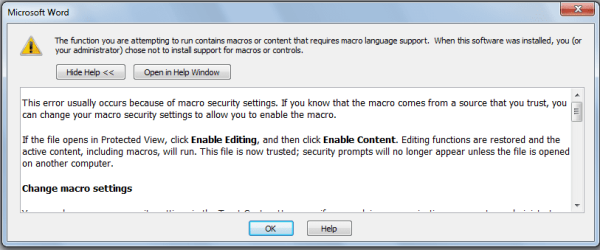
Every time I open Word or a Word file I get the attached message. I have tried every setting in the Trust Centre with the same result. Any suggestions would be greatly appreciated.
Regards
Powell Lucas
I need a little assistance in solving an annoyance relative to the thread title.
Every time I open Word or a Word file I get the attached message. I have tried every setting in the Trust Centre with the same result. Any suggestions would be greatly appreciated.
Regards
Powell Lucas
Attachments
My Computer
- Computer Manufacturer/Model Number
- Dell Inspiron 620s
- OS
- Windows Home Premium, 64 4.096 bit
- CPU
- i3-2100
- Motherboard
- Dell 0DGGBY
- Memory
- Dimm0, Samsung 64 bit, 4.096 Mb; Dimm1, Hyundai 64 bit, 2.04
- Graphics Card(s)
- Intel HD Graphics Family
- Sound Card
- ?
- Monitor(s) Displays
- Dell E197FP
- Hard Drives
- ?
- PSU
- ?
- Case
- ?
- Cooling
- ?