
Good Day Folks:
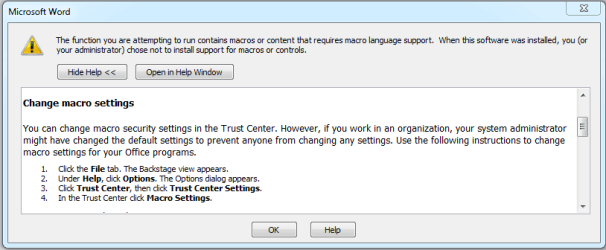
Every time I open a Word file I get a message telling me that the file requires Macro Support Language. I have followsed the instructions telling me how to enable/disable?? this function and have clicked on every one of the options available. I still get the same message. Since I have no idea what a Macro is (nor do I care to know) I would like to know how to correct this situation.
Please note that this problem has only cropped up since I installed a new AV application but I am not sure this is causing the problem. Before I jump all over them or uninstall the AV app I would like to make certain the problem is being caused by the new app.
As usual, any help would be appreciated.
Regards
Powell Lucas
Every time I open a Word file I get a message telling me that the file requires Macro Support Language. I have followsed the instructions telling me how to enable/disable?? this function and have clicked on every one of the options available. I still get the same message. Since I have no idea what a Macro is (nor do I care to know) I would like to know how to correct this situation.
Please note that this problem has only cropped up since I installed a new AV application but I am not sure this is causing the problem. Before I jump all over them or uninstall the AV app I would like to make certain the problem is being caused by the new app.
As usual, any help would be appreciated.
Regards
Powell Lucas
Attachments
My Computer
- Computer Manufacturer/Model Number
- Dell Inspiron 620s
- OS
- Windows Home Premium, 64 4.096 bit
- CPU
- i3-2100
- Motherboard
- Dell 0DGGBY
- Memory
- Dimm0, Samsung 64 bit, 4.096 Mb; Dimm1, Hyundai 64 bit, 2.04
- Graphics Card(s)
- Intel HD Graphics Family
- Sound Card
- ?
- Monitor(s) Displays
- Dell E197FP
- Hard Drives
- ?
- PSU
- ?
- Case
- ?
- Cooling
- ?