
Macruim Reflect performance...

Cr00zng

New member
Pro User
Local time
5:26 PM
Messages
568
I have two systems where I regularly use Reflect 4.2 freeware version. On both machines, it performs well; however, the performance differences are more than substantial.

The difference between the machines is i5 vs. i5-2500K CPU, Crucial C300 vs. Vertex 3; however, other aspects of the systems, such as OS, memory size, etc., are the same.

Here are the properties for the Crucial C300 and the backed up image (i5 CPU):
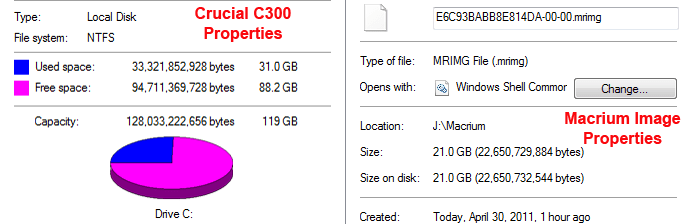
i5_SSD_img.png

And this is the time it takes for Macrium to backup the image:

i5.PNG

And these are the properties of the OCZ Vertex 3 and the backed up image (i5-2500K CPU)
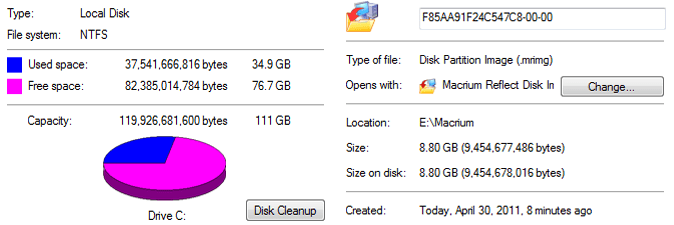
i5-2500.png

And this is how long it takes Macrium to backup the image:
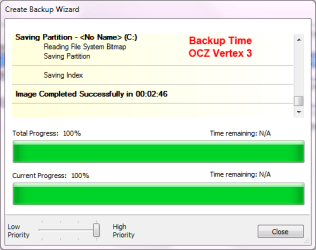
i5_2500.PNG

Certainly the i5-2500K with its Sandy Bridge motherboard is faster and the OCZ Vertex 3 has about 200 MB/s speed advantage; however, not as much as the backup times indicates (2:46 for OCZ vs 7:49 for Crucial).

The major difference is between the generated backup image sizes, 8.8 GBs for the OCZ vs. 21 GBs for the Crucial. That certainly explains most of the time differences between the two backups, despite the fact the OCZ drive has about 20% more utilization than the Crucial.

It does not explain why the system generates backups with so much difference in sizes? Obviously, the level of compression differences could easily answer this question, but....

Both system has this configuration for compression:
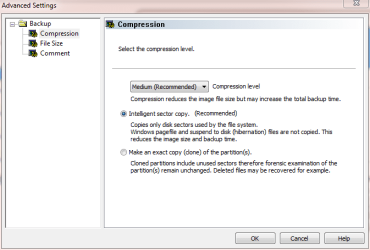
compression.PNG

Now, I am totally lost as to what causes the i5-2500K to generate a presumably highly compressed backup image with the same version of Macrium Reflect? Again, it is the 64-bit freeware version of 4.2, Built 3141.
Does anyone have some suggestion?
TIA...
 

My Computer

Computer type
PC/Desktop
Computer Manufacturer/Model Number
Custom built at Home
OS
Windows 7 64-bit, Windows 8.1 64-bit, OSX El Capitan, Windows 10 (VMware)
CPU
Intel i5-3350P 3.1 GHz
Motherboard
Gigabyte GA-Z77X-UP5 TH
Memory
16 GBs GSkill Sniper
Graphics Card(s)
Radeon HD 7850
Sound Card
VIA HD Audio
Monitor(s) Displays
Dell U2410 24"
Screen Resolution
1920x1200
Hard Drives
1 x Intel 520 240 GBs
1 x Seagate 1TBs SATA 2.0,
1 x Seagate 1TBs eSATA 2.0
PSU
Thermaltake 850W
Case
Antec P183
Cooling
Noctua NH-D14 Heatsink 2 x 120mm fans, 4 x 120mm case fans
Keyboard
Dell Multimedia keyboard
Mouse
Logitech Trackball
Internet Speed
28.5 Mb/s
Is this behavior consistent or a one time thing?

Have you experimented with deliberately changing the compression settings or the intelligent/exact setting??

Do both drives have the same cluster size?

Do you know or merely hope that either image will restore properly?

It is peculiar.


I have to add:

I'm a little less confident in Macrium than I was 2 weeks ago. I just installed an SSD and reinstalled Windows. I could not make a working Linux restore CD with Macrium. I tried standard, compatibility, and debug settings. The last 2 booted, but I could not then navigate through the restoration process. They both eventually stalled. All the more reason not to rely on images working.
 

My Computer

Computer type
PC/Desktop
Computer Manufacturer/Model Number
Ignatz Special; 4 speed manual gearbox; factory air conditioning; one of one
OS
Windows 7 Home Premium SP1, 64-bit
CPU
Intel Skylake i5-6600K, not overclocked
Motherboard
AsRock Z170M Extreme 4, micro ATX
Memory
8 GB HyperX DDR4-2666 (2 x 4 GB)
Graphics Card(s)
none; graphics are integrated on CPU
Sound Card
onboard: Realtek ALC1150; external: USB Behringer UF0-202
Monitor(s) Displays
Dell S2340M 23 inch IPS
Screen Resolution
1600 x 900
Hard Drives
System: Crucial MX100 series SSD, 128 GB;
Data: Samsung Spinpoint 103SJ, 1 TB;
Backup: WD Caviar Green WD30EZRX-00D8PB0, 3 TB
PSU
Rosewill SilentNight 500 watt fanless, semi-modular
Case
Antec Solo II
Cooling
Noctua NH-U12S; Noctua F12 intake, Noctua S12A exhaust
Keyboard
Microsoft 200 6JH-00001 USB
Mouse
Dell or Microsoft optical wired; USB
Antivirus
Microsoft Security Essentials and Malwarebytes Premium
Browser
Pale Moon
Other Info
All fans PWM; speeds at idle: CPU circa 500 rpm; intake circa 600 rpm; exhaust circa 600 rpm; CPU temps 27 idle and 47 C load in a warm room (27 C/81 F) when running Intel Extreme Tuning Utility stress test.
It is consistent for all backups, even Windows backup shows similar ratio in size differences. The reason for the differences falls under the category of "duh!".

My machine has Steam, Black Ops, Modern Warfare 2 with their already compressed video and sound files in addition to Adobe Web Premium CS5 that also have videos, images, etc. These files cannot be compressed and Macrium has no choice, but to back it up with the ratio of close to 1 to 1. The other machine is an office PC with easily compressible files.

As for restore, I've never needed to restore an image; if it comes to that, I'll cross my fingers that either of the Macrium or the Windows backup will work. Most certainly, your point about the image may not be reliable is valid...

With the help of SIW2 and others, I've created a Windows 7 boot disk for Macrium free version. It is described in this thread. Maybe you should try creating one that may help you restoring the image at the next time. I do hope that you'll never need it ;)
 

My Computer

Computer type
PC/Desktop
Computer Manufacturer/Model Number
Custom built at Home
OS
Windows 7 64-bit, Windows 8.1 64-bit, OSX El Capitan, Windows 10 (VMware)
CPU
Intel i5-3350P 3.1 GHz
Motherboard
Gigabyte GA-Z77X-UP5 TH
Memory
16 GBs GSkill Sniper
Graphics Card(s)
Radeon HD 7850
Sound Card
VIA HD Audio
Monitor(s) Displays
Dell U2410 24"
Screen Resolution
1920x1200
Hard Drives
1 x Intel 520 240 GBs
1 x Seagate 1TBs SATA 2.0,
1 x Seagate 1TBs eSATA 2.0
PSU
Thermaltake 850W
Case
Antec P183
Cooling
Noctua NH-D14 Heatsink 2 x 120mm fans, 4 x 120mm case fans
Keyboard
Dell Multimedia keyboard
Mouse
Logitech Trackball
Internet Speed
28.5 Mb/s

My Computers

System One System Two

  • Computer type
    PC/Desktop
    OS
    7 X64
    CPU
    i5 8400
    Motherboard
    gigabyte b365m ds3h
    Memory
    2x8gb 3200mhz
    Hard Drives
    various
    PSU
    pure power 11 400w cm
    Case
    Coolermaster
    Cooling
    cryorig m9i
  • Computer type
    PC/Desktop
    OS
    7x64
    CPU
    g5400
    Motherboard
    ga b365m ds3h
    Memory
    8gb ddr4 2400
    PSU
    xfx pro 450w
It is consistent for all backups, even Windows backup shows similar ratio in size differences. The reason for the differences falls under the category of "duh!".

My machine has Steam, Black Ops, Modern Warfare 2 with their already compressed video and sound files in addition to Adobe Web Premium CS5 that also have videos, images, etc. These files cannot be compressed and Macrium has no choice, but to back it up with the ratio of close to 1 to 1. The other machine is an office PC with easily compressible files.

As for restore, I've never needed to restore an image; if it comes to that, I'll cross my fingers that either of the Macrium or the Windows backup will work. Most certainly, your point about the image may not be reliable is valid...

With the help of SIW2 and others, I've created a Windows 7 boot disk for Macrium free version. It is described in this thread. Maybe you should try creating one that may help you restoring the image at the next time. I do hope that you'll never need it ;)

I have restored from both successfully using the the WinPE boot USB described in this thread. You must test any boot CD or USB you create before committing to it. Whs describes the testing process here with the Macrium product. http://www.sevenforums.com/tutorials/73828-imaging-free-macrium.html?filter[2]=Backup%20Restore
 

My Computer

Computer type
Laptop
Computer Manufacturer/Model Number
Hewlett-Packard/G62-107SA Notebook
OS
Microsoft Windows 7 Home Premium 64-bit Service Pack 1
CPU
Intel(R) Core(TM) i3 CPU M 330 @ 2.13GHz
Motherboard
Hewlett-Packard 1425
Memory
8 GB DDR3
Graphics Card(s)
Intel(R) HD Graphics
Sound Card
Realtek High Definition Audio
Monitor(s) Displays
Builtin
Screen Resolution
1366 x 768 x 32 bits (4294967296 colors) @ 60 Hz
Hard Drives
250 GB SATA Hard Disk Drive 7200 rpm
2TB Seagate GoFlex USB 2 Drive
1TB Iomega Prestige USB 2 Drive
1.5TB Iomega Prestige USB 2 Drive (Samsung)
2TB WD MyBook Live NAS.
Mouse
Logitech Anywhere MX
Internet Speed
152 Mbs download 10 Mbs upload
Antivirus
Norton 360
Browser
Chrome
I've tested both Windows and Macrium rescue disk on the USB and they work. And as for the image in itself...

As whs said in his video, "it's either good, or not good"
wink.gif


I'll be the first to know if time comes...

Knowing that you and other people had success with restoring their system that's good enough for me.
 
Last edited:

My Computer

Computer type
PC/Desktop
Computer Manufacturer/Model Number
Custom built at Home
OS
Windows 7 64-bit, Windows 8.1 64-bit, OSX El Capitan, Windows 10 (VMware)
CPU
Intel i5-3350P 3.1 GHz
Motherboard
Gigabyte GA-Z77X-UP5 TH
Memory
16 GBs GSkill Sniper
Graphics Card(s)
Radeon HD 7850
Sound Card
VIA HD Audio
Monitor(s) Displays
Dell U2410 24"
Screen Resolution
1920x1200
Hard Drives
1 x Intel 520 240 GBs
1 x Seagate 1TBs SATA 2.0,
1 x Seagate 1TBs eSATA 2.0
PSU
Thermaltake 850W
Case
Antec P183
Cooling
Noctua NH-D14 Heatsink 2 x 120mm fans, 4 x 120mm case fans
Keyboard
Dell Multimedia keyboard
Mouse
Logitech Trackball
Internet Speed
28.5 Mb/s
That's good. As to your other question. If you mount the image by clicking on it you can copy any data files you like from it onto your own data drive. I did this myself yesterday for something I deleted then thought I might need again. It wouldn't be a good idea to do that with programs, however, as they need to be installed.
 

My Computer

Computer type
Laptop
Computer Manufacturer/Model Number
Hewlett-Packard/G62-107SA Notebook
OS
Microsoft Windows 7 Home Premium 64-bit Service Pack 1
CPU
Intel(R) Core(TM) i3 CPU M 330 @ 2.13GHz
Motherboard
Hewlett-Packard 1425
Memory
8 GB DDR3
Graphics Card(s)
Intel(R) HD Graphics
Sound Card
Realtek High Definition Audio
Monitor(s) Displays
Builtin
Screen Resolution
1366 x 768 x 32 bits (4294967296 colors) @ 60 Hz
Hard Drives
250 GB SATA Hard Disk Drive 7200 rpm
2TB Seagate GoFlex USB 2 Drive
1TB Iomega Prestige USB 2 Drive
1.5TB Iomega Prestige USB 2 Drive (Samsung)
2TB WD MyBook Live NAS.
Mouse
Logitech Anywhere MX
Internet Speed
152 Mbs download 10 Mbs upload
Antivirus
Norton 360
Browser
Chrome
Back
Top