
Solved mad mouse mayhem

lffoar

Harry
Member
VIP
Local time
10:31 PM
Messages
277
Location
Adelaide South Australia
Hi all,
back again to the gurus!!
I have an annoying problem with an Asus G74 using wireless Micro$oft 3500 mouse.
When I open a web page and use the arrows to navigate, menus open up wherever the cursor happens to be. This is with no input from me, just up or down arrows. Also at times if I move the mouse to another part of the page it will highlight the text as I go, also with no input, ie no left or right click.
I've uninstalled/reinstalled M/soft mouse and keyboard centre and drivers several times but still the same.
Have unchecked "activate a window by hovering" in control panel/ease of access.
Have tried setting "hover time" in regedit to different times.
Mouse works fine in normal day to day ops, just on the web I have this gremlin. Ideas guys??
 

My Computer

Computer type
PC/Desktop
Computer Manufacturer/Model Number
Self built
OS
Windows 7 home premium 64bit
CPU
intel Core i7 4790 3.6Ghz
Motherboard
Gigabyte H97-D3H
Memory
16Gb G.Skill Sniper
Graphics Card(s)
Nvidia GTX 760
Sound Card
Realtek ALC1150 115dB SNR HD Audio
Monitor(s) Displays
LG 32" TV as monitor
Screen Resolution
1920 x 1080
Hard Drives
Samsung 840 PRO series SATA3 256Gb SSD.
Western Digital Black SATA3 -1Tb.
Western Digital external HDD-1TB.

Pioneer DVD-RW.
PSU
Antec HCG 620w
Case
Thermaltake A41
Cooling
Stock fans x 3. After market Arctic Freezer i11 cpu cooler
Keyboard
Logitech M520r wireless
Mouse
Logitech M310t wireless
Internet Speed
Fair to middlin'
Antivirus
Avast free
Browser
Firefox
Other Info
MBAM Pro
SuperAntiSpyware free edition
AdwCleaner
Ccleaner
Revo uninstaller Pro
I'm thinking it's not your mouse, rather the webpage you are on at the time.
 

My Computer

Computer type
PC/Desktop
Computer Manufacturer/Model Number
Home made Desktop
OS
Windows 10 Pro. 64/ version 1709 Windows 7 Pro/64
CPU
Intel i7-6800K @ 4.3
Motherboard
ASUS X-99 Deluxe II
Memory
Corsair Platinum 16 gig @2400
Graphics Card(s)
EVGA GTX 1070 OC
Monitor(s) Displays
Asus 27" LED LCD/VE278Q
Screen Resolution
1920-1080 or 1280-720 HDMI
Hard Drives
INTEL SSD 730-240 Gb Sata 3.0/
PSU
EVGA Platium 1200W
Case
Phanteks Luxe Tempered Glass 8 fans/ one radiator
Cooling
XSPC/ Water Cooled CPU
Keyboard
Das 4 Professional
Mouse
Logitech M705/MX Anywhere 2-S
Internet Speed
100 mbits
Antivirus
Microsoft Security Essentials/ Malwarebytes Premium 3.0/ SAS
Browser
I.E. 11 default/Firefox/ ISP Time Warner Cable/Spectrum
Other Info
LG BluRay Burner/
Sound system-KLipsch-THX/
Icy Dock ssd Hot Swap bays.
I think Jack is right. That is a function of the website - nothing wrong with your mouse.

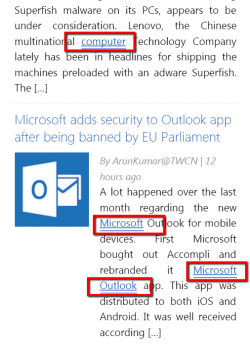
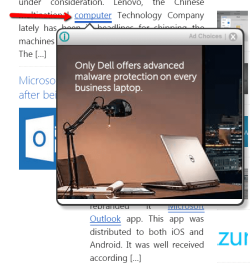
The first picture shows a website of another forum where all the blue underlined words hide ads. The second picture shows one of those ads. It is very easy to trigger those - even when you use the up/down keys, the cursor still travels over the page.


2015-02-21_2113.png
 

Attachments

  • 2015-02-21_2114.png
    2015-02-21_2114.png
    75.1 KB · Views: 33

My Computer

Computer Manufacturer/Model Number
HP, Dell, Gateway, Toshiba - 4 laptops and 2 desktops
OS
Vista, Windows7, Mint Mate, Zorin, Windows 8
CPU
from 1.6GHz Duo to i7
Monitor(s) Displays
2x HP w2207
Hard Drives
5x HDD, 7x SSD, 12x Externals
Keyboard
with trackball - no mices
Mouse
Trackball mice
Internet Speed
DSL 6000
Thanks fellers but it happens on any website. In fact while reading your replies I moved the cursor from right to left on the page and walahh, the whole page of text was highlighted. Got me stumped.....and confused......and getting to the point of tossing the mouse to the cat!!
 

My Computer

Computer type
PC/Desktop
Computer Manufacturer/Model Number
Self built
OS
Windows 7 home premium 64bit
CPU
intel Core i7 4790 3.6Ghz
Motherboard
Gigabyte H97-D3H
Memory
16Gb G.Skill Sniper
Graphics Card(s)
Nvidia GTX 760
Sound Card
Realtek ALC1150 115dB SNR HD Audio
Monitor(s) Displays
LG 32" TV as monitor
Screen Resolution
1920 x 1080
Hard Drives
Samsung 840 PRO series SATA3 256Gb SSD.
Western Digital Black SATA3 -1Tb.
Western Digital external HDD-1TB.

Pioneer DVD-RW.
PSU
Antec HCG 620w
Case
Thermaltake A41
Cooling
Stock fans x 3. After market Arctic Freezer i11 cpu cooler
Keyboard
Logitech M520r wireless
Mouse
Logitech M310t wireless
Internet Speed
Fair to middlin'
Antivirus
Avast free
Browser
Firefox
Other Info
MBAM Pro
SuperAntiSpyware free edition
AdwCleaner
Ccleaner
Revo uninstaller Pro
Hello lffoar,

What happens if you use a different mouse (wired for example), will the situation be different then?
Or could you try the mouse on a different system to see if it is Windows related?
Also have you tried a different web browser, like Firefox or Chrome?

Could you also perhaps post a screenshot here, would also be helpful ^^.
 

My Computer

Computer type
PC/Desktop
Computer Manufacturer/Model Number
Custom build
OS
Primary OS: Archlinux with Kde-Plasma5 x86-64. Secondary OS: Windows 8.1 x64. UEFI Setup.
CPU
i5-4570 3.2GHz
Motherboard
Asus H87-PLUS
Memory
8GiB
Graphics Card(s)
Nvidia GeForce GTX 660 (Msi TwinFrozr III)
Screen Resolution
1920 * 1080
Hard Drives
Samsung SSD 840 PRO 128Gib (Linux) [Is technically not a HDD]
WD Red 1TB (Data+Windows)
PSU
Corsair Gaming GS600 (600W)
Case
Zalman Z9 Plus
Internet Speed
46Mbps (5,75MBps) Down. 5Mbps (0,625MBps) Up.
Antivirus
Avast, but never really needed any AV though...
Browser
Firefox only ^^.
I guess it would be worth trying another mouse.
 

My Computer

Computer Manufacturer/Model Number
HP, Dell, Gateway, Toshiba - 4 laptops and 2 desktops
OS
Vista, Windows7, Mint Mate, Zorin, Windows 8
CPU
from 1.6GHz Duo to i7
Monitor(s) Displays
2x HP w2207
Hard Drives
5x HDD, 7x SSD, 12x Externals
Keyboard
with trackball - no mices
Mouse
Trackball mice
Internet Speed
DSL 6000
Tried the wireless mouse from my desktop......same same. Thought it may be a problem with the comp but tried Midori's suggestion and used IE, (Firefox is my usual) and all ok.
Buggar, I don't like IE. Oh well, at least the problem....for now....has gone.
 

My Computer

Computer type
PC/Desktop
Computer Manufacturer/Model Number
Self built
OS
Windows 7 home premium 64bit
CPU
intel Core i7 4790 3.6Ghz
Motherboard
Gigabyte H97-D3H
Memory
16Gb G.Skill Sniper
Graphics Card(s)
Nvidia GTX 760
Sound Card
Realtek ALC1150 115dB SNR HD Audio
Monitor(s) Displays
LG 32" TV as monitor
Screen Resolution
1920 x 1080
Hard Drives
Samsung 840 PRO series SATA3 256Gb SSD.
Western Digital Black SATA3 -1Tb.
Western Digital external HDD-1TB.

Pioneer DVD-RW.
PSU
Antec HCG 620w
Case
Thermaltake A41
Cooling
Stock fans x 3. After market Arctic Freezer i11 cpu cooler
Keyboard
Logitech M520r wireless
Mouse
Logitech M310t wireless
Internet Speed
Fair to middlin'
Antivirus
Avast free
Browser
Firefox
Other Info
MBAM Pro
SuperAntiSpyware free edition
AdwCleaner
Ccleaner
Revo uninstaller Pro
Try this: Make sure that your ALT and CTRL keys are not sticking. Just a hunch, but it's been known to be worth checking.
 

My Computer

Computer type
PC/Desktop
Computer Manufacturer/Model Number
iBuyPower NZXT
OS
Microsoft Windows 10 Home Build 15036
CPU
Intel(R) Core(TM) i7-860 @ 2.80GHz
Motherboard
Gigabyte Technology Co., Ltd. P55-UD3L
Memory
4.00 GB
Graphics Card(s)
NVIDIA GeForce GTX 750
Sound Card
(1) Line 6 UX2 (2) Realtek High Definition Audio
Monitor(s) Displays
23" acer
Screen Resolution
1920 x 1080 x 32 bits (4294967296 colors) @ 60 Hz
Hard Drives
(1) WDC WD5000AAKS-00D2B0 ATA Device (2) Seagate FreeAgent Go 250G USB Device
Cooling
Corsair H75 liquid cooler (Very easy to install, actually)
Internet Speed
60M cable modem-->Linksys E1200-->1Gbps net card
Browser
Chrome
Other Info
This is probably the longest I've ever had a Windows machine run without having to restore it to scratch. I'm used to restoring to "factory" about every 2 yrs. I've run with Win7 since new in 2009 and only recently (Nov, '14) restored to clean up the machine from all my 'xperimenting. LOL!! I may never need another machine.

Upgraded to 10 when it was still free, then installed 2017 update.
Hilarity Ensued

One of my keyboards developed a sticky Shift key.

Hilarity ensued. :eek:
 

My Computer

Computer type
PC/Desktop
Computer Manufacturer/Model Number
n/a
OS
W7 Ultimate SP1, LM19.2 MATE, W10 Home 1703, W10 Pro 1703 VM, #All 64 bit
CPU
AMD Phenom II x6 1100T, 3.3 GHz
Motherboard
ASUS M4A88T-M/USB3 (AM3)
Memory
12GB DDR3 1333 G-Skill (4GB x 2), G-Skill (2GB x 2)
Graphics Card(s)
NVIDIA GeForce GTX 660
Sound Card
Realtek?
Monitor(s) Displays
Samsung S23B350
Screen Resolution
1920x1080
Hard Drives
WD Green 2TB (SATA), WD Green 3TB (SATA), WD Blue 4TB (SATA), WD Blue 6TB (SATA)
PSU
Cooler Master
Case
Antec GX300 Tower
Cooling
3x Antec TRICOOL 120mm Fans
Mouse
Wired Optical
Internet Speed
DSL
Antivirus
Avast
Browser
Pale Moon (64 bit)
Other Info
2018-12-27 Upgraded HDDs
2015-12-10 Upgraded case, graphics card, storage
2015-08-15 Upgraded motherboard & RAM
2015-07-15 Upgraded LM17.1 to LM17.2
No sticky keys but while I was fiddlin' with it a guy I know popped in.....to drink my beer :(
He's pretty cluey, had a look and suggested it could be the Atheros bluetooth program corrupting web pages. Nothing to lose as I don't use bluetooth on this lappy so deleted it and wacko, I'm back on FF and mouse is behaving as it should :D
It'll get a nice piece of cheese tonight now.....and my mate has settled in to empty my fridge :confused:
Thanks all, consider it closed
 

My Computer

Computer type
PC/Desktop
Computer Manufacturer/Model Number
Self built
OS
Windows 7 home premium 64bit
CPU
intel Core i7 4790 3.6Ghz
Motherboard
Gigabyte H97-D3H
Memory
16Gb G.Skill Sniper
Graphics Card(s)
Nvidia GTX 760
Sound Card
Realtek ALC1150 115dB SNR HD Audio
Monitor(s) Displays
LG 32" TV as monitor
Screen Resolution
1920 x 1080
Hard Drives
Samsung 840 PRO series SATA3 256Gb SSD.
Western Digital Black SATA3 -1Tb.
Western Digital external HDD-1TB.

Pioneer DVD-RW.
PSU
Antec HCG 620w
Case
Thermaltake A41
Cooling
Stock fans x 3. After market Arctic Freezer i11 cpu cooler
Keyboard
Logitech M520r wireless
Mouse
Logitech M310t wireless
Internet Speed
Fair to middlin'
Antivirus
Avast free
Browser
Firefox
Other Info
MBAM Pro
SuperAntiSpyware free edition
AdwCleaner
Ccleaner
Revo uninstaller Pro
Back
Top