Madcatz Arcade stick suddenly a Unknown Device

FloPPyPiLLoW

New member
Local time
6:50 AM
Messages
24
So I was playing skullgirls with my fightstick it switched me back to keyboard controls when I switched windows and came back so I unplugged it and plugged it back in and it worked fine. Then I switched windows and came back and it did the same thing but this time when I unplugged it an plugged it back in it didn't fix it. Now when I plug it in it says it's an unknown device. I have had issues with it about a week ago where it was trying to install the windows xbox controller v2.06 instead of the windows xbox controller 6.0 drivers which I fixed by manually switching it. But when that happened it was still showing up under controllers in device manager however now it's showing up as an unknown device under the Universal Serial Buses tab in device manager which means I can't select the xbox controller driver for it again. Not sure what's up so hopefully someone does :)
 

My Computer My Computer

At a glance

OntarioI5-4670k @ 3.40GHz (4CPUs)2x8 G.skill ripjaw 1600mhzAMD Radeon HD 7900
Computer type
PC/Desktop
Computer Manufacturer/Model Number
Custom Build
OS
Ontario
CPU
I5-4670k @ 3.40GHz (4CPUs)
Motherboard
Gigabyte H87M-D3H
Memory
2x8 G.skill ripjaw 1600mhz
Graphics Card(s)
AMD Radeon HD 7900
Hard Drives
140gb SSD
1TB HD
Antivirus
AVG Free
Browser
Chrome + Firefox
Uninstall the device via Device Manager then configure Windows not to install updates.

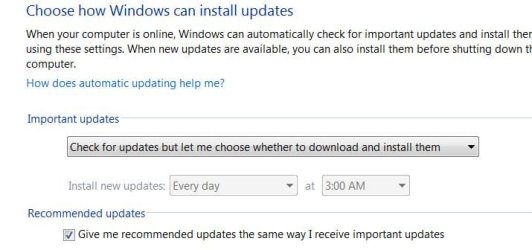
Open Windows updates, in the left column click change settings, then in the drop down box select 'Check for updates but let me choose whether to download and install them'. The purpose of this is to keep Windows Updates from automatically installing a driver.

Windows Updates Settings.JPG

Reboot and reconnect the device. Then install the driver you have saved. You can then set Windows Updates back to however you had it set previously.
 

My Computer My Computer

At a glance

W7 Pro x64 SP1 | W10 Pro IP x64 | W8.1 Pro x6...i7-4790k @ 4GHz (4.4GHz Boost)16GB DDR3 Kingston HyperX Fury @ 1600MHz CL 9...EVGA GTX 980 Classified
Computer type
PC/Desktop
Computer Manufacturer/Model Number
Custom Build
OS
W7 Pro x64 SP1 | W10 Pro IP x64 | W8.1 Pro x64 VM | Linux Mint VM
CPU
i7-4790k @ 4GHz (4.4GHz Boost)
Motherboard
ASUS Sabertooth Z87 (BIOS Rev 2004)
Memory
16GB DDR3 Kingston HyperX Fury @ 1600MHz CL 9-9-9-27
Graphics Card(s)
EVGA GTX 980 Classified
Sound Card
Realtek Onboard
Monitor(s) Displays
Samsung S27D390
Screen Resolution
1920 x 1080
Hard Drives
240GB Intel 520 Series SSD |
Samsung 850 EVO 120GB SSD |
2TB WD Caviar Black |
2TB WD Caviar Green
PSU
Corsair HX850-80 Gold Modular
Case
Cooler Master Silencio 650
Cooling
Corsair H80i w/2 x Corsair SP120 | 2 x 120mm Noctua NF-S12B
Keyboard
Microsoft Sidewinder X4
Mouse
Gigabyte M6900 optical
Internet Speed
152mb
Antivirus
F-Secure
Browser
Firefox 38.0
Other Info
Backup Rig: Win 7 Pro 64-bit | AMD A10-5800k | ASUS F2A85-V Pro | 8GB Samsung DDR3 @1600MHz | 120GB Toshiba SDD | 2TB Seagate HDD | Cooler Master Silencio 550
Doing that had no effect. When I plug it in it still comes up saying usb device not recognized.
 

My Computer My Computer

At a glance

OntarioI5-4670k @ 3.40GHz (4CPUs)2x8 G.skill ripjaw 1600mhzAMD Radeon HD 7900
Computer type
PC/Desktop
Computer Manufacturer/Model Number
Custom Build
OS
Ontario
CPU
I5-4670k @ 3.40GHz (4CPUs)
Motherboard
Gigabyte H87M-D3H
Memory
2x8 G.skill ripjaw 1600mhz
Graphics Card(s)
AMD Radeon HD 7900
Hard Drives
140gb SSD
1TB HD
Antivirus
AVG Free
Browser
Chrome + Firefox
Uninstall the usb root hubs via device manager; reboot; and let windows redetect all connected usb devices. If you have a wired keyboard and mouse that is good because it wont be affected. If its wireless it will be affected until you reboot and windows finds the drivers for it. So uninstall the root hubs, reboot, and let windows re detect all the connected devices and see if that solves your issue. If not post back and we can go from there.
 

My Computer My Computer

At a glance

Windows 7 ultimate 64-bitIntel I7 2600K 3.4ghzCorsair 16gb ddr3 1600mhzNvidia Geforce gt 430
Computer type
PC/Desktop
Computer Manufacturer/Model Number
custom built
OS
Windows 7 ultimate 64-bit
CPU
Intel I7 2600K 3.4ghz
Motherboard
Asus Evo P8P67
Memory
Corsair 16gb ddr3 1600mhz
Graphics Card(s)
Nvidia Geforce gt 430
Sound Card
Sound Blaster Titanium x-fi pci express
Monitor(s) Displays
Dell E198WFP
Hard Drives
1 western digital 2TB drive.
PSU
Antec 1200 watt
Case
Inwin Dragon Rider
Cooling
6 case supplied cooling fans
Keyboard
logitech mk700
Mouse
logitech m705
Internet Speed
25-50mbps download; 10mbps upload(i think)
Antivirus
avg free 2014
Browser
mozilla firefox
Other Info
Also have a pretty bad speaker setup which is a klipsch promedia 5.1 surround speaker setup with huge subwoofer and lg blu ray player/writer. Also a hp officejet pro 8600 plus wireless all in one and a logitech s7500 webcam.

I tried what you said matts and it worked for about 5-10 minutes then cut out again.
 

My Computer My Computer

At a glance

OntarioI5-4670k @ 3.40GHz (4CPUs)2x8 G.skill ripjaw 1600mhzAMD Radeon HD 7900
Computer type
PC/Desktop
Computer Manufacturer/Model Number
Custom Build
OS
Ontario
CPU
I5-4670k @ 3.40GHz (4CPUs)
Motherboard
Gigabyte H87M-D3H
Memory
2x8 G.skill ripjaw 1600mhz
Graphics Card(s)
AMD Radeon HD 7900
Hard Drives
140gb SSD
1TB HD
Antivirus
AVG Free
Browser
Chrome + Firefox
So even when my fightstick turns into an unknown device I am still able to use my xbox controller. Also when it goes unknown skullgirls still recognizes that a controller is plugged in up until I unplug it.
 

My Computer My Computer

At a glance

OntarioI5-4670k @ 3.40GHz (4CPUs)2x8 G.skill ripjaw 1600mhzAMD Radeon HD 7900
Computer type
PC/Desktop
Computer Manufacturer/Model Number
Custom Build
OS
Ontario
CPU
I5-4670k @ 3.40GHz (4CPUs)
Motherboard
Gigabyte H87M-D3H
Memory
2x8 G.skill ripjaw 1600mhz
Graphics Card(s)
AMD Radeon HD 7900
Hard Drives
140gb SSD
1TB HD
Antivirus
AVG Free
Browser
Chrome + Firefox
Reinstall the chipset drivers

Check if there's a BIOS update for your machine
 

My Computer My Computer

At a glance

Desk 1: Win 7 Pro x32; Desk 2: Windows 10 x64
Computer type
PC/Desktop
Computer Manufacturer/Model Number
Dell Optiplex 360 and Optiplex 755
OS
Desk 1: Win 7 Pro x32; Desk 2: Windows 10 x64
Hard Drives
500GB Crucial SSD in both Desktops
Other Info
Buffalo 6TB NAS, Raid 1
I agree with computergeek. Sounds like your motherboard(chipset) drivers need to be reinstalled and or updated. As well as checking to see if there is a bios update available to fix the issue.
 

My Computer My Computer

At a glance

Windows 7 ultimate 64-bitIntel I7 2600K 3.4ghzCorsair 16gb ddr3 1600mhzNvidia Geforce gt 430
Computer type
PC/Desktop
Computer Manufacturer/Model Number
custom built
OS
Windows 7 ultimate 64-bit
CPU
Intel I7 2600K 3.4ghz
Motherboard
Asus Evo P8P67
Memory
Corsair 16gb ddr3 1600mhz
Graphics Card(s)
Nvidia Geforce gt 430
Sound Card
Sound Blaster Titanium x-fi pci express
Monitor(s) Displays
Dell E198WFP
Hard Drives
1 western digital 2TB drive.
PSU
Antec 1200 watt
Case
Inwin Dragon Rider
Cooling
6 case supplied cooling fans
Keyboard
logitech mk700
Mouse
logitech m705
Internet Speed
25-50mbps download; 10mbps upload(i think)
Antivirus
avg free 2014
Browser
mozilla firefox
Other Info
Also have a pretty bad speaker setup which is a klipsch promedia 5.1 surround speaker setup with huge subwoofer and lg blu ray player/writer. Also a hp officejet pro 8600 plus wireless all in one and a logitech s7500 webcam.
Back
Top