Made a dynamic disk by mistake when I attempted to install vista

Doug B

New member
Local time
5:26 AM
Messages
3
Here's what I am up against. I suspect Widows 7 us corrupt and even with the restore I still have problems. Anyway, for giggles, I wanted to install Vista Professional on a partition as a dual boot and see how it does with Vista. Forget all that why business.

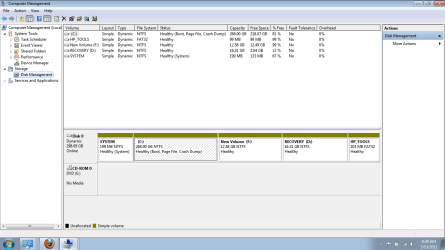
When I create a partition F:, it makes it a dynamic partition and when I attempt to install vista, it says it cannot install on a dynamic volume.

C is of course the main drive
D is the OEM recovery
E is the CD/DVD
F is the new drive.

I made F 12gb but it shows up as dynamic.

How do I get past this?

By the way this is a laptop so no second hard drive can be installed (or if it can, it's not a viable option).
 
Last edited:

My Computer My Computer

At a glance

Windows 7 64 bit Premium Home3gb
Computer Manufacturer/Model Number
HP G62
OS
Windows 7 64 bit Premium Home
Memory
3gb
Please post a screenshot of Disk Management window.
 

My Computers My Computers

  • At a glance

    7 X64i5 84002x8gb 3200mhz
    Computer type
    PC/Desktop
    OS
    7 X64
    CPU
    i5 8400
    Motherboard
    gigabyte b365m ds3h
    Memory
    2x8gb 3200mhz
    Hard Drives
    various
    PSU
    pure power 11 400w cm
    Case
    Coolermaster
    Cooling
    cryorig m9i
  • At a glance

    7x64g54008gb ddr4 2400
    Computer type
    PC/Desktop
    OS
    7x64
    CPU
    g5400
    Motherboard
    ga b365m ds3h
    Memory
    8gb ddr4 2400
    PSU
    xfx pro 450w
Hope this gets loaded. I ended up making an image before I monkeyed around too much and glad I did. When I reloaded the image, the partition was removed. Anyway, I did it again.

Thanks so much for replying and helping.
 

Attachments

  • Capture.PNG
    Capture.PNG
    30.2 KB · Views: 52

My Computer My Computer

At a glance

Windows 7 64 bit Premium Home3gb
Computer Manufacturer/Model Number
HP G62
OS
Windows 7 64 bit Premium Home
Memory
3gb
Hello Doug, and welcome to Seven Forums.

The problem was that you already had 4 primary partitions on that disk. This is why it wanted to convert the disk to Dynamic when you created the F partition. However, Vista will not install to a dynamic volume like that.

You may be able to use OPTION FOUR in the tutorial below to convert the disk back to a "Basic" disc without losing anything. Be sure to backup anything that you do not want to lose to be safe though.

http://www.sevenforums.com/tutorials/26829-convert-dynamic-disk-basic-disk.html

Hope this helps for now,
Shawn
 

My Computer My Computer

At a glance

64-bit Windows 11 Pro for WorkstationsIntel i7-8700K OC'd to 5 GHz64 GB (4x16GB) G.SKILL TridentZ RGB DDR4 3600...ASUS ROG-STRIX-GTX1080TI-O11G-GAMING
Computer type
PC/Desktop
Computer Manufacturer/Model Number
Self built custom
OS
64-bit Windows 11 Pro for Workstations
CPU
Intel i7-8700K OC'd to 5 GHz
Motherboard
ASUS ROG Maximus XI Formula Z390
Memory
64 GB (4x16GB) G.SKILL TridentZ RGB DDR4 3600 MHz
Graphics Card(s)
ASUS ROG-STRIX-GTX1080TI-O11G-GAMING
Sound Card
Integrated
Monitor(s) Displays
2 x Samsung Odyssey G7 27"
Screen Resolution
2560x1440
Hard Drives
1TB Samsung 990 PRO M.2,
4TB Samsung 990 PRO PRO M.2,
TerraMaster F8 SSD Plus NAS
PSU
Seasonic Prime Titanium 850W
Case
Thermaltake Core P3
Cooling
Corsair Hydro H115i
Keyboard
Logitech wireless K800
Mouse
Logitech MX Master 4
Internet Speed
2 Gb/s Download and 100 Mb/s Upload
Antivirus
Malwarebyte Anti-Malware Premium
Browser
Google Chrome
Other Info
Logitech Z625 speaker system,
Logitech BRIO 4K Pro webcam,
HP Color LaserJet Pro MFP M477fdn,
APC SMART-UPS RT 1000 XL - SURT1000XLI,
Galaxy S23 Plus phone
Hello Doug B, welcome to Seven Forums!


If you get it back to a Basic disk and need to create additional storage space, using the same Partition Wizard, have a look at Method Two of this tutorial at the link below and be sure to post back with any further questions you may have and to keep us informed.


Partition / Extended : Logical Drives
 

My Computer My Computer

At a glance

W 7 64-bit UltimateIntel Q9550 Yorkfield8GB Dominator 8500C5DATI : XFX 5870
Computer Manufacturer/Model Number
* BFK Customs *
OS
W 7 64-bit Ultimate
CPU
Intel Q9550 Yorkfield
Motherboard
ASUS P5Q Pro
Memory
8GB Dominator 8500C5D
Graphics Card(s)
ATI : XFX 5870
Sound Card
Realtek HD Audio 7-1
Monitor(s) Displays
1x 47" LCD HDMI & 3x 26" LCD HDMI
Screen Resolution
1920x1080P & 1920x1200
Hard Drives
1x 80GB Intel X25-M G2 SSD : 1x 500GB & 1x 640GB WD Caviar Black(s)
PSU
Corsair 620HX
Case
Cooler Master RC-690
Cooling
Tuniq Tower 120, 2x 140mm and 3x 120mm case fans
Keyboard
Microsoft 500
Mouse
Razer Diamondback 3G
Internet Speed
14 Mb/s
Other Info
1x Koutech 3Gb/s SATA HDD Hot Swap Rack
You'll need Partition Wizard version 4.2 home edition to do this for free as in the new version it is a paid feature: partition wizard 4.2 free.zip - Windows Live#

Hello Greg,

Just for pure FYI only. :)

The older Partition Wizard 4.2 Home edition would be ideal and easier, but OPTION FOUR in the tutorial will allow you to use the latest version of Partition Wizard to do the same using a different way.
 

My Computer My Computer

At a glance

64-bit Windows 11 Pro for WorkstationsIntel i7-8700K OC'd to 5 GHz64 GB (4x16GB) G.SKILL TridentZ RGB DDR4 3600...ASUS ROG-STRIX-GTX1080TI-O11G-GAMING
Computer type
PC/Desktop
Computer Manufacturer/Model Number
Self built custom
OS
64-bit Windows 11 Pro for Workstations
CPU
Intel i7-8700K OC'd to 5 GHz
Motherboard
ASUS ROG Maximus XI Formula Z390
Memory
64 GB (4x16GB) G.SKILL TridentZ RGB DDR4 3600 MHz
Graphics Card(s)
ASUS ROG-STRIX-GTX1080TI-O11G-GAMING
Sound Card
Integrated
Monitor(s) Displays
2 x Samsung Odyssey G7 27"
Screen Resolution
2560x1440
Hard Drives
1TB Samsung 990 PRO M.2,
4TB Samsung 990 PRO PRO M.2,
TerraMaster F8 SSD Plus NAS
PSU
Seasonic Prime Titanium 850W
Case
Thermaltake Core P3
Cooling
Corsair Hydro H115i
Keyboard
Logitech wireless K800
Mouse
Logitech MX Master 4
Internet Speed
2 Gb/s Download and 100 Mb/s Upload
Antivirus
Malwarebyte Anti-Malware Premium
Browser
Google Chrome
Other Info
Logitech Z625 speaker system,
Logitech BRIO 4K Pro webcam,
HP Color LaserJet Pro MFP M477fdn,
APC SMART-UPS RT 1000 XL - SURT1000XLI,
Galaxy S23 Plus phone
Deleting then using a partition undelete has been around a very long time.

It is not entirely safe, tho.

Undelete tools have improved over the years - pw seems pretty good, Paragon undelete is excellent, Acronis have probably improved theirs, too.

There is unlikely to be an issue - but if there is - it could be a major problem unless all the data has been backed up/imaged.

The same is true of any kind of conversion app. also.
 

My Computers My Computers

  • At a glance

    7 X64i5 84002x8gb 3200mhz
    Computer type
    PC/Desktop
    OS
    7 X64
    CPU
    i5 8400
    Motherboard
    gigabyte b365m ds3h
    Memory
    2x8gb 3200mhz
    Hard Drives
    various
    PSU
    pure power 11 400w cm
    Case
    Coolermaster
    Cooling
    cryorig m9i
  • At a glance

    7x64g54008gb ddr4 2400
    Computer type
    PC/Desktop
    OS
    7x64
    CPU
    g5400
    Motherboard
    ga b365m ds3h
    Memory
    8gb ddr4 2400
    PSU
    xfx pro 450w
I guess the problem is, it says I cant work on the disk that has the operating system on. I only have the option to repair windows 7 (no installation disk) so I have no way to reinstall windows 7 without buying another copy. I may be in over my head.

I did install vista and it wiped everything out. That's when I put the image back on and now it's back to having 7, however the image changes the disk partitions too so I am back to square 1. I want to have the 7 on here.

If I go back in history, the problem is the computer locks up all the time. No matter what programs are installed, no matter what is running, I have done memory tests, removed software, reinstalled software. I am stuck between a hardware or windows 7 problem. If it will run on XP or Vista, then I will know it's a windows 7 problem. If it hangs with vista, then I must have a hardware issue.

So, the whole reason to have dual boot is so I can see where the problem is.

Ive done all the virus, malware, testing. Its done this since I bought it (It was for my wife until she had enough and made me give her mine).
 

My Computer My Computer

At a glance

Windows 7 64 bit Premium Home3gb
Computer Manufacturer/Model Number
HP G62
OS
Windows 7 64 bit Premium Home
Memory
3gb
Whichever OS, Windows 7 or Vista, the information below will work to get a clean install using either OS so you could start fresh; the preferred method would be to do a complete wipe of the entire HDD first, using the last tutorial listed below.


After you have copied out or made back-ups of the data you need to save to external media; if you can find an exact Windows version that the PC shipped with you can do a clean install using the activation key on the COA sticker attached to the PC though it may require a robo-call to MS to sort the OEM batch-key.

How to Activate Windows 7 by Phone


If you can't find an exact same version, you could use the info in this tutorial to create an "all versions" installer of any version Windows installer, to install using the same method I posted above.

Windows 7 Universal Installation Disc - Create


After you have made backups of everything you care to save, the best method is to do a complete wipe (secure erase) of the entire Hard Disk Drive first, it over-writes everything, all the old Windows code including all the old drivers/programs, giving you the best possible space to install Windows to.

SSD / HDD : Optimize for Windows Reinstallation
 

My Computer My Computer

At a glance

W 7 64-bit UltimateIntel Q9550 Yorkfield8GB Dominator 8500C5DATI : XFX 5870
Computer Manufacturer/Model Number
* BFK Customs *
OS
W 7 64-bit Ultimate
CPU
Intel Q9550 Yorkfield
Motherboard
ASUS P5Q Pro
Memory
8GB Dominator 8500C5D
Graphics Card(s)
ATI : XFX 5870
Sound Card
Realtek HD Audio 7-1
Monitor(s) Displays
1x 47" LCD HDMI & 3x 26" LCD HDMI
Screen Resolution
1920x1080P & 1920x1200
Hard Drives
1x 80GB Intel X25-M G2 SSD : 1x 500GB & 1x 640GB WD Caviar Black(s)
PSU
Corsair 620HX
Case
Cooler Master RC-690
Cooling
Tuniq Tower 120, 2x 140mm and 3x 120mm case fans
Keyboard
Microsoft 500
Mouse
Razer Diamondback 3G
Internet Speed
14 Mb/s
Other Info
1x Koutech 3Gb/s SATA HDD Hot Swap Rack
Why do you think your only option is to buy another Win7? You own a copy of Win7 on that computer for life. They didn't provide you with a clean copy Installation DVD because the manufacturers lards consumer installations with sponsored bloatware to turn a profit, and having a DVD makes it too easy to clean reinstall without the bloatware or useless factory utilities which have better versions built into Win7.

This is why many tech enthusiasts find a Win7 installation DVD for their version to do their clean reinstall, or Repair Install. From your description i would wipe the HD and clean reinstall following these steps to get a purrfect reinstall of factory OEM: http://www.sevenforums.com/installation-setup/125874-re-install-windows-7-a.html#post1086729
 
Back
Top