Solved Made my font huge now can't use computer!

Glitchy

New member
Local time
2:22 PM
Messages
3
Please help. I am using large lcd tv and made my font size 500%. Now all menus are too big to use
And I can't change it back. I can't see the bottom of the menu to get back to the choice to change font size. I can't scroll down where it matters to change back. Is there any command to open font size dialog box? Do I restore to previous state? Ughhh.........annoying.:mad:
 

My Computer My Computer

At a glance

W7 ultimate x64
OS
W7 ultimate x64

My Computer My Computer

At a glance

Windows 10 Pro x64Intel Core i5 4440 @Stock4 x 4GB HyperX Fury DDR3Gigabyte GTX 1050Ti O4G
Computer type
PC/Desktop
Computer Manufacturer/Model Number
Custom Build
OS
Windows 10 Pro x64
CPU
Intel Core i5 4440 @Stock
Motherboard
Gigabyte Z97 D3H
Memory
4 x 4GB HyperX Fury DDR3
Graphics Card(s)
Gigabyte GTX 1050Ti O4G
Sound Card
Integrated
Monitor(s) Displays
Dell P2417H
Screen Resolution
1920 x 1080
Hard Drives
Samsung EVO 850 120GB / Toshiba DT01ACA050 1TB 7200prm 32MB
PSU
Riotoro Onyx 750W
Case
NZXT H500 Black-Red
Cooling
Stock CPU + NZXT 120mm + 2x120mm red fans
Keyboard
Modecom Volcano Lanparty
Mouse
Asus ROG Gladius / DeepCool E-Pad Plus
Internet Speed
DOCSIS 50/3 Mbit
Browser
Google Chrome
Other Info
Asus K55VJ(i5 3210M, GT635M / 2GB, 8GB DDR3, 500GB HDD)
Maybe the link will not help, if your screen is too big to scroll!
But, try and reboot into safe mode and see if the fonts are more manageable, I have no idea if that will work, and would not care to try it.
 

My Computer My Computer

At a glance

Vista and now 7 in 32 and 64 bit.
Computer Manufacturer/Model Number
Three desktops and one laptop with good specs..
OS
Vista and now 7 in 32 and 64 bit.
@stalker

Unfortunately that's not gonna help. The first method use windows explorer which is now unusable. I could easily change it back if windows explorer was useable. The second and third methods seem to be about changing the font type. I already hit the button to restore fonts to the defaults. It did nothing for my size problem.
 

My Computer My Computer

At a glance

W7 ultimate x64
OS
W7 ultimate x64
Please help. I am using large lcd tv and made my font size 500%. Now all menus are too big to use
And I can't change it back. I can't see the bottom of the menu to get back to the choice to change font size. I can't scroll down where it matters to change back. Is there any command to open font size dialog box? Do I restore to previous state? Ughhh.........annoying.:mad:

Hello Glitchy I have just tried what you have done so my solution will work.

First reboot into safe mode as davehc sugessted, F8 > advanced options > safe mode.

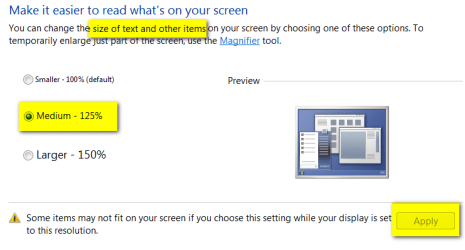
In safe mode right click the desktop select screen resolution from menu then select Make text or items larger or smaller link. Then select Smaller 100% or 1 of the 2 other choices, click apply and restart your computer normally.

2011-03-01_033115.png2011-03-01_033650.png
 
Last edited:

My Computer My Computer

At a glance

Windows 10 Pro x 2/Windows 11 HomeIntel i7 2600K @ 3.40 GHzCorsair Vengeance 16GB DDR3 1600MHz CL8 Dual ...EVGA GeForce RTX 3080 XC3 ULTRA GAMING 10GB G...
Computer type
PC/Desktop
Computer Manufacturer/Model Number
My own abomination, I call it the Money Pit
OS
Windows 10 Pro x 2/Windows 11 Home
CPU
Intel i7 2600K @ 3.40 GHz
Motherboard
ASUS Sabertooth P67
Memory
Corsair Vengeance 16GB DDR3 1600MHz CL8 Dual Channel Kit
Graphics Card(s)
EVGA GeForce RTX 3080 XC3 ULTRA GAMING 10GB GDDR6X
Sound Card
Onboard Realtek or Nvidia High Definition Audio (HDMI)
Monitor(s) Displays
Samsung JS7000 50" SUHD TV or Samsung 27" FHD 60Hz 8ms GTG V
Screen Resolution
1920 x 1080
Hard Drives
1 x Samsung 870 EVO 250 GB SSD (Windows 10 Pro), 1 x Samsung 850 EVO 250 GB SSD (Windows 10 Pro)
PSU
Corsair AX860 - 860W Modular Power Supply
Case
Phanteks Enthoo Luxe Full Tower Case - Black
Cooling
CORSAIR Hydro Series H150i PRO RGB 360mm Liquid CPU Cooler
Keyboard
Logitech K830 Illuminated Living-Room Keyboard
Mouse
Logitech MX Anywhere 2S Wireless Mouse
Internet Speed
100 Mbps
Antivirus
ESET Internet Security
Browser
Latest Version Of Firefox & Microsoft Edge Chromium Stable
Other Info
LG Super Multi Blue Internal Blu-ray Disk Rewriter - BH10LS30
6x2 HDMI Switcher (6 inputs, 2 outputs) so I can send the output of my Cable Box, Roku, or any my 4 computers to either my TV or Monitor separately or simultaneously.
Yee-ha, that worked! Don't know why I needed safe mode though. It was through the screen resolution menu that I could scroll down to change it like u said. Not how I changed it the first time. The check boxes didn't even have words next to them. I just picked the first one and hoped for the best. Once I selected that I could see the last check box was for 500% but the others had no info whatsoever. The 500% one only had the number visible. Thanks again!
 

My Computer My Computer

At a glance

W7 ultimate x64
OS
W7 ultimate x64
Yee-ha, that worked! Don't know why I needed safe mode though. It was through the screen resolution menu that I could scroll down to change it like u said. Not how I changed it the first time. The check boxes didn't even have words next to them. I just picked the first one and hoped for the best. Once I selected that I could see the last check box was for 500% but the others had no info whatsoever. The 500% one only had the number visible. Thanks again!

You are welcome.

The reason this works safe mode is because safe mode uses a lower resolution and the default 100% text size allowing you to change the text size from 500% back to a readable size in the display panel.
 

My Computer My Computer

At a glance

Windows 10 Pro x 2/Windows 11 HomeIntel i7 2600K @ 3.40 GHzCorsair Vengeance 16GB DDR3 1600MHz CL8 Dual ...EVGA GeForce RTX 3080 XC3 ULTRA GAMING 10GB G...
Computer type
PC/Desktop
Computer Manufacturer/Model Number
My own abomination, I call it the Money Pit
OS
Windows 10 Pro x 2/Windows 11 Home
CPU
Intel i7 2600K @ 3.40 GHz
Motherboard
ASUS Sabertooth P67
Memory
Corsair Vengeance 16GB DDR3 1600MHz CL8 Dual Channel Kit
Graphics Card(s)
EVGA GeForce RTX 3080 XC3 ULTRA GAMING 10GB GDDR6X
Sound Card
Onboard Realtek or Nvidia High Definition Audio (HDMI)
Monitor(s) Displays
Samsung JS7000 50" SUHD TV or Samsung 27" FHD 60Hz 8ms GTG V
Screen Resolution
1920 x 1080
Hard Drives
1 x Samsung 870 EVO 250 GB SSD (Windows 10 Pro), 1 x Samsung 850 EVO 250 GB SSD (Windows 10 Pro)
PSU
Corsair AX860 - 860W Modular Power Supply
Case
Phanteks Enthoo Luxe Full Tower Case - Black
Cooling
CORSAIR Hydro Series H150i PRO RGB 360mm Liquid CPU Cooler
Keyboard
Logitech K830 Illuminated Living-Room Keyboard
Mouse
Logitech MX Anywhere 2S Wireless Mouse
Internet Speed
100 Mbps
Antivirus
ESET Internet Security
Browser
Latest Version Of Firefox & Microsoft Edge Chromium Stable
Other Info
LG Super Multi Blue Internal Blu-ray Disk Rewriter - BH10LS30
6x2 HDMI Switcher (6 inputs, 2 outputs) so I can send the output of my Cable Box, Roku, or any my 4 computers to either my TV or Monitor separately or simultaneously.
Just in case it ever happens again, another thing that might've helped would have been to temporarily reduce your DPI scale so that you would be able to visualize those check boxes fully, and be able to check the correct boxes to make the changes you needed. Once done, you can always change your DPI scale back to the way you had it.
 

My Computer My Computer

At a glance

Vista 64 bit and 32 bit (SP2)Intel(R) Core(TM)2 Duo Processor T9400 (2.53 GHz4GB DDR2 System Memory (2 Dimm)512 MB NVIDIA GeForce 9600M GT
Computer Manufacturer/Model Number
HP Pavillion dv5t (generation 1)
OS
Vista 64 bit and 32 bit (SP2)
CPU
Intel(R) Core(TM)2 Duo Processor T9400 (2.53 GHz
Memory
4GB DDR2 System Memory (2 Dimm)
Graphics Card(s)
512 MB NVIDIA GeForce 9600M GT
Monitor(s) Displays
15.4" diagonal WSXGA+ High-Definition HP BrightView Widescre
Screen Resolution
1680 x 1050
Hard Drives
320GB 5400RPM SATA Hard Drive with HP ProtectSmart Hard Drive Protection
Keyboard
Built-in HP
Mouse
Built in - Synaptics TouchPad V6.5 on PS/2 Port
Internet Speed
Max
Other Info
~ Intel Next-Gen Wireless-N Mini-card w/Bluetooth ~ Blu-Ray ROM DVD+/-R/RW ~ Integ. HDTV Hybrid Tuner ~ 12 Cell Battery ~ MS Office (Home Premium) 2007 ~
I had the same problem!

Yee-ha, that worked! Don't know why I needed safe mode though. It was through the screen resolution menu that I could scroll down to change it like u said. Not how I changed it the first time. The check boxes didn't even have words next to them. I just picked the first one and hoped for the best. Once I selected that I could see the last check box was for 500% but the others had no info whatsoever. The 500% one only had the number visible. Thanks again!

You are welcome.

The reason this works safe mode is because safe mode uses a lower resolution and the default 100% text size allowing you to change the text size from 500% back to a readable size in the display panel.

Please help. I am using large lcd tv and made my font size 500%. Now all menus are too big to use
And I can't change it back. I can't see the bottom of the menu to get back to the choice to change font size. I can't scroll down where it matters to change back. Is there any command to open font size dialog box? Do I restore to previous state? Ughhh.........annoying.:mad:

Hello Glitchy I have just tried what you have done so my solution will work.

First reboot into safe mode as davehc sugessted, F8 > advanced options > safe mode.

In safe mode right click the desktop select screen resolution from menu then select Make text or items larger or smaller link. Then select Smaller 100% or 1 of the 2 other choices, click apply and restart your computer normally.

View attachment 141132View attachment 141134

I just wanted to add my two yen's worth. I had the same problem as Glitchy and Seven Forum rescued me using the same technique as offered by IownAmoneyPit. I wanted to express my thanks for his/her advice. I did want to add one point as well. As my screen was quite small, I couldn't get access to the buttons (which were the size of quarters, btw) at the right side of the screen, so I had to borrow a larger sized monitor to be able to be able to move to the right. Once I switched to screen, I was able to apply the changes and got the fonts back to the correct size. 1000 thank yous (really)!
 

My Computer My Computer

At a glance

Windows 8.1 32bit
Computer type
PC/Desktop
Computer Manufacturer/Model Number
dell
OS
Windows 8.1 32bit
Back
Top