
Magical desktop icons?

Nicane

New member
Local time
6:33 AM
Messages
63
Okay, so this problem happened (most likely because of me), when I deleted the desktop.ini file. The reason I did THAT is because two were present due to my "easy transfer" thing I did. So I deleted one, and it must have been the one that was in use, though it didn't seem like it. And BAM, all my icons keep re-arranging to ONE way. I can mess them up, delete some, and such. But the ones that remain get assigned the same spots as always, and new ones fill in the spaces on the left. Any clues how to "remake" or do something to fix this?

Thank you.

~Nicane
 

My Computer

OS
Windows 7 Ultimate 64-Bit (Build 7600)
CPU
Intel Q9550 2.83 GHz
Motherboard
ASUS P5E3 Premium
Memory
OCZ Platinum DDR3 1600
Graphics Card(s)
ATI Radeon 2400 HD
Monitor(s) Displays
Acer X221W
PSU
PC P&C 610W
Case
Antec 1200
You had two desktop.ini files because you have two desktops - all users and current user. System restore may be in order.

You might be able to correct this if you copy the existing one to the folder that is missing one.

The files were visible because you chose to show hidden/system files.
 
@Antman:
I didn't know that thanks for the info. +1

@Nicane:
Had you deleted your recycle bin?
I decided I was going to change my user name one made a new one and tried to copy all my setting over, So I just copied my folder and changed the name. Destroyed the OS.

What I learned Back-ups.
They save lives, and critical information.
System restore should fix it like antman said.
Good Luck
 

My Computer

Computer Manufacturer/Model Number
SMN-Productions
OS
Windows 7 x86/x64, Server 2008r2, Web Server 2008
CPU
i7 v2 3930K Steping stone 2
Motherboard
ASUS Rampage IV Extreme
Memory
G.SKILL Ripjaws Z Series 32GB
Graphics Card(s)
AMD HD 5770
Monitor(s) Displays
Acer 21" and Samsung 20"
Hard Drives
Patriot Pyro 80GB
PSU
1000 Watt
Case
HAF-X
Cooling
4 Fans
Keyboard
Black Widow Ultimate
Antman, what existing one..? :| I deleted both of them forever. Unless I can track them down somewhere. But I doubt it.
 

My Computer

OS
Windows 7 Ultimate 64-Bit (Build 7600)
CPU
Intel Q9550 2.83 GHz
Motherboard
ASUS P5E3 Premium
Memory
OCZ Platinum DDR3 1600
Graphics Card(s)
ATI Radeon 2400 HD
Monitor(s) Displays
Acer X221W
PSU
PC P&C 610W
Case
Antec 1200
Antman, what existing one..? :| I deleted both of them forever. Unless I can track them down somewhere. But I doubt it.
Recreate them. Use notepad to create the filename desktop.ini.

PAY CAREFUL ATTENTION TO THE PATH. Yours is likely different from mine. But the content should be the same.

------------------------------------------------------------------------------
C:\Users\Public\Desktop\Desktop.ini

[.ShellClassInfo]
LocalizedResourceName=@%SystemRoot%\system32\shell32.dll,-21799

------------------------------------------------------------------------------
E:\Desktop\Desktop.ini

[.ShellClassInfo]
LocalizedResourceName=@%SystemRoot%\system32\shell32.dll,-21769
IconResource=%SystemRoot%\system32\imageres.dll,-183
 
------------------------------------------------------------------------------
E:\Desktop\Desktop.ini

[.ShellClassInfo]
LocalizedResourceName=@%SystemRoot%\system32\shell32.dll,-21769
IconResource=%SystemRoot%\system32\imageres.dll,-183

What is that? A backup? Can you please explain that part a bit more? I recreated the other, which of course, was missing. :) But I don't know what you mean about the *:\Desktop\Desktop.ini
Thanks.
 

My Computer

OS
Windows 7 Ultimate 64-Bit (Build 7600)
CPU
Intel Q9550 2.83 GHz
Motherboard
ASUS P5E3 Premium
Memory
OCZ Platinum DDR3 1600
Graphics Card(s)
ATI Radeon 2400 HD
Monitor(s) Displays
Acer X221W
PSU
PC P&C 610W
Case
Antec 1200
You deleted two files named desktop.ini.

One was from your user folder named Desktop.

One was from the Public folder called Desktop.

I have provide you the content for the two different files.

Use them or don't use them.

If you do use them, be mindful to locate them correctly.
 
I still don't understand where this second file is located. I have no folder like that.
 

My Computer

OS
Windows 7 Ultimate 64-Bit (Build 7600)
CPU
Intel Q9550 2.83 GHz
Motherboard
ASUS P5E3 Premium
Memory
OCZ Platinum DDR3 1600
Graphics Card(s)
ATI Radeon 2400 HD
Monitor(s) Displays
Acer X221W
PSU
PC P&C 610W
Case
Antec 1200
Ahhh. There we go. :) Thank you very much. I will get on that right away and restart.
 

My Computer

OS
Windows 7 Ultimate 64-Bit (Build 7600)
CPU
Intel Q9550 2.83 GHz
Motherboard
ASUS P5E3 Premium
Memory
OCZ Platinum DDR3 1600
Graphics Card(s)
ATI Radeon 2400 HD
Monitor(s) Displays
Acer X221W
PSU
PC P&C 610W
Case
Antec 1200
After you place the files in the appropriate folders, you will NEED to right click each of the Desktop.ini files and set their attributes to Hidden and System.
 
Um, how do I make it "system"? I don't see an option for that. Just hidden, read-only, and archiving and such.
 

My Computer

OS
Windows 7 Ultimate 64-Bit (Build 7600)
CPU
Intel Q9550 2.83 GHz
Motherboard
ASUS P5E3 Premium
Memory
OCZ Platinum DDR3 1600
Graphics Card(s)
ATI Radeon 2400 HD
Monitor(s) Displays
Acer X221W
PSU
PC P&C 610W
Case
Antec 1200
Ah, well, I did that and it still doesn't work. It resets to the EXACT same position as before. Isn't there a file or something that it is using to reset to those positions? It's not all aligned to the left or something. It's just how I had it before I deleted the files.
 

My Computer

OS
Windows 7 Ultimate 64-Bit (Build 7600)
CPU
Intel Q9550 2.83 GHz
Motherboard
ASUS P5E3 Premium
Memory
OCZ Platinum DDR3 1600
Graphics Card(s)
ATI Radeon 2400 HD
Monitor(s) Displays
Acer X221W
PSU
PC P&C 610W
Case
Antec 1200
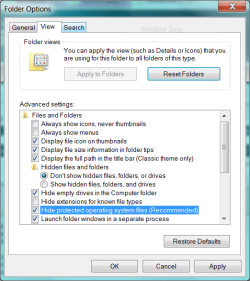
Desktop.ini is a systm file. As a rule, it is best not to delete system files, no matter what your goal is. What you are experiencing is the result of showing hidden files, an option.

Control Panel
Folder Options
View
Do not show hidden files
do not show system files.
.
 

Attachments

  • Capture.PNG
    Capture.PNG
    23.8 KB · Views: 6
Ohhh it works. :D I ended up having it arrange all my icons automatically, then turned it off and set them up and it stays! Ahh, thank you for giving me the place to put the new desktop.ini files. :)
 

My Computer

OS
Windows 7 Ultimate 64-Bit (Build 7600)
CPU
Intel Q9550 2.83 GHz
Motherboard
ASUS P5E3 Premium
Memory
OCZ Platinum DDR3 1600
Graphics Card(s)
ATI Radeon 2400 HD
Monitor(s) Displays
Acer X221W
PSU
PC P&C 610W
Case
Antec 1200
Good luck. I hope you enjoy using Windows 7. You may want to create restore points before attempting certain modifications. Usually, not always, you can recover from pretty freaky conditions with a simple system restore.
 
Back
Top