

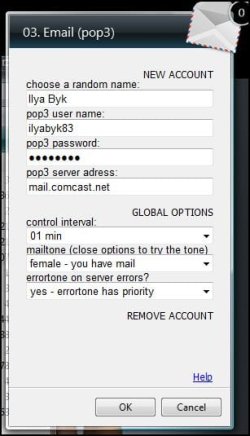
If you put your mouse on the gadget you will see a little key wrench appear on
the right of it, if you click on it a dialog box will open where you can put in your
e-mail account, set the control interval and the notification sound.
At the bottom there is even a help option to set it up.
It also works with Windows Vista.
Thank You. BUT - I don't see where I can specify how to notify me (what sound to use, audio or visual)
And can't see where to tell this program what program to open up when I press on whatever. Will this install under Windows 7 at all?? Like I said: THIS IS NOT IT
But very thank you!!
Attachments
My Computer
At a glance
Microsoft Windows 7 Ultimate 64BitIntel(R) i7(TM) @ 3.50GHz32GBNVIDIA GeForce 9500 GT 1GB
- Computer type
- PC/Desktop
- Computer Manufacturer/Model Number
- *MY* production
- OS
- Microsoft Windows 7 Ultimate 64Bit
- CPU
- Intel(R) i7(TM) @ 3.50GHz
- Motherboard
- ASUS P34
- Memory
- 32GB
- Graphics Card(s)
- NVIDIA GeForce 9500 GT 1GB
- Sound Card
- some onboard sound
- Monitor(s) Displays
- Dell E228WFP
- Screen Resolution
- 1680x1050 pixs
- Hard Drives
- Western Digital Caviar 2TB
Western Digital Passport 320GB
(portable drive)
OCZ Vector 256GB SSD
- PSU
- Antec 750W
- Case
- Coolermaster Storm Scout
- Cooling
- ZALMAN 120mm 2 Ball Cooling Fan x 4
- Keyboard
- A4Tech
- Mouse
- A4Tech NB-75D (Battery Free)
- Internet Speed
- Comcast Cable Internet
- Browser
- Google Chrome
- Other Info
- Second machine I built