Mail Recipient Connect To Hotmail

puremacgyver

New member
Local time
6:07 PM
Messages
15
I was hoping some one could help me set up dafault program for mail recipient to connect with Hotmail emailing.

As in Outlook there was an easy way when you click on your photo's to resize them, so that it made it easyer to send (making them smaller).

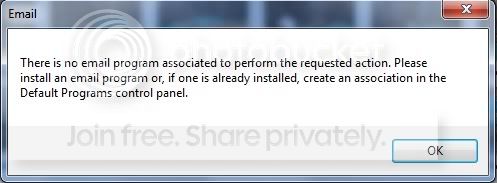
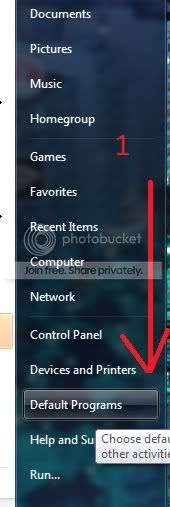
But right now when I select my picture right click/Send To/Mail Recipient it open the option to resize but there is no program set yet. It prompts me to setup the default program in the Control Panel.

I am currently using HotMail/Windows7 64 Ultima

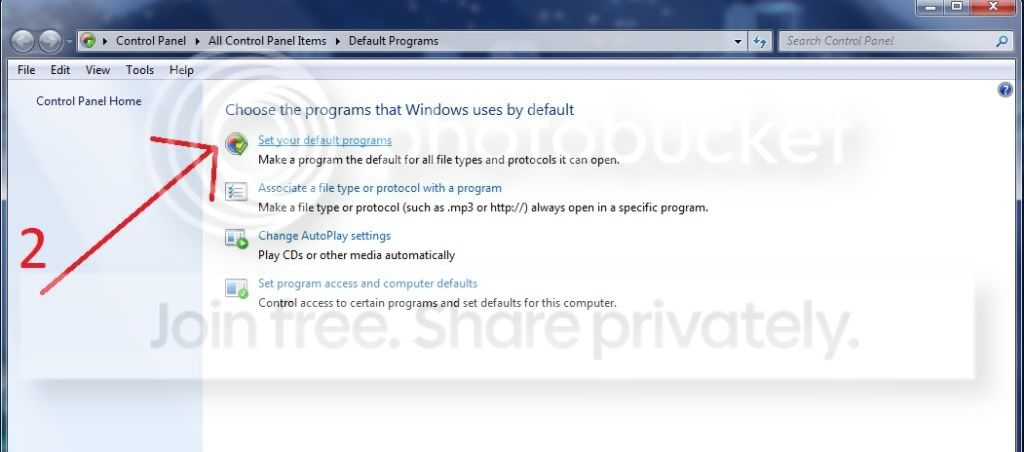
Here are some pics to show you what I trying to do.

mailrecipient1.jpg


mailrecipient2.jpg


Thank you for your time Bob
 

My Computer My Computer

OS
Windows 7 64bit Ultima
Try this

Go to Microsoft, Download windows live mail

That can be used for the default email.client, with Hot Mail

http://download.live.com/wlmail

Then make sure it is the default.
 
Last edited:

My Computer My Computer

Computer type
PC/Desktop
Computer Manufacturer/Model Number
Dell XPS 420
OS
Windows 10, Home Clean Install
CPU
Intel Core2 processsor Q8200(2.33Ghz 1333FSB) Quad Core Tech
Motherboard
Dell
Memory
6 gb
Graphics Card(s)
ATI Radeon 256MB HD3650
Sound Card
Intergrated 7.1 Channel Audio
Monitor(s) Displays
Dell SP2009W 20"
Hard Drives
640 GB Serial ATA Hard drive
Cooling
Fan
Keyboard
Dell USB Keyboard
Mouse
Dell Premium Optical USB
Internet Speed
DSL 2.85
It was easy, here are pics of how I did it. It installed automatically (self installed)

mail1.jpg


mail2.jpg


mail3.jpg


Had to go through a small setup at this point add your email and password.

Thanks for the reply!
Bob
 

My Computer My Computer

OS
Windows 7 64bit Ultima
That is one big advantage of Windows Seven everything is automatic. So glad that I was able to help.
 

My Computer My Computer

Computer type
PC/Desktop
Computer Manufacturer/Model Number
Dell XPS 420
OS
Windows 10, Home Clean Install
CPU
Intel Core2 processsor Q8200(2.33Ghz 1333FSB) Quad Core Tech
Motherboard
Dell
Memory
6 gb
Graphics Card(s)
ATI Radeon 256MB HD3650
Sound Card
Intergrated 7.1 Channel Audio
Monitor(s) Displays
Dell SP2009W 20"
Hard Drives
640 GB Serial ATA Hard drive
Cooling
Fan
Keyboard
Dell USB Keyboard
Mouse
Dell Premium Optical USB
Internet Speed
DSL 2.85
That is one big advantage of Windows Seven everything is automatic. So glad that I was able to help.
Yeah, everything is so automatic that it gives you no options!
 

My Computer My Computer

Computer Manufacturer/Model Number
Gateway NV52
OS
Win 7 64bit
CPU
Turion X2 Dual-Core Model RM-72
Memory
4 m
Hard Drives
320 TB (total)
Platter
Hi guys

I have similar problem as puremacgyver.
I tried to set email program in Default programs but there is no email clients showing at all.
I installed Windows Live Mail but it works locally which i'm trying to avoid.
My aim is to have my Right click : Sent to -> Mail Recepient to forward me straight to Hotmail as it did before.
Any ideas.
Thanks in advance
 

My Computer My Computer

OS
Win 7 Ultimate 64bit
Go to search
type default programs
In default make sure windows live mail is set to default.
 

My Computer My Computer

Computer type
PC/Desktop
Computer Manufacturer/Model Number
Dell XPS 420
OS
Windows 10, Home Clean Install
CPU
Intel Core2 processsor Q8200(2.33Ghz 1333FSB) Quad Core Tech
Motherboard
Dell
Memory
6 gb
Graphics Card(s)
ATI Radeon 256MB HD3650
Sound Card
Intergrated 7.1 Channel Audio
Monitor(s) Displays
Dell SP2009W 20"
Hard Drives
640 GB Serial ATA Hard drive
Cooling
Fan
Keyboard
Dell USB Keyboard
Mouse
Dell Premium Optical USB
Internet Speed
DSL 2.85
Thanks for you message Richc46 but i think you misreaded mine.
I want to use HOTMAIL via Internet Explorer as Windows 7 comes.
I don't want to use Windows Live Mail as it stores the emails locally on the HDD.
I already used Default programs but Windows Live HOTMAIL is not registred within the available email clients in Default Program list.
Any further thoughts?
Cheers
 

My Computer My Computer

OS
Win 7 Ultimate 64bit

My Computer My Computer

Computer type
PC/Desktop
Computer Manufacturer/Model Number
OQO 2+
OS
Windows 8 Pro w/MC 32-bit
CPU
Intel Atom 1.86 GHz
Motherboard
OQO 2+
Memory
2 GB
Graphics Card(s)
Intel GMA 500
Sound Card
IDT
Monitor(s) Displays
LCD
Screen Resolution
800 x 480 (portable) 1280 x 1024 (docked)
Hard Drives
64 GB SSD
PSU
9 Ah Battery (portable) or OQO Brick (docked)
Case
Shirt Pocket Sized
Cooling
Tiny Fan
Keyboard
Slide out (portable) DiNovo Edge (docked)
Mouse
Eraser head (portable) Logitech Bluetooth (docked)
Internet Speed
WWAN or 802.11G (portable) T1 (docked)
Browser
IE 10
Other Info
DVD-RW OQO Docking Station
Back
Top