Solved Mail recipient.MAPIMail appears in sendto folder

tricky1

New member
Local time
9:42 AM
Messages
9
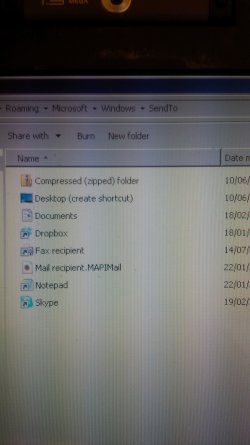
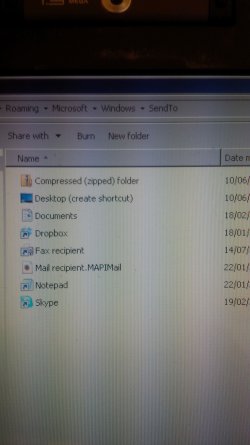
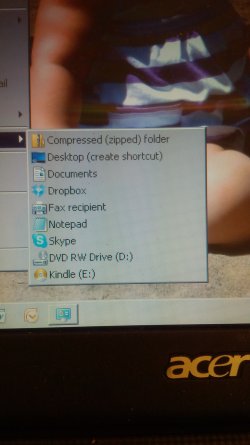
But when attempting to send a file to an email, the email option does not appear in the context menu.

I have searching but possibly not in the right place :(

Maybe someone can shine a light. :geek:
 

Attachments

  • IMG_00000915.jpg
    IMG_00000915.jpg
    624.7 KB · Views: 1
  • IMG_00000913.jpg
    IMG_00000913.jpg
    622.9 KB · Views: 0

My Computer My Computer

At a glance

Windows 7 Ultimate 32bitIntel core2 quad q9550 2,83ghz4 GigATI Saphire Radeon
OS
Windows 7 Ultimate 32bit
CPU
Intel core2 quad q9550 2,83ghz
Motherboard
Asus P5q Pro Turbo
Memory
4 Gig
Graphics Card(s)
ATI Saphire Radeon
Sound Card
On Board
Monitor(s) Displays
Viewsonic
Screen Resolution
1280x1024
Hard Drives
2 @500 gig Sata
1 @ 80 gig Sata
PSU
Corsair 750 Watt
Case
Generic
Keyboard
Microsoft wireless
Mouse
Logitech Wireless
Internet Speed
1.5meg wireless

My Computer My Computer

At a glance

Win7 Pro-64 Biti7-2600-3.4GHz8 GIG DDR3onboard
Computer Manufacturer/Model Number
Put together
OS
Win7 Pro-64 Bit
CPU
i7-2600-3.4GHz
Motherboard
ASRock Z68M
Memory
8 GIG DDR3
Graphics Card(s)
onboard
Sound Card
onboard
Hard Drives
Seagate 1TB 7200RPM
PSU
680 W
Case
black
Cooling
stock fans
Keyboard
Microsoft
Mouse
Microsoft optical
first I downloaded the "add sendto" reg file, no change.

second I downloaded the "remove sendto" reg file of course it did what was expected, it removed sendto I then re-ran the add sendto reg file and it restored sendto so we are OK there.

The problem is that although send to mail link is in the send to folder it doesnt appear in the send to context menu.

I shall carry on further and report back
 

Attachments

  • IMG_00000915.jpg
    IMG_00000915.jpg
    624.7 KB · Views: 0

My Computer My Computer

At a glance

Windows 7 Ultimate 32bitIntel core2 quad q9550 2,83ghz4 GigATI Saphire Radeon
OS
Windows 7 Ultimate 32bit
CPU
Intel core2 quad q9550 2,83ghz
Motherboard
Asus P5q Pro Turbo
Memory
4 Gig
Graphics Card(s)
ATI Saphire Radeon
Sound Card
On Board
Monitor(s) Displays
Viewsonic
Screen Resolution
1280x1024
Hard Drives
2 @500 gig Sata
1 @ 80 gig Sata
PSU
Corsair 750 Watt
Case
Generic
Keyboard
Microsoft wireless
Mouse
Logitech Wireless
Internet Speed
1.5meg wireless
I also tried this:

3. To Restore Specific Send to Context Menu Item(s)
A) Open the SendTo folder.

B) Copy the shortcuts that you want to restore.

C) Go to the hidden folder location below.
C:\Users\(your user-name)\AppData\Roaming\Microsoft\Windows\SendTo
D) Paste the shortcuts into your SendTo folder, and approve.


Weird...... mailto still doesnt appear in the context menu.

for an experiment I deleted the notepad link from the send to folder, of course it disappeared from the send to context menu, I then restored the notepad link in the send to folder and of course it reappeared in the context menu.

very wierd, it must be something a lot deeper than just the folders/menu


My Computer My Computer

At a glance

Windows 7 Ultimate 32bitIntel core2 quad q9550 2,83ghz4 GigATI Saphire Radeon
OS
Windows 7 Ultimate 32bit
CPU
Intel core2 quad q9550 2,83ghz
Motherboard
Asus P5q Pro Turbo
Memory
4 Gig
Graphics Card(s)
ATI Saphire Radeon
Sound Card
On Board
Monitor(s) Displays
Viewsonic
Screen Resolution
1280x1024
Hard Drives
2 @500 gig Sata
1 @ 80 gig Sata
PSU
Corsair 750 Watt
Case
Generic
Keyboard
Microsoft wireless
Mouse
Logitech Wireless
Internet Speed
1.5meg wireless
Right-click on the item named Mail Recipient.MAPIMail

Select Properties from the context menu.

Remove the check by Hidden in the Attributes section.

"OK" your way out of the Properties dialog window.

Check your sendto menu.
 

My Computer My Computer

At a glance

W7 Pro SP1 64biti78GBIntel HD Graphics
Computer type
Laptop
Computer Manufacturer/Model Number
Employer provided Dell Latitude
OS
W7 Pro SP1 64bit
CPU
i7
Memory
8GB
Graphics Card(s)
Intel HD Graphics
Hard Drives
crappy SSD
Antivirus
Employer mandated Symantec Endpoint Protection
Browser
Pale Moon 64bit, IE11 64bit & Chrome 64bit
No ticks in read only or hidden attributes
 

My Computer My Computer

At a glance

Windows 7 Ultimate 32bitIntel core2 quad q9550 2,83ghz4 GigATI Saphire Radeon
OS
Windows 7 Ultimate 32bit
CPU
Intel core2 quad q9550 2,83ghz
Motherboard
Asus P5q Pro Turbo
Memory
4 Gig
Graphics Card(s)
ATI Saphire Radeon
Sound Card
On Board
Monitor(s) Displays
Viewsonic
Screen Resolution
1280x1024
Hard Drives
2 @500 gig Sata
1 @ 80 gig Sata
PSU
Corsair 750 Watt
Case
Generic
Keyboard
Microsoft wireless
Mouse
Logitech Wireless
Internet Speed
1.5meg wireless
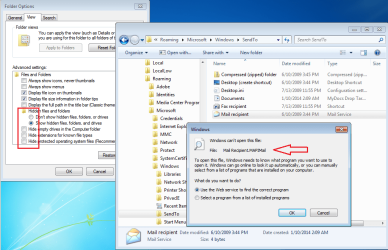
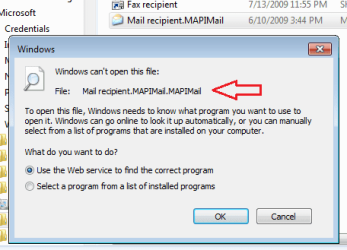
It is not normal for the Mail Recipient.MAPIMail extension to be showing.
Did you do or install something to make that show up?

When I double click on that item, I see this:

MAPIMail.png


If the item was manually renamed, then you might see something like this:

MAPIMail2.png


You might want to set your folder options like I showed in the first screenshot and then look at the desktop.ini file that should be in that sendto folder. That desktop ini file should bee something like the one that I've attached to this post.
 

Attachments

My Computer My Computer

At a glance

W7 Pro SP1 64biti78GBIntel HD Graphics
Computer type
Laptop
Computer Manufacturer/Model Number
Employer provided Dell Latitude
OS
W7 Pro SP1 64bit
CPU
i7
Memory
8GB
Graphics Card(s)
Intel HD Graphics
Hard Drives
crappy SSD
Antivirus
Employer mandated Symantec Endpoint Protection
Browser
Pale Moon 64bit, IE11 64bit & Chrome 64bit
I continued my quest to fix this problem before I saw the last post.

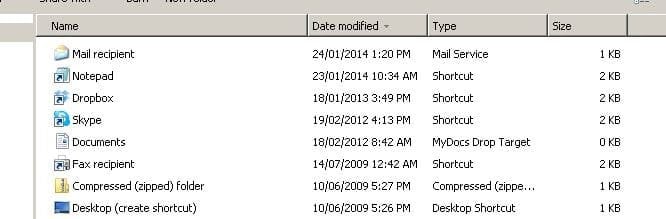
I got to looking closer and I noticed the actual icon was not an envelope, it should be.

I did another Google search and came up with a link:
Send To Context Menu - Remove or Restore Default Items

I used method 2. downloaded the file (step 5)

Ran it and it fixed the problem, how it happened I shall never know.

Hopefully posting those links doesnt violate any forum rules but it worked for me
 

Attachments

  • fixed.JPG
    fixed.JPG
    27.2 KB · Views: 26
Last edited by a moderator:

My Computer My Computer

At a glance

Windows 7 Ultimate 32bitIntel core2 quad q9550 2,83ghz4 GigATI Saphire Radeon
OS
Windows 7 Ultimate 32bit
CPU
Intel core2 quad q9550 2,83ghz
Motherboard
Asus P5q Pro Turbo
Memory
4 Gig
Graphics Card(s)
ATI Saphire Radeon
Sound Card
On Board
Monitor(s) Displays
Viewsonic
Screen Resolution
1280x1024
Hard Drives
2 @500 gig Sata
1 @ 80 gig Sata
PSU
Corsair 750 Watt
Case
Generic
Keyboard
Microsoft wireless
Mouse
Logitech Wireless
Internet Speed
1.5meg wireless
Glad that you got it working :-)
 

My Computer My Computer

At a glance

W7 Pro SP1 64biti78GBIntel HD Graphics
Computer type
Laptop
Computer Manufacturer/Model Number
Employer provided Dell Latitude
OS
W7 Pro SP1 64bit
CPU
i7
Memory
8GB
Graphics Card(s)
Intel HD Graphics
Hard Drives
crappy SSD
Antivirus
Employer mandated Symantec Endpoint Protection
Browser
Pale Moon 64bit, IE11 64bit & Chrome 64bit
Back
Top