
- Local time
- 5:12 PM
- Messages
- 31
[problem solved see third post in thread for details]
Hi,
My fonts folder has gone corrupt. It all started with me trying out a 3rd party font manager that made operation on the font folder and then when I uninstalled that font manager it could not correctly reinstall the system fonts. Or rather, it reinstalled them, but they stayed on other locations on the harddrive instead of being in the fonts folder.
So the perfectionist in me tried to restore things back to how it was before, and after trying many things I figured I'd go drastic and since I had backups of all the font files from before, I booted into Linux and simply deleted the contents of the c:\windows\fonts folder and replaced with the contents of my backup.
I thought that would work but it didn't. The whole OS became unbootable, so I had to insert the Windows 7 DVD and run system repair twice before it would let me boot.
When I now booted, fonts were ugly, and I went into the fonts folder and manually installed all the *.fon files (of which there were plenty of duplicates).
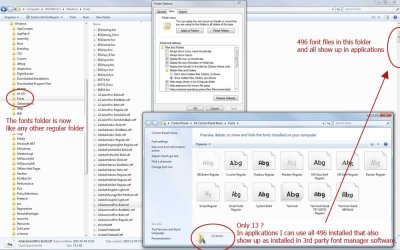
After reboot all looks fine and all software have access to the fonts they need, so I guess I could be content, but I am not. The fonts folder is only displaying 13 odd files while a different 3rd party font manager shows all font files present in the fonts folder as being installed and they are so as well since I can use them in applications. The windows fonts folder appear corrupt, it is just like any other folder now.
The perfectionist in me would like to restore fonts folder functionality but I do not know how.
Does anyone have any ideas what I could do?
Hi,
My fonts folder has gone corrupt. It all started with me trying out a 3rd party font manager that made operation on the font folder and then when I uninstalled that font manager it could not correctly reinstall the system fonts. Or rather, it reinstalled them, but they stayed on other locations on the harddrive instead of being in the fonts folder.
So the perfectionist in me tried to restore things back to how it was before, and after trying many things I figured I'd go drastic and since I had backups of all the font files from before, I booted into Linux and simply deleted the contents of the c:\windows\fonts folder and replaced with the contents of my backup.
I thought that would work but it didn't. The whole OS became unbootable, so I had to insert the Windows 7 DVD and run system repair twice before it would let me boot.
When I now booted, fonts were ugly, and I went into the fonts folder and manually installed all the *.fon files (of which there were plenty of duplicates).
After reboot all looks fine and all software have access to the fonts they need, so I guess I could be content, but I am not. The fonts folder is only displaying 13 odd files while a different 3rd party font manager shows all font files present in the fonts folder as being installed and they are so as well since I can use them in applications. The windows fonts folder appear corrupt, it is just like any other folder now.
The perfectionist in me would like to restore fonts folder functionality but I do not know how.
Does anyone have any ideas what I could do?
Attachments
Last edited:
My Computer
- Computer Manufacturer/Model Number
- built it myself
- OS
- Windows 7 Pro 64-bit
- CPU
- Intel i7 950
- Motherboard
- Asus Sabertooth X58
- Memory
- 18GB
- Graphics Card(s)
- Gigabyte Radeon HD7700
- Sound Card
- onboard Realtek HD audio chip
- Monitor(s) Displays
- 2 x Dell U2412M
- Screen Resolution
- 1920x1200
- Hard Drives
- 3 SSD
4 Western Digital Caviar Green
- PSU
- SeaSonic x650
- Case
- Fractal Design R3 case
- Cooling
- Magehalems rev. B CPU cooler
