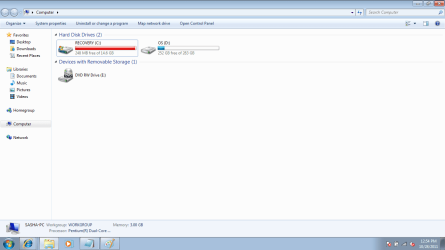
MAJOR MESS, Restored windows now have RECOVERY as C drive

damo87

New member
Local time
10:26 PM
Messages
8
Ive just done a system restore on my Dell Inspiron and since doing that i now have a recovery drive which is labelled "C" drive its 14.6gb in size but only 248mb free space and I also have a "D" drive which is named "OS" this is 283gb with 252gb free, So my problem is that i want to get rid of the drive named "Recovery" as i am always getting the error message telling me its running low on space allthough there is not really much on there, Is there a way of increasing the capacity or just removing it all together, Ive tried another restore but it wont let me as there is not enough space on the "Recovery" drive, this drive wasnt on there before i done the restore so why is it there now, I just want it off the laptop as these error messages are beginning to bug me....PLEASE HELP!!!!
 
Last edited:

My Computer My Computer

At a glance

Windows 7 64 bit
Computer Manufacturer/Model Number
Dell Inspiron
OS
Windows 7 64 bit
What procedure did you follow to do the system restore? It sounds like you may have restored to the wrong drive or partition? It could be a real mess to fix now. A screen shot of your expanded disk management screen may help sort it out.
 

My Computer My Computer

At a glance

Windows 10 Education 64 bitAMD Phenom II X4 980 Black Edition Deneb 3.7GHz8GB 4GBx2 Kingston PC10600 DDR3 1333 MemoryZotac NVIDIA Geforce GT640 2 Gig DDR3 PCIe
Computer type
PC/Desktop
Computer Manufacturer/Model Number
Home Built
OS
Windows 10 Education 64 bit
CPU
AMD Phenom II X4 980 Black Edition Deneb 3.7GHz
Motherboard
Asus M4N68T-M V2 µATX Motherboard
Memory
8GB 4GBx2 Kingston PC10600 DDR3 1333 Memory
Graphics Card(s)
Zotac NVIDIA Geforce GT640 2 Gig DDR3 PCIe
Sound Card
VIA VT1708s High Definition Audio 8-channel Onboard
Monitor(s) Displays
22" LG E2242 1080p and 2 19" I-INC AG191D
Screen Resolution
1280x1024 - 1920x1080 - 1280x1024
Hard Drives
Crucial M100 256 GB SSD and 500 GB WD Blue SATA
PSU
Thermaltake TR 620
Case
Power Up Black ATX Mid-Tower Case
Cooling
Stock heatsink and fan
Keyboard
Logitech Wireless K350 Wave
Mouse
Logitech Wireless M570 Trackman Wheel
Internet Speed
80 Mbps Down 30 Mbps Up
Antivirus
Windows Defender
Browser
Internet Explorer 11
Other Info
HP DVD1040e Lightscribe - External USB2
I was given an operating system disk with my laptop it says on the disk "Reinstallation disk windows 7 home premium 64 bit, and where do i find the expanded disk management
 

My Computer My Computer

At a glance

Windows 7 64 bit
Computer Manufacturer/Model Number
Dell Inspiron
OS
Windows 7 64 bit
Disk Management.png
 

My Computer My Computer

At a glance

Windows 7 64 bit
Computer Manufacturer/Model Number
Dell Inspiron
OS
Windows 7 64 bit
Somebody please help me
 

My Computer My Computer

At a glance

Windows 7 64 bit
Computer Manufacturer/Model Number
Dell Inspiron
OS
Windows 7 64 bit
We need to see the disk management screen to see what drive or partition is the active and or boot drive. If you type manage into the search box in the start menu, you should see Computer Management in the list. Once you launch that go to the Storage section and launch Disk Management. Maximize that screen and then post a screen shot of it.
 

My Computer My Computer

At a glance

Windows 10 Education 64 bitAMD Phenom II X4 980 Black Edition Deneb 3.7GHz8GB 4GBx2 Kingston PC10600 DDR3 1333 MemoryZotac NVIDIA Geforce GT640 2 Gig DDR3 PCIe
Computer type
PC/Desktop
Computer Manufacturer/Model Number
Home Built
OS
Windows 10 Education 64 bit
CPU
AMD Phenom II X4 980 Black Edition Deneb 3.7GHz
Motherboard
Asus M4N68T-M V2 µATX Motherboard
Memory
8GB 4GBx2 Kingston PC10600 DDR3 1333 Memory
Graphics Card(s)
Zotac NVIDIA Geforce GT640 2 Gig DDR3 PCIe
Sound Card
VIA VT1708s High Definition Audio 8-channel Onboard
Monitor(s) Displays
22" LG E2242 1080p and 2 19" I-INC AG191D
Screen Resolution
1280x1024 - 1920x1080 - 1280x1024
Hard Drives
Crucial M100 256 GB SSD and 500 GB WD Blue SATA
PSU
Thermaltake TR 620
Case
Power Up Black ATX Mid-Tower Case
Cooling
Stock heatsink and fan
Keyboard
Logitech Wireless K350 Wave
Mouse
Logitech Wireless M570 Trackman Wheel
Internet Speed
80 Mbps Down 30 Mbps Up
Antivirus
Windows Defender
Browser
Internet Explorer 11
Other Info
HP DVD1040e Lightscribe - External USB2
Disk Manage.png
 

My Computer My Computer

At a glance

Windows 7 64 bit
Computer Manufacturer/Model Number
Dell Inspiron
OS
Windows 7 64 bit
I was given an operating system disk with my laptop it says on the disk "Reinstallation disk windows 7 home premium 64 bit, and where do i find the expanded disk management

So you booted from that disk and did an OS install or recovery? There is a difference! Do you remember what menus or options came up and what you did?
 

My Computer My Computer

At a glance

Windows 10 Education 64 bitAMD Phenom II X4 980 Black Edition Deneb 3.7GHz8GB 4GBx2 Kingston PC10600 DDR3 1333 MemoryZotac NVIDIA Geforce GT640 2 Gig DDR3 PCIe
Computer type
PC/Desktop
Computer Manufacturer/Model Number
Home Built
OS
Windows 10 Education 64 bit
CPU
AMD Phenom II X4 980 Black Edition Deneb 3.7GHz
Motherboard
Asus M4N68T-M V2 µATX Motherboard
Memory
8GB 4GBx2 Kingston PC10600 DDR3 1333 Memory
Graphics Card(s)
Zotac NVIDIA Geforce GT640 2 Gig DDR3 PCIe
Sound Card
VIA VT1708s High Definition Audio 8-channel Onboard
Monitor(s) Displays
22" LG E2242 1080p and 2 19" I-INC AG191D
Screen Resolution
1280x1024 - 1920x1080 - 1280x1024
Hard Drives
Crucial M100 256 GB SSD and 500 GB WD Blue SATA
PSU
Thermaltake TR 620
Case
Power Up Black ATX Mid-Tower Case
Cooling
Stock heatsink and fan
Keyboard
Logitech Wireless K350 Wave
Mouse
Logitech Wireless M570 Trackman Wheel
Internet Speed
80 Mbps Down 30 Mbps Up
Antivirus
Windows Defender
Browser
Internet Explorer 11
Other Info
HP DVD1040e Lightscribe - External USB2
If my memory serves me correctly it was an OS install, i put in the disk followed the instructions ( basically clicked next a few times) it did give me 2 options and one of them was advanced and that was the one i went with as the other one said it would keep all my files on the computer and i had allready transfered them to an external hard drive so didnt need them
 

My Computer My Computer

At a glance

Windows 7 64 bit
Computer Manufacturer/Model Number
Dell Inspiron
OS
Windows 7 64 bit
What I see in your screen shot doesn't make sense to me? Its been my experience that the Recovery partition is normally the last partition on the drive, not the first or second? The OEM partition likely has diagnostic utilities etc on it. Its a hidden partition so it doesn't get a drive letter. Your recovery partition is C because the boot files are there and its marked as active. The OS got installed on the last partition and got labeled D. Normally the OS partition would be the the first or second partition and be labeled C. The recovery partition would be last and labeled D. I think if it was me I would start over with a clean install. I would delete the second recovery partition and the last OS partition. Then create a new partition structure and make sure I install Windows 7 to the correct partition. You may want to wait and see if someone more knowledgeable than me has a better idea.
http://www.sevenforums.com/tutorials/1649-clean-install-windows-7-a.html
 

My Computer My Computer

At a glance

Windows 10 Education 64 bitAMD Phenom II X4 980 Black Edition Deneb 3.7GHz8GB 4GBx2 Kingston PC10600 DDR3 1333 MemoryZotac NVIDIA Geforce GT640 2 Gig DDR3 PCIe
Computer type
PC/Desktop
Computer Manufacturer/Model Number
Home Built
OS
Windows 10 Education 64 bit
CPU
AMD Phenom II X4 980 Black Edition Deneb 3.7GHz
Motherboard
Asus M4N68T-M V2 µATX Motherboard
Memory
8GB 4GBx2 Kingston PC10600 DDR3 1333 Memory
Graphics Card(s)
Zotac NVIDIA Geforce GT640 2 Gig DDR3 PCIe
Sound Card
VIA VT1708s High Definition Audio 8-channel Onboard
Monitor(s) Displays
22" LG E2242 1080p and 2 19" I-INC AG191D
Screen Resolution
1280x1024 - 1920x1080 - 1280x1024
Hard Drives
Crucial M100 256 GB SSD and 500 GB WD Blue SATA
PSU
Thermaltake TR 620
Case
Power Up Black ATX Mid-Tower Case
Cooling
Stock heatsink and fan
Keyboard
Logitech Wireless K350 Wave
Mouse
Logitech Wireless M570 Trackman Wheel
Internet Speed
80 Mbps Down 30 Mbps Up
Antivirus
Windows Defender
Browser
Internet Explorer 11
Other Info
HP DVD1040e Lightscribe - External USB2
Thanks for the help ill give it a go and see what happens, how do i go about deleting the partitions?
 

My Computer My Computer

At a glance

Windows 7 64 bit
Computer Manufacturer/Model Number
Dell Inspiron
OS
Windows 7 64 bit
ok thanks ill give it a go, how do i go about deleting the partitions?
 

My Computer My Computer

At a glance

Windows 7 64 bit
Computer Manufacturer/Model Number
Dell Inspiron
OS
Windows 7 64 bit
Have a look at the tutorial I linked too, during the install you can go to Drive Options (advanced), there you can delete and create partitions.
 

My Computer My Computer

At a glance

Windows 10 Education 64 bitAMD Phenom II X4 980 Black Edition Deneb 3.7GHz8GB 4GBx2 Kingston PC10600 DDR3 1333 MemoryZotac NVIDIA Geforce GT640 2 Gig DDR3 PCIe
Computer type
PC/Desktop
Computer Manufacturer/Model Number
Home Built
OS
Windows 10 Education 64 bit
CPU
AMD Phenom II X4 980 Black Edition Deneb 3.7GHz
Motherboard
Asus M4N68T-M V2 µATX Motherboard
Memory
8GB 4GBx2 Kingston PC10600 DDR3 1333 Memory
Graphics Card(s)
Zotac NVIDIA Geforce GT640 2 Gig DDR3 PCIe
Sound Card
VIA VT1708s High Definition Audio 8-channel Onboard
Monitor(s) Displays
22" LG E2242 1080p and 2 19" I-INC AG191D
Screen Resolution
1280x1024 - 1920x1080 - 1280x1024
Hard Drives
Crucial M100 256 GB SSD and 500 GB WD Blue SATA
PSU
Thermaltake TR 620
Case
Power Up Black ATX Mid-Tower Case
Cooling
Stock heatsink and fan
Keyboard
Logitech Wireless K350 Wave
Mouse
Logitech Wireless M570 Trackman Wheel
Internet Speed
80 Mbps Down 30 Mbps Up
Antivirus
Windows Defender
Browser
Internet Explorer 11
Other Info
HP DVD1040e Lightscribe - External USB2
I was given an operating system disk with my laptop it says on the disk "Reinstallation disk windows 7 home premium 64 bit, and where do i find the expanded disk management
Was this a full (clean install) Windows 7 installation disk? - what does your documentation say?
It is possible that you have done a clean install over the top of your factory partition structure.
Your "Recovery" partition is system, active, Boot. Your "OS" partition irrespective of the label has the pagefile.

Did you have any other disks with you pc like "Factory recovery/restore)".
 

My Computer My Computer

At a glance

Windows 7x64 Home Premium SP1Intel i7 2600kG.Skill Ripjaws (DDR3-1600) 2x4GBNvidia GeForce GTS 450; Intel HD Graphics 300...
Computer type
PC/Desktop
Computer Manufacturer/Model Number
Own build
OS
Windows 7x64 Home Premium SP1
CPU
Intel i7 2600k
Motherboard
ASUS P8Z68 Deluxe
Memory
G.Skill Ripjaws (DDR3-1600) 2x4GB
Graphics Card(s)
Nvidia GeForce GTS 450; Intel HD Graphics 3000(GT2+)
Monitor(s) Displays
Dell Ultrasharp IPS panel U2311H, Samsung SyncMaster P2350
Screen Resolution
1920x1080
Hard Drives
Samsung 850 Pro SSD 256GB, Samsung SSD 840 120GB, Seagates 1TB Barracuda ST31000528AS x2
PSU
Seasonic M12II 520W
Case
Lian Li Lancool PC-K60
Cooling
Case: 1x120mm, 3x140mm CPU: Hyper 212+
Keyboard
Logitech MK520 (wireless)
Mouse
Logitech MK520
Internet Speed
6-7 Mbps
Antivirus
Norton Security Premium, Malwarebytes on 2 (MSE on 3rd PC)
Browser
FireFox
Other Info
Audio: Logitech Z523 2.1
You clearly clean reinstalled WIn7 using the Reinstallation DVD (a clean copy of Win7, not a Recovery Disk with preinstalled factory bloatware) on top of the Recovery Partition.

If you are otherwise satisfied with performance you can make sure you have the files you want off of D and delete it in Disk management, extend C into its space or part of its space to make the OS partition the size you want. Partition or Volume - Extend

If you want to start over then you might as well boot the DVD, use Custom drive options to delete all partitions and clean reinstall following these steps to get a perfect Reinstall of Factory OEM: Reinstalling Windows 7

If you have programs which came with the computer that you want then you'll have to order Factory Recovery disks from the maker to run to set it back to factory condition, but since you were provided with the valuable clean Reinstallation DVD you can get a much superior install of Win7.
 
Back
Top