[Major Problem] Attempted to add additional RAM, but fail to startup.

duongducminh

New member
Local time
7:04 AM
Messages
100
hi,
today i decided to add more ram to my computer. i have currently 3.5gb of ram with 4 ram slots. i replaced the 512mb ram with my new 1gb ram. altogether now is 4gb. when i turned the computer on, there was only a black screen...:(. i waited for 5 minutes but still black screen. i then arranged my rams around the ram slots. Some of my rearranged ram order resulted in the machine to beep several times and sometimes twice only.
can anyone help me? i would like to play my windows with 4gb ram.

thank you
 

My Computer My Computer

At a glance

Windows 7 Ultimate 64-BitIntel(R) Pentinum(R) D CPU 2.80 GHz - Dual Core3.5 GBAsus Geforce 8500GT
Computer Manufacturer/Model Number
Dell Dimension E520 Desktop/PC
OS
Windows 7 Ultimate 64-Bit
CPU
Intel(R) Pentinum(R) D CPU 2.80 GHz - Dual Core
Motherboard
Dell Inc. 0WG864
Memory
3.5 GB
Graphics Card(s)
Asus Geforce 8500GT
Monitor(s) Displays
Asus PG191
Screen Resolution
1280 x 1024
Hard Drives
320GB
Internet Speed
26.78 Mbps
Take out all the sticks of ram and put in only the new stick. Try to turn on your computer your new stick may be dead.
 

My Computer My Computer

At a glance

Windows 7 x86/x64, Server 2008r2, Web Server ...i7 v2 3930K Steping stone 2G.SKILL Ripjaws Z Series 32GBAMD HD 5770
Computer Manufacturer/Model Number
SMN-Productions
OS
Windows 7 x86/x64, Server 2008r2, Web Server 2008
CPU
i7 v2 3930K Steping stone 2
Motherboard
ASUS Rampage IV Extreme
Memory
G.SKILL Ripjaws Z Series 32GB
Graphics Card(s)
AMD HD 5770
Monitor(s) Displays
Acer 21" and Samsung 20"
Hard Drives
Patriot Pyro 80GB
PSU
1000 Watt
Case
HAF-X
Cooling
4 Fans
Keyboard
Black Widow Ultimate
Might be the speeds.
 

My Computer My Computer

At a glance

Seven ultimate 32bitCore2Duo E57003GB DDR2HD5670
Computer Manufacturer/Model Number
Asus
OS
Seven ultimate 32bit
CPU
Core2Duo E5700
Motherboard
Asus p5qlem
Memory
3GB DDR2
Graphics Card(s)
HD5670
Sound Card
Onboard
Monitor(s) Displays
Philips 18.5 widescreen
Screen Resolution
Depends
Hard Drives
500GB Samsung 7200RPM
PSU
500w Sparta
Case
Aerocool
Cooling
Standard + 2x 40's inserted
Keyboard
Multimedia
Mouse
Genius
Internet Speed
10meg.
Yes, smurofneves is right. It very well could be the speed of the ram, or your motherboard may just not hold 4Gb of ram.
 

My Computer My Computer

At a glance

Windows 7 x86/x64, Server 2008r2, Web Server ...i7 v2 3930K Steping stone 2G.SKILL Ripjaws Z Series 32GBAMD HD 5770
Computer Manufacturer/Model Number
SMN-Productions
OS
Windows 7 x86/x64, Server 2008r2, Web Server 2008
CPU
i7 v2 3930K Steping stone 2
Motherboard
ASUS Rampage IV Extreme
Memory
G.SKILL Ripjaws Z Series 32GB
Graphics Card(s)
AMD HD 5770
Monitor(s) Displays
Acer 21" and Samsung 20"
Hard Drives
Patriot Pyro 80GB
PSU
1000 Watt
Case
HAF-X
Cooling
4 Fans
Keyboard
Black Widow Ultimate
If you have the manual sometimes it tells what 2 beeps means this may lead you to fixing the problem :)
 

My Computer My Computer

At a glance

Windows 7 Professional x64 Sp1Intel Core i5 650 @ 3.2Ghz10GBASUS GTX 650Ti
Computer type
PC/Desktop
Computer Manufacturer/Model Number
Custom Build
OS
Windows 7 Professional x64 Sp1
CPU
Intel Core i5 650 @ 3.2Ghz
Motherboard
Dell 33FF6 Motherboard
Memory
10GB
Graphics Card(s)
ASUS GTX 650Ti
Sound Card
Nvidia
Monitor(s) Displays
2 Monitors
Screen Resolution
1920 x 1080
Hard Drives
2 1TB 7200RPM
PSU
Thermaltake 600w
Keyboard
Logitech G110
Internet Speed
75Mbs
Take out all the sticks of ram and put in only the new stick. Try to turn on your computer your new stick may be dead.

ive done that, it works singlely.
 

My Computer My Computer

At a glance

Windows 7 Ultimate 64-BitIntel(R) Pentinum(R) D CPU 2.80 GHz - Dual Core3.5 GBAsus Geforce 8500GT
Computer Manufacturer/Model Number
Dell Dimension E520 Desktop/PC
OS
Windows 7 Ultimate 64-Bit
CPU
Intel(R) Pentinum(R) D CPU 2.80 GHz - Dual Core
Motherboard
Dell Inc. 0WG864
Memory
3.5 GB
Graphics Card(s)
Asus Geforce 8500GT
Monitor(s) Displays
Asus PG191
Screen Resolution
1280 x 1024
Hard Drives
320GB
Internet Speed
26.78 Mbps

My Computer My Computer

At a glance

Windows 7 Ultimate 64-BitIntel(R) Pentinum(R) D CPU 2.80 GHz - Dual Core3.5 GBAsus Geforce 8500GT
Computer Manufacturer/Model Number
Dell Dimension E520 Desktop/PC
OS
Windows 7 Ultimate 64-Bit
CPU
Intel(R) Pentinum(R) D CPU 2.80 GHz - Dual Core
Motherboard
Dell Inc. 0WG864
Memory
3.5 GB
Graphics Card(s)
Asus Geforce 8500GT
Monitor(s) Displays
Asus PG191
Screen Resolution
1280 x 1024
Hard Drives
320GB
Internet Speed
26.78 Mbps
Yes, smurofneves is right. It very well could be the speed of the ram, or your motherboard may just not hold 4Gb of ram.

how can i find my motherboard info?
 

My Computer My Computer

At a glance

Windows 7 Ultimate 64-BitIntel(R) Pentinum(R) D CPU 2.80 GHz - Dual Core3.5 GBAsus Geforce 8500GT
Computer Manufacturer/Model Number
Dell Dimension E520 Desktop/PC
OS
Windows 7 Ultimate 64-Bit
CPU
Intel(R) Pentinum(R) D CPU 2.80 GHz - Dual Core
Motherboard
Dell Inc. 0WG864
Memory
3.5 GB
Graphics Card(s)
Asus Geforce 8500GT
Monitor(s) Displays
Asus PG191
Screen Resolution
1280 x 1024
Hard Drives
320GB
Internet Speed
26.78 Mbps
sorry about the delayed response, your best option would be to contact dell technical support or looking up et exact model number of the pc :)
 

My Computer My Computer

At a glance

Windows 7 x86/x64, Server 2008r2, Web Server ...i7 v2 3930K Steping stone 2G.SKILL Ripjaws Z Series 32GBAMD HD 5770
Computer Manufacturer/Model Number
SMN-Productions
OS
Windows 7 x86/x64, Server 2008r2, Web Server 2008
CPU
i7 v2 3930K Steping stone 2
Motherboard
ASUS Rampage IV Extreme
Memory
G.SKILL Ripjaws Z Series 32GB
Graphics Card(s)
AMD HD 5770
Monitor(s) Displays
Acer 21" and Samsung 20"
Hard Drives
Patriot Pyro 80GB
PSU
1000 Watt
Case
HAF-X
Cooling
4 Fans
Keyboard
Black Widow Ultimate
how can i find my motherboard info?
The Dell tag number on your Dell machine is used to find the PRECISE description about your SPECIFIC MACHINE, on the Dell Support Site for home users.

Just enter one of the main areas, and it will prompt you to be more specific about your machine, either by model or ideally by entering the actual 7-character Dell tag number (which is on the side, bottom, or back of the machine). Everything from there on will be exactly and precisely relevant to your exact particular physical computer purchased from Dell.


Note that as has already been said by others, memory sticks normally should all be of the same "speed" and "timings". For sure, if you have "pairs" of memory sticks that differ in characteristics between the pairs, then they should be inserted into corresponding "every-other-slot pairs" of memory slots, e.g. in 1+3, or in 2+4. Of course if all four sticks are identical (e.g. 4 sticks of 1GB memory purchased together as a "kit") then they can just go in all four slots with no considerations.

Having unusual mismatches in the individual memory sticks you've inserted into the memory slots can definitely confuse the BIOS and cause boot problems. It is normally NEVER a good idea to replace or substitute any individually purchased single memory stick into an environment in which there are already other "matched pairs" of memory sticks in use. Again, the mismatched timings and speeds of these memory cards is going to cause problems.

Finally, sometimes the BIOS can recover from these unexpected mismatches successfully and without a problem. However it will actually "slow down" the overall memory access speed to conform to the slowest memory stick you've inserted. So while you may get the SIZE increase from your new memory, you certainly may have done yourself a disservice in terms of PERFORMANCE... because all of the memory is now running slower, having been slowed down by the BIOS to match your slowest memory stick.

And, at other times, the BIOS simply cannot figure it out... because of the mismatch.


My recommendation is to perhaps consider purchasing a new "kit" of 2 or 4 memory sticks to produce a matched environment, with exactly the right memory which the motherboard in your Dell computer expects... both timings and speeds. Having a "matched set" of memory sticks in timing/speed is ALWAYS the right way to go.

Memory upgrades are normally done by replacing A PAIR OF MEMORY STICKS, not replacing an individual memory stick.

And if you do have different size memory sticks, again you should put them into the machine in alternating memory slot pairs. Two that are one same size should go in slots 1+3, and the other two that are their own same size should go in slots 2+4. Of course this notion may not apply to your particular motherboard and BIOS, and you may well be able to use any slots you want thanks to a "modern BIOS". That's just not the way I've done it in the past, because the machines I've always built or worked on have had this same 1+3 or 2+4 consideration, so I've always just used 4 identical memory sticks, and planted them in all 4 available memory slots... and known I did the right thing which could not possibly not work.

Memory prices are low enough so that you can consider this pairs or kit "solution", and ensure that your Dell machine has been upgraded with correct and compatible and proper memory sticks.


My own 100% regular source for new memory is from Crucial Memory online. I believe they are the largest memory maker there is, and their prices are fantastic. The prices are especially good if you buy a "kit", i.e. 2x1GB or 4x1GB or even larger. This is a terrific way to really upgrade the memory on your machine, as the price is terrific and the results are guaranteed since the new memory sticks are identical.

That link sends you to the "Crucial Memory Advisor Tool" and you will be able to enter Dell and your product/model number, and you will be presented with a list of choices for EXACTLY THE KIND OF MEMORY STICKS which belong in your particular computer.

Crucial also has telephone tech support, and 100% guarantee on your memory purchase. I am a loyal Crucial customer over many years.

That's my suggestion.
 

My Computer My Computer

At a glance

Windows 7 Pro x64 (1), Win7 Pro X64 (2)i5-3350p 3.1Ghz/6MB-cache (1); E8400 3.0Ghz/6...8GB PC3-12800 DDR3 (1); 4GB PC3-10600 DDR3 (2)ATI HD7750 (1), (see TV cards); ATI R7 250 (2)
Computer type
PC/Desktop
Computer Manufacturer/Model Number
Home-built, two systems (1) and (2)
OS
Windows 7 Pro x64 (1), Win7 Pro X64 (2)
CPU
i5-3350p 3.1Ghz/6MB-cache (1); E8400 3.0Ghz/6MB-cache (2)
Motherboard
ASUS P8Z77-V Pro (1); ASUS P5Q3 (2)
Memory
8GB PC3-12800 DDR3 (1); 4GB PC3-10600 DDR3 (2)
Graphics Card(s)
ATI HD7750 (1), (see TV cards); ATI R7 250 (2)
Sound Card
Realtek ALC892 HD Audio (1); Realtek ALC1200 HD Audio (2)
Monitor(s) Displays
Eizo HD2441W LCD, Eizo S2433W (1); Eizo 24" S2433W (2)
Screen Resolution
1920x1200, 1920x1200 (1); 1920x1200 (2)
Hard Drives
(1) 1TB SATA-II (7200RPM), 2x2TB SATA-III (7200RPM), 250GB SATA-III (10000RPM) for OS; 2x2TB external USB 3.0

(2) 320GB SATA-II (7200RPM), 750GB SATA-II (7200RPM), 150GB SATA-II (10000RPM) for OS; 2TB external USB 3.0
PSU
Nesteq ECS-6001 600W (1); Nesteq ECS-5001 500W (2)
Case
Acousti-Case 360 (1) and (2)
Cooling
Noctua NH-U12P SE2 for CPU, 2x120mm case fans (1) and (2)
Keyboard
IBM PS/2 (1) and (2)
Mouse
Logitech MX Revolution wireless (1); Microsoft wired (2)
Internet Speed
100mbps down / 10mbps up
Antivirus
Microsoft Security Essentials; Malwarebyte Anti-Malware Pro
Browser
Firefox
Other Info
Ceton InfiniTV 4-tuner cablecard-enabled TV card as well as Hauppauge HVR-2250 OTA/ATSC 2-tuner TV card in (1), running under Win7 WMC
Ya timings and voltage is important. It all needs to be the same as the other guys said and is best to use matching kits. A kit being a set of 2 or 3 or 4 or 6 stix in your case Id guess 2 or 4 stix kits. They have been tested to work together before they are packaged.

Some systems have probs running all 4 dimms and normally you may have to bump up the voltage to the mem a lil bit. Also it is best to put your larger set say if you have a 1gig kit and a 2gig kit you should run the larger 2gig kit in the main 2 slots or dimms on the mobo- I do not know your mobo but I will say dimms 1 and 3 if intel and 1 and 2 for amd I think it is. Saying if a 2gig kit runs at 1.6v running 4 stix you might have to bump up the mem voltage to say 1.65v. Also some mem is very funky about higher voltages. Some are sold at say 1.6v and if you up it any it can have fits.

Another thing to think about- most mem runs a lil more high than what you set the voltage at. Saying If you want the mem to run at 1.6v you actually have to set it at 1.55v. I can not explain why mobos do this but it is true. In actual use and looking at a monitoring program the mem can up or down .02 to .06 easy while running. It never really runs at 1 voltage setting.

If having probs you should run only the new set and maybe 1 at a time and run memtest86 for 6 hours or so see if it passes. You should maybe let it run and pass 8x memtest may not normally start to fault until run 4 through 7- I am saying let it run all test per run it is 9 tests per run if I remember right. But I have had it fail after 10 or 14 hours also. If so you may have to adjust the voltage a lil and or tweak the timings a lil. After they have been tested out as good then add your other mem and run memtest another 8 full runs. If probs adjust the voltage a lil and or the timings.

Like my mem in my last abit system I think it was 4-4-5-12 but my abit mobo prefers 5-5-5-15 Bamb it is dialed in and works perfect and I basically got this info from reading about general mem probs and abit mobos like mine.

a low power psu can cause probs too. I am not trying to get you to upgrade that I am just saying and dells and such systems come with weak low power psu's generally and barely run what is in the machine when you buy them. Maybe being old and or adding components can strain the psu and the psu is the only 1 thing that can ruin destroy everything in the system. I do not know you can have added 50 more hard drives or something and now adding more mem the psu can not take it.

I do think dell can or will tell ya what they know is a good matching upgrade set of memory and will work with the mem you have out of the package and no guess work- you should still run memtest 86 tho. 1 or both stix could be bad what ever..

You will get it right soon- I hope so..
 
Last edited:

My Computer My Computer

At a glance

w7
OS
w7
To the OP. After all the post you might be discombobulated. Lets go back to basics. Get your motherboard specs for now and later use. If you want to just add ram the easy way to find out what you should get is pull out the old ram, (don't touch the shinny contacts). On the side of of the ram is the specs. Speed, volts, ddr 2 or 3, and part number. The reason for this is because some manufactures stick any thing that will fit and run. If they all match buy added ram that matches. If you want to replace all the ram I would use the motherboards specs to choose the new ram. Some mismatched ram will run poorly if at all. Those online site that scan your computer and tell you what you need works for some people and doesn't for others. That is another reason why you need the motherboard specs. In my computer world mismatched ram is a NO NO. Let us know what you find and choose.
 

My Computer My Computer

At a glance

Windows 10 Pro. 64/ version 1709 Windows 7 Pr...Intel i7-6800K @ 4.3Corsair Platinum 16 gig @2400EVGA GTX 1070 OC
Computer type
PC/Desktop
Computer Manufacturer/Model Number
Home made Desktop
OS
Windows 10 Pro. 64/ version 1709 Windows 7 Pro/64
CPU
Intel i7-6800K @ 4.3
Motherboard
ASUS X-99 Deluxe II
Memory
Corsair Platinum 16 gig @2400
Graphics Card(s)
EVGA GTX 1070 OC
Monitor(s) Displays
Asus 27" LED LCD/VE278Q
Screen Resolution
1920-1080 or 1280-720 HDMI
Hard Drives
INTEL SSD 730-240 Gb Sata 3.0/
PSU
EVGA Platium 1200W
Case
Phanteks Luxe Tempered Glass 8 fans/ one radiator
Cooling
XSPC/ Water Cooled CPU
Keyboard
Das 4 Professional
Mouse
Logitech M705/MX Anywhere 2-S
Internet Speed
100 mbits
Antivirus
Microsoft Security Essentials/ Malwarebytes Premium 3.0/ SAS
Browser
I.E. 11 default/Firefox/ ISP Time Warner Cable/Spectrum
Other Info
LG BluRay Burner/
Sound system-KLipsch-THX/
Icy Dock ssd Hot Swap bays.
If Dell are no help to you, you can download a memory scanner from Crucial, which will advise exactly what you need for a memory upgrade. I concur with dsperber, Crucial have never let me down either. www.crucial.com
 

My Computer My Computer

At a glance

Windows 7 Ultimate SP1 64-BitIntel Core i7 870 @ 2.93GHz8Gb Dual-Channel DDR3 @ 664MHznVidia GeForce GTX 460 1024MB dedicated RAM
Computer Manufacturer/Model Number
HP Pavilion Elite 495UK
OS
Windows 7 Ultimate SP1 64-Bit
CPU
Intel Core i7 870 @ 2.93GHz
Motherboard
MSI 2A9C (CPU1)
Memory
8Gb Dual-Channel DDR3 @ 664MHz
Graphics Card(s)
nVidia GeForce GTX 460 1024MB dedicated RAM
Sound Card
Realtek HD Audio
Monitor(s) Displays
HP2310i
Screen Resolution
1920 x 1080
Hard Drives
1x1954GB Hitachi HDS22020ALA 330 (RAID), 1x1954GB Hitachi External for backup and storage
PSU
460W
Case
HP Elite
Cooling
Air cooled
Keyboard
Logitech K750 solar-powered keyboard
Mouse
Logitech Wireless M180 mouse
Internet Speed
2Mb
Other Info
Pure Avanti Flow Internet Radio with iPod Dock, 64Gb iPod, HP USB Speakers, Sony MDR-V500 Headphones, Sony Vaio F-Series Laptop
today i decided to add more ram to my computer. i have currently 3.5gb of ram with 4 ram slots. i replaced the 512mb ram with my new 1gb ram. altogether now is 4gb. when i turned the computer on, there was only a black screen...:(.
Just in passing, your "system specs" only show that you have a Dell computer, but not the model number.

As I mentioned in my earlier post, if you don't already have the the detailed Dell "User Manual" documentation for your machine (either in paper or PDF form) conveniently available, you can download all of the latest drivers, software updates, documentation and manuals FOR YOUR SPECIFIC MACHINE... exactly configured including any optional upgrades you may have also purchased from Dell... by using the Dell tag number on your Dell machine.

This tag number can be used to locate the PRECISE description about your SPECIFIC MACHINE, on the Dell Support Site for home users.

Just enter one of the main area buttons on that support home page and it will prompt you to be more specific about your machine, either by model or ideally ("recommended") by entering the actual 7-character Dell tag number (which is on the side, bottom, or back of the machine).

Everything presented to you from there on will be exactly and precisely relevant to your exact particular physical computer purchased from Dell. They will know exactly what physical machine you own and exactly what is on it, and anything they subsequently offer to you will be specifically compatible with that machine.


As far as memory goes, again I highly recommend you go to the RAM Memory Upgrade: Dell, Mac, Apple, HP, Compaq. USB drives, SSD at Crucial.com web site and use their own "memory wizard" to find out exactly the type of memory you should buy for your particular Dell machine.

The options presented by Crucial will be for memory sticks of various sizes and speeds, and "kits" of multiple matched memory sticks to replace 2 or more of your current memory sticks. But you can rest assured that ALL OF THESE OPTIONS will be for memory cards that are guaranteed to be 100% compatible and appropriate for your computer manufacturer's motherboard.


NOTE 1: Crucial Memory is an online retailer brand name for Micron Corp., which is certainly one of if not the largest memory manufacturer in the world. So you can trust their products.

NOTE 2: You state that your original memory configuration was 3.5GB, and that you upgraded one of the memory sticks from .5GB to 1GB, raising your total memory size from 3.5GB to 4GB. To be honest, although this shouldn't have harmed anything assuming the new 1GB memory stick was compatible, I don't think you're really going to see all that much performance boost from this upgrade by only .5GB when you're already at 3.5GB installed memory. Memory upgrades from much smaller installed exisitng memory configurations (like 2GB) to 4GB will really see much more dramatic performance improvements from the memory upgrade. Your Dell "user guide" will tell you what the maximum amount of memory supported by your computer is.
 

My Computer My Computer

At a glance

Windows 7 Pro x64 (1), Win7 Pro X64 (2)i5-3350p 3.1Ghz/6MB-cache (1); E8400 3.0Ghz/6...8GB PC3-12800 DDR3 (1); 4GB PC3-10600 DDR3 (2)ATI HD7750 (1), (see TV cards); ATI R7 250 (2)
Computer type
PC/Desktop
Computer Manufacturer/Model Number
Home-built, two systems (1) and (2)
OS
Windows 7 Pro x64 (1), Win7 Pro X64 (2)
CPU
i5-3350p 3.1Ghz/6MB-cache (1); E8400 3.0Ghz/6MB-cache (2)
Motherboard
ASUS P8Z77-V Pro (1); ASUS P5Q3 (2)
Memory
8GB PC3-12800 DDR3 (1); 4GB PC3-10600 DDR3 (2)
Graphics Card(s)
ATI HD7750 (1), (see TV cards); ATI R7 250 (2)
Sound Card
Realtek ALC892 HD Audio (1); Realtek ALC1200 HD Audio (2)
Monitor(s) Displays
Eizo HD2441W LCD, Eizo S2433W (1); Eizo 24" S2433W (2)
Screen Resolution
1920x1200, 1920x1200 (1); 1920x1200 (2)
Hard Drives
(1) 1TB SATA-II (7200RPM), 2x2TB SATA-III (7200RPM), 250GB SATA-III (10000RPM) for OS; 2x2TB external USB 3.0

(2) 320GB SATA-II (7200RPM), 750GB SATA-II (7200RPM), 150GB SATA-II (10000RPM) for OS; 2TB external USB 3.0
PSU
Nesteq ECS-6001 600W (1); Nesteq ECS-5001 500W (2)
Case
Acousti-Case 360 (1) and (2)
Cooling
Noctua NH-U12P SE2 for CPU, 2x120mm case fans (1) and (2)
Keyboard
IBM PS/2 (1) and (2)
Mouse
Logitech MX Revolution wireless (1); Microsoft wired (2)
Internet Speed
100mbps down / 10mbps up
Antivirus
Microsoft Security Essentials; Malwarebyte Anti-Malware Pro
Browser
Firefox
Other Info
Ceton InfiniTV 4-tuner cablecard-enabled TV card as well as Hauppauge HVR-2250 OTA/ATSC 2-tuner TV card in (1), running under Win7 WMC
i have scanned with crucial's memory scanner.

"the best performance comes from using matched pairs of modules", does this mean that having same DDR's will have its maximum performance?

Also, i have found out my motherboard info and manufacturer model number.
 

Attachments

  • Untitled.jpg
    Untitled.jpg
    26.3 KB · Views: 16

My Computer My Computer

At a glance

Windows 7 Ultimate 64-BitIntel(R) Pentinum(R) D CPU 2.80 GHz - Dual Core3.5 GBAsus Geforce 8500GT
Computer Manufacturer/Model Number
Dell Dimension E520 Desktop/PC
OS
Windows 7 Ultimate 64-Bit
CPU
Intel(R) Pentinum(R) D CPU 2.80 GHz - Dual Core
Motherboard
Dell Inc. 0WG864
Memory
3.5 GB
Graphics Card(s)
Asus Geforce 8500GT
Monitor(s) Displays
Asus PG191
Screen Resolution
1280 x 1024
Hard Drives
320GB
Internet Speed
26.78 Mbps
Matched pairs, means they have been tested together at the manufacturer and sold together as a set. However I would recommend getting a DDR pc2-6400 memory stick instead of the 5200 because your dragging down the speeds of your other sticks.
 

My Computer My Computer

At a glance

Windows 7 x86/x64, Server 2008r2, Web Server ...i7 v2 3930K Steping stone 2G.SKILL Ripjaws Z Series 32GBAMD HD 5770
Computer Manufacturer/Model Number
SMN-Productions
OS
Windows 7 x86/x64, Server 2008r2, Web Server 2008
CPU
i7 v2 3930K Steping stone 2
Motherboard
ASUS Rampage IV Extreme
Memory
G.SKILL Ripjaws Z Series 32GB
Graphics Card(s)
AMD HD 5770
Monitor(s) Displays
Acer 21" and Samsung 20"
Hard Drives
Patriot Pyro 80GB
PSU
1000 Watt
Case
HAF-X
Cooling
4 Fans
Keyboard
Black Widow Ultimate
I'm puzzled. Your information shows some very odd and seemingly unacceptable or contradictory details.

Are you "overclocking"??

(1) That screenshot shows you to currently have 3.5GB of PC2-6400 memory installed. That is 800Mhz memory.

According to the Dell Dimension E520 Owner's Manual, your machine supports a max of 4GB of memory, not the 8GB maximum shown in that screenshot.

I've checked the Crucial web site directly for the Dell E520 and it certainly does show that 8GB is the maximum supported by the machine, but that seems incorrect since the Dell manual says only 4GB max is supported.

(2) Also, according to page 69 of that Dell owner's manual which describes the memory, and the machine specs on page 109, only 553Mhz or 667Mhz memory is supported. It does not show that 800Mhz memory is supported.
Memory
Type 533-MHz and 667-MHz dual DDR2 unbuffered SDRAM
Memory connectors four
Memory capacities 256 MB, 512 MB, or 1 GB non-ECC
Minimum memory 256 MB
Maximum memory 4 GB
Of course it would provide better performance to have 667Mhz memory installed (expecially since the price is so cheap) rather than 553Mhz memory, so given a choice choice I'd definitely recommend 667Mhz memory. But this would be PC2-5300 memory (sometimes named DDR2-667), not PC2-6400 as you show currently installed.

Have you installed your own "upgraded" memory sticks, sometime after you purchased your Dell E520? Or did the machine come from Dell that way, with PC2-6400 800Mhz memory already installed? The 3.5GB total currently present is certainly an unusual, kind of non-standard number.

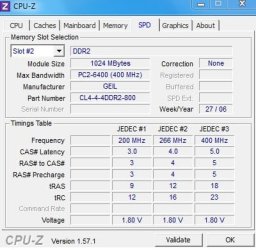
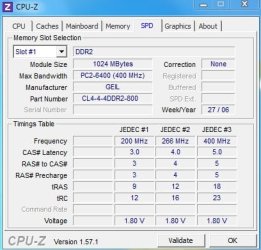
(3) Just to be absolutely sure of what you're really running, can you please please download and install CPUID (sometimes referred to as CPU-Z, which was its old name), run it, and post the results of looking at the SPD tab for all four slots of memory you've got installed.


Nevertheless, as is shown on page 69 of the Dell manual:
DDR2 Memory Overview

DDR2 memory modules should be installed in pairs of matched memory size, speed, and technology. If the DDR2 memory modules are not installed in matched pairs, the computer will continue to operate, but with a slight reduction in performance.
 

My Computer My Computer

At a glance

Windows 7 Pro x64 (1), Win7 Pro X64 (2)i5-3350p 3.1Ghz/6MB-cache (1); E8400 3.0Ghz/6...8GB PC3-12800 DDR3 (1); 4GB PC3-10600 DDR3 (2)ATI HD7750 (1), (see TV cards); ATI R7 250 (2)
Computer type
PC/Desktop
Computer Manufacturer/Model Number
Home-built, two systems (1) and (2)
OS
Windows 7 Pro x64 (1), Win7 Pro X64 (2)
CPU
i5-3350p 3.1Ghz/6MB-cache (1); E8400 3.0Ghz/6MB-cache (2)
Motherboard
ASUS P8Z77-V Pro (1); ASUS P5Q3 (2)
Memory
8GB PC3-12800 DDR3 (1); 4GB PC3-10600 DDR3 (2)
Graphics Card(s)
ATI HD7750 (1), (see TV cards); ATI R7 250 (2)
Sound Card
Realtek ALC892 HD Audio (1); Realtek ALC1200 HD Audio (2)
Monitor(s) Displays
Eizo HD2441W LCD, Eizo S2433W (1); Eizo 24" S2433W (2)
Screen Resolution
1920x1200, 1920x1200 (1); 1920x1200 (2)
Hard Drives
(1) 1TB SATA-II (7200RPM), 2x2TB SATA-III (7200RPM), 250GB SATA-III (10000RPM) for OS; 2x2TB external USB 3.0

(2) 320GB SATA-II (7200RPM), 750GB SATA-II (7200RPM), 150GB SATA-II (10000RPM) for OS; 2TB external USB 3.0
PSU
Nesteq ECS-6001 600W (1); Nesteq ECS-5001 500W (2)
Case
Acousti-Case 360 (1) and (2)
Cooling
Noctua NH-U12P SE2 for CPU, 2x120mm case fans (1) and (2)
Keyboard
IBM PS/2 (1) and (2)
Mouse
Logitech MX Revolution wireless (1); Microsoft wired (2)
Internet Speed
100mbps down / 10mbps up
Antivirus
Microsoft Security Essentials; Malwarebyte Anti-Malware Pro
Browser
Firefox
Other Info
Ceton InfiniTV 4-tuner cablecard-enabled TV card as well as Hauppauge HVR-2250 OTA/ATSC 2-tuner TV card in (1), running under Win7 WMC
I'm puzzled. Your information shows some very odd and seemingly unacceptable or contradictory details.

Are you "overclocking"??

(1) That screenshot shows you to currently have 3.5GB of PC2-6400 memory installed. That is 800Mhz memory.

According to the Dell Dimension E520 Owner's Manual, your machine supports a max of 4GB of memory, not the 8GB maximum shown in that screenshot.

I've checked the Crucial web site directly for the Dell E520 and it certainly does show that 8GB is the maximum supported by the machine, but that seems incorrect since the Dell manual says only 4GB max is supported.

(2) Also, according to page 69 of that Dell owner's manual which describes the memory, and the machine specs on page 109, only 553Mhz or 667Mhz memory is supported. It does not show that 800Mhz memory is supported.
Memory
Type 533-MHz and 667-MHz dual DDR2 unbuffered SDRAM
Memory connectors four
Memory capacities 256 MB, 512 MB, or 1 GB non-ECC
Minimum memory 256 MB
Maximum memory 4 GB
Of course it would provide better performance to have 667Mhz memory installed (expecially since the price is so cheap) rather than 553Mhz memory, so given a choice choice I'd definitely recommend 667Mhz memory. But this would be PC2-5300 memory (sometimes named DDR2-667), not PC2-6400 as you show currently installed.

Have you installed your own "upgraded" memory sticks, sometime after you purchased your Dell E520? Or did the machine come from Dell that way, with PC2-6400 800Mhz memory already installed? The 3.5GB total currently present is certainly an unusual, kind of non-standard number.

(3) Just to be absolutely sure of what you're really running, can you please please download and install CPUID (sometimes referred to as CPU-Z, which was its old name), run it, and post the results of looking at the SPD tab for all four slots of memory you've got installed.


Nevertheless, as is shown on page 69 of the Dell manual:
DDR2 Memory Overview

DDR2 memory modules should be installed in pairs of matched memory size, speed, and technology. If the DDR2 memory modules are not installed in matched pairs, the computer will continue to operate, but with a slight reduction in performance.

when i bought it 2nd hand, yes i installed my own RAM.
i have 2 questions?
1.In my case, is having 3GB RAM faster than 3.5GB?(i have a feeling that taking my 512mb ram out will be better)
2.When i have 4 RAM slots, but only decide to use 3 slots leaving 1 remaining, is it faster? i heard my friend saying that if i use all slots, then the motherboard uses more effort.

thank you!
 

Attachments

  • Untit2led.jpg
    Untit2led.jpg
    29.4 KB · Views: 1
  • Untitl4d.jpg
    Untitl4d.jpg
    32.3 KB · Views: 1
  • Untitle34d.jpg
    Untitle34d.jpg
    32.4 KB · Views: 1
  • Untitled.jpg
    Untitled.jpg
    31.6 KB · Views: 1

My Computer My Computer

At a glance

Windows 7 Ultimate 64-BitIntel(R) Pentinum(R) D CPU 2.80 GHz - Dual Core3.5 GBAsus Geforce 8500GT
Computer Manufacturer/Model Number
Dell Dimension E520 Desktop/PC
OS
Windows 7 Ultimate 64-Bit
CPU
Intel(R) Pentinum(R) D CPU 2.80 GHz - Dual Core
Motherboard
Dell Inc. 0WG864
Memory
3.5 GB
Graphics Card(s)
Asus Geforce 8500GT
Monitor(s) Displays
Asus PG191
Screen Resolution
1280 x 1024
Hard Drives
320GB
Internet Speed
26.78 Mbps
when i bought it 2nd hand, yes i installed my own RAM.
Well apparently it's been working, with three out of four slots filled with three identical 1GB 800Mhz memory cards and the remaining fourth slot holding what I guess is a 512MB 553Mhz (or a bit slower?) memory card.

However as I understand things, all of the memory would be SLOWED DOWN BY THE BIOS to conform to the slowest memory present. So I don't think you've been getting the performance you'd hoped for with those three "fast" cards. You've actually been getting the performance of those three cards limited by the slowest card, i.e. the 512MB fourth card.

Again, 800Mhz is faster than Dell says the machine can support... although apparently it's physically working. But this may be because you actually have that slow fourth card, so this may be what has "saved" you in the first place. Don't really know, but it's really not right.

My recommendation is to spend $64 and buy this 2x2GB kit from Crucial which is guaranteed to be perfect for your Dell XPS E520, and which will be the proper 667Mhz faster memory that Dell states is supported by your machine.

Remove all four of your current memory cards, and place these two 2GB cards in slots 1 and 2 of the machine. This will give you the 4GB you want, in just two matched memory cards... and at the fastest speed Dell states can be used.


i have 2 questions?

1.In my case, is having 3GB RAM faster than 3.5GB?(i have a feeling that taking my 512mb ram out will be better)
I wouldn't spend much time trying to argue one way or another.

My honest recommendation is to spend $64 and be done with it. Toss your current four memory cards and replace them with the two new ones from Crucial. 4GB is better than either 3.5GB or 3GB. And, your machine's memory will actually be running at the max 667Mhz speed it can run at, rather than the 553Mhz it is currently probably running at because that's the slowest card of your four.


2.When i have 4 RAM slots, but only decide to use 3 slots leaving 1 remaining, is it faster? i heard my friend saying that if i use all slots, then the motherboard uses more effort.
Well.. "more effort" is not really an appropriate description.

But personally I would NEVER not use pairs of matched memory cards in pairs of memory slots. Also, I would fill either 2 or 4 memory slots, and never 3.

As Dell said:
DDR2 Memory Overview

DDR2 memory modules should be installed in pairs of matched memory size, speed, and technology. If the DDR2 memory modules are not installed in matched pairs, the computer will continue to operate, but with a slight reduction in performance.
 

My Computer My Computer

At a glance

Windows 7 Pro x64 (1), Win7 Pro X64 (2)i5-3350p 3.1Ghz/6MB-cache (1); E8400 3.0Ghz/6...8GB PC3-12800 DDR3 (1); 4GB PC3-10600 DDR3 (2)ATI HD7750 (1), (see TV cards); ATI R7 250 (2)
Computer type
PC/Desktop
Computer Manufacturer/Model Number
Home-built, two systems (1) and (2)
OS
Windows 7 Pro x64 (1), Win7 Pro X64 (2)
CPU
i5-3350p 3.1Ghz/6MB-cache (1); E8400 3.0Ghz/6MB-cache (2)
Motherboard
ASUS P8Z77-V Pro (1); ASUS P5Q3 (2)
Memory
8GB PC3-12800 DDR3 (1); 4GB PC3-10600 DDR3 (2)
Graphics Card(s)
ATI HD7750 (1), (see TV cards); ATI R7 250 (2)
Sound Card
Realtek ALC892 HD Audio (1); Realtek ALC1200 HD Audio (2)
Monitor(s) Displays
Eizo HD2441W LCD, Eizo S2433W (1); Eizo 24" S2433W (2)
Screen Resolution
1920x1200, 1920x1200 (1); 1920x1200 (2)
Hard Drives
(1) 1TB SATA-II (7200RPM), 2x2TB SATA-III (7200RPM), 250GB SATA-III (10000RPM) for OS; 2x2TB external USB 3.0

(2) 320GB SATA-II (7200RPM), 750GB SATA-II (7200RPM), 150GB SATA-II (10000RPM) for OS; 2TB external USB 3.0
PSU
Nesteq ECS-6001 600W (1); Nesteq ECS-5001 500W (2)
Case
Acousti-Case 360 (1) and (2)
Cooling
Noctua NH-U12P SE2 for CPU, 2x120mm case fans (1) and (2)
Keyboard
IBM PS/2 (1) and (2)
Mouse
Logitech MX Revolution wireless (1); Microsoft wired (2)
Internet Speed
100mbps down / 10mbps up
Antivirus
Microsoft Security Essentials; Malwarebyte Anti-Malware Pro
Browser
Firefox
Other Info
Ceton InfiniTV 4-tuner cablecard-enabled TV card as well as Hauppauge HVR-2250 OTA/ATSC 2-tuner TV card in (1), running under Win7 WMC
hi,
today i decided to add more ram to my computer. i have currently 3.5gb of ram with 4 ram slots. i replaced the 512mb ram with my new 1gb ram. altogether now is 4gb. when i turned the computer on, there was only a black screen...:(. i waited for 5 minutes but still black screen. i then arranged my rams around the ram slots. Some of my rearranged ram order resulted in the machine to beep several times and sometimes twice only.
can anyone help me? i would like to play my windows with 4gb ram.

thank you

You know, with the E520, I don't think you will see any gain going from 3.5 to 4 GB even though you have a 64bit OS. I don't believe that DELL supports memory remapping so your PCI/Graphics card will use some of that 4 GB and you will only see 3.5GB at best. So 3.5 GB is probably the optimal amount for your E520.
 

My Computer My Computer

At a glance

Windows 10 Pro. EFI boot partition, full EFI ...i7 4770k 4.4GHz (44-44-43-43 turbo) @ 1.248V16GB (8GBx2) @2200 MHz G.skill Sniper 10-11-1...MSI GTX 970 Gaming 4G
Computer type
PC/Desktop
Computer Manufacturer/Model Number
Home built (GeneO industries)/Model 4
OS
Windows 10 Pro. EFI boot partition, full EFI boot
CPU
i7 4770k 4.4GHz (44-44-43-43 turbo) @ 1.248V
Motherboard
ASUS Maximus VI Hero
Memory
16GB (8GBx2) @2200 MHz G.skill Sniper 10-11-10-30-1, 1.6V
Graphics Card(s)
MSI GTX 970 Gaming 4G
Sound Card
Onboard SupremeFX Audio
Monitor(s) Displays
NEC Spectraview 2490WUXi-SV
Screen Resolution
1920 x 1200
Hard Drives
Samsung 850 Pro 256GB (OS), Samsung 2x 128GB 840 Pro SSD in RAID0, 3x WD Blue 6Gb/s 1TB RAID0, WD 2TB Black external USB 3.0, 2TB WD20EARS Green external USB 3.0, 2x 500GB Seagate and 1 750 GB external USB, 1x 350GB external USB3
PSU
Seasonic X-850 (2012 KM3 model)
Case
Fractal Design Define R4
Cooling
NH-D14, NF-F12, NF-A15; NF-P14, NF-P12,NF-A14, S12A PWM
Keyboard
Cooler Master Storm Quickfire Rapid - Brown
Mouse
Logitech G602
Internet Speed
126.4 Mb/s down, 24.3 Mb/s up
Other Info
USB 3.0 x8 , SATA III x8, eSATA, USB 2.0 x6. Samsung DVD R/W drive.

WEI: CPU 7.8, Memory 7.9, Graphics 7.9, Disk 7.9
Back
Top