
You are using an out of date browser. It may not display this or other websites correctly.
You should upgrade or use an alternative browser.
You should upgrade or use an alternative browser.
Majority of Taskbar Not Changing Color
- Thread starter BassMZero
- Start date

If you are on Home Premium, Enterprise, Professional or Ultimate then you can change it from "Personalize>Windows Color"
Just right click on the desktop and go to Personalize and there you would see "Windows Color" Second option in the bottom.
And if you wish to change it in the theme itself try @ "Taskbar & SystemTray > TaskBand > Aero > TaskBand > Background Bottom "
Just right click on the desktop and go to Personalize and there you would see "Windows Color" Second option in the bottom.
And if you wish to change it in the theme itself try @ "Taskbar & SystemTray > TaskBand > Aero > TaskBand > Background Bottom "
My Computer
At a glance
Windows 7 Ultimate
- OS
- Windows 7 Ultimate

Hello BassMZero
This sometimes happens in you have other toolbars added on the taskbar. Right click the taskbar/toolbars and uncheck any that are active and try again. I have the same thing on mine but mine is intentional, I like the way mine looks with central taskbar icons.

Is it a custom theme or are you just changing it in personalization
Danny
This sometimes happens in you have other toolbars added on the taskbar. Right click the taskbar/toolbars and uncheck any that are active and try again. I have the same thing on mine but mine is intentional, I like the way mine looks with central taskbar icons.
Is it a custom theme or are you just changing it in personalization
Danny
My Computer
At a glance
Windows 7 Home Premium x64 SP1intel(R)core(TM)2 duo CPU T6600 @ 2.20GHz3 gb ddr3ati radeon hd4570/512mb
- Computer Manufacturer/Model Number
- acer aspire 5935g
- OS
- Windows 7 Home Premium x64 SP1
- CPU
- intel(R)core(TM)2 duo CPU T6600 @ 2.20GHz
- Motherboard
- intel gm45/gm47 revision 07
- Memory
- 3 gb ddr3
- Graphics Card(s)
- ati radeon hd4570/512mb
- Monitor(s) Displays
- lop156wh2-tle1 15.3 flat
- Screen Resolution
- 1366x768
- Hard Drives
- OCZ-Agility3 60gig ssd
320gig external hdd
500gig external hdd
- Mouse
- Optical
- Internet Speed
- 30Mbps Down/30Mbps Up

Welcome to the Seven Forums
As Danny asked are you using a 3rd party custom theme?
If so it may have been built wrong, try changing the way Taskbar buttons are displayed. Right click on taskbar go to Properties In the Taskbar tab use the dropdown arrow and change it and Apply and see if it changes.
Jerry
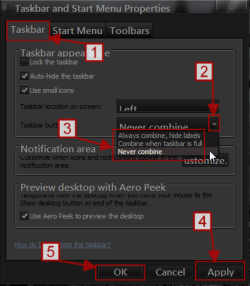
As Danny asked are you using a 3rd party custom theme?
If so it may have been built wrong, try changing the way Taskbar buttons are displayed. Right click on taskbar go to Properties In the Taskbar tab use the dropdown arrow and change it and Apply and see if it changes.
Jerry
My Computer
At a glance
Win 7 Pro x64 / Win 10 ProIntel(R) Core(TM) i7-3630QM CPU @ 2.40GHz12 GB(1) Intel(R) HD Graphics 4000 (2) NVIDIA GeFo...
- Computer type
- Laptop
- Computer Manufacturer/Model Number
- Sager NP9170
- OS
- Win 7 Pro x64 / Win 10 Pro
- CPU
- Intel(R) Core(TM) i7-3630QM CPU @ 2.40GHz
- Motherboard
- CLEVO P170EM
- Memory
- 12 GB
- Graphics Card(s)
- (1) Intel(R) HD Graphics 4000 (2) NVIDIA GeForce GTX 675M
- Sound Card
- (1) Realtek High Definition Audio (2) Intel(R) Display Aud
- Monitor(s) Displays
- 17.3
- Screen Resolution
- 1920x1080
- Hard Drives
- (1) Samsung 860 EVO 500GB(OS) (1) Samsung 860 EVO 500GB(Data)
- Keyboard
- Backlite
- Antivirus
- MSE, Malwarebytes Pro
- Browser
- Firefox
- Other Info
- DESKTOP: Custom-built.
OS: Win 10 Pro x64.
CASE: Rosewill R5.
CPU: Intel I5 4670K CPU @ 3.40GHz.
CPU COOLER: Cool Master Hyper 212 EVO.
MOTHERBOARD: Asus Z87-A.
MEMORY: Kingston HyperX 2x4 GB.
GPU: Nvidia Geforce 650 TI.
PSU: Corsair TX750.
DRIVES: (1) Samsung 840 120 GB SSD (2) Western Digital blue 500 GB 7200 RPM.

This may help. Right click an empty place in the taskbar, Properties, 1.Customise, check 2.Always show All Icons an shown. Click OK, OK.

My Computer
At a glance
Windows 7 Ultimate X64 SP1Intel i5-2550K, Differing ~4.4-4.8GHz No buil...16GB G.Skill Sniper 1866MHz @ 2133MHz 2x8GBASUS GTX650TIB-DC2OC-2GD5, (650TI Boost)
- Computer type
- PC/Desktop
- Computer Manufacturer/Model Number
- Home Built Desktop By DataTech
- OS
- Windows 7 Ultimate X64 SP1
- CPU
- Intel i5-2550K, Differing ~4.4-4.8GHz No built in GPU
- Motherboard
- ASUS P8Z68-V PRO/GEN3
- Memory
- 16GB G.Skill Sniper 1866MHz @ 2133MHz 2x8GB
- Graphics Card(s)
- ASUS GTX650TIB-DC2OC-2GD5, (650TI Boost)
- Sound Card
- Onboard Realtek 5-1
- Monitor(s) Displays
- Samsung P2570HD
- Screen Resolution
- 1920x1080
- Hard Drives
- Samsung 840 Pro 256GB SSD for OS, 500GB Seagate Constellation (Enterprise drive) for Data
- PSU
- Corsair HX650W
- Case
- Inwin Dragon Rider
- Cooling
- Hyper 212 EVO w/two Noctua fans, push-pull, @1300 RPM
- Keyboard
- E-Z Eyes, bright yellow keys with large characters
- Mouse
- steelseries SENSEI Laser Pro Gaming
- Internet Speed
- 48-51Mbs Mbs down, 11 Mbs up Xfinity Cable
- Antivirus
- Norton Internet Security 2013
- Browser
- IE 10, Opera, Pale Moon if needed
- Other Info
- 4 case fans, LG BluRay-RE, ASUS DVD-RW, Mr. Fusion power supply, 1.21 gigawatts.