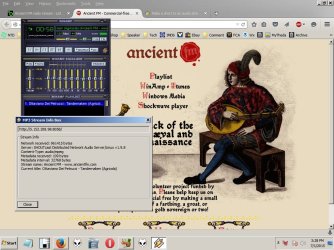
Make a short to an audio stream and load a playerIn Win XP

somafm.com/dronezone/ is a bit harder...
...only because they give you so many options
...so many ways to stream their content.

I'll put some instructions together for you a bit later.
 

My Computer My Computer

At a glance

W7 Pro SP1 64biti78GBIntel HD Graphics
Computer type
Laptop
Computer Manufacturer/Model Number
Employer provided Dell Latitude
OS
W7 Pro SP1 64bit
CPU
i7
Memory
8GB
Graphics Card(s)
Intel HD Graphics
Hard Drives
crappy SSD
Antivirus
Employer mandated Symantec Endpoint Protection
Browser
Pale Moon 64bit, IE11 64bit & Chrome 64bit
All help appreciated.

I will see about inspecting pls files in the meantime.

In the ancientfm example they show Winamp as the default player plus a couple others.


Winamp auto-loads when selected and pls turns up in there. Maybe I can locate the .pls itself with the search box? Only asking because so much of this seems embedded on autoloading programs.

Just out of curiosity, has anyone here used the programs which can build a shortcut?
I'm thinking those are just the .bat files you describe with input fields, but just guessing.
One thing and another it might be easier with more advanced website trees like SomaFM.

A good discussion. I hope we aren't re-inventing the wheel and others will be able
to use the technique.
 

My Computer My Computer

At a glance

Windows 7 x64 UltimateAMD Athlon II x3 4502 GB
Computer type
PC/Desktop
Computer Manufacturer/Model Number
custom
OS
Windows 7 x64 Ultimate
CPU
AMD Athlon II x3 450
Motherboard
MSI 880GM
Memory
2 GB
Hard Drives
various
Browser
Firefox, Opera
A correction. I thought there are a variety of shortcut makers but not so. I just was
searching for those applications at Cnet etc and came up empty. The dialog in the
XP or Win7 should be adequate for everything once it is understood. I'm not saying I'm there yet.
 

My Computer My Computer

At a glance

Windows 7 x64 UltimateAMD Athlon II x3 4502 GB
Computer type
PC/Desktop
Computer Manufacturer/Model Number
custom
OS
Windows 7 x64 Ultimate
CPU
AMD Athlon II x3 450
Motherboard
MSI 880GM
Memory
2 GB
Hard Drives
various
Browser
Firefox, Opera
~~~
Winamp auto-loads when selected and pls turns up in there. Maybe I can locate the .pls itself with the search box? Only asking because so much of this seems embedded on autoloading programs.
~~~
When you click on the WinAmp link, the browser downloads the PLS file to some folder. Then the browser opens that PLS file by passing it to Windows (file) Explorer. Explorer checks to see what app is supposed to play PLS files... then Explorer opens that app (passing the path/filename of the PLS file to the player*). In your case, WinAmp is the player that opens. In my case, Media Player Classic. However, I do not let any browser automatically open files like these.

*As mentioned earlier, you can probably do this via a shortcut. You don't have to open the PLS file in a text editor to locate the URL. You just make a shortcut that points the player of interest to the PLS file that you have saved on your hard drive. You might even be able to make a shortcut that points the player to the PLS file online. I think that I've done this in the past, but I cannot test that right now.


Mouse over one of the links and notice that it is a PLS file:
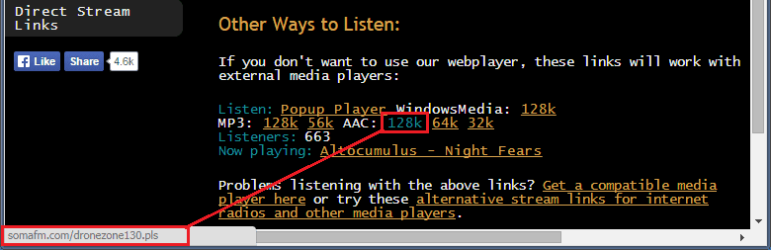
1-DZ-AAC-128k-PLS.png

If you have told your browser of choice to always open PLS files, then you might not see the options to save the PLS file to a convenient folder when you click on that 128k link. In that case, right click on the link shown in the screenshot ABOVE and select something like "Save link as...".

Once you get the PLS file where you want it - drag/drop it into Notepad.
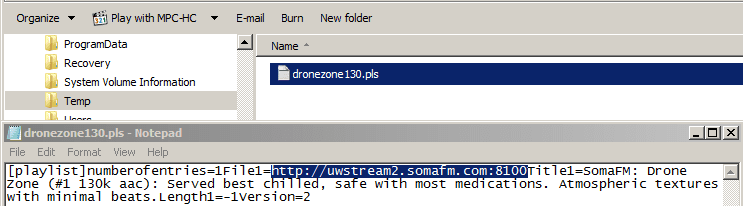
2-DZ-AAC-128k-PLS.PNG
The URL of interest is highlighted.

On the SomaFM website, you can go to their direct links and copy/paste the same info without downloading/dragging/opening a PLS file:
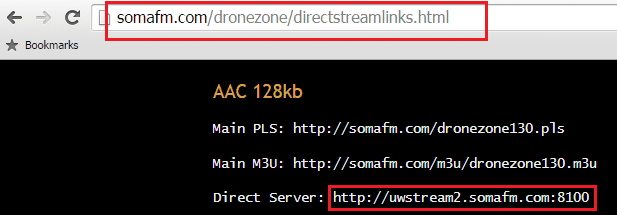
3-DZ-AAC-128k-PLS.PNG


Sidebar:
Notepad shows all of the lines of info crammed together. (See the second screenshot in this post.) That is because these PLS files use a LF (Line Feed) to terminate a line of info. (Unix/Linux based systems/software use that to terminate lines.)
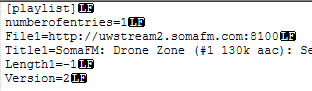
4-DZ-AAC-128k-PLS.PNG

If you edit the PLS file via Notepad, you might end up adding a CRLF (Carriage Return/Line Feed). (By default, Windows based systems/software use those to terminate lines.)
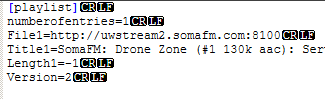
5-DZ-AAC-128k-PLS.PNG

I have no idea is the way that a line is terminated matters to various players.

On SomaFM, you might want to test several URLs - some players will display info about what is playing - if you get the correct URL.

 
Last edited:

My Computer My Computer

At a glance

W7 Pro SP1 64biti78GBIntel HD Graphics
Computer type
Laptop
Computer Manufacturer/Model Number
Employer provided Dell Latitude
OS
W7 Pro SP1 64bit
CPU
i7
Memory
8GB
Graphics Card(s)
Intel HD Graphics
Hard Drives
crappy SSD
Antivirus
Employer mandated Symantec Endpoint Protection
Browser
Pale Moon 64bit, IE11 64bit & Chrome 64bit
Apply button is greyed out because you haven't made any changes yet. It will be clickable as soon as you change a value.

If you can keep the example same it will be better. As I understand it, your previous example (foobar and webpage) is supposed to:
1- Run: foobar2000.exe
2- Open http://audio-ogg.ibiblio.org:8000/wcpe.ogg in default web browser

Is this true?

What is not working with it? Maybe you need to change directory of foobar2000 to "Program Files (x86)" instead of Program Files, you have to check which folder it is in, I simply used the one which you provided. Is this the case?

Like this:
Code:
@echo off 
cd C:\Program Files (x86)\foobar2000
start foobar2000.exe 
[COLOR=black]start http://audio-ogg.ibiblio.org:8000/wcpe.ogg[/COLOR]
exit


I am catching up n re-reading all the info here. This older post I did not answer properly
about the shortcut:

No I don't want it to open in the browser, that's what I'm trying to eliminate i.e. load music
but be able to navigate the browser when my previous shortcut job accomplishes.

In fact I do not know how/why the IP address (given below in the thread) can work at all
but I will be getting to that.
 

My Computer My Computer

At a glance

Windows 7 x64 UltimateAMD Athlon II x3 4502 GB
Computer type
PC/Desktop
Computer Manufacturer/Model Number
custom
OS
Windows 7 x64 Ultimate
CPU
AMD Athlon II x3 450
Motherboard
MSI 880GM
Memory
2 GB
Hard Drives
various
Browser
Firefox, Opera
OP here,

I see the path you constructed and the whole routine for that I've had in use for a long time.

But in trying to set up a new one ......
Looking at the source code for that website, I don't see a URL that can be used directly from there.

If you visit the station's website (Ancient FM - Commercial-free Mediaeval and Renaissance Music) they offer a playlist file (playlist.pls). If you have the .PLS file extension associated with the app of interest, you can save the PLS file to your desktop and double click on it from there.

Or, you can open the PLS file in a text editor and copy out the URL to create a shortcut like:

Code:
"C:\Program Files (x86)\foobar2000\foobar2000.exe" http://5.152.208.98:8058/


Success.

I have edited a sample text shortcut with the code above and can install the shortcut in the
tray.

I'm still unclear on how to get the IP info from the PLS file so I'm not stuck in a jamb in the future.
Will try at ancientfm when it opens to Winamp.

Other thing I noticed was 1.) Setting the target file correctly should be at Foobar
2.) Select a new icon (other than duplicate Foobar) is locked.

This is a big step forward though for this job. Thanks for the time given to it.
 

My Computer My Computer

At a glance

Windows 7 x64 UltimateAMD Athlon II x3 4502 GB
Computer type
PC/Desktop
Computer Manufacturer/Model Number
custom
OS
Windows 7 x64 Ultimate
CPU
AMD Athlon II x3 450
Motherboard
MSI 880GM
Memory
2 GB
Hard Drives
various
Browser
Firefox, Opera
I see part of the icon problem now. The browse path is not going correctly to where icons are stored:

Where is the directory to find these? I have seen it but in these shortcuts the only path is to foobar etc.
 

My Computer My Computer

At a glance

Windows 7 x64 UltimateAMD Athlon II x3 4502 GB
Computer type
PC/Desktop
Computer Manufacturer/Model Number
custom
OS
Windows 7 x64 Ultimate
CPU
AMD Athlon II x3 450
Motherboard
MSI 880GM
Memory
2 GB
Hard Drives
various
Browser
Firefox, Opera
I have found how to open the .pls file to read the IP address. Since I am now doing screenshots I made one for this:
 

Attachments

  • ancinetfm.jpg
    ancinetfm.jpg
    121.3 KB · Views: 1

My Computer My Computer

At a glance

Windows 7 x64 UltimateAMD Athlon II x3 4502 GB
Computer type
PC/Desktop
Computer Manufacturer/Model Number
custom
OS
Windows 7 x64 Ultimate
CPU
AMD Athlon II x3 450
Motherboard
MSI 880GM
Memory
2 GB
Hard Drives
various
Browser
Firefox, Opera
I'm still unclear on how to get the IP info from the PLS file so I'm not stuck in a jamb in the future.
I see that you found one way to get the IP... but let's go over the steps to do it another way.

Do you have any problems saving the PLS file to some temporary location on your hard drive? (perhaps the desktop) Once that PLS file is saved somewhere, do these steps:

Manually open Notepad (perhaps via the Start menu).

Left click (and hold) on the PLS file.

Drag the mouse (& thus the PLS file) until the mouse cursor is over the body of the Notepad app.

Release the left click (drop the PLS file into the body of the Notepad app).
 

My Computer My Computer

At a glance

W7 Pro SP1 64biti78GBIntel HD Graphics
Computer type
Laptop
Computer Manufacturer/Model Number
Employer provided Dell Latitude
OS
W7 Pro SP1 64bit
CPU
i7
Memory
8GB
Graphics Card(s)
Intel HD Graphics
Hard Drives
crappy SSD
Antivirus
Employer mandated Symantec Endpoint Protection
Browser
Pale Moon 64bit, IE11 64bit & Chrome 64bit
Some websites change those PLS files quite often. Other websites leave them alone for years and years.

What happens if you make a shortcut like this:

Code:
"C:\Program Files (x86)\foobar2000\foobar2000.exe" http://www.simplexstream.com/tunein.php/telegram/playlist.pls

That is the kind of shortcut that I mentioned in post #24 where the text is red in that post. If that works for you, then you don't have to open the PLS file and get the IP address or URL (which can change).
 

My Computer My Computer

At a glance

W7 Pro SP1 64biti78GBIntel HD Graphics
Computer type
Laptop
Computer Manufacturer/Model Number
Employer provided Dell Latitude
OS
W7 Pro SP1 64bit
CPU
i7
Memory
8GB
Graphics Card(s)
Intel HD Graphics
Hard Drives
crappy SSD
Antivirus
Employer mandated Symantec Endpoint Protection
Browser
Pale Moon 64bit, IE11 64bit & Chrome 64bit
We are getting there.\

On this Somafm > Dronezone they have a page of direct streamlinks which stay on all the time uninterrupted
etc.

Here is the collection:

I've only tried to enter/drag the Mp3 128 (first option) This is a lot deeper than I had expected to go.

SomaFM: Drone Zone: Direct Stream Links for other media players

You can see the .pls links there. Plus I see that Foobar offers the same drag/drop feature as Winamp
but it hasn't all come together yet. I've added a pls but not getting sound and I've waited plenty time for it
to set up. Where Winamp showed the IP address, none is visible with this one (which would have solved everything
since I had the template. )

Perhaps one of the others direct stream options shown?

I will try the technique you give for Notepad and report back.
 

My Computer My Computer

At a glance

Windows 7 x64 UltimateAMD Athlon II x3 4502 GB
Computer type
PC/Desktop
Computer Manufacturer/Model Number
custom
OS
Windows 7 x64 Ultimate
CPU
AMD Athlon II x3 450
Motherboard
MSI 880GM
Memory
2 GB
Hard Drives
various
Browser
Firefox, Opera
Now I can test :-)


This works for me:
Code:
"C:\Program Files (x86)\K-Lite Codec Pack\MPC-HC64\mpc-hc64.exe" http://www.simplexstream.com/tunein.php/telegram/playlist.pls
If that format fails for you, then it might be a limitation of the WinAmp and/or foobar2000. Or perhaps some security setting.


Even though somafm offers direct links [as I linked to post #24 & you linked to post #31], I'm still going to use their PLS file to make the point that you should not need an IP address in the URL to make your shortcuts.

Some PLS files use an IP address as part of the URL.
Code:
[playlist]
numberofentries=1
File1=http://[COLOR=Red]5.152.208.98[/COLOR]:8058/
Title1=Ancient FM - www.ancientfm.com
Length1=-1
version=2
This works for me:
Code:
"C:\Program Files (x86)\K-Lite Codec Pack\MPC-HC64\mpc-hc64.exe" http://[COLOR=Red]5.152.208.98[/COLOR]:8058/

Other PLS files use text in the URL.
Code:
[playlist]
numberofentries=5
File1=http://[COLOR=Red]uwstream2.somafm.com[/COLOR]:80
Title1=SomaFM: Drone Zone (#1 128k mp3): Served best chilled, safe with most medications. Atmospheric textures with minimal beats.
Length1=-1
File2=http://xstream1.somafm.com:8014
Title2=SomaFM: Drone Zone (#2 128k mp3): Served best chilled, safe with most medications. Atmospheric textures with minimal beats.
Length2=-1
File3=http://uwstream3.somafm.com:8014
Title3=SomaFM: Drone Zone (#3 128k mp3): Served best chilled, safe with most medications. Atmospheric textures with minimal beats.
Length3=-1
File4=http://uwstream2.somafm.com:8002
Title4=SomaFM: Drone Zone (#4 128k mp3): Served best chilled, safe with most medications. Atmospheric textures with minimal beats.
Length4=-1
File5=http://ice.somafm.com/dronezone
Title5=SomaFM: Drone Zone (Firewall-friendly 128k mp3) Served best chilled, safe with most medications. Atmospheric textures with minimal beats.
Length5=-1
Version=2
This works for me:
Code:
"C:\Program Files (x86)\K-Lite Codec Pack\MPC-HC64\mpc-hc64.exe" http://[COLOR=Red]uwstream2.somafm.com[/COLOR]:80
Your players should be able to turn the text in the URL to an IP address via a DNS query.
 

My Computer My Computer

At a glance

W7 Pro SP1 64biti78GBIntel HD Graphics
Computer type
Laptop
Computer Manufacturer/Model Number
Employer provided Dell Latitude
OS
W7 Pro SP1 64bit
CPU
i7
Memory
8GB
Graphics Card(s)
Intel HD Graphics
Hard Drives
crappy SSD
Antivirus
Employer mandated Symantec Endpoint Protection
Browser
Pale Moon 64bit, IE11 64bit & Chrome 64bit
I am back and will test the sample using the simplestream pls example in the post above.

Syntax seems to be the big problem. Plus what you describe as the various problems/techniques in how
the links are made.

AAC (also shown above) would be a good one to try as well.

Sorry to have to be spoon fed about this but I'm out of my depth.
 

My Computer My Computer

At a glance

Windows 7 x64 UltimateAMD Athlon II x3 4502 GB
Computer type
PC/Desktop
Computer Manufacturer/Model Number
custom
OS
Windows 7 x64 Ultimate
CPU
AMD Athlon II x3 450
Motherboard
MSI 880GM
Memory
2 GB
Hard Drives
various
Browser
Firefox, Opera
I see part of the icon problem now. The browse path is not going correctly to where icons are stored:

Where is the directory to find these? I have seen it but in these shortcuts the only path is to foobar etc.

Catching up on this as well. I have a couple of locations for icons stored on Win7 and will give those
when I'm ready to browse to them. It was a simple google lookup for anyone who wants to find them
right away.


Where are my icons in Windows 7? - Super User
 

My Computer My Computer

At a glance

Windows 7 x64 UltimateAMD Athlon II x3 4502 GB
Computer type
PC/Desktop
Computer Manufacturer/Model Number
custom
OS
Windows 7 x64 Ultimate
CPU
AMD Athlon II x3 450
Motherboard
MSI 880GM
Memory
2 GB
Hard Drives
various
Browser
Firefox, Opera
Well that superuser page was useless for me. Dll this and that is not an icon folder. Even looking for the
icon folder gave me icons _for_ folders.

Maybe someone knows where the folder for icons is in Win7? Simple and direct. I came up with a lot of bad search when using the Win7 search box with what I found as the icon file extension which is .ico.

Just to get things going, there is an icon archive site here:

Windows 7 Icons - Download 285 Free Windows 7 icons here

You can simply download one to the desktop. I picked one pretty much at random, dl'ed to the
desktop and then opened my Properties for the shortcut and navigated to it.

That job is sort of done but done the hard way.

Also, why is there a 'remember me' box on Win7 that never remembers my login?
 

My Computer My Computer

At a glance

Windows 7 x64 UltimateAMD Athlon II x3 4502 GB
Computer type
PC/Desktop
Computer Manufacturer/Model Number
custom
OS
Windows 7 x64 Ultimate
CPU
AMD Athlon II x3 450
Motherboard
MSI 880GM
Memory
2 GB
Hard Drives
various
Browser
Firefox, Opera
Back
Top