You are using an out of date browser. It may not display this or other websites correctly.
You should upgrade or use an
alternative browser.
Solved Make dialog windows default to "More details"?
New member
Guru
Gold Member
VIP
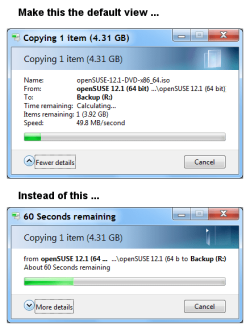
Does anyone know how to set the dialog windows to "
More details" (as the default view)?
- Computer type
- PC/Desktop
- Computer Manufacturer/Model Number
- n/a
- OS
- W7 Ultimate SP1, LM19.2 MATE, W10 Home 1703, W10 Pro 1703 VM, #All 64 bit
- CPU
- AMD Phenom II x6 1100T, 3.3 GHz
- Motherboard
- ASUS M4A88T-M/USB3 (AM3)
- Memory
- 12GB DDR3 1333 G-Skill (4GB x 2), G-Skill (2GB x 2)
- Graphics Card(s)
- NVIDIA GeForce GTX 660
- Sound Card
- Realtek?
- Monitor(s) Displays
- Samsung S23B350
- Screen Resolution
- 1920x1080
- Hard Drives
- WD Green 2TB (SATA), WD Green 3TB (SATA), WD Blue 4TB (SATA), WD Blue 6TB (SATA)
- PSU
- Cooler Master
- Case
- Antec GX300 Tower
- Cooling
- 3x Antec TRICOOL 120mm Fans
- Mouse
- Wired Optical
- Internet Speed
- DSL
- Antivirus
- Avast
- Browser
- Pale Moon (64 bit)
- Other Info
- 2018-12-27 Upgraded HDDs
2015-12-10 Upgraded case, graphics card, storage
2015-08-15 Upgraded motherboard & RAM
2015-07-15 Upgraded LM17.1 to LM17.2
If I am not mistaken the only solution for now is 3rd party apps like
Classic Shell.
One of the reasons why there are no native solutions is described
here.
.
Last edited:
- Computer type
- PC/Desktop
- OS
- Windows 8.1 ; Windows 7 x86 (Dec2008-Jan2013)
- Other Info
- "The scale icon at the top right of a post or tutorial is how you can give rep to the member."
New member
Guru
Gold Member
VIP
Thread Starter
Thanks Neutron16
One of the reasons why there are no native solutions is described
here.
Thanks for that link
Neutron16.

Also, thanks to
Ivo for investigating.
I have tried TeraCopy (using the replace Explorer option).
It balks if you try to move items in protect locations.
For example:
All Users Start Menu
C:\ProgramData\Microsoft\Windows\Start Menu
I haven't tried Classic Shell.
I don't like replacing built-in OS functions (see TeraCopy above).
- Computer type
- PC/Desktop
- Computer Manufacturer/Model Number
- n/a
- OS
- W7 Ultimate SP1, LM19.2 MATE, W10 Home 1703, W10 Pro 1703 VM, #All 64 bit
- CPU
- AMD Phenom II x6 1100T, 3.3 GHz
- Motherboard
- ASUS M4A88T-M/USB3 (AM3)
- Memory
- 12GB DDR3 1333 G-Skill (4GB x 2), G-Skill (2GB x 2)
- Graphics Card(s)
- NVIDIA GeForce GTX 660
- Sound Card
- Realtek?
- Monitor(s) Displays
- Samsung S23B350
- Screen Resolution
- 1920x1080
- Hard Drives
- WD Green 2TB (SATA), WD Green 3TB (SATA), WD Blue 4TB (SATA), WD Blue 6TB (SATA)
- PSU
- Cooler Master
- Case
- Antec GX300 Tower
- Cooling
- 3x Antec TRICOOL 120mm Fans
- Mouse
- Wired Optical
- Internet Speed
- DSL
- Antivirus
- Avast
- Browser
- Pale Moon (64 bit)
- Other Info
- 2018-12-27 Upgraded HDDs
2015-12-10 Upgraded case, graphics card, storage
2015-08-15 Upgraded motherboard & RAM
2015-07-15 Upgraded LM17.1 to LM17.2
Have you tried Supercopier ?
It has many options, it has the option to "show Details" always.
SuperCopier Website
- Computer type
- PC/Desktop
- Computer Manufacturer/Model Number
- Custom 2014 Upgrade.
- OS
- Windows 7 Ultimate x64 sp1
- CPU
- Intel i5 4590 Haswell refresh 3.30GHz(3.7GHz Turbo) Quad.
- Motherboard
- Gigabyte GA-H97-HD3 LGA 1150
- Memory
- G.Skill Ripjaws F3-12800CL9D-8GBRL 16GB (4x4GB) (1600MHz)
- Graphics Card(s)
- Gigabyte GeForce GT 740 4GB
- Sound Card
- Onboard. Realtek High Definition Audio
- Monitor(s) Displays
- Asus VW266H x 2
- Screen Resolution
- 1920x1200 @ 60Hz
- Hard Drives
- Samsung 840 EVO 120GB SSD /
Samsung 850 Pro Series 1TB SSD x 2 /
Western Digital WD Black 1TB /
Western Digital VelociRaptor 150 GB.
- PSU
- Corsair 650 hx modular
- Case
- Cooler Master
- Cooling
- 3x fans
- Keyboard
- Logitech Media Keyboard 600
- Mouse
- Logitech Performance Mouse MX
- Internet Speed
- Cable Broadband 100mbs/D, 2mbs/U
- Antivirus
- MSE, Malwarebytes, AdwCleaner, SUPERAntiSpyware
- Browser
- Mozilla Firefox, Google Chrome
- Other Info
- 1GB DataRam
New member
Guru
Gold Member
VIP
Thread Starter
Thanks rustberger
Have you tried Supercopier ?
It has many options, it has the option to "show Details" always.
SuperCopier Website
No I haven't.
Thanks for the link.
- Computer type
- PC/Desktop
- Computer Manufacturer/Model Number
- n/a
- OS
- W7 Ultimate SP1, LM19.2 MATE, W10 Home 1703, W10 Pro 1703 VM, #All 64 bit
- CPU
- AMD Phenom II x6 1100T, 3.3 GHz
- Motherboard
- ASUS M4A88T-M/USB3 (AM3)
- Memory
- 12GB DDR3 1333 G-Skill (4GB x 2), G-Skill (2GB x 2)
- Graphics Card(s)
- NVIDIA GeForce GTX 660
- Sound Card
- Realtek?
- Monitor(s) Displays
- Samsung S23B350
- Screen Resolution
- 1920x1080
- Hard Drives
- WD Green 2TB (SATA), WD Green 3TB (SATA), WD Blue 4TB (SATA), WD Blue 6TB (SATA)
- PSU
- Cooler Master
- Case
- Antec GX300 Tower
- Cooling
- 3x Antec TRICOOL 120mm Fans
- Mouse
- Wired Optical
- Internet Speed
- DSL
- Antivirus
- Avast
- Browser
- Pale Moon (64 bit)
- Other Info
- 2018-12-27 Upgraded HDDs
2015-12-10 Upgraded case, graphics card, storage
2015-08-15 Upgraded motherboard & RAM
2015-07-15 Upgraded LM17.1 to LM17.2


