Make MP3 file louder

quadrplax

New member
Member
Local time
1:02 PM
Messages
92
Is there any way I can make an MP3 file louder? I tried MP3Gain (which I actually use frequently for leveling audio files) and it capped at 105.9dB, which isn't loud enough and the quality starts to degrade. I tried messing around a lot in Audacity, trying normalize and amplify, but they seemed to do nothing (I could use amplify to make it quieter if I wanted to). The only thing that kind of worked was increasing the Gain in the Bass/Treble effect, which made it sound completely terrible. I'm doing this for an outdated device (iPAQ 210 with Windows Mobile 6) so I doubt I can do anything to the device to make it louder. Help?
 

My Computer

Computer type
PC/Desktop
Computer Manufacturer/Model Number
custom build
OS
Windows 7 Home Premium 64bit
CPU
AMD Phenom II X4 965 AM3 3.4Ghz 512KB 45NM 125W 4000MHZ
Motherboard
GIGABYTE GA-990FXA-UD3 AM3+ AMD 990FX SATA 6Gb/s USB 3.0 ATX
Memory
Mushkin 997008 DDR3 UDIMM (2x4GB) 8GB PC3-14900 1866MHZ 9-10
Graphics Card(s)
HIS Radeon HD 7870 2 GB (256-Bit) GDDR5 2x Mini-Displayport
Monitor(s) Displays
Dell U2414H, Dell E2014H
Screen Resolution
16:9 1920x1080, 16:9 1600x900
Hard Drives
Kingston HyperX 3K 120 GB SATA III 2.5-Inch 6.0 Gb/s Solid State Drive SH103S3/120G
Keyboard
Some old PS/2 one
Mouse
USB Kensignton
Internet Speed
5Mb/s Download, 1Mb/s Upload
Antivirus
Avast! Free Antivirus
Browser
Mozilla Firefox
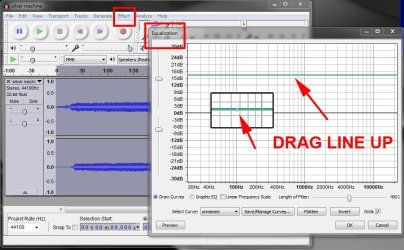
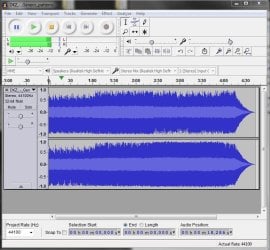
In Audacity, go Effect, Equalization and use the center 'blip' to drag the whole line upwards. Click OK. Save as mp3. See pic

audacity_mp3_volume.jpg
 

My Computer

Computer type
PC/Desktop
Computer Manufacturer/Model Number
self build
OS
Windows 7 pro x64 SP1
CPU
Intel i7-2600k o/c to 4.6GHz
Motherboard
MSI Z68-GD80
Memory
8GB Mushkin 1866MHz
Graphics Card(s)
Nvidia GTX 750 Ti 2GB
Sound Card
integrated
Monitor(s) Displays
Liyama ProLite 27"
Screen Resolution
1920*1080 px
Hard Drives
Seagate 2TB
PSU
Coolermaster GX 750W
Case
Antec 300 case + 5 fans
Cooling
Dark Rock Pro
Internet Speed
62Mbit down 18Mbit up
Antivirus
MSE
Browser
Firefox
Other Info
Blackgold BGT3650 Quad HD TV card. Also have various 3770 + 4770K render boxes.
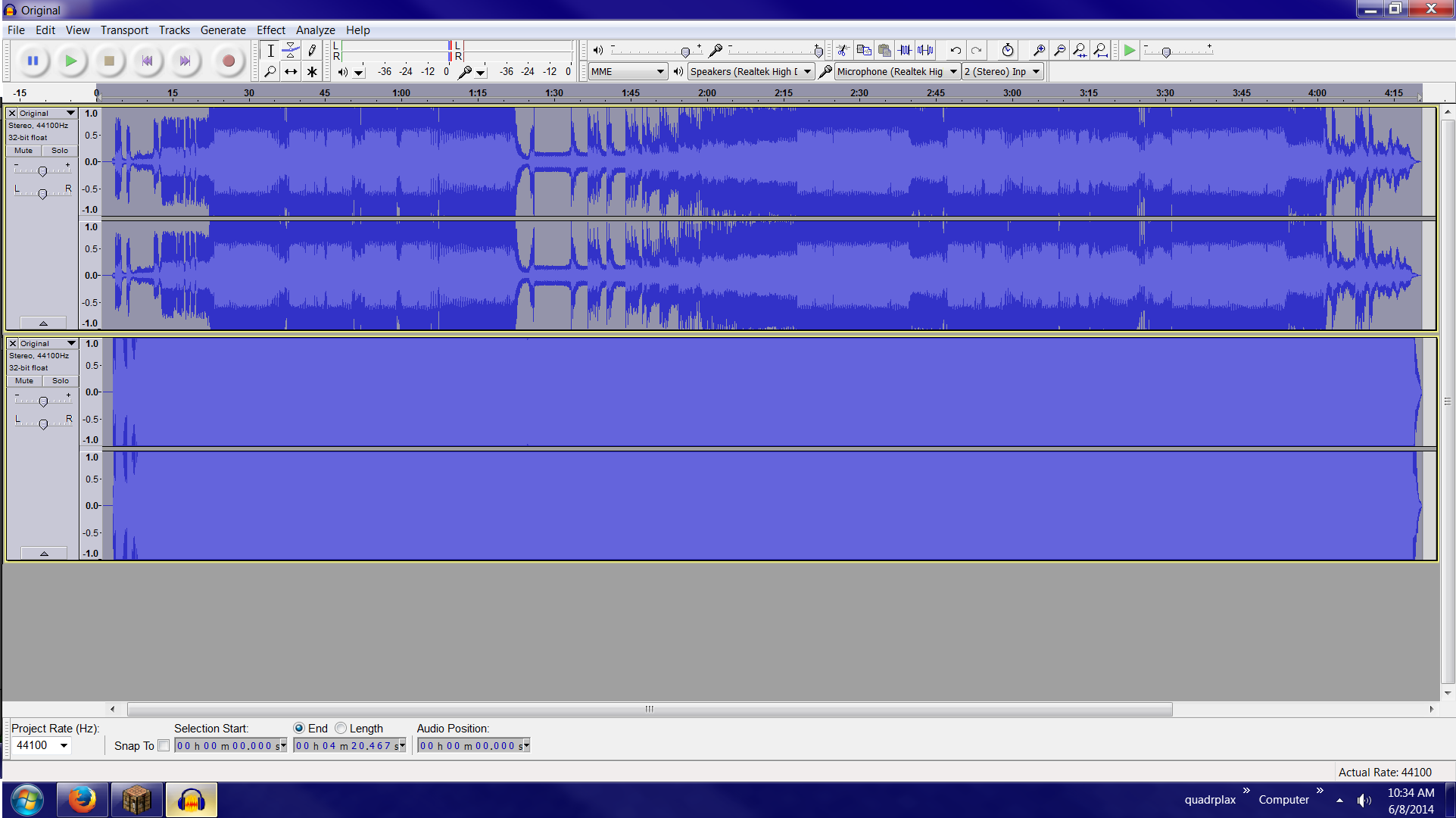
It still has the same terrible audio problem. I tried doing normalize first, since that makes the bars smaller first, then doing equalizer, but still had terrible audio problem. My bars look a lot different than yours. Top is before and bottom is after.
kHwh99a.png
 

My Computer

Computer type
PC/Desktop
Computer Manufacturer/Model Number
custom build
OS
Windows 7 Home Premium 64bit
CPU
AMD Phenom II X4 965 AM3 3.4Ghz 512KB 45NM 125W 4000MHZ
Motherboard
GIGABYTE GA-990FXA-UD3 AM3+ AMD 990FX SATA 6Gb/s USB 3.0 ATX
Memory
Mushkin 997008 DDR3 UDIMM (2x4GB) 8GB PC3-14900 1866MHZ 9-10
Graphics Card(s)
HIS Radeon HD 7870 2 GB (256-Bit) GDDR5 2x Mini-Displayport
Monitor(s) Displays
Dell U2414H, Dell E2014H
Screen Resolution
16:9 1920x1080, 16:9 1600x900
Hard Drives
Kingston HyperX 3K 120 GB SATA III 2.5-Inch 6.0 Gb/s Solid State Drive SH103S3/120G
Keyboard
Some old PS/2 one
Mouse
USB Kensignton
Internet Speed
5Mb/s Download, 1Mb/s Upload
Antivirus
Avast! Free Antivirus
Browser
Mozilla Firefox
I don't think Audacity can "undo" a poorly recorded mp3. If it was originally recorded at too low or too high a level, it may not be correctable. You'd have clipping distortion if recorded too hot or background noise if recorded too low.

I'd try to re-record or find another version of the same file if possible. Otherwise, you can fiddle around at the margins with equalizer settings or noise reduction tools, but I wouldn't expect miracles.

Those wave forms generally look bad to me---overloaded, banging against the ceiling.
 

My Computer

Computer type
PC/Desktop
Computer Manufacturer/Model Number
Ignatz Special; 4 speed manual gearbox; factory air conditioning; one of one
OS
Windows 7 Home Premium SP1, 64-bit
CPU
Intel Skylake i5-6600K, not overclocked
Motherboard
AsRock Z170M Extreme 4, micro ATX
Memory
8 GB HyperX DDR4-2666 (2 x 4 GB)
Graphics Card(s)
none; graphics are integrated on CPU
Sound Card
onboard: Realtek ALC1150; external: USB Behringer UF0-202
Monitor(s) Displays
Dell S2340M 23 inch IPS
Screen Resolution
1600 x 900
Hard Drives
System: Crucial MX100 series SSD, 128 GB;
Data: Samsung Spinpoint 103SJ, 1 TB;
Backup: WD Caviar Green WD30EZRX-00D8PB0, 3 TB
PSU
Rosewill SilentNight 500 watt fanless, semi-modular
Case
Antec Solo II
Cooling
Noctua NH-U12S; Noctua F12 intake, Noctua S12A exhaust
Keyboard
Microsoft 200 6JH-00001 USB
Mouse
Dell or Microsoft optical wired; USB
Antivirus
Microsoft Security Essentials and Malwarebytes Premium
Browser
Pale Moon
Other Info
All fans PWM; speeds at idle: CPU circa 500 rpm; intake circa 600 rpm; exhaust circa 600 rpm; CPU temps 27 idle and 47 C load in a warm room (27 C/81 F) when running Intel Extreme Tuning Utility stress test.
That's interesting, I got my songs by downloading them from YouTube with clipconverter.cc and it looks like that is the only song that even makes it halfway to the top. I'll try getting the same song from another video.

EDIT: Leveling the volume to 89.0dB (from 103) in MP3Gain makes the bars not ridiculously tall
EDIT2: Equalization only lets me get back to the original volume before getting terrible quality
 
Last edited:

My Computer

Computer type
PC/Desktop
Computer Manufacturer/Model Number
custom build
OS
Windows 7 Home Premium 64bit
CPU
AMD Phenom II X4 965 AM3 3.4Ghz 512KB 45NM 125W 4000MHZ
Motherboard
GIGABYTE GA-990FXA-UD3 AM3+ AMD 990FX SATA 6Gb/s USB 3.0 ATX
Memory
Mushkin 997008 DDR3 UDIMM (2x4GB) 8GB PC3-14900 1866MHZ 9-10
Graphics Card(s)
HIS Radeon HD 7870 2 GB (256-Bit) GDDR5 2x Mini-Displayport
Monitor(s) Displays
Dell U2414H, Dell E2014H
Screen Resolution
16:9 1920x1080, 16:9 1600x900
Hard Drives
Kingston HyperX 3K 120 GB SATA III 2.5-Inch 6.0 Gb/s Solid State Drive SH103S3/120G
Keyboard
Some old PS/2 one
Mouse
USB Kensignton
Internet Speed
5Mb/s Download, 1Mb/s Upload
Antivirus
Avast! Free Antivirus
Browser
Mozilla Firefox
That's interesting, I got my songs by downloading them from YouTube with clipconverter.cc and it looks like that is the only song that even makes it halfway to the top. I'll try getting the same song from another video.

If you got it from Youtube, I'd bypass clipconverter.cc.

Just start Audacity in recording mode and then load the video in Youtube and let Audacity record it while you listen.

You are at the mercy of the guy who uploaded the file to Youtube. If his recording is poor, your recording or download of that recording will suffer and there isn't a whole lot you can do about it.

You can probably improve it a bit via Audacity and that would certainly be a better choice than clipconverter.

I use mp3gain and like it, but it's not perfect. It samples the song at many points and does what it can. I'm not sure all playback applications will follow the modifications made by mp3gain. It doesn't actually change the audio portion, but it gives instructions to the playback app to modify perceived volume. You can play around with it and change the setting from 89 to 99 or 79 and see what you get on your player.
 

My Computer

Computer type
PC/Desktop
Computer Manufacturer/Model Number
Ignatz Special; 4 speed manual gearbox; factory air conditioning; one of one
OS
Windows 7 Home Premium SP1, 64-bit
CPU
Intel Skylake i5-6600K, not overclocked
Motherboard
AsRock Z170M Extreme 4, micro ATX
Memory
8 GB HyperX DDR4-2666 (2 x 4 GB)
Graphics Card(s)
none; graphics are integrated on CPU
Sound Card
onboard: Realtek ALC1150; external: USB Behringer UF0-202
Monitor(s) Displays
Dell S2340M 23 inch IPS
Screen Resolution
1600 x 900
Hard Drives
System: Crucial MX100 series SSD, 128 GB;
Data: Samsung Spinpoint 103SJ, 1 TB;
Backup: WD Caviar Green WD30EZRX-00D8PB0, 3 TB
PSU
Rosewill SilentNight 500 watt fanless, semi-modular
Case
Antec Solo II
Cooling
Noctua NH-U12S; Noctua F12 intake, Noctua S12A exhaust
Keyboard
Microsoft 200 6JH-00001 USB
Mouse
Dell or Microsoft optical wired; USB
Antivirus
Microsoft Security Essentials and Malwarebytes Premium
Browser
Pale Moon
Other Info
All fans PWM; speeds at idle: CPU circa 500 rpm; intake circa 600 rpm; exhaust circa 600 rpm; CPU temps 27 idle and 47 C load in a warm room (27 C/81 F) when running Intel Extreme Tuning Utility stress test.
This song is from Monstercat, so I doubt it would be his fault for bad quality. I tried recording it myself, which isn't the best since my horrible internet won't let me watch 1080p. I used the equalizer on it, and alas after switching between the tracks (recorded and MP3Gain'ed) they were both about the same volume. If there is a maximum possible volume, I'm guessing I've hit it.
 

My Computer

Computer type
PC/Desktop
Computer Manufacturer/Model Number
custom build
OS
Windows 7 Home Premium 64bit
CPU
AMD Phenom II X4 965 AM3 3.4Ghz 512KB 45NM 125W 4000MHZ
Motherboard
GIGABYTE GA-990FXA-UD3 AM3+ AMD 990FX SATA 6Gb/s USB 3.0 ATX
Memory
Mushkin 997008 DDR3 UDIMM (2x4GB) 8GB PC3-14900 1866MHZ 9-10
Graphics Card(s)
HIS Radeon HD 7870 2 GB (256-Bit) GDDR5 2x Mini-Displayport
Monitor(s) Displays
Dell U2414H, Dell E2014H
Screen Resolution
16:9 1920x1080, 16:9 1600x900
Hard Drives
Kingston HyperX 3K 120 GB SATA III 2.5-Inch 6.0 Gb/s Solid State Drive SH103S3/120G
Keyboard
Some old PS/2 one
Mouse
USB Kensignton
Internet Speed
5Mb/s Download, 1Mb/s Upload
Antivirus
Avast! Free Antivirus
Browser
Mozilla Firefox
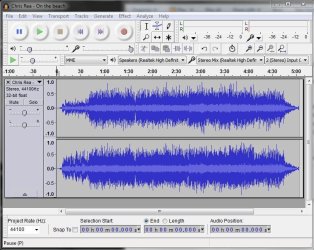
In my first post I simulated a low volume mp3 as an example (volume reduced in Audacity). Correct level should look like this (after any processing) -

audacity_correct_level.JPG

if the level hits the top, it is clipping (distorted).

BTW re YouTube - see forum rule 4

4) No piracy or discussion of piracy allowed at all. Such as software, music, videos and other intellectual property violations (e.g. downloading youtube videos locally etc)
 

My Computer

Computer type
PC/Desktop
Computer Manufacturer/Model Number
self build
OS
Windows 7 pro x64 SP1
CPU
Intel i7-2600k o/c to 4.6GHz
Motherboard
MSI Z68-GD80
Memory
8GB Mushkin 1866MHz
Graphics Card(s)
Nvidia GTX 750 Ti 2GB
Sound Card
integrated
Monitor(s) Displays
Liyama ProLite 27"
Screen Resolution
1920*1080 px
Hard Drives
Seagate 2TB
PSU
Coolermaster GX 750W
Case
Antec 300 case + 5 fans
Cooling
Dark Rock Pro
Internet Speed
62Mbit down 18Mbit up
Antivirus
MSE
Browser
Firefox
Other Info
Blackgold BGT3650 Quad HD TV card. Also have various 3770 + 4770K render boxes.
Oh, sry about that violation, anyway, how would you fix the clipping/distorted problem? My audio reaches the top in many places before any editing, as you can see from my image.
 

My Computer

Computer type
PC/Desktop
Computer Manufacturer/Model Number
custom build
OS
Windows 7 Home Premium 64bit
CPU
AMD Phenom II X4 965 AM3 3.4Ghz 512KB 45NM 125W 4000MHZ
Motherboard
GIGABYTE GA-990FXA-UD3 AM3+ AMD 990FX SATA 6Gb/s USB 3.0 ATX
Memory
Mushkin 997008 DDR3 UDIMM (2x4GB) 8GB PC3-14900 1866MHZ 9-10
Graphics Card(s)
HIS Radeon HD 7870 2 GB (256-Bit) GDDR5 2x Mini-Displayport
Monitor(s) Displays
Dell U2414H, Dell E2014H
Screen Resolution
16:9 1920x1080, 16:9 1600x900
Hard Drives
Kingston HyperX 3K 120 GB SATA III 2.5-Inch 6.0 Gb/s Solid State Drive SH103S3/120G
Keyboard
Some old PS/2 one
Mouse
USB Kensignton
Internet Speed
5Mb/s Download, 1Mb/s Upload
Antivirus
Avast! Free Antivirus
Browser
Mozilla Firefox
Like ignatzatsonic said, you can't undo clipping/distortion. The problem seems to be the source material. I'm not sure what mp3gain does, but it may be making things worse. I suggest getting a clean copy of the music you want, and if necessary tweak the level in Audacity, but keep the max below the ceiling.
 

My Computer

Computer type
PC/Desktop
Computer Manufacturer/Model Number
self build
OS
Windows 7 pro x64 SP1
CPU
Intel i7-2600k o/c to 4.6GHz
Motherboard
MSI Z68-GD80
Memory
8GB Mushkin 1866MHz
Graphics Card(s)
Nvidia GTX 750 Ti 2GB
Sound Card
integrated
Monitor(s) Displays
Liyama ProLite 27"
Screen Resolution
1920*1080 px
Hard Drives
Seagate 2TB
PSU
Coolermaster GX 750W
Case
Antec 300 case + 5 fans
Cooling
Dark Rock Pro
Internet Speed
62Mbit down 18Mbit up
Antivirus
MSE
Browser
Firefox
Other Info
Blackgold BGT3650 Quad HD TV card. Also have various 3770 + 4770K render boxes.
I tried clean copy, from both recording it through Audacity and a method I'm not allowed to speak of here, same problems.
 

My Computer

Computer type
PC/Desktop
Computer Manufacturer/Model Number
custom build
OS
Windows 7 Home Premium 64bit
CPU
AMD Phenom II X4 965 AM3 3.4Ghz 512KB 45NM 125W 4000MHZ
Motherboard
GIGABYTE GA-990FXA-UD3 AM3+ AMD 990FX SATA 6Gb/s USB 3.0 ATX
Memory
Mushkin 997008 DDR3 UDIMM (2x4GB) 8GB PC3-14900 1866MHZ 9-10
Graphics Card(s)
HIS Radeon HD 7870 2 GB (256-Bit) GDDR5 2x Mini-Displayport
Monitor(s) Displays
Dell U2414H, Dell E2014H
Screen Resolution
16:9 1920x1080, 16:9 1600x900
Hard Drives
Kingston HyperX 3K 120 GB SATA III 2.5-Inch 6.0 Gb/s Solid State Drive SH103S3/120G
Keyboard
Some old PS/2 one
Mouse
USB Kensignton
Internet Speed
5Mb/s Download, 1Mb/s Upload
Antivirus
Avast! Free Antivirus
Browser
Mozilla Firefox
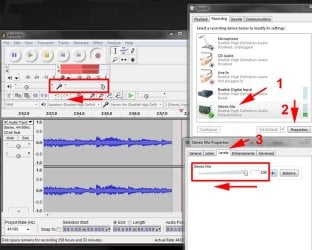
If your Audacity recordings are hitting the ceiling (distorting), try reducing the rec level either in the Windows sound settings (R click speaker icon - recording devices) or Audacity input (or both) so it looks a bit like this pic

rec_level.jpg
 

My Computer

Computer type
PC/Desktop
Computer Manufacturer/Model Number
self build
OS
Windows 7 pro x64 SP1
CPU
Intel i7-2600k o/c to 4.6GHz
Motherboard
MSI Z68-GD80
Memory
8GB Mushkin 1866MHz
Graphics Card(s)
Nvidia GTX 750 Ti 2GB
Sound Card
integrated
Monitor(s) Displays
Liyama ProLite 27"
Screen Resolution
1920*1080 px
Hard Drives
Seagate 2TB
PSU
Coolermaster GX 750W
Case
Antec 300 case + 5 fans
Cooling
Dark Rock Pro
Internet Speed
62Mbit down 18Mbit up
Antivirus
MSE
Browser
Firefox
Other Info
Blackgold BGT3650 Quad HD TV card. Also have various 3770 + 4770K render boxes.
Here's a suggestion: Can you guys give me a sound file that you know works and isn't distorted or whatever, and I'll try amplifying that file.
 

My Computer

Computer type
PC/Desktop
Computer Manufacturer/Model Number
custom build
OS
Windows 7 Home Premium 64bit
CPU
AMD Phenom II X4 965 AM3 3.4Ghz 512KB 45NM 125W 4000MHZ
Motherboard
GIGABYTE GA-990FXA-UD3 AM3+ AMD 990FX SATA 6Gb/s USB 3.0 ATX
Memory
Mushkin 997008 DDR3 UDIMM (2x4GB) 8GB PC3-14900 1866MHZ 9-10
Graphics Card(s)
HIS Radeon HD 7870 2 GB (256-Bit) GDDR5 2x Mini-Displayport
Monitor(s) Displays
Dell U2414H, Dell E2014H
Screen Resolution
16:9 1920x1080, 16:9 1600x900
Hard Drives
Kingston HyperX 3K 120 GB SATA III 2.5-Inch 6.0 Gb/s Solid State Drive SH103S3/120G
Keyboard
Some old PS/2 one
Mouse
USB Kensignton
Internet Speed
5Mb/s Download, 1Mb/s Upload
Antivirus
Avast! Free Antivirus
Browser
Mozilla Firefox
Here's a spoken word file that is not distorted. You'll have to unpack it to hear it.
 

My Computer

Computer type
PC/Desktop
Computer Manufacturer/Model Number
Ignatz Special; 4 speed manual gearbox; factory air conditioning; one of one
OS
Windows 7 Home Premium SP1, 64-bit
CPU
Intel Skylake i5-6600K, not overclocked
Motherboard
AsRock Z170M Extreme 4, micro ATX
Memory
8 GB HyperX DDR4-2666 (2 x 4 GB)
Graphics Card(s)
none; graphics are integrated on CPU
Sound Card
onboard: Realtek ALC1150; external: USB Behringer UF0-202
Monitor(s) Displays
Dell S2340M 23 inch IPS
Screen Resolution
1600 x 900
Hard Drives
System: Crucial MX100 series SSD, 128 GB;
Data: Samsung Spinpoint 103SJ, 1 TB;
Backup: WD Caviar Green WD30EZRX-00D8PB0, 3 TB
PSU
Rosewill SilentNight 500 watt fanless, semi-modular
Case
Antec Solo II
Cooling
Noctua NH-U12S; Noctua F12 intake, Noctua S12A exhaust
Keyboard
Microsoft 200 6JH-00001 USB
Mouse
Dell or Microsoft optical wired; USB
Antivirus
Microsoft Security Essentials and Malwarebytes Premium
Browser
Pale Moon
Other Info
All fans PWM; speeds at idle: CPU circa 500 rpm; intake circa 600 rpm; exhaust circa 600 rpm; CPU temps 27 idle and 47 C load in a warm room (27 C/81 F) when running Intel Extreme Tuning Utility stress test.

My Computer

Computer type
PC/Desktop
Computer Manufacturer/Model Number
self build
OS
Windows 7 pro x64 SP1
CPU
Intel i7-2600k o/c to 4.6GHz
Motherboard
MSI Z68-GD80
Memory
8GB Mushkin 1866MHz
Graphics Card(s)
Nvidia GTX 750 Ti 2GB
Sound Card
integrated
Monitor(s) Displays
Liyama ProLite 27"
Screen Resolution
1920*1080 px
Hard Drives
Seagate 2TB
PSU
Coolermaster GX 750W
Case
Antec 300 case + 5 fans
Cooling
Dark Rock Pro
Internet Speed
62Mbit down 18Mbit up
Antivirus
MSE
Browser
Firefox
Other Info
Blackgold BGT3650 Quad HD TV card. Also have various 3770 + 4770K render boxes.
Also, check the playback device for equalizer or gain settings. My MP3 player has both. The gain setting can reduce the sound level based on other songs or the album. (So you don't blow out your ear drums from song to song.)
 

My Computer

Computer type
PC/Desktop
Computer Manufacturer/Model Number
Built 2/11/2011
OS
Windows 7 Pro-x64
CPU
i7-2600 3.4GHz - 3.8GHz Turbo
Motherboard
Intel DH67BL-B3
Memory
8Gb - 2x4GB, Muskin 991770 PC3-1333
Graphics Card(s)
Integrated Intel HD 2000
Sound Card
Integrated Intel 10.1 HD, RealTek ALC892
Monitor(s) Displays
Asus LCD VH222H, Haier HL24XSL2a
Screen Resolution
1920x1080, 1920x1080
Hard Drives
Crucial SSD C300-128Gb,
Western Digital WD5002AALX - 500Gb,
Western Digital WD7501AALS - 750Gb
PSU
Seasonic 650W 80+ Gold Modular
Case
Rosewill Defender
Cooling
Stock CPU, Four 120mm case fans, PCH fan added
Keyboard
Logitech EX100 Y-RBH94 Wireless
Mouse
Logitech EX100 M-RCE95 Wireless
Internet Speed
3.0/1.5 Mbs
Antivirus
Microsoft Security Essentials
Browser
Microsoft Internet Explorer 11
Other Info
Antec Veris Premier-Multimedia IR Station,
Cyber Accoustics-3602 Speakers,
AFT XM-5U Card Reader,
Hauppauge TV-HVR-2250,
Sony LX300 USB Turntable
Ok, I think I have reached a maximum possible volume because the file you sent me that's supposed to work could not be made any louder than the song, unless I check allow clipping and then I get the terrible sound on both. As for the playback device, "Windows Media Player 10 Mobile for Pocket PC" has very little options, nothing fancy like an equalizer.
 

My Computer

Computer type
PC/Desktop
Computer Manufacturer/Model Number
custom build
OS
Windows 7 Home Premium 64bit
CPU
AMD Phenom II X4 965 AM3 3.4Ghz 512KB 45NM 125W 4000MHZ
Motherboard
GIGABYTE GA-990FXA-UD3 AM3+ AMD 990FX SATA 6Gb/s USB 3.0 ATX
Memory
Mushkin 997008 DDR3 UDIMM (2x4GB) 8GB PC3-14900 1866MHZ 9-10
Graphics Card(s)
HIS Radeon HD 7870 2 GB (256-Bit) GDDR5 2x Mini-Displayport
Monitor(s) Displays
Dell U2414H, Dell E2014H
Screen Resolution
16:9 1920x1080, 16:9 1600x900
Hard Drives
Kingston HyperX 3K 120 GB SATA III 2.5-Inch 6.0 Gb/s Solid State Drive SH103S3/120G
Keyboard
Some old PS/2 one
Mouse
USB Kensignton
Internet Speed
5Mb/s Download, 1Mb/s Upload
Antivirus
Avast! Free Antivirus
Browser
Mozilla Firefox
If you donwload music from Youtube with some app. get it through "any audio converter" to make it into a real mp3.
Then Audicity will work to make it louder.
regards, Lowie
 

My Computer

Computer Manufacturer/Model Number
Dell
OS
windows 7 x 64
As I said, I tried using that audio file they know for a fact isn't distorted, and it didn't work
 

My Computer

Computer type
PC/Desktop
Computer Manufacturer/Model Number
custom build
OS
Windows 7 Home Premium 64bit
CPU
AMD Phenom II X4 965 AM3 3.4Ghz 512KB 45NM 125W 4000MHZ
Motherboard
GIGABYTE GA-990FXA-UD3 AM3+ AMD 990FX SATA 6Gb/s USB 3.0 ATX
Memory
Mushkin 997008 DDR3 UDIMM (2x4GB) 8GB PC3-14900 1866MHZ 9-10
Graphics Card(s)
HIS Radeon HD 7870 2 GB (256-Bit) GDDR5 2x Mini-Displayport
Monitor(s) Displays
Dell U2414H, Dell E2014H
Screen Resolution
16:9 1920x1080, 16:9 1600x900
Hard Drives
Kingston HyperX 3K 120 GB SATA III 2.5-Inch 6.0 Gb/s Solid State Drive SH103S3/120G
Keyboard
Some old PS/2 one
Mouse
USB Kensignton
Internet Speed
5Mb/s Download, 1Mb/s Upload
Antivirus
Avast! Free Antivirus
Browser
Mozilla Firefox
Back
Top