Make Realistic Icons More Realistic?

Darryl Licht

New member
Guru
VIP
Local time
8:49 AM
Messages
1,934
Location
So Cal (I.E.)
I have seen many screenshots where the icons in Devices and Printers very realistically represent the device it represents, but mine dont.

Here is a screenshot:
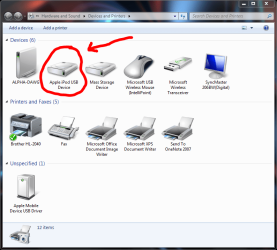
Apple iPod image in Devices and Printers.PNG

I'd like to change the iPod to represent my Nano, make the display look like my Samsung, make the Printer look like my printer...

How can I accomplish this?
 

My Computer My Computer

Computer Manufacturer/Model Number
Homebrew PC - "Alpha_Dawg"
OS
Windows 7 Ultimate 64 bit Steve Ballmer Signature Edition
CPU
Intel Core 2 Quad - Q9550 - 2.83GHz stock - OC'd to 3.6GHz
Motherboard
Gigabyte EP45-UD3P
Memory
4GB DDR2 800MHz (PC6400) OCZ Reaper
Graphics Card(s)
Nvidia GE Force 8800 GTS
Sound Card
Asus Xonar DX
Monitor(s) Displays
Samsung SyncMaster 2333HD
Screen Resolution
1920 x 1080
Hard Drives
WD Caviar Black 750GB - 7200RPM - 32MB cache
WD Caviar Green 1.5TB - 5400RPM - 64MB cache
WD Caviar Green 2.0TB - 5400RPM - 64MB cache
PSU
PC Power & Cooling Silencer 750
Case
Gigabyte 3D Aurora
Cooling
Case is Air - 5ea. 120mm fans (mix of Arctic and Xigmatec)
Keyboard
MS Natural Wireless KB
Mouse
MS Wireless Mouse
Internet Speed
50 mbps down/5 mbps up
Other Info
AVerMedia - AVerTVHD G2 Dual Tuner Card
Right click on Icon>properties>change icon
Some cannot be changed
Others you must look under the last tab

EDIT: Sorry just checked the icons you want to change and it cannot be done the way I said
 

My Computer My Computer

Computer type
PC/Desktop
Computer Manufacturer/Model Number
Dell XPS 420
OS
Windows 10, Home Clean Install
CPU
Intel Core2 processsor Q8200(2.33Ghz 1333FSB) Quad Core Tech
Motherboard
Dell
Memory
6 gb
Graphics Card(s)
ATI Radeon 256MB HD3650
Sound Card
Intergrated 7.1 Channel Audio
Monitor(s) Displays
Dell SP2009W 20"
Hard Drives
640 GB Serial ATA Hard drive
Cooling
Fan
Keyboard
Dell USB Keyboard
Mouse
Dell Premium Optical USB
Internet Speed
DSL 2.85
I know, I tried that early on... even searching with google turns up little info. It appears that this is up to the HW manufacturers, and would come thru an update! If HW manuf. can do it so can we!

Anyone know how this can be done?
 

My Computer My Computer

Computer Manufacturer/Model Number
Homebrew PC - "Alpha_Dawg"
OS
Windows 7 Ultimate 64 bit Steve Ballmer Signature Edition
CPU
Intel Core 2 Quad - Q9550 - 2.83GHz stock - OC'd to 3.6GHz
Motherboard
Gigabyte EP45-UD3P
Memory
4GB DDR2 800MHz (PC6400) OCZ Reaper
Graphics Card(s)
Nvidia GE Force 8800 GTS
Sound Card
Asus Xonar DX
Monitor(s) Displays
Samsung SyncMaster 2333HD
Screen Resolution
1920 x 1080
Hard Drives
WD Caviar Black 750GB - 7200RPM - 32MB cache
WD Caviar Green 1.5TB - 5400RPM - 64MB cache
WD Caviar Green 2.0TB - 5400RPM - 64MB cache
PSU
PC Power & Cooling Silencer 750
Case
Gigabyte 3D Aurora
Cooling
Case is Air - 5ea. 120mm fans (mix of Arctic and Xigmatec)
Keyboard
MS Natural Wireless KB
Mouse
MS Wireless Mouse
Internet Speed
50 mbps down/5 mbps up
Other Info
AVerMedia - AVerTVHD G2 Dual Tuner Card
I know, I tried that early on... even searching with google turns up little info. It appears that this is up to the HW manufacturers, and would come thru an update! If HW manuf. can do it so can we!

Anyone know how this can be done?


There is a built-in option with Win7 that allows windows to automatically detect and download Hi-Res/Realistic icons. Or you can edit the registry key that represents that device. Thats what I did :)
 

My Computer My Computer

Computer Manufacturer/Model Number
Dell
OS
Windows 7 Ultimate 64bit
CPU
i3
Memory
4Gb
Graphics Card(s)
Intel(R) HD Graphics
Hard Drives
350G built-in, 1T Seagate External, 2T Buffalo External
Case
I prefer upper, but I will settle for lower
Internet Speed
Yes, I would like some please...
Other Info
Ham & Eggs - A days work for a chicken, but a lifetime of commitment for a pig.
Alternatively, you can make your own icons from your choicest photos.

Edit , here is a quick example of a downloaded photo of a printer converted to icon (in the zip, and the display is a png)
printer.png
View attachment printer.zip

If you want, you can add shadow, reflections etc, too to the icon .
 

My Computer My Computer

Computer type
PC/Desktop
Computer Manufacturer/Model Number
Self Assembled
OS
Microsoft Windows 10 Pro Insider Preview 64-bit
CPU
Intel(R) Core(TM) i3-4130 CPU @ 3.40GHz
Motherboard
Gigabyte Technology Co., Ltd. B85M-D3H
Memory
Corsair Vengence 4GB x2 (8.00GB Dual-Channel DDR3 @ 798MHz)
Graphics Card(s)
2047MB GeForce GTS 450 (ZOTAC International)
Sound Card
Onboard (Realtek High Definition Audio)
Monitor(s) Displays
LG Flatron E2040T
Screen Resolution
1600x900
Hard Drives
Western Digital 1 TB
Seagate 500 GB
PSU
Corsair VS550
Case
Cooler Master K380
Cooling
Cooler Master Seidon 120V Plus
Keyboard
Logitech MK260r
Mouse
Logitech MK260r
Internet Speed
PMPL Broadband
Antivirus
Windows Defender + MBAM
Browser
Firefox
Other Info
Dell Studio 15" Laptop
f you’re wondering where Windows 7 keeps these high-resolution photorealistic icons it downloads from the device metadata service, then you’d be glad to know you can easily find them as ICOs under the “%LOCALAPPDATA%\Microsoft\Device Metadata\dmrccache\” directory. Inside the folder appropriate to your region (ex. en-US), there should be individual folders with GUIDs for each of the devices with metadata associated with it. The icon resides in the “DeviceInformation” folder of each device.

As it turns out, the GUIDs for each device can also be used to download the metadata package directly from Microsoft’s Metadata servers. For example, the metadata package for the Sandisk Micro flash drive is available here. http://download.dmd.metaservices.mi...774a-4cc6-9c51-89264da4ed5a.devicemetadata-ms Rename the file to a .CAB extension and you can simply extract the resources.
 

My Computer My Computer

Computer Manufacturer/Model Number
packard bell IXTREME M5722
OS
Operating System : Windows 7 Home Premium Edition 6.01.7600 SP1 (x64)
CPU
Processor : Intel Core 2 Quad Q8300 @ 2500 MHz
Motherboard
Mainboard : Packard Bell (Acer EG43M )
Memory
Physical Memory :8GB Corsair4x 2GB 800MHz C5 DDR2
Graphics Card(s)
Video Card : XFX 6700 AMD
Monitor(s) Displays
Maestro 234DL - BenQ V2220 - BenQ VW2420H
Screen Resolution
Current Display :1920x1080p pixels at 60 Hz in HD LED
Hard Drives
Hard Disks : WDC (1000 GB)
Drive C: (Hard Disk) : 428 GB available on 491 GB
Drive D: (Hard Disk) : 426 GB available on 492 GB
SAMSUNG spinpoint HD103SJ 1000.2 GB
(X 2) KINGSTON SSD NOW V 30GB
PSU
XFX ProSeries 550W PSU
Case
PACKARD BELL IXTREME
Cooling
System Blower Current: 150mA Air Flow16CFM ;Akasa 90mm rear
Keyboard
Gigabyte Aivia K8100
Mouse
TRUST-Wireless Laser Mouse - Carbon edition MI-7770C
Internet Speed
TP-LINK > TL-WN951N / AV500 Gigabit Powerline Adapters
Browser
chrome dev
Other Info
EXTRA COOLING>(FAN CONTROLLER) PC Bay Cooler 3 x 40mm fans; Akasa AK-HD-BL Blue hard drive cooler 2 x 40 mm fan 4500 rpm 29.7 dBA
Bios> American Megatrends Inc.
Version : P01-A1
Date : 08/31/2009
Back
Top