
make recovery

naseerkhan

New member
Local time
12:23 AM
Messages
3
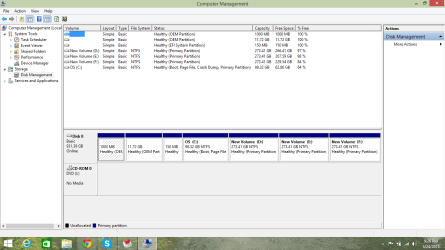
hi every one i am new in this forum i will request to dear admin he must be help me or other people help mee i will instal win 7 or 8 and i want make recovery like i am postingnow a pic and i wantd how i done it any one can guide me plz any one can guide me plz
save.png
 

My Computer

Computer type
Laptop
Computer Manufacturer/Model Number
unkown etc
OS
windows 8.1 x64
CPU
core i-5
Motherboard
intel
Memory
6 gb
Graphics Card(s)
2 gb
Hard Drives
1 tb
Antivirus
eset
Browser
chrome
Why are you re installing ? What`s wrong with your computer ?

You already have a Recovery partition, labeled (OEM Partition)
 

My Computer

Computer type
PC/Desktop
Computer Manufacturer/Model Number
Skylake Special #666
OS
Windows 10 Pro x64
CPU
Intel Core i7 6700K
Motherboard
Asus Sabertooth Z170 Mark 1
Memory
GSkill TridentZ RGB 16GB 3600 16-16-16-36
Graphics Card(s)
EVGA GTX 980 Ti SC x2
Sound Card
Realtek High Definition
Monitor(s) Displays
AOC G2460PG
Screen Resolution
1920 x 1080 144Hz
Hard Drives
Samsung 860 Pro 256GB, Seagate Barracuda 4TB x2
PSU
EVGA 1000 P2, EVGA White Custom Braided Cables
Case
Corsair Vengeance C70 Gunmetal Black
Cooling
Corsair H100i v2, Corsair ML120 x2, Thermal Grizzly Kryonaut
Keyboard
Logitech G910 Orion Spectrum
Mouse
Logitech G700s
Internet Speed
Verizon Fios Quantum Gateway 75/75
Antivirus
Windows Defender, Malwarebytes Free 3.8.3
Browser
Chrome
Other Info
Corsair SP120 x4, LG Blu-ray Drive, Durabrand HT-395 100 Watt Dolby Digital Amp, Corsair H2100 Wireless 7.1 Headset
Dear Sir my windows are curopted and also deleted the partiton of recover its old pic and i want to reinstall a windows like this pic and make recovery partiton how i create u will guide me plzzzzz
 

My Computer

Computer type
Laptop
Computer Manufacturer/Model Number
unkown etc
OS
windows 8.1 x64
CPU
core i-5
Motherboard
intel
Memory
6 gb
Graphics Card(s)
2 gb
Hard Drives
1 tb
Antivirus
eset
Browser
chrome
hi every one i am new in this forum i will request to dear admin he must be help me or other people help mee i will instal win 7 or 8 and i want make recovery like i am postingnow a pic and i wantd how i done it any one can guide me plz any one can guide me plz
 

My Computer

Computer type
Laptop
Computer Manufacturer/Model Number
unkown etc
OS
windows 8.1 x64
CPU
core i-5
Motherboard
intel
Memory
6 gb
Graphics Card(s)
2 gb
Hard Drives
1 tb
Antivirus
eset
Browser
chrome
I am not sure if you can create a system recovery partition without some serious knowledge.

What you can do with great ease is:
- Install whichever OS you like (given they are genuine) - http://www.sevenforums.com/tutorials/219487-clean-reinstall-factory-oem-windows-7-a.html
- Install chipset drivers for motherboard, and networking drivers
- Update Windows
- Create a backup image with Macrium free http://www.sevenforums.com/tutorials/73828-imaging-free-macrium.html
- Install the rest of the drivers
- Install your applications
- Fine tune/optimize/customize your OS installation
- Create another image with Macrium free

Hope this helps.
 

My Computer

Computer type
PC/Desktop
Computer Manufacturer/Model Number
Custom Build
OS
Windows 7 Ultimate x64 SP1
CPU
AMD Phenom 2 1090T
Motherboard
Gigabyte GA-890FXA-UD5
Memory
2x8GB Kingston HyperX Fury Black 1600Mhz Unganged
Graphics Card(s)
MSI GTX 970 Gaming 4G
Sound Card
Realtek On-Board HD 7.1 Audio / Logitech G35
Monitor(s) Displays
3xAcer GD245HQ
Screen Resolution
1920x1080
Hard Drives
Samsung 850 Pro 512GB SSD - OS /
WD Caviar Black SATA 3 - 1 TBx2 - Dynamic RAID 0 /
WD Caviar Green SATA 2 - 640GBx2 - Dynamic RAID 0 /
WD Caviar Green SATA 2 - 640GB - Internal Backup /
Seagate Barracude SATA 3 - 3TB - External Backup/ Sync
PSU
HighPower 1000W
Case
Cooler Master HAF 932
Cooling
Noctua NH-D14
Keyboard
Logitech G19
Mouse
Logitech G500
Internet Speed
100/4 Mbit Cable (100GB quota)
Antivirus
ZoneAlarm Extreme Security / MBAM Pro / MBAE Free / SAS Free
Browser
IE 11 - Firefox - Chrome
Other Info
Logitech F710/ G27/ G940/ Z5500 // TrackIR 5 // Nvidia 3D Surround Vision
Just follow these steps to Clean Reinstall Windows 7 which explain the best way to create a backup after it's all set up and running perfectly. As you have an EFI System partition you have a EFI BIOS which requires booting the installation disk as a EFI Device, deleting all partitions during the booted install.

You really don't want a Recovery partition on the same drive if you can help it because it would be lost along with the OS if the hard drive dies. Better to save a backup image of the finished install(s) externally or to another hard drive. But if you don't have one then you can shrink the OS partition by the size of the install and save the backup image there.

All of this and much more is explained in the blue link tutorial and will result in a perfect install if you stick with those steps. Feel free to ask back any questions you have as you go.

If you also want Windows 8 in a Dual Boot then after install of Win7 shrink C to Dual Boot Installation - Windows 8 and Windows 7. In that case I would use Macrium to back up both installs externally or to another hard drive so that you have more flexibility in what you want to restore and to where. Macrium Imaging - Windows 7 Help Forums
For example you can choose only the Win7 or the Win8 to restore along with the EFI System partition.
 
Back
Top