Make secure USB stick for malware offline repair

UberGoober

New member
Local time
5:57 AM
Messages
44
I have one of those baddies that takes over remotely by making your PC part of a domain and taking over SYSTEM and Trusted Installer. It also installs a hidden OS on the HDD, which DBAN didn't erase. I actually booted to it after the wipe, but couldn't get any credentials/user account to allow me to use/change anything.

A clean W7 install isn't a real install - it's a "spoof" version laid over their OS. If you try too many security/hardening settings changes, it locks you out of more and more access by graying out options. It loads its own versions of drivers, and I can't update even with offline mfgr. versions.

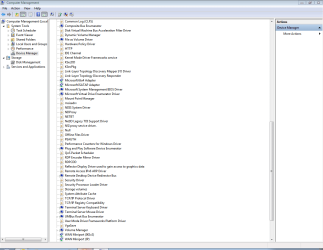
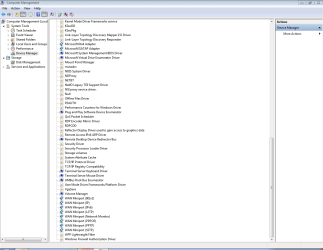
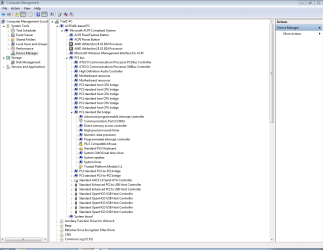
Here's Device Manager view By Connection:
DevMgr.1.PNG
DevMgr2.PNG
DevMgr3.PNG

Downloading various scan/fix tools to the desktop as recommended really doesn't work, because SYSTEM already has a spoof version it loads instead of the new file - all scans take about 6-30 seconds for a 250GB HDD. So...

Is there a way to make an absolutely secure USB stick on a clean PC with versions of these programs that run offline? A way that guarantees this malware can't hide on the USB stick?

Thanks, UberGoober
 

Attachments
  • DevMgr.1.PNG
    DevMgr.1.PNG
    32.9 KB · Views: 9
  • DevMgr2.PNG
    DevMgr2.PNG
    36.3 KB · Views: 3
  • DevMgr3.PNG
    DevMgr3.PNG
    35.5 KB · Views: 4

My Computer My Computer

Computer type
PC/Desktop
Computer Manufacturer/Model Number
HP Pro 6005 SFF refurbished by Joy
OS
Windows 7 Pro 64 bit
CPU
Athlon II X2 B24
Motherboard
HP 3047-h
Memory
8 GB
Graphics Card(s)
Integrated Radeon HD4200
Hard Drives
GB0750C8047
Seagate Barracuda 7200.9 250GB
Browser
IE 11

My Computer My Computer

Computer type
PC/Desktop
Computer Manufacturer/Model Number
Home made Desktop
OS
Windows 10 Pro. 64/ version 1709 Windows 7 Pro/64
CPU
Intel i7-6800K @ 4.3
Motherboard
ASUS X-99 Deluxe II
Memory
Corsair Platinum 16 gig @2400
Graphics Card(s)
EVGA GTX 1070 OC
Monitor(s) Displays
Asus 27" LED LCD/VE278Q
Screen Resolution
1920-1080 or 1280-720 HDMI
Hard Drives
INTEL SSD 730-240 Gb Sata 3.0/
PSU
EVGA Platium 1200W
Case
Phanteks Luxe Tempered Glass 8 fans/ one radiator
Cooling
XSPC/ Water Cooled CPU
Keyboard
Das 4 Professional
Mouse
Logitech M705/MX Anywhere 2-S
Internet Speed
100 mbits
Antivirus
Microsoft Security Essentials/ Malwarebytes Premium 3.0/ SAS
Browser
I.E. 11 default/Firefox/ ISP Time Warner Cable/Spectrum
Other Info
LG BluRay Burner/
Sound system-KLipsch-THX/
Icy Dock ssd Hot Swap bays.
1) It also installs a hidden OS on the HDD, which DBAN didn't erase.
2) I actually booted to it after the wipe
3) A clean W7 install isn't a real install - it's a "spoof" version laid over their OS

1) i find that very hard to believe.
2) this implies you didn't actually wipe the drive.
3) i am confused on this one, you seem to be saying there is no way to do a clean install?

are you using a legal working copy of windows to do your reinstall?
Other than the retail/oem windows XP and windows 7 discs i have bought from newegg over the years, I use the Dell restore disk for Dell computers and have never had a problem.
I don't even bother to wipe or dban a drive, after booting to the windows dvd for reinstall just delete all partitions on the drive then let windows install on what it then sees as an unpartitioned drive.

once windows is installed and you log in, then you may have drivers missing under device manager. that is completely normal, and you need to get those drivers from a safe and credible source...
like for dell computers i go to support.dell.com or if i need motherboard drivers for an asrock board then i get those from asrock.com. I suspect you might be reinstalling software/drivers you think is legit but is infected and you yourself are unknowingly reinstalling your problem.
 

My Computer My Computer

Computer type
PC/Desktop
Computer Manufacturer/Model Number
homebuilt & dell & sgi
OS
Windows 7 x64, ultimate/pro/home, SLES x86 & ia64
CPU
intel & amd
Motherboard
yes
Memory
yes
Graphics Card(s)
gtx970
Sound Card
same as memory
Monitor(s) Displays
benq 27"
Screen Resolution
2560*1440
Hard Drives
many
Thanks for replying to my post, ya'll! It's kind of you to volunteer to help us with our 'puter problems.

Respectfully, I really don't want to argue about whether I'm infected with a RAT (https://technet.microsoft.com/en-us/library/dd632947.aspx). Been there, done that (http://www.sevenforums.com/system-s...stalled-hidden-virtual-hd-os-c-partition.html). Let's just assume I'm correct that I'm infected, OK?

BTW, I already wrote and tried to post this reply, forgetting about the glitch where the "Post" button always redirects me to the sign-in page when I'm already signed in. So I lost my work. This time I'll copy it to note pad, sign in and try posting again.

I got A+ certification in 2011 just for my own edification, so I do understand all the doubts you've presented me with. I'll address the ones in your posts. Then we drop it and concentrate on a wipe solution and guaranteed secure USB stick, OK?

Got this PC from Newegg. It's a Joy Systems officially-refurbed HP 6005 Pro SFF with W7 Pro SP1. The disk sent with it is Microsoft-branded and labelled "Intended for distribution with a refurbished PC". HP, AMD, Broadcom, Realtek, etc. drivers used to load when installing from the disk, not all that garbage shown above, which cannot be changed, period. Any attempt to use a driver installer pkg. results in a huge, blinking "ERROR!" message, and a reboot is forced. That's why I'd like to try a secure USB offline install.

The mouse and keyboard driver alerts are one clue analysts use to detect a RAT - you can't update, roll back or install new ones. They are needed by some of the hundreds of Authorized Users allowed to log onto my PC remotely.

The boot menu screen always shows a PXE Boot Agent. I have to "Ctrl+S", save settings, then designate the boot device. The DVD drive spins, but what is actually installed is a restore of the Remote Admin's original setup, just like in your company domain.

Even with complete disconnection from the network and internet (I use Ethernet cables only), the original setup is restored. It has to come from somewhere on the HDD.

I've used DBAN since it only came on floppies. It's now on a CD I've used successfully on numerous HDDs people asked me to dispose of for them. After these wipes to my HDD, I still couldn't make a whole-HDD partition with DISKPART or any of my 3rd-party programs. Between 8 and 12 GB are missing when you do the math with 1,024 bits after each wipe.

Neither do the "clean" or "clean all" commands work, even using the hidden elevated admin account. And I reviewed everything very carefully all 3 times I tried - no syntax or spelling errors in my commands - yet the only response to "Enter" execution are error messages that there's no such command or syntax is wrong.

So, any ideas to get the drive fully wiped and/or create a truly secure USB stick?

Thanks for any efforts you invest for trying to help me - I tried to write in an upbeat, friendly tone, but don't know how it'll come across to ya'll on reading it. I honestly do appreciate it.

UberGoober
 

My Computer My Computer

Computer type
PC/Desktop
Computer Manufacturer/Model Number
HP Pro 6005 SFF refurbished by Joy
OS
Windows 7 Pro 64 bit
CPU
Athlon II X2 B24
Motherboard
HP 3047-h
Memory
8 GB
Graphics Card(s)
Integrated Radeon HD4200
Hard Drives
GB0750C8047
Seagate Barracuda 7200.9 250GB
Browser
IE 11
Downloading various scan/fix tools to the desktop as recommended really doesn't work, because SYSTEM already has a spoof version it loads instead of the new file - all scans take about 6-30 seconds for a 250GB HDD. So...

Is there a way to make an absolutely secure USB stick on a clean PC with versions of these programs that run offline? A way that guarantees this malware can't hide on the USB stick?
Yes, you make your repair tool on another PC.
 

My Computer My Computer

Computer type
Laptop
Computer Manufacturer/Model Number
Dell Latitude E6540 Laptop
OS
Windows 7 Professional 64bit
CPU
Intel Core i7 4600M @ 2.90GHz
Motherboard
Dell Inc. 0CYT5F (SOCKET 0)
Memory
16.0GB Dual-Channel DDR3 @ 797MHz (11-11-11-28)
Graphics Card(s)
Intel HD Graphics 4600 (Dell) 2048MB ATI AMD Radeon HD 8790M
Sound Card
Realtek High Definition Audio
Monitor(s) Displays
HP ZR30w (2560x1600@60Hz)
Hard Drives
256GB LITEONIT LMT-256M6M-41 mm SATA (SSD)
1TB Samsung SSD 860 EVO mSATA SATA (SSD)
2TB USB 3.0 USB Device
115GB SanDisk Ultra Fit USB
Other Info
Multiple Dell E-Port Plus II Port Replicator/Docking Stations 0Y72NH USB 3.0 + 130W AC Adapters
Got this PC from Newegg. It's a Joy Systems officially-refurbed HP 6005 Pro SFF with W7 Pro SP1. The disk sent with it is Microsoft-branded and labelled "Intended for distribution with a refurbished PC". HP, AMD, Broadcom, Realtek, etc. drivers used to load when installing from the disk, not all that garbage shown above, which cannot be changed, period. Any attempt to use a driver installer pkg. results in a huge, blinking "ERROR!" message, and a reboot is forced. That's why I'd like to try a secure USB offline install.

Even with complete disconnection from the network and internet (I use Ethernet cables only), the original setup is restored. It has to come from somewhere on the HDD.
this makes me think of what i typed above after #3.
I'm thinking of 2 things-

1) the media you are using to reinstall is already corrupted; basically no different than buying a department store pc with malware already on it which we all know about and hate. And is why we build our own computers, with buying a legit oem copy of win7 from someplace reliable. I tried years ago a purchased copy of win7 ultimate from ebay, was less than $50. it was counterfeit, but everything about it looked legit with the one thing being the seal on plastic dvd case had been razorbladed so it had been carefully opened. I was in denial thinking it couldn't be that rampant, but it is.
So i suspect your "disk sent with it is Microsoft-branded and labelled Intended for distribution with a refurbished PC" might be bad, and every time you use it to reinstall you are just reinstalling your malware.

2) hardware in that joy systems has malware in the firmware, and is reinstalling itself within windows. not common but not unheard of. Reminds me of the sony copy protection firmware rootkit scandal years ago. would not surprise me that malware is present at the hardware level. I said above that i have purchased oem windows 7 discs from newegg, i trust them for that. but it would not surprise me if they are selling refurb'd pc's that are malware infected at various levels.

for #1 the way to validate would be to install (if possible) that copy of windows on different hardware, different hard drive, off network, to see if the problem persists. if so it's coming from that dvd.
for #2 to somewhat validate would be to get a new legit copy of windows for $100 and install on new hard drive in that joy systems box, off network, and see if problem persists. if so then i would suspect something on motherboard has malware in the firmware, that exposes you once you have an internet connection.

And you should be able to modify bios settings and disable PXE boot. if not then that further points to the refurb pc, which it's possible the installed bios has malware. see if you can identify the motherboard and get a new bios version direct from the manufacturer.


the first sentence in the link: Malware installed a hidden virtual HD/OS on C: partition
they left 12GB of hard drive unaccounted for when wiping
that was the problem.
I disagree with the notion "it has to come from somewhere on the hard drive" with one exception,
and that is the firmware on the hard drive can also be malware. The simple solution here is to scrounge a new hard drive you are sure is ok.
 

My Computer My Computer

Computer type
PC/Desktop
Computer Manufacturer/Model Number
homebuilt & dell & sgi
OS
Windows 7 x64, ultimate/pro/home, SLES x86 & ia64
CPU
intel & amd
Motherboard
yes
Memory
yes
Graphics Card(s)
gtx970
Sound Card
same as memory
Monitor(s) Displays
benq 27"
Screen Resolution
2560*1440
Hard Drives
many
Hi, maxseven

My last sentence wasn't clear. I meant in order to prevent the malware from loading itself onto the USB stick while I'm trying to run the applications. I've already made a stick on a clean PC - the malware on my PC corrupted it so none of the scanners work any more.

For instance, has anyone used Panda Vaccine? Did it work for you?
What about the sticks with "read only" switches?

Any suggestions or info gratefully accepted! UberGoober
 

My Computer My Computer

Computer type
PC/Desktop
Computer Manufacturer/Model Number
HP Pro 6005 SFF refurbished by Joy
OS
Windows 7 Pro 64 bit
CPU
Athlon II X2 B24
Motherboard
HP 3047-h
Memory
8 GB
Graphics Card(s)
Integrated Radeon HD4200
Hard Drives
GB0750C8047
Seagate Barracuda 7200.9 250GB
Browser
IE 11
Thanks for replying again, Ron. My thoughts in purple...

1) the media you are using to reinstall is already corrupted; basically no different than buying a department store pc with malware already on it which we all know about and hate. And is why we build our own computers, with buying a legit oem copy of win7 from someplace reliable. I tried years ago a purchased copy of win7 ultimate from ebay, was less than $50. it was counterfeit, but everything about it looked legit with the one thing being the seal on plastic dvd case had been razorbladed so it had been carefully opened. I was in denial thinking it couldn't be that rampant, but it is.
So i suspect your "disk sent with it is Microsoft-branded and labelled Intended for distribution with a refurbished PC" might be bad, and every time you use it to reinstall you are just reinstalling your malware.

That's certainly a real-world scenario, but I don't think it's the case here. I clean-installed on a better HDD I already had soon after getting the Joy PC, and Win7 did none of the odd things that happen now when I try to clean install. I used that install for over a year with no problems.

2) hardware in that joy systems has malware in the firmware, and is reinstalling itself within windows. not common but not unheard of. Reminds me of the sony copy protection firmware rootkit scandal years ago. would not surprise me that malware is present at the hardware level. I said above that i have purchased oem windows 7 discs from newegg, i trust them for that. but it would not surprise me if they are selling refurb'd pc's that are malware infected at various levels.

You're right - all the firmware is corrupted. The Win7 disk originally installed HP-branded firmware, device drivers, etc., and DevMgr used to show the HP proprietary device model names and numbers. Now it's all generic, non-mfgr.-specific. None of these problems were present before I noticed that Remote Desktop, which I'd turned off, was suddenly in the Start menu.

for #1 the way to validate would be to install (if possible) that copy of windows on different hardware, different hard drive, off network, to see if the problem persists. if so it's coming from that dvd.
for #2 to somewhat validate would be to get a new legit copy of windows for $100 and install on new hard drive in that joy systems box, off network, and see if problem persists. if so then i would suspect something on motherboard has malware in the firmware, that exposes you once you have an internet connection.

I performed your #1 on a Dell with Vista with about the same specs as this PC, doing a custom clean install on a DBAN'd HDD with my Win7 disk. Worked perfectly until I went to Windows update. I'm just convinced I've got a Remote Access Trojan from what I've read about their behavior and how my PC is acting. It then allows installation of the kinds of malware you're referring to.

And you should be able to modify bios settings and disable PXE boot. if not then that further points to the refurb pc, which it's possible the installed bios has malware. see if you can identify the motherboard and get a new bios version direct from the manufacturer.

Oh, no, the purveyors of this poop are much smarter than that! They simply set up a Setup Password for themselves. I used to look at BIOS settings all the time to learn the terminology I didn't understand. One day I was locked out.

I tried installing the firmware & drivers I had put on a USB stick using a clean PC. Trusted Installer denies all access.


the first sentence in the link: Malware installed a hidden virtual HD/OS on C: partition
they left 12GB of hard drive unaccounted for when wiping "They" means DBAN and the various other programs I tried to wipe the disk with, not the way it came from JOY, where I could account for all kB on the drive.
that was the problem.
I disagree with the notion "it has to come from somewhere on the hard drive" with one exception,
and that is the firmware on the hard drive can also be malware. The simple solution here is to scrounge a new hard drive you are sure is ok. I've already infected 5 HDDs from PCs people wanted to get rid of if I'd wipe their data. Had DBAN'd all of them on the old XP box I recycled, which was running fine, but it was a security concern to me (How ironic!).

I'd really like to try wiping an infected disk successfully if you know of any new programs to try.

Thanks again. UberGoober
 

My Computer My Computer

Computer type
PC/Desktop
Computer Manufacturer/Model Number
HP Pro 6005 SFF refurbished by Joy
OS
Windows 7 Pro 64 bit
CPU
Athlon II X2 B24
Motherboard
HP 3047-h
Memory
8 GB
Graphics Card(s)
Integrated Radeon HD4200
Hard Drives
GB0750C8047
Seagate Barracuda 7200.9 250GB
Browser
IE 11
Panda Vaccine is not going to help you.

A USB flash drive with a write-protect switch will prevent the flash drive from getting infected.

There is a possibility that the computer's BIOS is infected and the computer is toast.
 

My Computer My Computer

Computer type
Laptop
Computer Manufacturer/Model Number
Employer provided Dell Latitude
OS
W7 Pro SP1 64bit
CPU
i7
Memory
8GB
Graphics Card(s)
Intel HD Graphics
Hard Drives
crappy SSD
Antivirus
Employer mandated Symantec Endpoint Protection
Browser
Pale Moon 64bit, IE11 64bit & Chrome 64bit
Try booting any live Linux distribution from USB/DVD, and from the terminal run the dd command:

Code:
dd if=/dev/urandom of=/dev/<target device>

This will write a random mix of 0 and 1 across the entire disk. Nothing will survive this wipe. For 500GB this will take about 6hrs.

If you are paranoid, run dd a second time immediately after the first, using the same command.
 
Last edited:

My Computer My Computer

Computer type
PC/Desktop
Computer Manufacturer/Model Number
Golden Mk. I.4
OS
Windows 10 Pro x64 ; Xubuntu x64
CPU
Intel i7 860 @ 2.80 GHz O/C'ed to 4.0GHz
Motherboard
Gigabyte P55A-UD3R Rev.1. Award BIOS F13
Memory
16GB Corsair Vengance DDR3 @ 661 MHz Dual Channel (9-9-9-24)
Graphics Card(s)
EVGA NVidia GTX 560 1024MB
Sound Card
Realtek Integrated
Monitor(s) Displays
Dual Samsung SyncMaster 2494HS
Screen Resolution
1920*1080 and 1920*1080
Hard Drives
1*Samsung 840 EVO 120GB SSD;
1*OCZ Vertex 2 60GB SSD;
2*Samsung F3 SpinPoint 1TB in RAID0;
1*Samsung F1 SpinPoint 1TB;
2*Western Digital 1TB External USB 3.0
1*Western Digital 500GB External USB 3.0
1*Seagate 500GB External USB 2.0
PSU
Thermaltake ToughPower QFan 750W
Case
Thermaltake Element S VK60001W2Z
Cooling
Corsair H60 Water Cooling, 2*230mm and 2*80mm case fans
Keyboard
Logitech G110
Mouse
Logitech MX518
for wiping the hard drive, do a search on low level format. unless i am mistaken, you didn't mention what make/model hard drive... search at the hard drive maker's website and try putting in a help ticket with them asking if they have any drive wiping tools.

i can't say don't try a linux distro using dd, but i'm skeptical on that because dban is essentially that plus the algorithms for writing to the drive. if your not having any success with dban on the hard drive then i don't understand how using dd in linux can do any better, since dban is a booting linux distro that just runs writing algorithms with the basic 1-pass writing zeros being dd if=/dev/zero or /dev/null.

what i would be interested in is seeing a network capture from wireshark and from a router/firewall when this problem pc is running.

are you sure your router is not compromised and hacked?
https://threatpost.com/lizard-squads-ddos-for-hire-service-built-on-hacked-home-routers/110341/

and what do you have for an internet connection, is it a static ip that is always the same to the world?
if so that could be your problem. normally your isp will change it every so often. you can visit the grc shieldsup website from any pc within your network, or use one of the utilities over at dslreports.com. power cycle your router or house gateway and see if what they say your ip address is changes.

you could also try installing a free linux distro like opensuse on the problem pc / hard disk and see what then happens.

to be honest, at this point if it were me it would be for curiosity's sake if nothing good was on tv. If i needed a working computer i'd just newegg a new mobo that i could swap the cpu and ram over to.
I'm still a little confused as to what has been narrowed down and where you think the problem lies... still all on the hard drive? or mobo firmware and bios? or the windows dvd media?
 

My Computer My Computer

Computer type
PC/Desktop
Computer Manufacturer/Model Number
homebuilt & dell & sgi
OS
Windows 7 x64, ultimate/pro/home, SLES x86 & ia64
CPU
intel & amd
Motherboard
yes
Memory
yes
Graphics Card(s)
gtx970
Sound Card
same as memory
Monitor(s) Displays
benq 27"
Screen Resolution
2560*1440
Hard Drives
many
Back
Top