Solved Make sleep button shut down windows 7

Henrikmon

New member
Local time
5:24 AM
Messages
4
Location
Copenhagen, Denmark
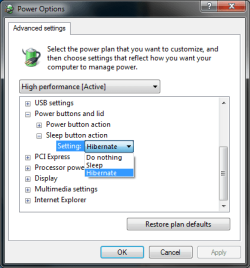
Why can't I make my sleep button power down my computer. The option in power mangement missing. Is there a way to change this eg. through regedit?
 

Attachments

  • SleepButton.png
    SleepButton.png
    13.4 KB · Views: 88

My Computer

OS
Windows 7 Ultimate x64
I think that this is because the sleep button is only intended for that, sleep, as the options your screen grab show are the same as on my computer. However the power button can have many different functionalities.

macca21
 

My Computer

OS
Windows 7 Professional 32-bit, Windows 8 Pro (sometimes)
The reason that I want to change it to shut down, is that my MCE remote sends a sleep command when pressing the power button. I want my computer to shut down instead of go sleeping. I was hoping that i could trick windows into doing so.
 

My Computer

OS
Windows 7 Ultimate x64
Henrikmon,
Maccaquacker is correct. The sleep button will not shutdown your computer.

Although the procedure is not a one step thing, probably you will find that when you push that remote that an event is entered in the event log.

You can then schedule a shutdown to occur when that event occurs.

I leave the reading up on the Event Viewer (eventvwr.msc) and on the task scheduler (taskschd.msc) to you.
 

My Computer

Computer Manufacturer/Model Number
Toshiba Satellite S875D-S7239 laptop
OS
MS Windows 7 Ultimate SP1 64-bit
CPU
AMD A10-4600M
Motherboard
AMD Pumori (Socket FT1)
Memory
6.00 GB Dual-Channel DDR3 @ 798MHz (11-11-12-28)
Graphics Card(s)
AMD Radeon HD 7660G
Sound Card
High Definition Audio Device
Monitor(s) Displays
Generic PnP Monitor (1600x900@60Hz)
Screen Resolution
1600x900@60Hz
Hard Drives
SSD 119GB Corsair CSSD-V128GB2 ATA Device
Keyboard
Standard PS/2 Keyboard
Mouse
HP Wireless Optical Mobile Mouse Model FHA-3410
Internet Speed
What the local pub, local coffee shop offers.
Other Info
Optical Drive:MATSHITA BD-CMB UJ160B ATA Device


Also have an Asus ha1002xp netbook with Win 7 Ultimate installed.
Ahh I see, but I doubt that changing this setting would make a difference to what the remote does.
I have had a look around and found this program:
LM Keymap

Have never used this myself but it may help solve your problem

(click the download link then scroll to the bottom and click download standard)
 

My Computer

OS
Windows 7 Professional 32-bit, Windows 8 Pro (sometimes)
I'll give LM Keymap a try sometime tonight, if I can find the time for it. Thank you for now. I let you know if it works for me.
 

My Computer

OS
Windows 7 Ultimate x64

My Computer

Computer Manufacturer/Model Number
Toshiba Satellite S875D-S7239 laptop
OS
MS Windows 7 Ultimate SP1 64-bit
CPU
AMD A10-4600M
Motherboard
AMD Pumori (Socket FT1)
Memory
6.00 GB Dual-Channel DDR3 @ 798MHz (11-11-12-28)
Graphics Card(s)
AMD Radeon HD 7660G
Sound Card
High Definition Audio Device
Monitor(s) Displays
Generic PnP Monitor (1600x900@60Hz)
Screen Resolution
1600x900@60Hz
Hard Drives
SSD 119GB Corsair CSSD-V128GB2 ATA Device
Keyboard
Standard PS/2 Keyboard
Mouse
HP Wireless Optical Mobile Mouse Model FHA-3410
Internet Speed
What the local pub, local coffee shop offers.
Other Info
Optical Drive:MATSHITA BD-CMB UJ160B ATA Device


Also have an Asus ha1002xp netbook with Win 7 Ultimate installed.
I finally got time to try out LM Keymap and it works beautifully.
I change my sleep button function to "do nothing" and let LM Keymap close my computer when I press my power button on my remote.

Thank you for your help.
 

My Computer

OS
Windows 7 Ultimate x64
I had that problem i went and type Power options in the search section of my personalization and it came up with how to change my power and sleep button
I am new at this and hope it helps
 

My Computer

Computer Manufacturer/Model Number
Lenovo
OS
Windows 7 x64 and x32 Sp 1
CPU
2.4
Motherboard
Unknown
Memory
3 gig
Graphics Card(s)
Unknown
Sound Card
unknnown
Monitor(s) Displays
unknnown
Hard Drives
320 gb
Why can't I make my sleep button power down my computer. The option in power mangement missing. Is there a way to change this eg. through regedit?

Hello, to make the Sleep button shutdown the computer without using keybinding software:

Download the .reg file attached to this post (or here's a link: https://www.dropbox.com/s/43ysiqbg15658vd/EnableSleepShutdown.reg?dl=0 )

Merge it with the registry

Then go into power options and restore the default settings for your power plan. The sleep button will now shutdown Windows. Tested to be working on Windows 7 and Windows 10
 

Attachments

My Computer

Computer type
PC/Desktop
Computer Manufacturer/Model Number
HP-h8-1237c
OS
Windows 7 Home Premium x64
CPU
Intel Quad-core i5-2320 CPU 3.00 GHz
Motherboard
h8-1237c
Memory
10.0 GB
Graphics Card(s)
Nvida GeForce GT 520 Intergraded RAMDAC - 4065 MB
Sound Card
Integrated IDT 92HD89E Audio
Monitor(s) Displays
One BlueH WSXGA+ 1680x1050 (16:10 ratio)
Screen Resolution
1680 x 1050 (1050p 16/10 ratio, res model WSXGA+)
Hard Drives
SATA III 1.80 TB NTFS
PSU
Internal ATX 300W (100V-240V)
Case
13.33 cm (5.25 inch) ODD (2) - 2 8.89 cm (3.5 inch) HDD (2)
Internet Speed
Speedtest.net shows 18.60 Mbps dl and 4.33 Mbps upload. LIES
Antivirus
None
Browser
Firefox 19.0
Other Info
Uninstalled default software and configured computer for speed using msconfig and registry repair & optimization tools.
Back
Top
