

I recently installed Adobe Premiere Elements and there was a conflict with the biometrics device on my HP laptop. Anyhow, I decided to just do away with the thing all together. I never use it anyhow. The company that makes the drivers quit supporting the device a long time ago so, there aren't any updates. I'd rather type in passwords anyhow.
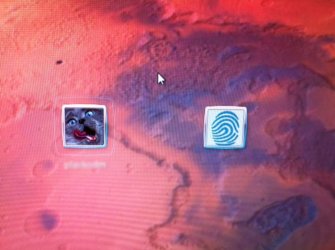
So, I disabled the driver and all related software I could find. Problem is, I am still left with the fingerprint log on icon when I boot the machine. Anybody know how to get rid of it?
Fingerprint reader is by Validity Sensors Inc.
Software was VeriSoft or Digital Persona
All on my HP Pavilion dv8
As well as disabling the driver and un-installing any reference to VeriSoft and Digital Persona, I tried editing Local Group Policy to not allow the use of biometrics. Nothing I have tried so far has worked.
Maybe edit/remove a registry key or some other such thing?
Attaches are shots of how it is and how it should be:
So, I disabled the driver and all related software I could find. Problem is, I am still left with the fingerprint log on icon when I boot the machine. Anybody know how to get rid of it?
Fingerprint reader is by Validity Sensors Inc.
Software was VeriSoft or Digital Persona
All on my HP Pavilion dv8
As well as disabling the driver and un-installing any reference to VeriSoft and Digital Persona, I tried editing Local Group Policy to not allow the use of biometrics. Nothing I have tried so far has worked.
Maybe edit/remove a registry key or some other such thing?
Attaches are shots of how it is and how it should be:
Attachments

Last edited:
My Computer
At a glance
Windows 7 X64 ProfessionalIntel® Pentium D Dual Core 3.6GHZ4GB DDR2 PC2-5300GeForce GT 440 (Fermi) 2GB 128-bit DDR3 PCI E...
- Computer Manufacturer/Model Number
- Dell XPS 400
- OS
- Windows 7 X64 Professional
- CPU
- Intel® Pentium D Dual Core 3.6GHZ
- Motherboard
- DELL Dimension 9150 MotherBoard DXP051 XPS400 FJ030
- Memory
- 4GB DDR2 PC2-5300
- Graphics Card(s)
- GeForce GT 440 (Fermi) 2GB 128-bit DDR3 PCI Express 2.0 x16
- Sound Card
- ASUS XONAR DG 5.1 Channels PCI Interface Xonar DG
- Monitor(s) Displays
- 2 X 23" Apple Cinema Display
- Screen Resolution
- 1920 X 1200p
- Hard Drives
- 250GB Intel® 510 Series SSD SATA 6G (w/TRIM) [500MB/s Reads]
1.0TB Western Digital Caviar Black SATA 6G 7200rpm 64MB Cache
- PSU
- 375 Watt Dell
- Case
- Dell XPS 400 BTX Case
- Cooling
- Dell XPS 400 Air Cooling
- Keyboard
- Logitech Illuminated Keyboard
- Mouse
- Logitech M705 Marathon
- Internet Speed
- +/- 9929 Kbps
- Other Info
- This machine was given to me when my dad bought a new computer. I keep throwing upgrades at it and it keeps on ticking. Think I've done everything to it that can be done outside a PSU upgrade so I can run an even BETTER GPU.