Make Top Folder's Date Modified Attribute Reflect Its Contents

CoachHoach

New member
Local time
9:45 PM
Messages
4
I have a folder that contains profile backups for a bunch of users. It's a fairly simple file structure:

E:\Users
E:\Users\User1
E:\Users\User1\My Documents
E:\Users\User1\My Documents\file2.file
E:\Users\User1\My Documents\file3.file
E:\Users\User1\Pictures
E:\Users\User1\file1.file
E:\Users\User2


And so on.

What I'm trying to achieve is that the folders for User1, User2, etc. have Date Modified attributes that reflect the most recent of any file or folder within it. Currently, I have a number of User folders that have a modified date of sometime in 2008, while its respective subfolders have modified dates much more recent than 2008. I just want to be able to take a quick glance at the top level folders and see what the most recent date modified is for any of its contents.

Is this possible?

Thank you very much.
 

My Computer My Computer

OS
Windows Vista Home Premium 32bit
I have a folder that contains profile backups for a bunch of users. It's a fairly simple file structure:

E:\Users
E:\Users\User1
E:\Users\User1\My Documents
E:\Users\User1\My Documents\file2.file
E:\Users\User1\My Documents\file3.file
E:\Users\User1\Pictures
E:\Users\User1\file1.file
E:\Users\User2


And so on.

What I'm trying to achieve is that the folders for User1, User2, etc. have Date Modified attributes that reflect the most recent of any file or folder within it. Currently, I have a number of User folders that have a modified date of sometime in 2008, while its respective subfolders have modified dates much more recent than 2008. I just want to be able to take a quick glance at the top level folders and see what the most recent date modified is for any of its contents.

Is this possible?

Thank you very much.


Your profile says you are using Vista.
Are you asking for someone who uses Windows 7 ?

Please clarify before I try to give my answer.
 

My Computer My Computer

Computer Manufacturer/Model Number
Acer Aspire 7741Z
OS
Windows 7 Home Premium 64-bit, SP1
CPU
Intel Pentium P6200, Cores 2, 2.13 GHz
Memory
4 GB
Graphics Card(s)
Intel HD
Sound Card
unknown
Monitor(s) Displays
17.3 inches
Screen Resolution
1600 x 900
Hard Drives
640 GB, 5400 PRM
Your profile says you are using Vista.
Are you asking for someone who uses Windows 7 ?

Please clarify before I try to give my answer.

Technically, I'm looking for a solution for a Windows Server 2003 R2 machine, but I was also hoping that the same (or a similar) fix would apply to Windows 7 as well. Sorry for not clarifying to begin with. My daily use computer is running Vista, but this issue regards a different environment.
 

My Computer My Computer

OS
Windows Vista Home Premium 32bit
Your profile says you are using Vista.
Are you asking for someone who uses Windows 7 ?

Please clarify before I try to give my answer.

Technically, I'm looking for a solution for a Windows Server 2003 R2 machine, but I was also hoping that the same (or a similar) fix would apply to Windows 7 as well. Sorry for not clarifying to begin with. My daily use computer is running Vista, but this issue regards a different environment.

Will this screenshot fits your rerequirement ? (I am using Windows 7.)

Dtae%20Modified.png
 

My Computer My Computer

Computer Manufacturer/Model Number
Acer Aspire 7741Z
OS
Windows 7 Home Premium 64-bit, SP1
CPU
Intel Pentium P6200, Cores 2, 2.13 GHz
Memory
4 GB
Graphics Card(s)
Intel HD
Sound Card
unknown
Monitor(s) Displays
17.3 inches
Screen Resolution
1600 x 900
Hard Drives
640 GB, 5400 PRM
Possibly, but it's hard for me to tell you exactly without knowing that folder structure.

Here is a pair of screenshots that demonstrate my issue:

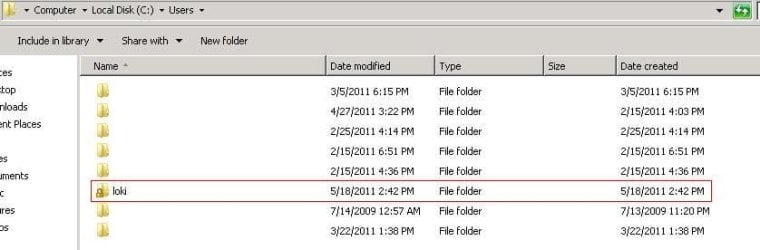
This is the top level folder for a bunch of users (loki simply being one of the ones to exhibit the issue):
folder1.JPG
Note the date is 5/18/2011.

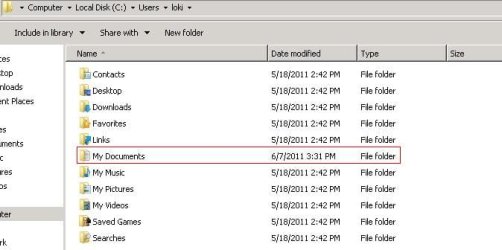
Now if I enter the loki directory, you can see there exists a folder with a more recent date modified (6/7/2011):
folder2.JPG

Ideally, I would like the top directory (C:\Users\loki) to exhibit the more recent date modified (6/7/2011).
It seems that making changes in its subdirectories does not affect it, though.
 

My Computer My Computer

OS
Windows Vista Home Premium 32bit
I see now. The change in subfolder is not reflected in the main folder.

I don't have an answer for you.
Sorry.
 

My Computer My Computer

Computer Manufacturer/Model Number
Acer Aspire 7741Z
OS
Windows 7 Home Premium 64-bit, SP1
CPU
Intel Pentium P6200, Cores 2, 2.13 GHz
Memory
4 GB
Graphics Card(s)
Intel HD
Sound Card
unknown
Monitor(s) Displays
17.3 inches
Screen Resolution
1600 x 900
Hard Drives
640 GB, 5400 PRM
Sub directories will never affect the parent in this way and there is no way to make it do so.
 

My Computer My Computer

Computer type
PC/Desktop
Computer Manufacturer/Model Number
Alienware Aurora ALX R4
OS
Windows 10 Pro (x64)
CPU
Intel Core i7-3930K (3.2GHz - 4.5GHz)
Motherboard
Alienware Aurora-R4 x79
Memory
4x Samsung 4GB PC3-12800 DDR3 (16GB 1600MHz)
Graphics Card(s)
Nvidia Geforce GTX 690
Sound Card
SteelSeries Siberia Elite
Monitor(s) Displays
Dell UltraSharp U3011
Screen Resolution
2560x1600
Hard Drives
Samsung 850 Pro 256 GB, Seagate 1TB Desktop Hybrid HDD, 2x Western Digital 4TB Green HDD
PSU
875W Some Dell PSU <.<
Case
Alienware Aurora ALX
Cooling
Custom Liquid Cooling (EK CPU & GPU blocks) dual EK 480RAD
Keyboard
Logitech G710+ Mechanical
Mouse
Logitech G700s
Internet Speed
Verizon Fios (50 mbps average)
Other Info
Server: Intel NUC D54250WYK: i5-4250U, 16GB, 256 GB mSATA, Windows Server 2012 R2
Sub directories will never affect the parent in this way and there is no way to make it do so.

I see. There wouldn't happen to be any kindof 3rd party utilities or scripts I could use to accomplish this, would there?
 

My Computer My Computer

OS
Windows Vista Home Premium 32bit
Back
Top